
1. บทนำ
This user manual provides essential information for the proper setup, operation, maintenance, and troubleshooting of your Ozone OES-BAS-22 Electronic Safe-Core. Please read this manual thoroughly before using the safe to ensure optimal performance and security. This electronic safe is designed to provide secure storage for your valuables.
2. สินค้าหมดview
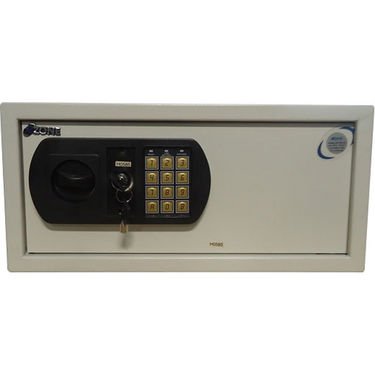
This image displays the front panel of the Ozone OES-BAS-22 Electronic Safe-Core, highlighting the electronic keypad, key override lock, and the overall compact design. The keypad allows for digital code entry, while the key provides an alternative access method.
3. การตั้งค่า
3.1. การติดตั้งแบตเตอรี่
- หาช่องใส่แบตเตอรี่ ซึ่งโดยทั่วไปจะอยู่ด้านในของประตูตู้เซฟ
- เปิดฝาครอบแบตเตอรี่
- Insert the required number of batteries (usually AA or AAA, refer to the compartment label) ensuring correct polarity (+/-).
- ปิดฝาครอบแบตเตอรี่ให้แน่น
3.2. การตั้งค่ารหัสเริ่มต้น
- With the safe door open, locate the reset button (often a small red or green button) on the inside of the door or near the battery compartment.
- Press the reset button. You should hear a beep or see an indicator light.
- On the keypad, enter your desired new code (typically 3-8 digits).
- Confirm the code by pressing the 'E' or '#' button.
- ทดสอบรหัสใหม่โดยเปิดประตูตู้เซฟไว้ก่อน เพื่อให้แน่ใจว่าใช้งานได้ถูกต้อง ก่อนปิดตู้เซฟ
4. คู่มือการใช้งาน
4.1. Opening the Safe with Electronic Code
- ป้อนรหัสส่วนตัวของคุณบนแป้นพิมพ์
- Press the 'E' or '#' button.
- Within 5 seconds of a successful code entry, turn the handle clockwise (or counter-clockwise, depending on model) to open the door.
4.2. Opening the Safe with Override Key
- หาช่องกุญแจ ซึ่งโดยปกติจะซ่อนอยู่หลังฝาครอบเล็กๆ บนแผงปุ่มกด
- Insert the override key and turn it.
- ขณะที่จับกุญแจไว้และหมุนอยู่ ให้หมุนที่จับเพื่อเปิดประตูตู้นิรภัย
4.3. การปิดและล็อคตู้นิรภัย
- ปิดประตูตู้เซฟให้แน่น
- Turn the handle counter-clockwise (or clockwise) until the bolts are fully extended and the door is securely locked.
4.4. Changing Your Personal Code
- With the safe door open, press the reset button.
- ป้อนรหัสใหม่ที่คุณต้องการ (3-8 หลัก) บนแป้นพิมพ์
- Press the 'E' or '#' button to confirm.
- Verify the new code by entering it with the door open before closing.
5. การบำรุงรักษา
- การเปลี่ยนแบตเตอรี่: Replace batteries annually or when the low battery indicator (if present) illuminates. Always use new, high-quality batteries of the specified type.
- การทำความสะอาด: ทำความสะอาดภายนอกตู้เซฟด้วยผ้านุ่มๆamp ใช้ผ้าเช็ดทำความสะอาด หลีกเลี่ยงน้ำยาทำความสะอาดที่มีฤทธิ์กัดกร่อนหรือตัวทำละลายที่อาจทำให้พื้นผิวหรือแป้นพิมพ์เสียหายได้
- การจัดเก็บกุญแจ: Store override keys in a secure location away from the safe itself. Do not store them inside the safe.
- การตรวจสอบกลไก: Periodically check the locking bolts and door hinges for smooth operation. Do not lubricate the electronic lock mechanism.
6 การแก้ไขปัญหา
| ปัญหา | สารละลาย |
|---|---|
| ตู้เซฟไม่สามารถเปิดด้วยรหัสได้ | Ensure batteries are fresh and correctly installed. Re-enter code carefully. Try the override key. |
| แป้นพิมพ์ไม่ตอบสนอง | Check battery power. Replace batteries if necessary. Ensure no foreign objects are obstructing buttons. |
| เสียงสัญญาณเตือนภัยดังขึ้นโดยไม่คาดคิด | This safe features a visual alarm. Ensure the safe is not being tampered with. If persistent, contact customer support. |
| ประตูไม่สามารถปิดหรือล็อคได้อย่างถูกต้อง | Check for any obstructions inside the safe or around the door frame. Ensure the handle is fully turned to engage bolts. |
7. ข้อมูลจำเพาะ
| คุณสมบัติ | รายละเอียด |
|---|---|
| ยี่ห้อ | โอโซน |
| แบบอย่าง | OES-BAS-22 |
| ประเภทล็อค | อิเล็กทรอนิกส์ |
| คุณสมบัติพิเศษ | พกพาได้ |
| น้ำหนักสินค้า | 12.2 กก. (26.9 ปอนด์) |
| เตือน | ภาพ |
| ระดับความต้านทานต่อน้ำ | ไม่ทนน้ำ |
| ยูพีซี | 783942612165 |
| ขนาดแพ็คเกจ | 42.9 x 38 x 20 ซม. |