
1. บทนำ
This user manual provides comprehensive instructions for the Yamaha PSRE443 61-Key Portable Keyboard. It covers essential information for setting up, operating, maintaining, and troubleshooting your instrument. The PSRE443 is designed for musicians of all levels, offering a wide range of voices, accompaniment styles, and interactive learning features.
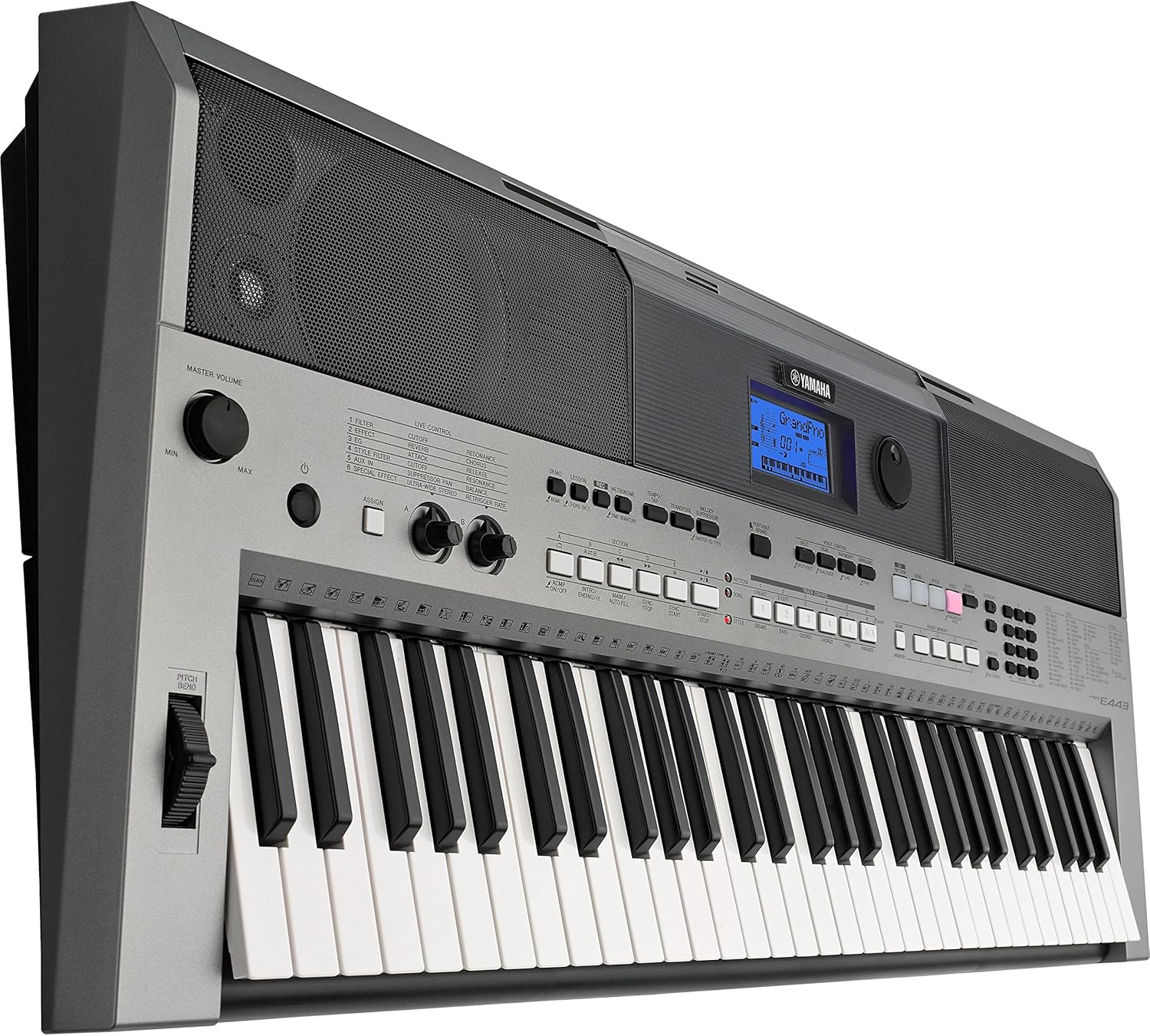
รูปที่ 1.1 : ด้านหน้า view of the Yamaha PSRE443 Portable Keyboard, showcasing the 61 keys, control panel, and integrated speakers.
2. ข้อมูลด้านความปลอดภัย
Please read these safety precautions carefully before using your PSRE443 keyboard to ensure safe and optimal performance.
- แหล่งจ่ายไฟ: Use only the specified power adapter (not included) or 6 AA batteries. Ensure the voltage matches the requirements of the instrument.
- ที่ตั้ง: ควรหลีกเลี่ยงการวางเครื่องมือไว้ในที่ที่มีแสงแดดส่องโดยตรง ใกล้แหล่งความร้อน หรือในสภาพแวดล้อมที่มีฝุ่นละออง ความชื้นสูง หรือมีการสั่นสะเทือนมากเกินไป
- น้ำและความชื้น: อย่าให้เครื่องดนตรีโดนฝนหรือความชื้น และอย่าวางภาชนะบรรจุของเหลวไว้บนเครื่องดนตรี
- การจัดการ: อย่าออกแรงมากเกินไปกับแป้นกด ปุ่มกด หรือขั้วต่อต่างๆ หลีกเลี่ยงการทำเครื่องดนตรีตก
- การทำความสะอาด: Clean the instrument with a soft, dry cloth. Do not use paint thinners, solvents, or cleaning fluids.
3. การตั้งค่า
3.1 การแกะกล่อง
Carefully remove the keyboard from its packaging. Retain the packaging materials for future transport or storage.
3.2 การเชื่อมต่อสายไฟ
The PSRE443 can be powered using an AC adapter (sold separately) or batteries.
- การใช้อะแดปเตอร์ AC: Connect the appropriate Yamaha AC power adapter (e.g., PA-150, sold separately) to the 12V DC IN jack on the rear panel of the keyboard. Plug the adapter into a standard AC outlet.
- การใช้แบตเตอรี่: Open the battery compartment on the underside of the keyboard. Insert six new "AA" size alkaline (LR6) or rechargeable Ni-MH batteries, ensuring correct polarity.
3.3 Connecting Headphones or External Audio System
To listen privately or connect to an external amplifier/speaker system, use the PHONES/OUTPUT jack.
- Connect stereo headphones to the PHONES/OUTPUT jack. The internal speakers will be muted.
- สำหรับภายนอก amplification, connect an audio cable from the PHONES/OUTPUT jack to the input of your ampเครื่องขยายเสียงหรือลำโพงที่มีกำลังขยาย

Figure 3.1: Rear panel connections, including DC IN, USB TO HOST, USB TO DEVICE, SUSTAIN, AUX IN, and PHONES/OUTPUT jacks.
4. การทำงานพื้นฐาน
4.1 เปิด/ปิดเครื่อง
กดปุ่ม [พาวเวอร์] กดปุ่มเพื่อเปิดเครื่อง กดปุ่มค้างไว้ [พาวเวอร์] กดปุ่มค้างไว้สองสามวินาทีเพื่อปิดเครื่อง
4.2 การควบคุมระดับเสียง
ปรับแต่ง [ระดับเสียงหลัก] knob to set the overall output level of the instrument.
4.3 การเลือกเสียง
The PSRE443 features 755 high-quality voices, including realistic Sweet! and Cool! Voices.
- กดปุ่ม [เสียง] ปุ่ม.
- ใช้แป้นพิมพ์ตัวเลขหรือ [หมวดหมู่] buttons to browse and select a voice. The selected voice name and number will appear on the LCD display.
4.4 Selecting Styles
The keyboard includes 200 diverse accompaniment styles.
- กดปุ่ม [สไตล์] ปุ่ม.
- ใช้แป้นพิมพ์ตัวเลขหรือ [หมวดหมู่] buttons to select a style.
- กดปุ่ม [ACMP ON/OFF] button to start/stop the accompaniment.
5. คุณสมบัติขั้นสูง
5.1 Real-time Control Knobs
The two assignable real-time control knobs allow for dynamic manipulation of sound parameters such as filter cutoff, effects, and sound envelope during performance.
- หมุน [ASSIGN] button to select the parameter you wish to control (e.g., Filter, Effect, EQ).
- หมุน [CONTROL KNOB A] or [CONTROL KNOB B] to adjust the selected parameter in real-time.

Figure 5.1: Real-time control knobs (A and B) and the ASSIGN button for dynamic sound manipulation.
5.2 Pitch Bend Wheel
Use the pitch bend wheel located on the left side of the keyboard to smoothly raise or lower the pitch of notes while playing.
5.3 PATTERN Function
The PATTERN function allows you to create and play dynamic grooves, similar to a DJ. Press the [DJ PATTERN] button to activate this mode and use the various pads and controls to build your patterns.
5.4 Arpeggio Function
The Arpeggio function automatically generates arpeggiated phrases based on the chords you play. Press the [ARPEGGIO] button to activate and deactivate this feature.
5.5 6-Track Sequencer
Record your performances using the built-in 6-track sequencer. This allows you to layer multiple instrument parts to create complete songs.
- กดปุ่ม [บันทึก] กดปุ่มเพื่อเข้าสู่โหมดสแตนด์บายการบันทึก
- กด [เริ่มหยุด] เพื่อเริ่มการบันทึก
- กด [เริ่มหยุด] อีกครั้งเพื่อหยุดการบันทึก
5.6 Music Database
The Music Database provides 305 song titles with pre-configured keyboard settings (voice, style, tempo) for quick and easy setup. Press the [MUSIC DATABASE] button and use the numeric keypad to select a song.
5.7 Yamaha Education Suite (Y.E.S.)
Y.E.S. offers a suite of lesson functions to help beginners learn to play. These include listening, timing, and waiting modes to practice songs at your own pace.
6. การเชื่อมต่อ
6.1 AUX IN Terminal
Connect an external audio player (e.g., smartphone, MP3 player) to the AUX IN terminal using a stereo mini cable. This allows you to play along with your favorite songs through the keyboard's speakers.

Figure 6.1: Connecting an external audio device to the AUX IN terminal.
6.2 USB TO HOST Terminal
Connect the keyboard to a computer (PC or Mac) using a standard USB cable. This enables MIDI communication, allowing you to use the keyboard as a MIDI controller or transfer MIDI data to and from your computer.
6.3 USB TO DEVICE Terminal
Insert a USB flash drive into the USB TO DEVICE terminal to save and load user data, such as recorded songs or registration memories.

รูปที่ 6.2: ระยะใกล้ view of the USB TO HOST and USB TO DEVICE ports for computer and storage connectivity.
6.4 iOS Device Connectivity
The PSRE443 supports connectivity with iOS devices (iPhone/iPod touch/iPad) for use with various Yamaha apps, enhancing your playing, performing, and practicing experience.
7. การบำรุงรักษา
7.1 การทำความสะอาด
เช็ดเครื่องดนตรีด้วยผ้าแห้งนุ่มๆ สำหรับคราบสกปรกฝังแน่น ให้ใช้ผ้าที่ชื้นเล็กน้อยเช็ดamp ใช้ผ้าชุบน้ำหมาดๆ เช็ดให้แห้ง หลีกเลี่ยงน้ำยาทำความสะอาดที่มีฤทธิ์กัดกร่อนหรือตัวทำละลาย
7.2 พื้นที่จัดเก็บ
When not in use for extended periods, disconnect the AC adapter or remove the batteries. Store the instrument in a cool, dry place away from extreme temperatures and humidity.
8 การแก้ไขปัญหา
| ปัญหา | สาเหตุที่เป็นไปได้ | สารละลาย |
|---|---|---|
| ไม่มีไฟฟ้า | AC adapter not connected, batteries depleted/incorrectly inserted | Check AC adapter connection; replace batteries or ensure correct polarity. |
| ไม่มีเสียง | Volume too low, headphones connected, local control off | Increase MASTER VOLUME; disconnect headphones; check Local Control setting (refer to full manual). |
| คีย์ไม่ตอบสนอง | MIDI settings, specific mode activated | Check MIDI settings if connected to computer; ensure not in a mode that disables keyboard input. |
For more detailed troubleshooting, please refer to the complete owner's manual available on the Yamaha webเว็บไซต์.
9. ข้อมูลจำเพาะ
| คุณสมบัติ | คำอธิบาย |
|---|---|
| ชื่อรุ่น | พีเอสอาร์อี443 |
| หมายเลขรุ่น | พีเอสอาร์-E433 |
| จำนวนคีย์ | 61 |
| เสียงพูด | 755 High Quality Voices (including Sweet! and Cool! Voices) |
| สไตล์ | 200 Varieties of Styles |
| ซีเควน | การบันทึก 6 แท็ก |
| ปุ่มควบคุม | 2 Real-time Control Knobs |
| การเชื่อมต่อ | USB TO HOST, USB TO DEVICE, AUX IN (3.5mm Jack), PHONES/OUTPUT (3.5mm Jack), SUSTAIN |
| แหล่งพลังงาน | AC Adapter (12V, sold separately) or 6 "AA" Batteries |
| น้ำหนักสินค้า | 22 ปอนด์ (ประมาณ 9.98 กก.) |
| ขนาดรายการ (ยาว x กว้าง x สูง) | 41.34 x 19.69 x 8.54 นิ้ว (ประมาณ 105 x 50 x 21.7 ซม.) |
10. วิดีโอผลิตภัณฑ์อย่างเป็นทางการ
วิดีโอ 10.1: จบแล้วview of the Yamaha PSRE443 61-Key Portable Keyboard, highlighting its versatile features, extensive voice library, and real-time controls.
11. การรับประกันและการสนับสนุน
11.1 ข้อมูลการรับประกัน
The Yamaha PSRE443 Portable Keyboard comes with a limited 1-year warranty covering parts and labor. Please retain your proof of purchase for warranty claims.
11.2 การสนับสนุนลูกค้า
For further assistance, technical support, or to download the full owner's manual, please visit the official Yamaha webเว็บไซต์หรือติดต่อฝ่ายบริการลูกค้ายามาฮ่า