
Linq IT-H408
Linq IT-H408 4-Port USB 2.0 Hub User Manual
Model: IT-H408
การแนะนำ
This manual provides instructions for the proper setup, operation, and maintenance of your Linq IT-H408 4-Port USB 2.0 Hub. This device allows you to expand a single USB port into four, each with an independent on/off switch, facilitating efficient management of connected peripherals.
สินค้าเกินview
The Linq IT-H408 is a USB 2.0 hub designed to provide four additional USB ports. Each port features an individual power switch, allowing you to control power to connected devices independently. It supports data transfer speeds of up to 480 Mbps.
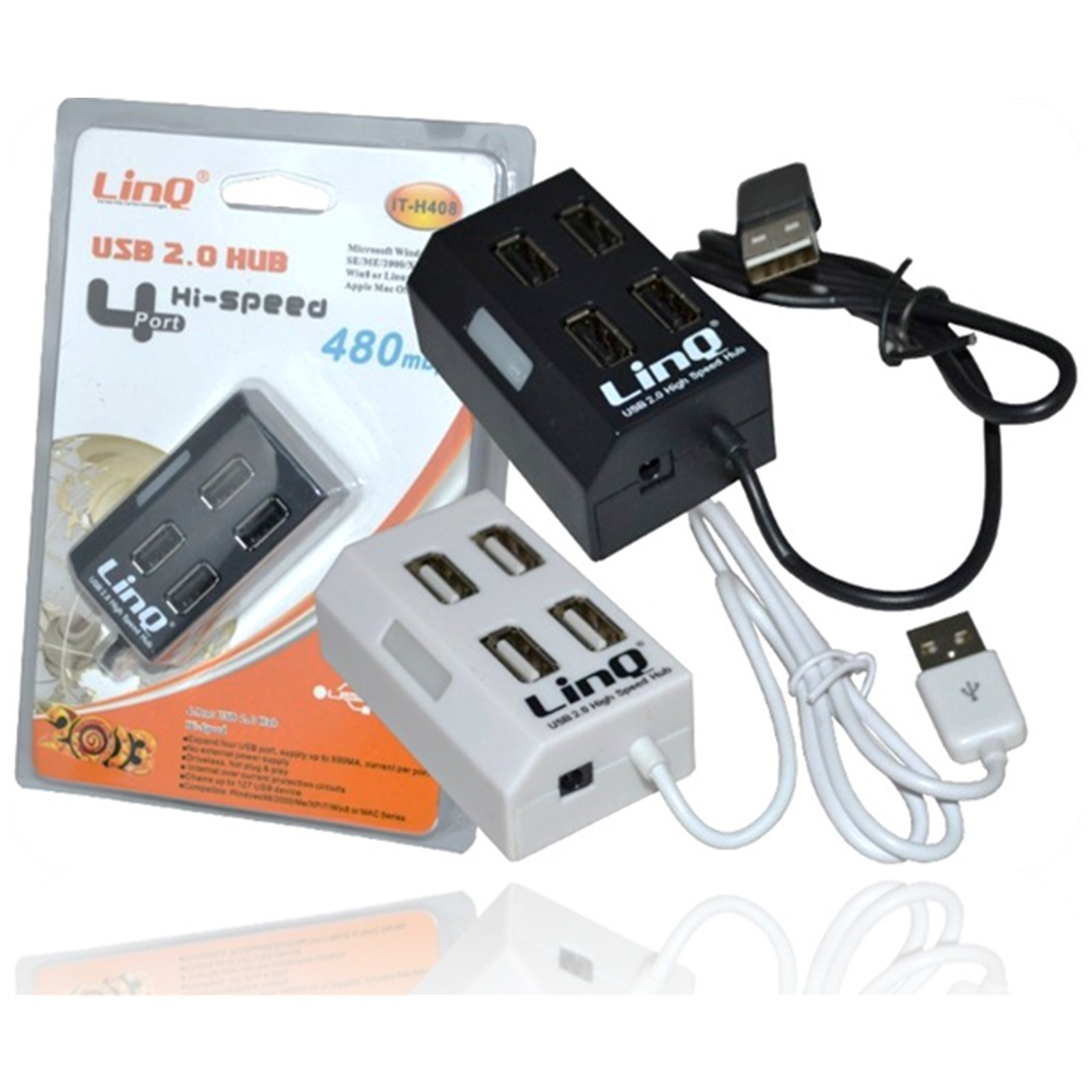
Figure 1: Linq IT-H408 4-Port USB 2.0 Hub. This image displays the hub's compact form factor, highlighting the four USB ports and their corresponding individual power switches, along with the integrated USB cable for connection to a host device.
คำแนะนำการตั้งค่า
- แกะกล่อง Hub: Carefully remove the Linq IT-H408 USB Hub from its packaging.
- เชื่อมต่อกับคอมพิวเตอร์: Plug the integrated USB cable from the hub into an available USB 2.0 or USB 3.0 port on your computer.
- การติดตั้งไดร์เวอร์: The hub is plug-and-play and typically does not require additional driver installation for compatible operating systems (Windows 98/2000/ME/XP/7/8, Mac OS series). Your operating system should automatically detect and configure the device.
- เชื่อมต่ออุปกรณ์ต่อพ่วง: Plug your USB devices (e.g., flash drives, keyboards, mice) into the available ports on the Linq IT-H408 hub.
การดำเนินงานฮับ
- Powering On/Off Ports: Each USB port on the Linq IT-H408 has an independent on/off switch. Press the switch corresponding to the desired port to toggle its power state. An indicator light (if present) will illuminate when the port is active.
- อุปกรณ์เชื่อมต่อ: Insert your USB device into an available port. Ensure the port is powered on using its individual switch.
- การถ่ายโอนข้อมูล: The hub supports USB 2.0 data transfer speeds up to 480 Mbps. Performance may vary based on the connected device and host system.
- การใช้พลังงาน: For high-power devices, ensure your computer's USB port can supply sufficient power. If multiple high-power devices are connected, an external power adapter (not included) might be required for optimal performance, if the hub supports it.
การซ่อมบำรุง
- การทำความสะอาด: ใช้ผ้าแห้งเนื้อนุ่มเช็ดทำความสะอาดภายนอกของดุมล้อ หลีกเลี่ยงการใช้น้ำยาทำความสะอาดหรือสารละลาย
- พื้นที่จัดเก็บ: เมื่อไม่ได้ใช้งาน ให้เก็บฮับไว้ในที่แห้งและเย็น หลีกเลี่ยงแสงแดดโดยตรงและอุณหภูมิที่สูงหรือต่ำเกินไป
- การจัดการ: หลีกเลี่ยงการทำดุมล้อตกหรือการกระแทกอย่างรุนแรง ห้ามพยายามถอดชิ้นส่วนอุปกรณ์
การแก้ไขปัญหา
อุปกรณ์ไม่ได้รับการรู้จัก:
- Ensure the hub's USB cable is securely connected to your computer.
- Verify that the individual switch for the connected port is in the "on" position.
- ลองเชื่อมต่อฮับเข้ากับพอร์ต USB อื่นบนคอมพิวเตอร์ของคุณ
- Test the connected device by plugging it directly into your computer's USB port to rule out device issues.
- รีสตาร์ทเครื่องคอมพิวเตอร์ของคุณ
ความเร็วในการถ่ายโอนข้อมูลช้า:
- Ensure both the hub and the connected device are USB 2.0 compatible for optimal USB 2.0 speeds.
- หลีกเลี่ยงการเชื่อมต่ออุปกรณ์แบนด์วิดท์สูงหลายเครื่องพร้อมกันหากพบปัญหาความเร็วช้าลง
- Ensure the hub is connected to a USB 2.0 or higher port on your computer.
การเชื่อมต่อไม่ต่อเนื่อง:
- ตรวจสอบการเชื่อมต่อสายเคเบิลทั้งหมดว่าหลวมหรือไม่
- Ensure the hub is not placed near sources of strong electromagnetic interference.
- If using a desktop computer, try connecting the hub to a rear USB port directly on the motherboard.
ข้อมูลจำเพาะ
| หมายเลขรุ่น | IT-H408 (Internal: 6950029010495) |
| ยี่ห้อ | Linq |
| อินเทอร์เฟซ | ยูเอสบี 2.0 |
| จำนวนพอร์ต | 4 (with individual switches) |
| อัตราการถ่ายโอนข้อมูล | สูงสุดถึง 480 Mbps |
| ระบบปฏิบัติการที่รองรับ | Windows 98 / 2000 / ME / XP / 7 / 8, Mac OS series |
| สี | สีขาว, สีดำ |
| ขนาด (โดยประมาณ) | 19 x 11.6 x 5 ซม. (ขนาดบรรจุภัณฑ์) |
| น้ำหนัก (โดยประมาณ) | 80 กรัม |
| แบตเตอรี่ที่จำเป็น | เลขที่ |
การรับประกันและการสนับสนุน
Specific warranty information for the Linq IT-H408 USB Hub is typically provided at the point of purchase or within the product packaging. Please refer to your purchase documentation for details regarding warranty coverage and duration.
For technical support or further assistance, please contact your retailer or visit the official Linq webไซต์ โปรดเก็บใบเสร็จรับเงินของคุณไว้เป็นหลักฐานการซื้อสำหรับการเรียกร้องการรับประกันใดๆ
Ask a question about this manual
Ask about setup, troubleshooting, compatibility, parts, safety, or missing instructions. Manuals+ will review the question and use this page’s manual context to help answer it.