
1. บทนำ
1.1 ผลิตภัณฑ์เกินview
The CELLULARLINE Interphone F5MC is a advanced Bluetooth communication system designed for motorcycle helmets. It provides hands-free communication, music streaming, and GPS navigation audio, compatible with both open and closed helmets. This device features a new microchip for enhanced performance and offers robust functionality for riders.
1.2 คุณสมบัติหลัก
- Bluetooth Connectivity for wireless communication.
- Integrated Microphone for clear audio transmission.
- Waterproof design for use in various weather conditions.
- Touch control method for intuitive operation.
- Compatible with smartphones, tablets, and car audio systems.
- Designed for motorcycle riding applications.
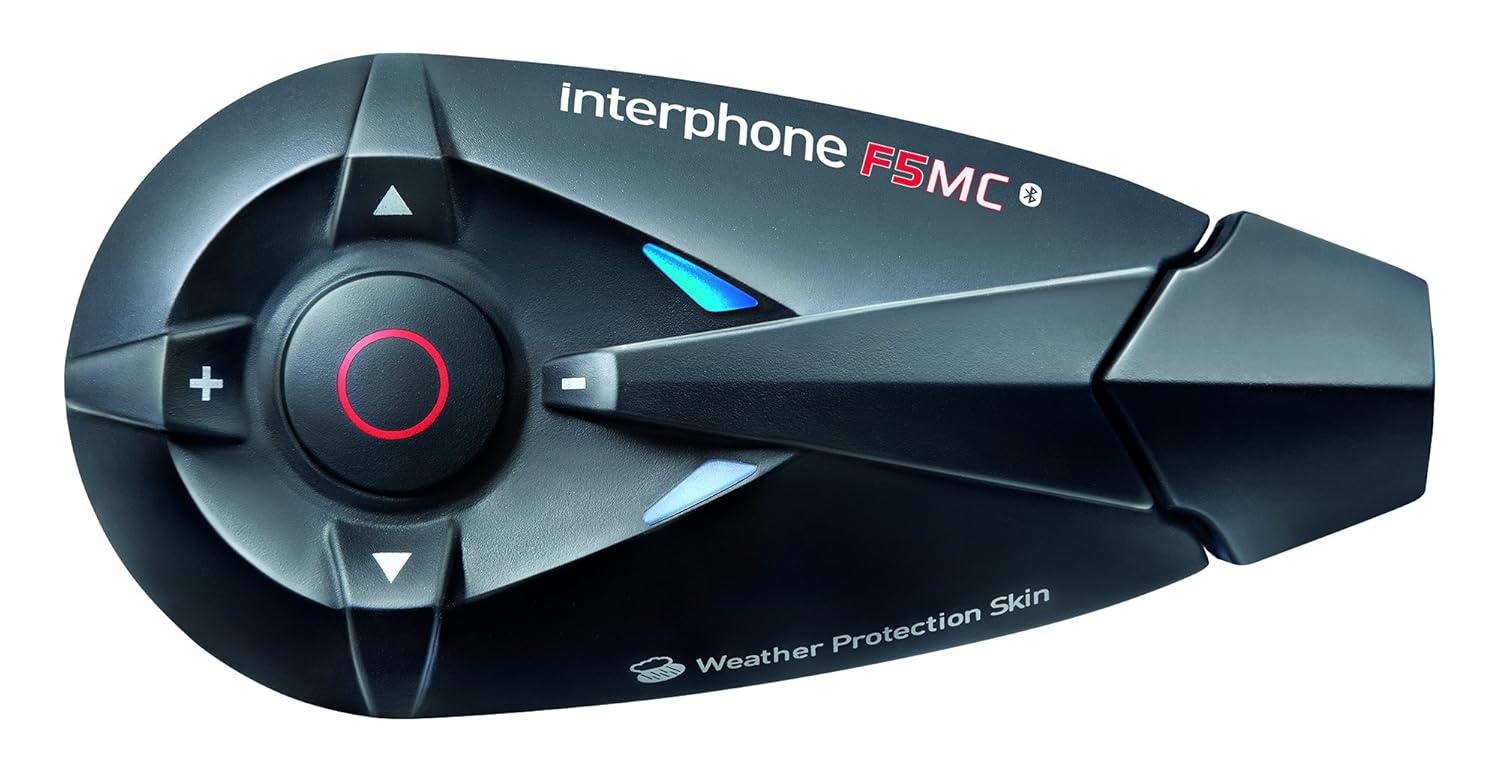
รูปที่ 1.1: The Interphone F5MC Bluetooth Headset. This image displays the main unit of the Interphone F5MC, highlighting its ergonomic design and control buttons, including the central multifunction button and volume controls.
2. เนื้อหาบรรจุภัณฑ์
The Interphone F5MC package typically includes the following components:
- Interphone F5MC Main Unit(s)
- Ear Cushions / Speakers
- Microphone for full-face helmet
- Microphone for jet helmet
- DC Power Charging & Music Line In Cable
- Mounting Brackets (clip and adhesive options)
- สายชาร์จ USB

รูปที่ 2.1: Interphone F5MC Product Packaging. This image shows the retail box for the Interphone F5MC, indicating it is a dual unit package suitable for two helmets, highlighting features like multi-user conference and long distance communication.

รูปที่ 2.2: Interphone F5MC Component Diagram. This diagram illustrates the various components included with the Interphone F5MC system, such as the main unit, different microphone types (for full-face and jet helmets), speakers, and charging/audio cables, along with their connections.
3. การตั้งค่า
3.1 การชาร์จเครื่อง
- Connect the DC power charging cable to the charging port on the Interphone F5MC unit.
- Plug the other end of the cable into a suitable USB power source (e.g., computer USB port, USB wall adapter).
- The status LED will indicate charging status. A full charge is recommended before first use.
3.2 Mounting the Unit to a Helmet
- Choose between the clip mount or adhesive mount option based on your helmet type and preference.
- Securely attach the chosen mounting bracket to the side of your helmet. Ensure it is positioned where the unit will not obstruct vision or movement.
- Slide the Interphone F5MC main unit onto the mounted bracket until it clicks into place.
3.3 การติดตั้งไมโครโฟนและลำโพง
- Select the appropriate microphone for your helmet type (full-face or jet).
- Attach the speakers inside the helmet, aligning them with your ears for optimal audio. Use the provided adhesive pads if necessary.
- Position the microphone close to your mouth, ensuring it is not directly in the path of wind noise.
- Connect the speaker and microphone cables to the corresponding ports on the Interphone F5MC main unit. Refer to Figure 2.2 for connection details.
3.4 การจับคู่บลูทูธเบื้องต้น
- Ensure the Interphone F5MC unit is powered off.
- Press and hold the Multi-Function Button (MFB) until the status LED flashes rapidly, indicating pairing mode.
- บนสมาร์ทโฟนหรืออุปกรณ์บลูทูธอื่นๆ ของคุณ ให้เปิดใช้งานบลูทูธและค้นหาอุปกรณ์ที่ใช้งานได้
- Select "Interphone F5MC" from the list of found devices.
- หากระบบถาม ให้ป้อนรหัส PIN (โดยปกติคือ "0000")
- Once paired, the status LED will change to a slow flash or solid blue, depending on the unit's status.
4. คู่มือการใช้งาน
4.1 เปิด/ปิดเครื่อง
- การเปิดเครื่อง: Press and hold the MFB for approximately 3 seconds until you hear an audible tone and the LED illuminates.
- วิธีปิดเครื่อง: Press and hold the MFB for approximately 5 seconds until you hear a descending tone and the LED turns off.
4.2 ระบบสื่อสารภายใน (อินเตอร์คอม)
The F5MC supports multi-user intercom communication. Refer to the full manual for detailed pairing instructions for multiple units.
- เริ่มใช้งานระบบอินเตอร์คอม: Briefly press the Intercom button (specific button may vary, refer to unit's markings).
- สิ้นสุดการสื่อสารภายใน: Briefly press the Intercom button again.
4.3 การโทรศัพท์
- รับสาย: กด MFB สั้นๆ
- วางสาย: กด MFB สั้นๆ
- ปฏิเสธสาย: กดปุ่ม MFB ค้างไว้ 2 วินาที
- โทรออกด้วยเสียง: With the unit in standby, briefly press the MFB twice to activate your phone's voice assistant (if supported).
4.4 การเล่นเพลง
Ensure your Interphone F5MC is paired with a music source (e.g., smartphone).
- เล่น/หยุดชั่วคราว: กด MFB สั้นๆ
- เพลงถัดไป: Press the 'Volume Up' button for 2 seconds.
- แทร็กก่อนหน้า: Press the 'Volume Down' button for 2 seconds.
- การปรับระดับเสียง: Briefly press the 'Volume Up' or 'Volume Down' buttons.
4.5 วิทยุ FM
- วิธีเปิด/ปิดวิทยุ: Press a dedicated FM button or a combination of buttons (refer to specific unit markings).
- สถานีสแกน: Press and hold the 'Volume Up' or 'Volume Down' buttons to scan for the next/previous station.
5. การบำรุงรักษา
5.1 การทำความสะอาด
- เช็ดตัวเครื่องด้วยผ้านุ่ม damp ผ้า. อย่าใช้สารเคมีที่รุนแรงหรือน้ำยาทำความสะอาดที่มีฤทธิ์กัดกร่อน
- ตรวจสอบให้แน่ใจว่าพอร์ตทั้งหมดแห้งก่อนชาร์จหรือเชื่อมต่ออุปกรณ์เสริม
5.2 พื้นที่จัดเก็บ
- เก็บอุปกรณ์ไว้ในที่แห้งและเย็น หลีกเลี่ยงแสงแดดโดยตรงและอุณหภูมิที่สูงหรือต่ำเกินไป
- หากเก็บรักษาเป็นเวลานาน ควรชาร์จแบตเตอรี่ให้ได้ประมาณ 50% ทุกๆ สองสามเดือน เพื่อยืดอายุการใช้งานของแบตเตอรี่
5.3 การดูแลแบตเตอรี่
- หลีกเลี่ยงการปล่อยแบตเตอรี่จนหมดบ่อยครั้ง
- ใช้เฉพาะสายชาร์จที่ให้มาและแหล่งจ่ายไฟที่ใช้งานร่วมกันได้เท่านั้น
6 การแก้ไขปัญหา
6.1 ไม่มีไฟฟ้า
- ตรวจสอบให้แน่ใจว่าอุปกรณ์ชาร์จแบตเตอรี่เต็มแล้ว เสียบเข้ากับแหล่งจ่ายไฟและตรวจสอบไฟแสดงสถานะการชาร์จ
- Verify that the power button is being pressed and held for the correct duration (approximately 3 seconds).
6.2 ไม่มีเสียง
- Check that the speakers are correctly connected to the main unit and properly positioned inside the helmet.
- Ensure the volume is not set to minimum. Adjust using the volume buttons.
- Verify that the unit is successfully paired with your audio source (e.g., smartphone).
6.3 ปัญหาการจับคู่
- Ensure both devices are in pairing mode and within close proximity.
- Turn off and restart both the Interphone F5MC and the device you are trying to pair.
- Clear previous Bluetooth pairings from both devices and attempt to pair again.
6.4 Intercom Disconnection
- Ensure units are within the specified intercom range and have a clear line of sight.
- ตรวจสอบสัญญาณรบกวนที่อาจเกิดขึ้นจากอุปกรณ์อิเล็กทรอนิกส์อื่นๆ
- Attempt to re-establish the intercom connection by briefly pressing the intercom button.
7. ข้อมูลจำเพาะ
| คุณสมบัติ | รายละเอียด |
|---|---|
| ชื่อรุ่น | INTERPHONEF5MCTP |
| เทคโนโลยีการเชื่อมต่อ | บลูทูธ |
| เทคโนโลยีการสื่อสารไร้สาย | บลูทูธ |
| ส่วนประกอบที่รวมอยู่ | Ear Cushions, Microphones |
| วัสดุ | พลาสติก |
| การใช้งานเฉพาะของผลิตภัณฑ์ | การขี่มอเตอร์ไซค์ |
| อุปกรณ์ที่รองรับ | Smartphones, Tablets, Car Audio Systems |
| ระดับความต้านทานต่อน้ำ | กันน้ำ |
| วิธีการควบคุม | สัมผัส |
| ผู้ผลิต | CELLULARLINE |
| ขนาดสินค้า | 8.99 x 4.5 x 2.01 ซม. |
| น้ำหนักสินค้า | 54.4 กรัม (0.12 ปอนด์) |
| แบตเตอรี่ | แบตเตอรี่ลิเธียมโพลิเมอร์ 1 ก้อน (รวมอยู่ด้วย) |
| คุณสมบัติพิเศษ | รวมไมโครโฟน |
| สี | สีดำ |
| การวางตำแหน่งหู | หูเปิด |
| ฟอร์มแฟกเตอร์ | ครอบหู |
8. การรับประกันและการสนับสนุน
For warranty information, technical support, or service inquiries, please refer to the documentation provided with your purchase or contact CELLULARLINE customer service directly. Details regarding warranty periods and support procedures are typically available on the manufacturer's official webเว็บไซต์หรือผ่านผู้ค้าปลีกของคุณ