
1. บทนำ
This manual provides detailed instructions for the installation, operation, and maintenance of the Seco-Larm Enforcer SK-3523-SDQ Heavy-Duty Access Control Keypad. Please read this manual thoroughly before installation and operation to ensure proper functionality and safety.
The SK-3523-SDQ is a robust, outdoor-rated access control keypad designed for secure entry management. It supports up to 210 users and features a durable stainless steel faceplate and a rugged cast-aluminum housing.
2. ข้อมูลด้านความปลอดภัย
โปรดปฏิบัติตามข้อควรระวังด้านความปลอดภัยต่อไปนี้เพื่อป้องกันความเสียหายต่อตัวเครื่องและเพื่อความปลอดภัยของผู้ใช้งาน:
- ความปลอดภัยทางไฟฟ้า: Disconnect power before installation or servicing. All wiring should comply with local electrical codes.
- สภาพแวดล้อม : Although designed for outdoor use, avoid direct exposure to extreme weather conditions if possible. Ensure proper sealing during installation to maintain its weather resistance.
- บุคลากรที่ได้รับอนุญาต: Installation and maintenance should only be performed by qualified technicians.
- แหล่งจ่ายไฟ: ใช้เฉพาะแหล่งจ่ายไฟ voltage and current ratings to avoid damage.
3. เนื้อหาบรรจุภัณฑ์
ตรวจสอบว่ามีรายการทั้งหมดอยู่ในแพ็คเกจ:
- Seco-Larm Enforcer SK-3523-SDQ Keypad Unit
- สกรูยึดและตัวล็อค
- Diode (for inductive loads)
- คู่มือการใช้งาน (เอกสารนี้)
- Security Key (for accessing internal components)
4. การตั้งค่าและการติดตั้ง
Proper installation is crucial for the keypad's performance and longevity.
4.1 การติดตั้งแผงปุ่มกด
- เลือกสถานที่: Select a flat, secure surface for mounting, typically near the access point. Ensure adequate space for wiring.
- เตรียมพื้นผิว: Use the keypad as a template to mark drilling points for mounting screws.
- เจาะรู: Drill pilot holes for the mounting screws and a larger hole for wiring access.
- แป้นพิมพ์รักษาความปลอดภัย: Mount the keypad securely using the provided screws and anchors. Ensure the unit is level.
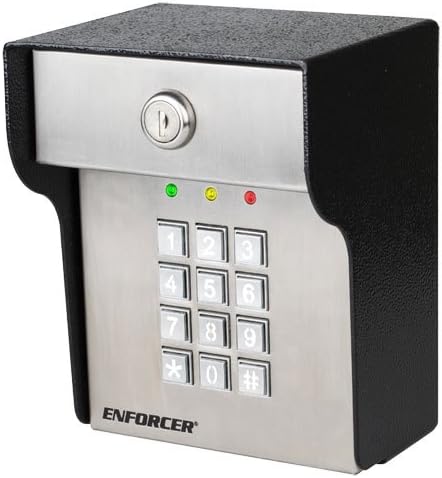
ภาพที่ 1: ด้านหน้า view of the Seco-Larm Enforcer SK-3523-SDQ Heavy-Duty Access Control Keypad. It features a stainless steel faceplate with a 12-button numeric keypad, a key lock at the top, and three indicator LEDs (green, yellow, red) above the keypad. The housing is black and rugged.
4.2 การเชื่อมต่อสายไฟ
Refer to the wiring diagram provided with the product for specific connections. General steps include:
- การเชื่อมต่อไฟฟ้า: Connect the keypad to a stable 12-24 VDC power supply. Observe polarity.
- Lock Connection: Connect the keypad's output relays to the electric lock or gate operator. Use the provided diode for inductive loads to prevent back-EMF damage.
- ปุ่มออก: Connect an optional exit button to the designated terminals.
- Alarm/Auxiliary Output: Connect to an alarm system or other auxiliary devices if required.
บันทึก: Always ensure power is disconnected before making any wiring changes.
5. คู่มือการใช้งาน
5.1 โหมดการเขียนโปรแกรม
The keypad operates in two main modes: โหมดปกติ (for access) and โหมดการเขียนโปรแกรม (for configuration).
- การเข้าสู่โหมดการเขียนโปรแกรม: Enter the Master Code followed by '#'. The yellow LED will illuminate.
- การออกจากโหมดการเขียนโปรแกรม: Press '#' or wait for 10 seconds of inactivity.
5.2 การจัดการรหัสผู้ใช้
The keypad supports up to 210 user codes.
- การเพิ่มรหัสผู้ใช้:
- เข้าสู่โหมดการเขียนโปรแกรม
- Press '1' (Add User Code).
- Enter a 4-8 digit User Code.
- Press '#'. The green LED will flash to confirm.
- การลบรหัสผู้ใช้:
- เข้าสู่โหมดการเขียนโปรแกรม
- Press '2' (Delete User Code).
- กรอกรหัสผู้ใช้ที่ต้องการลบ
- Press '#'. The red LED will flash to confirm.
5.3 Granting Access
To gain access, users must enter their valid user code followed by '#'.
- Successful Entry: The green LED will illuminate, and the lock will activate for the programmed duration.
- Unsuccessful Entry: The red LED will flash, and access will be denied.
6. การบำรุงรักษา
The SK-3523-SDQ keypad is designed for minimal maintenance. However, regular checks can extend its lifespan:
- การทำความสะอาด: เช็ดพื้นผิวแป้นพิมพ์ด้วยผ้านุ่มๆamp ผ้า หลีกเลี่ยงน้ำยาทำความสะอาดหรือตัวทำละลายที่มีฤทธิ์กัดกร่อน
- การตรวจสอบสายไฟ: Periodically check wiring connections for corrosion or damage, especially in outdoor environments.
- การทดสอบการทำงาน: Test the keypad's operation and lock activation regularly to ensure proper function.
7 การแก้ไขปัญหา
| ปัญหา | สาเหตุที่เป็นไปได้ | สารละลาย |
|---|---|---|
| แป้นพิมพ์ไม่เปิดใช้งาน | ไม่มีแหล่งจ่ายไฟ; การเดินสายไฟไม่ถูกต้อง; แหล่งจ่ายไฟชำรุด | Check power connections; verify power supply voltage; ensure correct polarity. |
| Keypad accepts code but lock does not activate. | Incorrect lock wiring; faulty lock; relay issue. | Verify lock wiring; test the lock independently; check keypad relay output. |
| Cannot enter Programming Mode. | Incorrect Master Code; keypad malfunction. | Ensure correct Master Code is used; reset keypad to factory defaults (refer to full manual for procedure). |
| Keypad buttons are unresponsive. | Physical damage; internal fault. | Inspect for damage; contact technical support if issue persists. |
8. ข้อมูลจำเพาะ
- แบบอย่าง: SK-3523-SDQ
- ยี่ห้อ: Seco-Larm Enforcer
- อินพุต Voltage: 12-24 โวลต์ดีซี
- การจับฉลากปัจจุบัน: Standby: 20mA, Active: 80mA
- ความจุผู้ใช้: 210 (1 Master, 209 User Codes)
- รีเลย์เอาท์พุต: 1 (NO/NC, 2A @ 30VDC)
- ที่อยู่อาศัย: Cast-aluminum, stainless steel faceplate
- สิ่งแวดล้อม: จัดอันดับกลางแจ้ง
- ขนาด : (โปรดดูแผนภาพผลิตภัณฑ์สำหรับขนาดที่แน่นอน)
9. การรับประกันและการสนับสนุน
Seco-Larm products are warranted against defects in material and workmanship under normal use for a period of one (1) year from the date of sale to the original customer. For technical support or warranty claims, please contact Seco-Larm customer service or visit their official webเว็บไซต์.
Webเว็บไซต์: www.seco-larm.com