
การแนะนำ
This manual provides detailed instructions for the safe and efficient operation of your Ozeri 360 Oscillation Micro-Blade Noise Reduction Technology Tower Fan, Model OZF5. Please read all instructions carefully before use and retain this manual for future reference.
ข้อมูลด้านความปลอดภัย
เพื่อลดความเสี่ยงจากการเกิดไฟไหม้ ไฟฟ้าช็อต หรือการบาดเจ็บ ควรปฏิบัติตามข้อควรระวังด้านความปลอดภัยพื้นฐานเหล่านี้เสมอ:
- ตรวจสอบให้แน่ใจว่าพัดลมวางอยู่บนพื้นผิวที่มั่นคงและระดับเพื่อป้องกันการพลิกคว่ำ
- ห้ามสอดนิ้วหรือสิ่งแปลกปลอมใดๆ เข้าไปในช่องเปิดของพัดลม
- Keep the fan away from water or moist areas.
- ถอดปลั๊กพัดลมออกจากเต้ารับไฟฟ้าก่อนทำความสะอาดหรือบำรุงรักษาใดๆ
- ห้ามใช้พัดลมกับสายไฟหรือปลั๊กที่ชำรุด
- เครื่องใช้ไฟฟ้าตัวนี้มีไว้สำหรับใช้ภายในอาคารเท่านั้น
เนื้อหาแพ็คเกจ
ตรวจสอบว่ามีส่วนประกอบทั้งหมดอยู่:
- Ozeri 360 Oscillation Tower Fan Unit
- Fan Base (2 halves)
- รีโมทคอนโทรล
- Screws for Base Assembly (3 pieces)
- คู่มือการใช้งาน
การตั้งค่า
Follow these steps to assemble your Ozeri Tower Fan:
- Carefully remove all packaging materials from the fan unit and its components.
- Connect the two halves of the fan base. Ensure they fit together securely.
- Align the assembled base with the bottom of the fan unit.
- Secure the base to the fan unit using the 3 provided screws. Hand assembly is sufficient; no special tools are required.
- วางพัดลมบนพื้นผิวที่มั่นคงและระดับเดียวกัน
- เสียบสายไฟเข้ากับเต้ารับไฟฟ้ามาตรฐาน
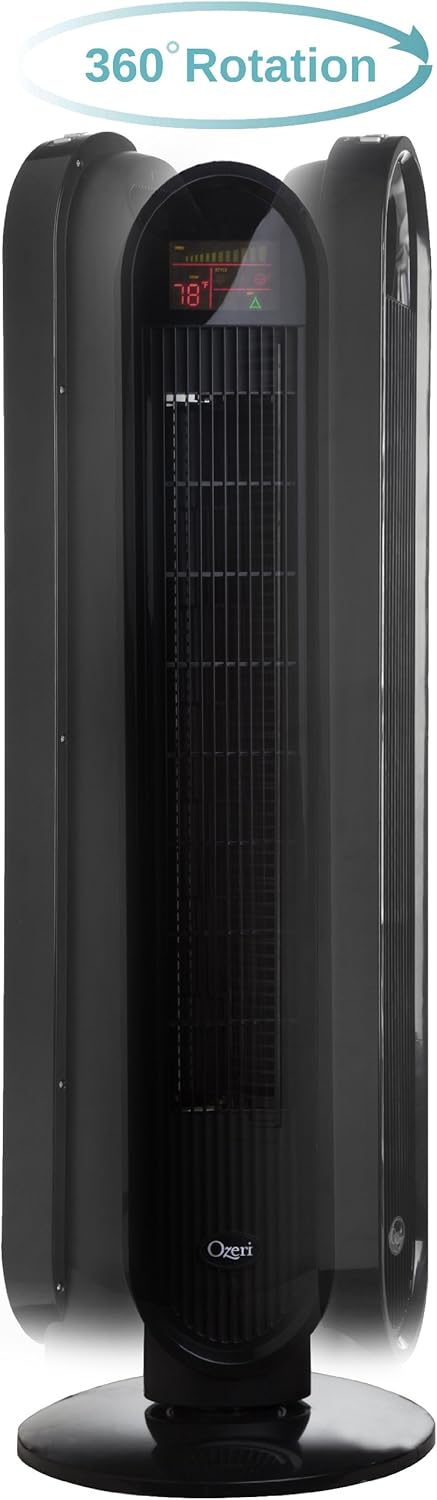
คำแนะนำการใช้งาน
Your Ozeri Tower Fan can be operated using the control panel on top of the unit or the included remote control.
ฟังก์ชั่นแผงควบคุม:

- ปุ่มเปิด/ปิด: เปิดหรือปิดพัดลม
- ปุ่มความเร็ว: Cycles through 3 whisper-quiet speed settings. The LCD display will show the current speed level.
- ปุ่มโหมด: Selects between 3 preprogrammed airflow patterns (e.g., normal, natural, sleep).
- Oscillation (OSC) Button: Activates or deactivates the oscillation feature. You can select oscillation angles of 60, 90, 120, or 360 degrees for partial to complete air circulation.
- ปุ่มตั้งเวลา: Sets the 8-hour programmable timer in 30-minute increments.
- ปุ่มอัตโนมัติ: Engages the auto mode, which adjusts fan speed based on room temperature.
จอแสดงผล LCD:

The multi-colored LCD displays all active fan functions and the current room temperature, allowing for easy monitoring and control.
รีโมทคอนโทรล:
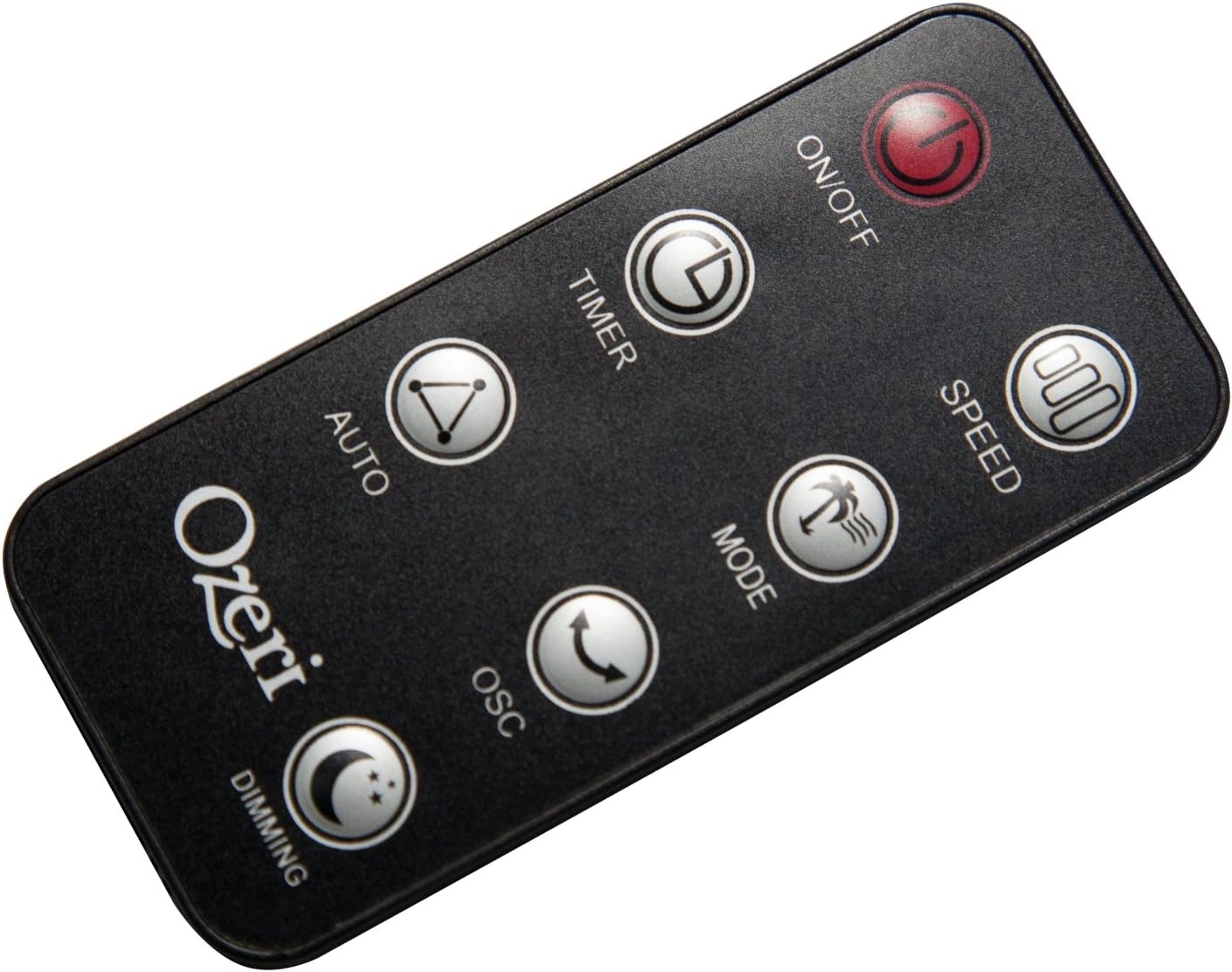
The extended-range remote control provides convenient access to all fan features from a distance. It includes buttons for On/Off, Speed, Timer, Mode, Auto, Oscillation, and Dimming (for the LCD display). The remote can be stored in a dedicated slot on the fan unit.

วิดีโอผลิตภัณฑ์อย่างเป็นทางการ:
Video: This official product video demonstrates the Ozeri 360 Oscillation Tower Fan, highlighting its micro-blade noise reduction technology and various features.
การซ่อมบำรุง
Regular cleaning ensures optimal performance and longevity of your fan:
- ควรถอดปลั๊กพัดลมทุกครั้งก่อนทำความสะอาด
- ใช้แบบนุ่มๆamp ใช้ผ้าเช็ดทำความสะอาดพื้นผิวภายนอก ห้ามใช้น้ำยาทำความสะอาดที่มีฤทธิ์กัดกร่อนหรือตัวทำละลาย
- ใช้เครื่องดูดฝุ่นที่มีหัวแปรงเพื่อดูดฝุ่นออกจากช่องรับอากาศและช่องระบายอากาศอย่างเบามือ
- ห้ามจุ่มพัดลมลงในน้ำหรือปล่อยให้น้ำหยดลงในตัวเรือนมอเตอร์
- เก็บพัดลมไว้ในที่เย็นและแห้งเมื่อไม่ใช้งาน
การแก้ไขปัญหา
หากคุณพบปัญหาเกี่ยวกับพัดลม โปรดดูปัญหาทั่วไปและวิธีแก้ไขต่อไปนี้:
- พัดลมไม่เปิด: Ensure the power cord is securely plugged into a working outlet. Check if the power button on the fan or remote has been pressed.
- การไหลเวียนของอากาศที่อ่อนแอ: Check the fan speed setting and increase it if necessary. Ensure the air intake and exhaust grilles are not obstructed by dust or other objects.
- Fan makes unusual noise: Turn off and unplug the fan. Inspect for any foreign objects caught in the grilles or internal components. If the noise persists after clearing any obstructions, contact customer support.
- การควบคุมระยะไกลไม่ทำงาน: Ensure the remote control batteries are correctly installed and not depleted. Point the remote directly at the fan's receiver.
ข้อมูลจำเพาะ
| คุณสมบัติ | รายละเอียด |
|---|---|
| ยี่ห้อ | โอเซริ |
| หมายเลขรุ่น | ออซเอฟ5 |
| สี | สีดำ |
| การออกแบบพัดลมไฟฟ้า | พัดลมตั้งพื้น |
| แหล่งพลังงาน | สายไฟ |
| คุณสมบัติพิเศษ | Oscillating (60, 90, 120, 360 degrees) |
| จำนวนความเร็ว | 3 |
| วัดtage | 60 วัตต์ |
| ความจุการไหลของอากาศ | 5000 ลูกบาศก์ฟุตต่อนาที |
| เล่มที่tage | 127 โวลต์ |
| วิธีการควบคุม | Remote Control, Electronic Touch Controls |
| วัสดุ | พลาสติก |
| น้ำหนักสินค้า | 9 ปอนด์ |
การรับประกันและการสนับสนุน
This Ozeri Tower Fan comes with a 1-year no questions asked warranty. For warranty claims, technical support, or any inquiries, please refer to the contact information provided on the Ozeri official webเว็บไซต์หรือเอกสารการซื้อของคุณ