
การแนะนำ
This manual provides instructions for the proper setup, operation, and maintenance of your Case Logic Optical Wireless Mouse, Model EW-6000. Please read this manual thoroughly before using the device to ensure optimal performance and longevity.
เนื้อหาแพ็คเกจ
- Case Logic Optical Wireless Mouse (EW-6000)
- ตัวรับสัญญาณนาโน USB
- คู่มือการใช้งาน (เอกสารนี้)
หมายเหตุ: ไม่รวมแบตเตอรี่และต้องซื้อแยกต่างหาก
การตั้งค่า
1. การติดตั้งแบตเตอรี่
- ค้นหาช่องใส่แบตเตอรี่ที่ด้านล่างของเมาส์
- เปิดฝาช่องใส่แบตเตอรี่
- Insert the required batteries (typically 1x AA or 2x AAA, check the compartment for specific type) ensuring correct polarity (+/-).
- ปิดฝาช่องใส่แบตเตอรี่ให้แน่น
2. การเชื่อมต่อตัวรับสัญญาณ USB Nano
The USB Nano Receiver is typically stored within the mouse's battery compartment or a dedicated slot for portability.
- Remove the USB Nano Receiver from its storage slot.
- เสียบตัวรับสัญญาณ USB Nano เข้ากับพอร์ต USB ที่ว่างอยู่บนคอมพิวเตอร์ของคุณ
- คอมพิวเตอร์ของคุณจะตรวจจับและติดตั้งไดรเวอร์ที่จำเป็นโดยอัตโนมัติ ซึ่งอาจใช้เวลาสักครู่
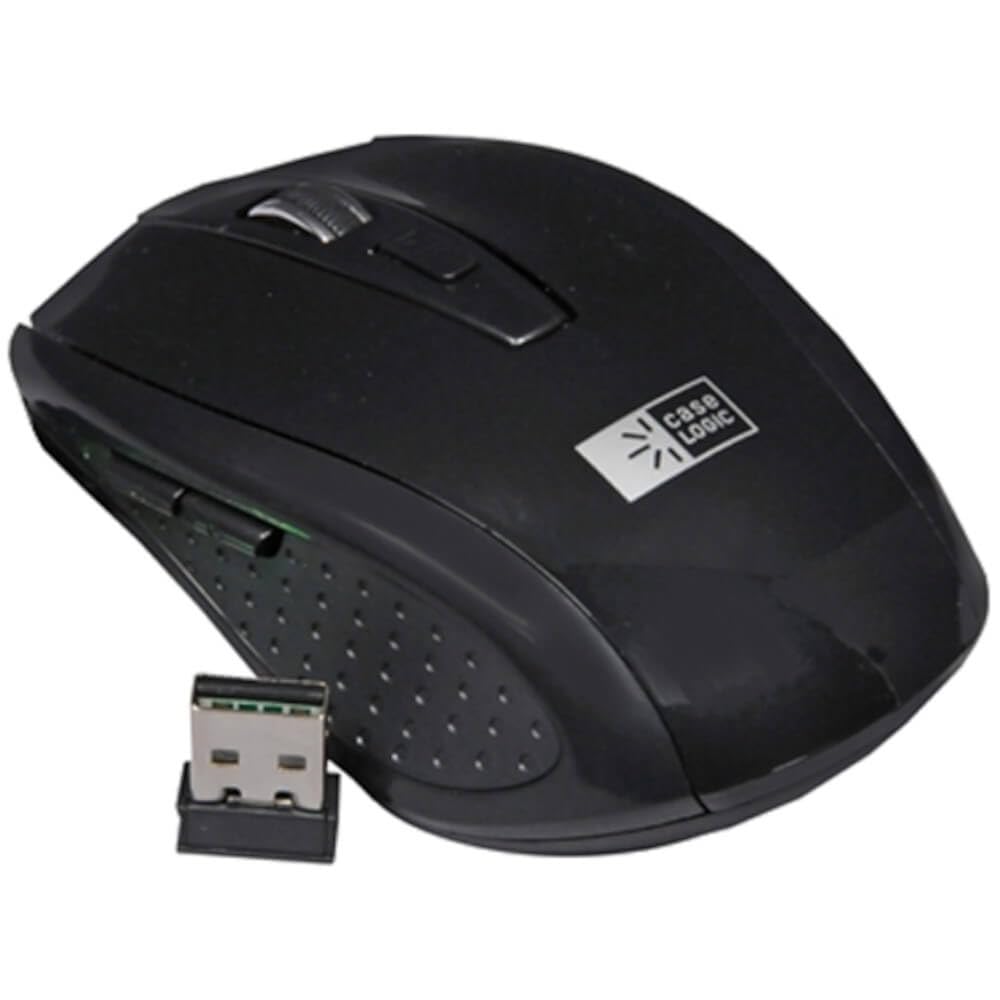
Image: The Case Logic Optical Wireless Mouse shown alongside its compact USB Nano Receiver. The mouse is black with a scroll wheel and two main buttons, and the Case Logic logo is visible on its surface. The USB receiver is small and designed for discreet connection to a computer's USB port.
3. เปิดเครื่อง
Locate the power switch on the underside of the mouse and slide it to the "ON" position. The mouse should now be ready for use.
คำแนะนำการใช้งาน
ฟังก์ชั่นพื้นฐาน
- ปุ่มซ้าย: ฟังก์ชันการคลิกหลัก ซึ่งโดยทั่วไปใช้สำหรับการเลือกรายการหรือเปิดลิงก์
- ปุ่มขวา: ฟังก์ชันคลิกเสริม ซึ่งโดยทั่วไปใช้สำหรับเมนูบริบท
- ล้อเลื่อน: ใช้สำหรับเลื่อนดูเอกสารและ web หน้าต่างๆ นอกจากนี้ยังอาจทำหน้าที่เป็นปุ่มคลิกกลางได้อีกด้วย
เซ็นเซอร์ออปติคอล
The mouse features an 800 DPI (Dots Per Inch) high-definition optical sensor, providing precise and responsive cursor control. This sensitivity is suitable for general computing tasks.
การเชื่อมต่อแบบไร้สาย
The mouse operates on a 2.4GHz wireless frequency, offering a reliable connection with an operating range of up to 10 meters (approximately 33 feet) from the USB Nano Receiver.
ฟังก์ชั่นเปิดปิดอัตโนมัติ
To conserve battery life, the mouse is equipped with an auto power-saving function. It will automatically enter a sleep mode after a period of inactivity. To wake the mouse, simply move it or click any button.
การซ่อมบำรุง
การทำความสะอาด
To maintain optimal performance, periodically clean your mouse. Use a soft, dry cloth to wipe the exterior. For stubborn dirt, a slightly damp สามารถใช้ผ้าเช็ดทำความสะอาดได้ โดยต้องแน่ใจว่าไม่มีความชื้นเข้าไปในตัวเครื่อง หลีกเลี่ยงการใช้สารเคมีรุนแรงหรือน้ำยาทำความสะอาดที่มีฤทธิ์กัดกร่อน
การเปลี่ยนแบตเตอรี่
When the mouse's performance degrades or it stops responding, it is likely time to replace the batteries. Follow the battery installation steps outlined in the "Setup" section.
การแก้ไขปัญหา
- เมาส์ไม่ตอบสนอง:
- ตรวจสอบให้แน่ใจว่าเมาส์เปิดอยู่
- ตรวจสอบระดับแบตเตอรี่และเปลี่ยนหากจำเป็น
- Verify the USB Nano Receiver is securely plugged into a working USB port. Try a different USB port.
- ขยับเมาส์ให้ใกล้กับตัวรับสัญญาณมากขึ้นเพื่อตรวจสอบว่าไม่มีปัญหาเรื่องระยะทางหรือไม่
- รีสตาร์ทเครื่องคอมพิวเตอร์ของคุณ
- การเคลื่อนไหวของเคอร์เซอร์ที่ไม่แน่นอน:
- ทำความสะอาดเซ็นเซอร์ออปติคัลที่อยู่ใต้เมาส์
- โปรดตรวจสอบให้แน่ใจว่าคุณใช้เมาส์บนพื้นผิวที่เหมาะสม พื้นผิวที่มีการสะท้อนแสงสูงหรือโปร่งใสอาจส่งผลต่อการติดตามการเคลื่อนไหว
- ตรวจสอบสัญญาณรบกวนจากอุปกรณ์ไร้สายอื่นๆ
- ปัญหาการเชื่อมต่อ:
- Unplug and re-plug the USB Nano Receiver.
- If possible, try the mouse and receiver on a different computer to determine if the issue is with the mouse or the computer.
ข้อมูลจำเพาะ
| ยี่ห้อ | Case ลอจิก |
| หมายเลขรุ่น | EW-6000 |
| เทคโนโลยีการเชื่อมต่อ | Wireless (2.4GHz USB Nano Receiver) |
| เทคโนโลยีตรวจจับการเคลื่อนไหว | ออฟติคอล |
| ดีพีไอ | 800 จุดต่อนิ้ว |
| ระยะการทำงาน | สูงสุด 10 เมตร |
| อุปกรณ์ที่รองรับ | เครื่องคอมพิวเตอร์ส่วนบุคคล |
| ระบบปฏิบัติการ | Linux, Windows 7, Windows XP (and newer compatible OS) |
| แหล่งพลังงาน | ใช้พลังงานจากแบตเตอรี่ (ไม่รวมแบตเตอรี่) |
| ขนาด (กว้าง x ยาว x สูง) | 21.08 x 9.91 x 3.81 ซม. |
| น้ำหนัก | 113.4 กรัม |
การรับประกันและการสนับสนุน
For warranty information or technical support, please refer to the documentation provided with your purchase or visit the official Case Logic webไซต์นี้ โปรดเก็บหลักฐานการซื้อไว้เพื่อใช้ยืนยันการรับประกัน