
1. บทนำ
This manual provides comprehensive instructions for the setup, operation, and maintenance of your A4tech Natural A Ergonomic Keyboard, model KRS-85. Designed with patented A-Shape keys and round-edged keycaps, this keyboard aims to promote a natural typing position, thereby helping to prevent Repetitive Strain Injury (RSI).
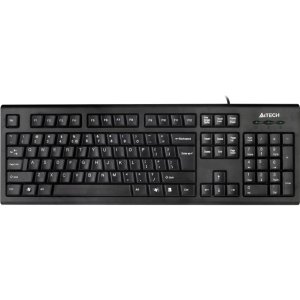
Figure 1: A4tech Natural A Ergonomic Keyboard (KRS-85). This image displays the full layout of the black wired keyboard, highlighting its ergonomic design with A-Shape keys and round keycaps.
2. การตั้งค่า
2.1 ข้อกำหนดของระบบ
- IBM or Compatible Systems
- Windows 2000 / XP (X64) / 2003 (X64) / Vista
2.2 การเชื่อมต่อคีย์บอร์ด
- ค้นหาพอร์ต USB ที่มีอยู่ในคอมพิวเตอร์ของคุณ
- Insert the USB connector of the A4tech KRS-85 keyboard firmly into the USB port.
- ระบบปฏิบัติการของคุณควรตรวจจับและติดตั้งไดรเวอร์ที่จำเป็นโดยอัตโนมัติ กระบวนการนี้อาจใช้เวลาสักครู่
- เมื่อการติดตั้งเสร็จสมบูรณ์ คีย์บอร์ดก็พร้อมใช้งานได้ทันที
3. คู่มือการใช้งาน
The A4tech Natural A Keyboard is designed for comfortable and efficient typing. Its unique features are intended to enhance your typing experience and reduce strain.
3.1 คุณสมบัติหลัก
- Patented A-Shape Keys: The layout of the keys is designed to align with the natural position of your hands and wrists, promoting a more relaxed posture.
- Round Edged Keycaps: These keycaps provide a smooth and comfortable typing surface.
- รูปแบบมาตรฐาน: The keyboard features a full-size layout including a numeric keypad, function keys (F1-F12), and navigation keys.
3.2 การใช้งานพื้นฐาน
Use the keyboard as you would any standard computer keyboard for typing, navigating, and executing commands. The ergonomic design is intended to provide comfort during extended use.
4. การบำรุงรักษา
การบำรุงรักษาอย่างถูกต้องจะช่วยให้แป้นพิมพ์ของคุณมีอายุการใช้งานยาวนานและมีประสิทธิภาพเหมาะสมที่สุด
4.1 การทำความสะอาด
- ถอดแป้นพิมพ์ออกจากคอมพิวเตอร์ของคุณก่อนทำความสะอาด
- ใช้ผ้านุ่มไม่เป็นขุยเช็ดเล็กน้อยampชุบน้ำหรือน้ำยาทำความสะอาดอ่อนๆ เพื่อเช็ดพื้นผิวของแป้นพิมพ์
- หลีกเลี่ยงการใช้สารเคมีรุนแรง น้ำยาทำความสะอาดที่มีฤทธิ์กัดกร่อน หรือความชื้นที่มากเกินไป
- สำหรับการทำความสะอาดระหว่างคีย์ ให้ใช้ลมอัดเพื่อกำจัดฝุ่นและเศษต่างๆ
5 การแก้ไขปัญหา
If you encounter issues with your A4tech Natural A Keyboard, please refer to the following common solutions.
5.1 แป้นพิมพ์ไม่ตอบสนอง
- ตรวจสอบให้แน่ใจว่าสาย USB เชื่อมต่อกับพอร์ต USB ที่ใช้งานได้บนคอมพิวเตอร์ของคุณอย่างแน่นหนา ลองใช้พอร์ต USB อื่น
- รีสตาร์ทเครื่องคอมพิวเตอร์ของคุณ
- Check your computer's Device Manager (Windows) to see if the keyboard is recognized and if there are any driver issues.
5.2 Specific Key Combinations Not Working (e.g., Ctrl-Alt-Del)
- Some users have reported that certain key combinations, such as Ctrl-Alt-Del, may not function as expected on this keyboard with Windows operating systems. This is a known compatibility limitation for some configurations.
- If this issue persists, consider using alternative methods for these functions within your operating system, or consult A4tech support for potential workarounds or driver updates if available.
6. ข้อมูลจำเพาะ
| คุณสมบัติ | รายละเอียด |
|---|---|
| ชื่อสินค้า | Natural_A Rounded Edge Keyboard |
| หมายเลขรุ่น | เคอาร์เอส-85 |
| เทคโนโลยีการเชื่อมต่อ | สาย (USB) |
| คำอธิบายแป้นพิมพ์ | การยศาสตร์ |
| จำนวนคีย์ | 85 |
| ขนาดสินค้า | 19.69 x 7.87 x 1.97 นิ้ว |
| น้ำหนักสินค้า | 2.2 ปอนด์ |
| ผู้ผลิต | ERGOGUYS (A4tech Co., Ltd) |
| วันที่พร้อมใช้งานครั้งแรก | 31 ตุลาคม 2013 |
7. ข้อมูลการรับประกัน
The A4tech Natural A Ergonomic Keyboard (KRS-85) comes with a รับประกันจำกัด 1 ปี จากผู้ผลิต การรับประกันนี้ครอบคลุมถึงข้อบกพร่องในวัสดุและฝีมือการผลิตภายใต้การใช้งานปกติ
Please retain your proof of purchase for warranty claims. For detailed terms and conditions, refer to the warranty documentation provided with your product or contact the manufacturer directly.
8. การสนับสนุน
For further assistance, technical support, or warranty inquiries, please contact the manufacturer or your point of purchase. Ensure you have your product model number (KRS-85) and proof of purchase ready when contacting support.