
1. บทนำ
This manual provides essential instructions for the setup, operation, and maintenance of your Grundig Multimedia QWERTY Keyboard, Model 72845. Please read this manual thoroughly before using the product to ensure proper functionality and longevity.
2. เนื้อหาบรรจุภัณฑ์
ตรวจสอบให้แน่ใจว่ามีรายการทั้งหมดอยู่ในบรรจุภัณฑ์:
- Grundig Multimedia QWERTY Keyboard (Model 72845)
- คู่มือการใช้งาน (เอกสารนี้)
3. การตั้งค่า
ทำตามขั้นตอนต่อไปนี้เพื่อตั้งค่าแป้นพิมพ์ของคุณ:
- แกะคีย์บอร์ดออก: นำคีย์บอร์ดออกจากบรรจุภัณฑ์อย่างระมัดระวัง
- เชื่อมต่อกับคอมพิวเตอร์: The Grundig Multimedia Keyboard is a wired device. Locate an available USB port on your PC. Insert the USB connector of the keyboard firmly into the USB port.
- การติดตั้งไดร์เวอร์: Your operating system (e.g., Windows, macOS, Linux) should automatically detect and install the necessary drivers. No additional software installation is typically required.
- ทดสอบฟังก์ชันการทำงาน: เปิดโปรแกรมแก้ไขข้อความหรือ web browser and type to confirm the keyboard is working correctly.

รูปที่ 3.1 : ด้านซ้าย view of the keyboard, illustrating the QWERTY layout and dedicated function keys. This view shows the standard alphanumeric keys, function keys (F1-F4), and several quick-access buttons along the left side, including keys for 'Esc', 'Tab', 'Caps Lock', 'Shift', and 'Ctrl'.
4. คู่มือการใช้งาน
The Grundig Multimedia QWERTY Keyboard is designed for ease of use with an ergonomic layout and 13 dedicated hotkeys for quick access to multimedia and system functions.
4.1 Standard Keyboard Functions
The keyboard features a standard QWERTY layout, suitable for general typing and data entry. All standard alphanumeric keys, punctuation, and modifier keys (Shift, Ctrl, Alt) function as expected.
4.2 Multimedia and Hotkey Functions
This keyboard includes 13 quick-access hotkeys. These keys are pre-programmed to control various multimedia functions and system shortcuts, enhancing productivity.

รูปที่ 4.1: มุม view of the keyboard's left side, showing the ergonomic curve and a set of dedicated hotkeys. These hotkeys are typically used for quick access to common computer functions like launching applications or navigating web หน้า
Common hotkey functions may include:
- การควบคุมมัลติมีเดีย: Play/Pause, Stop, Previous Track, Next Track, Volume Up, Volume Down, Mute.
- Internet/Application Shortcuts: Home, Email, My Computer, Search.
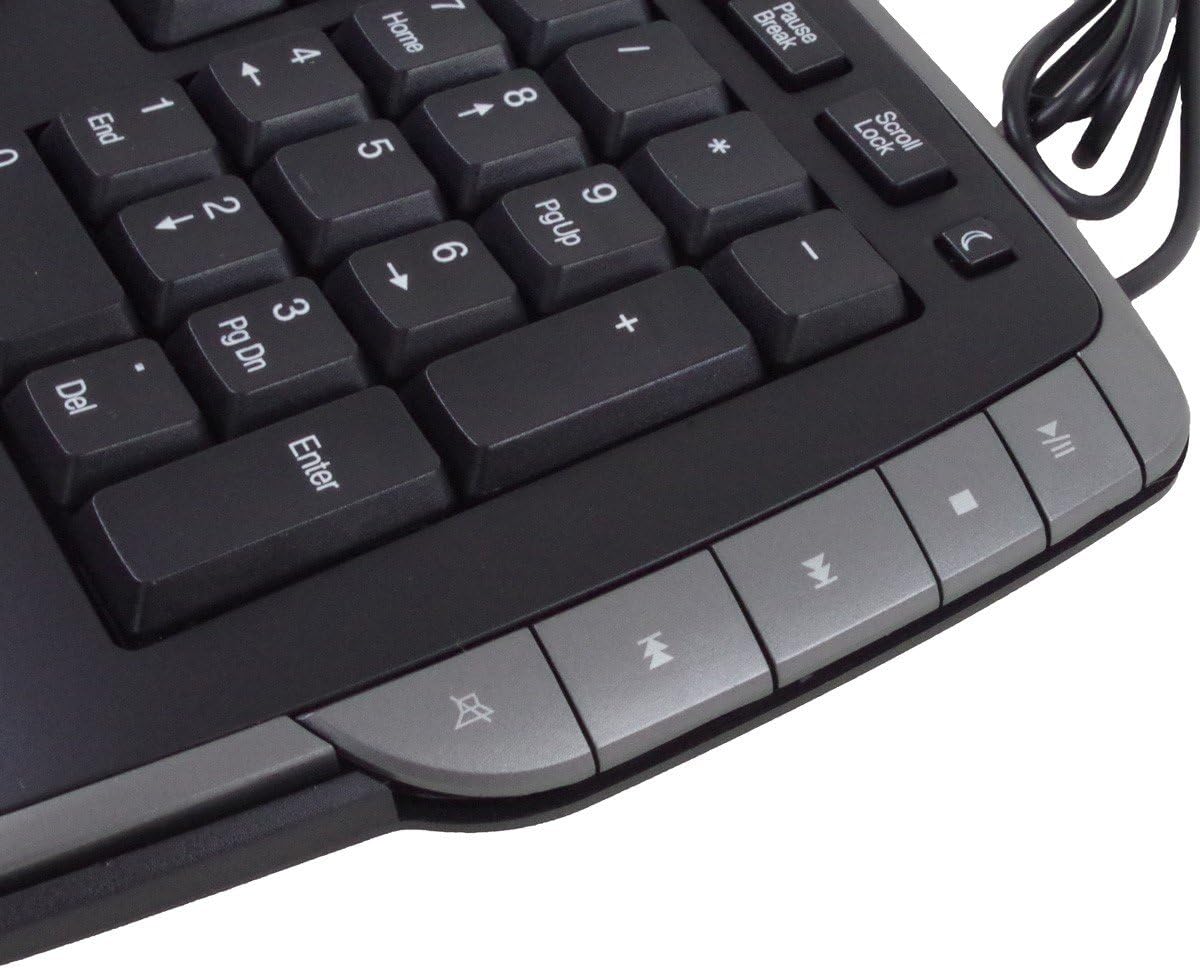
รูปที่ 4.2: ด้านขวา view of the keyboard, featuring the numeric keypad and additional multimedia control hotkeys. These keys provide convenient access to media playback controls and other system functions.
Refer to the keycap legends for specific functions of each hotkey. No additional software is required for these keys to function on most operating systems.
5. การบำรุงรักษา
Proper care and maintenance will extend the life of your keyboard.
- การทำความสะอาด: ในการทำความสะอาดแป้นพิมพ์ ให้ถอดแป้นพิมพ์ออกจากคอมพิวเตอร์ก่อน ใช้ผ้าเนื้อนุ่มที่ไม่เป็นขุยชุบน้ำหมาดๆ เช็ดเบาๆampล้างออกด้วยน้ำหรือน้ำยาทำความสะอาดอ่อนๆ หลีกเลี่ยงความชื้นที่มากเกินไป ห้ามฉีดน้ำยาทำความสะอาดลงบนแป้นพิมพ์โดยตรง
- การสัมผัสของเหลว: คีย์บอร์ดนี้คือ ไม่กันน้ำ. Avoid spilling liquids on it. If liquid spills occur, immediately disconnect the keyboard and allow it to dry completely before reconnecting.
- ฝุ่นและเศษขยะ: ใช้ลมอัดเพื่อกำจัดฝุ่นละอองและเศษต่างๆ ออกจากระหว่างปุ่ม
- พื้นที่จัดเก็บ: เก็บแป้นพิมพ์ไว้ในสภาพแวดล้อมที่สะอาดและแห้งเมื่อไม่ได้ใช้งาน
6 การแก้ไขปัญหา
หากคุณพบปัญหาเกี่ยวกับแป้นพิมพ์ โปรดลองทำตามขั้นตอนการแก้ไขปัญหาต่อไปนี้:
- แป้นพิมพ์ไม่ตอบสนอง:
- ตรวจสอบให้แน่ใจว่าได้เสียบสาย USB เข้ากับแป้นพิมพ์และพอร์ต USB ของคอมพิวเตอร์อย่างแน่นหนาแล้ว
- ลองเชื่อมต่อคีย์บอร์ดกับพอร์ต USB อื่นบนคอมพิวเตอร์ของคุณ
- รีสตาร์ทเครื่องคอมพิวเตอร์ของคุณ
- Test the keyboard on another computer, if available, to determine if the issue is with the keyboard or the computer.
- Hotkeys Not Working:
- ตรวจสอบให้แน่ใจว่าแป้นพิมพ์เชื่อมต่ออย่างถูกต้อง
- Some hotkeys may require specific software or operating system settings to be enabled. Check your computer's control panel or system preferences for keyboard settings.
- การแสดงผลอักขระไม่ถูกต้อง:
- Verify that your operating system's keyboard language settings match the QWERTY layout of your keyboard.
7. ข้อมูลจำเพาะ
| ยี่ห้อ: | กรุนดิก |
| หมายเลขรุ่น: | 72845 |
| เทคโนโลยีการเชื่อมต่อ: | มีสาย |
| รูปแบบแป้นพิมพ์: | คีย์บอร์ด QWERTY |
| จำนวนคีย์: | Standard keys + 13 Hotkeys |
| คุณสมบัติพิเศษ: | การออกแบบตามหลักสรีรศาสตร์ |
| อุปกรณ์ที่รองรับ: | PC |
| วัสดุ: | โพลีบิวทิลีนเทเรฟทาเลต |
| สี: | Silver (Note: Product images show a dark grey/black with silver accents) |
| ระดับการต้านทานน้ำ: | ไม่กันน้ำ |
8. การรับประกันและการสนับสนุน
Information regarding specific warranty terms and availability of spare parts is not provided. For product support or warranty inquiries, please contact your retailer or the manufacturer directly. Keep your purchase receipt as proof of purchase.
9. ข้อมูลด้านความปลอดภัย
- ห้ามพยายามถอดประกอบหรือปรับเปลี่ยนแป้นพิมพ์
- Keep the keyboard away from extreme temperatures, direct sunlight, and high humidity.
- หลีกเลี่ยงการทำแป้นพิมพ์ตกหรือได้รับแรงกระแทกรุนแรง
- เมื่อผลิตภัณฑ์หมดอายุการใช้งานแล้ว ควรทิ้งอย่างถูกวิธีตามระเบียบข้อบังคับท้องถิ่น