
1. บทนำ
The MOOG MiniFooger Analog Delay is a high-quality effects pedal designed for guitar and bass, delivering over 650ms of rich, blooming analog delay. As part of the Minifooger family, this pedal embodies legendary Moog quality, tone, and versatility in a compact, rugged housing built for reliable performance.
This pedal features a 100% analog signal path, true bypass switching, and an extremely low-noise design, ensuring no negative impact on your instrument's tone. Its meticulous design incorporates premium components, a discrete JFET input stage, and a vintage compander circuit for superior delay tone. A dedicated expression input further expands the pedal's capabilities, allowing for dynamic control over key parameters.
2. การตั้งค่า
Follow these steps to properly set up your MiniFooger Analog Delay pedal:
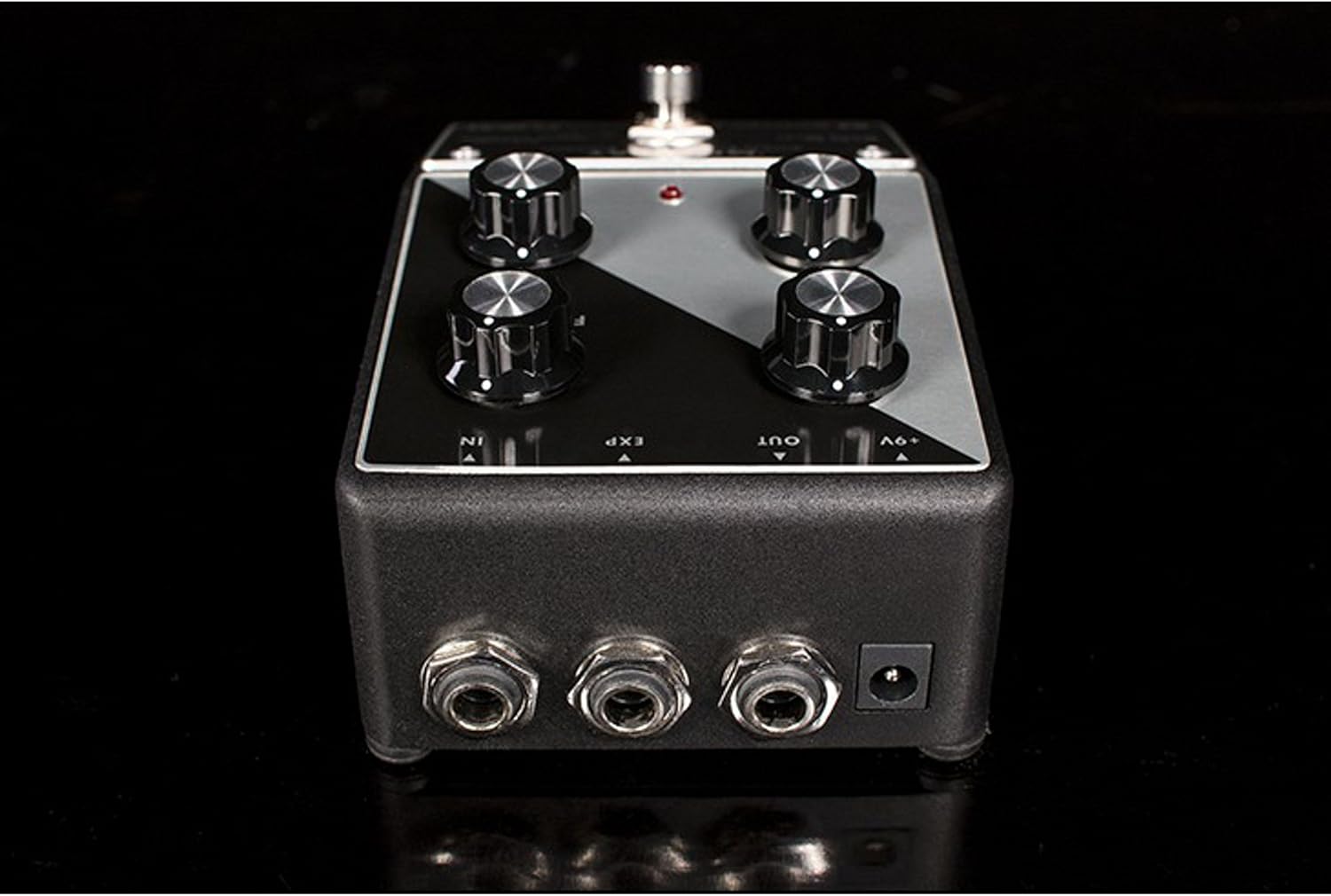
- การเชื่อมต่อไฟฟ้า: Connect a 9V DC power supply (center negative) to the '+9V' jack on the rear of the pedal. The pedal can also be powered by a 9V battery (included), which can be accessed by removing the bottom plate.
- อินพุตเสียง: Connect your instrument (guitar or bass) to the 'IN' jack on the rear of the pedal using a standard 1/4-inch instrument cable.
- เอาต์พุตเสียง: Connect the 'OUT' jack on the rear of the pedal to your ampต่อเข้ากับแอมป์หรือเอฟเฟ็กต์ตัวถัดไปในลำดับสัญญาณของคุณโดยใช้สายเคเบิลเครื่องดนตรีขนาดมาตรฐาน 1/4 นิ้ว
- แป้นเหยียบควบคุมเสียง (อุปกรณ์เสริม): For dynamic control, connect a Moog EP-3 or similar expression pedal to the 'EXP' jack on the rear of the pedal.
3. คู่มือการใช้งาน
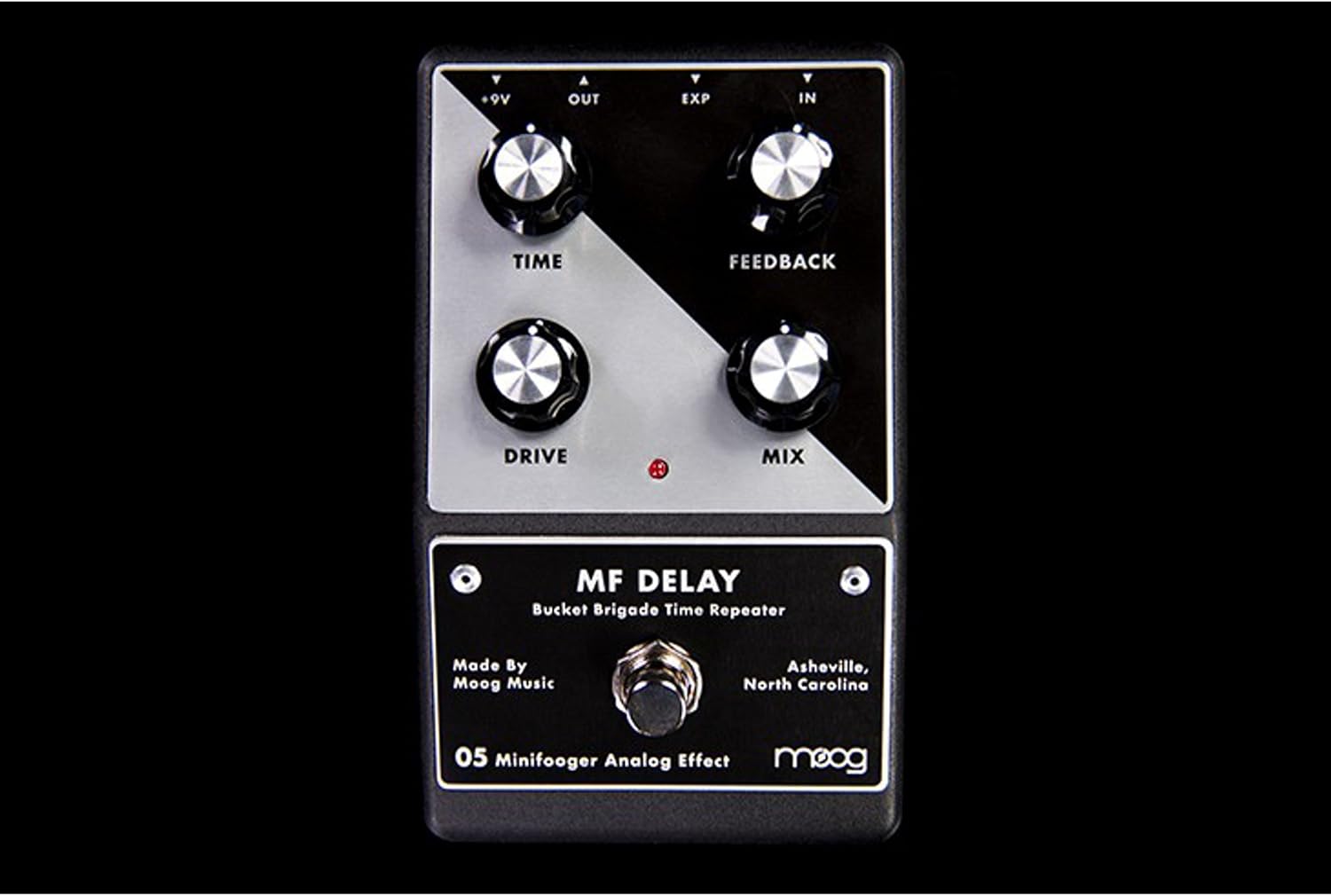
The MiniFooger Analog Delay features four primary control knobs and a footswitch for intuitive operation:
- เวลา: This knob controls the delay time, ranging from very short slap-back echoes to over 650 milliseconds of rich, sustained delay.
- ข้อเสนอแนะ: Adjusts the number of repeats. Turning this knob clockwise increases the number of echoes, allowing for long, decaying trails or even self-oscillation at higher settings.
- ไดรฟ์: This control adds a wide range of classic drive, boost, and color to your signal. It can be used to add warmth, grit, or a significant boost to the delayed signal.
- ผสม: Blends the dry (unaffected) signal with the wet (delayed) signal. Turn counter-clockwise for more dry signal, and clockwise for more wet signal. The mix control allows the dry signal to be completely eliminated if desired.
- ฟุตสวิตช์: Engages or bypasses the delay effect. The MiniFooger Analog Delay features true bypass, ensuring your signal remains unaffected when the pedal is disengaged.
Expression Pedal Functionality
The expression pedal input allows for hands-free control over either the เวลา or ข้อเสนอแนะ parameter. By default, the expression pedal controls the delay เวลา. To switch the expression pedal's function to control ข้อเสนอแนะ, an internal switch needs to be adjusted.
To change Expression Pedal Control:
- Ensure the pedal is disconnected from power and your instrument.
- Carefully remove the screws from the bottom plate of the pedal.
- Locate the small switch inside the pedal, typically labeled for expression control.
- Toggle the switch to the desired position (TIME or FEEDBACK).
- Carefully reattach the bottom plate and secure the screws.
Note: If you are uncomfortable performing this internal adjustment, please consult a qualified technician.
4. การบำรุงรักษา
To ensure the longevity and optimal performance of your MiniFooger Analog Delay pedal, follow these maintenance guidelines:
- การทำความสะอาด: Use a soft, dry cloth to clean the exterior of the pedal. Avoid using abrasive cleaners or solvents, as these can damage the finish and internal components.
- พื้นที่จัดเก็บ: Store the pedal in a dry, temperate environment away from direct sunlight, extreme temperatures, and excessive humidity.
- การเปลี่ยนแบตเตอรี่: If using battery power, replace the 9V battery when the pedal's performance degrades or the indicator light dims. To replace, carefully remove the bottom plate, disconnect the old battery, and connect a new 9V battery, ensuring correct polarity.
- การเชื่อมต่อสายเคเบิล: Periodically check all cable connections for wear and tear. Loose or damaged cables can lead to signal loss or noise.
5 การแก้ไขปัญหา
If you encounter issues with your MiniFooger Analog Delay, refer to the following troubleshooting tips:
- ไม่มีเสียงหรือสัญญาณอ่อน:
- ตรวจสอบให้แน่ใจว่าได้เชื่อมต่อแหล่งจ่ายไฟอย่างถูกต้องและใช้งานได้ปกติ
- Check all instrument cables for proper connection and integrity.
- ตรวจสอบให้แน่ใจว่าเครื่องมือของคุณและ ampเครื่องขยายกำลังทำงานอย่างถูกต้อง
- Check the 'MIX' knob setting; if set fully counter-clockwise, only the dry signal will pass.
- เสียงรบกวนหรือเสียงหึ่งที่ไม่พึงประสงค์:
- Ensure you are using a regulated 9V DC power supply.
- ตรวจสอบสายเคเบิลหรือจุดเชื่อมต่อว่ามีปัญหาหรือไม่
- Test the pedal in a different power outlet or with a different power supply.
- Delay Not Functioning Correctly:
- Check the 'TIME' and 'FEEDBACK' knob settings.
- If using an expression pedal, ensure it is connected correctly and the internal switch is set to the desired parameter.
If these steps do not resolve the issue, please contact MOOG customer support for further assistance.
6. ข้อมูลจำเพาะ
| คุณสมบัติ | รายละเอียด |
|---|---|
| ยี่ห้อ | มู้ก |
| หมายเลขรุ่น | MFS-DELAY-02 |
| หมายเลขชิ้นส่วนของผู้ผลิต | MOOGMFDELAY |
| เอฟเฟกต์เอาต์พุตเสียง | ล่าช้า |
| รูปแบบสัญญาณ | อนาล็อก |
| เวลาหน่วง | Over 650ms (Bucket Brigade) |
| พลัง | 9V DC (center negative), 35mA |
| ประเภทการควบคุม | Knob (TIME, FEEDBACK, DRIVE, MIX) |
| บายพาส | บายพาสจริง |
| ขนาดรายการ | Approximately 7 x 7 x 7 inches (packaging dimensions, actual pedal is smaller) |
| ยูพีซี | 094922450074, 040232216664 |
| GTIN | 00094922450074, 094922450074 040232216664 |
7. การรับประกันและการสนับสนุน
MOOG products are manufactured to high standards and come with a limited warranty. For specific warranty terms and conditions, please refer to the warranty card included with your product or visit the official MOOG webเว็บไซต์.
For technical support, service, or any questions regarding your MiniFooger Analog Delay pedal, please contact MOOG customer support through their official webไซต์หรือข้อมูลการติดต่อที่ให้ไว้ในบรรจุภัณฑ์ผลิตภัณฑ์ของคุณ