
1. บทนำ
This manual provides comprehensive instructions for the installation, configuration, operation, and maintenance of your D-Link DGS-1210-08P Smart Switch. The DGS-1210 series represents the third generation of D-Link Web Smart Switches, designed to integrate advanced security and management functions for optimal application performance and modularity. Its innovative fanless design ensures silent operation and extended durability, making the DGS-1210 an efficient and cost-effective solution for small and medium-sized businesses (SMBs).
2. สินค้าหมดview
2.1 คุณสมบัติหลัก
- Features 8 Power over Ethernet (PoE) ports.
- These PoE ports provide up to 15.4 W per port.
- Offers the flexibility to connect 802.3af compatible devices, such as network cameras and IP phones.
- Includes 2 Gigabit SFP ports for fiber optic connections.
- Web-managed interface for advanced configuration.
2.2 เนื้อหาบรรจุภัณฑ์
- D-Link DGS-1210-08P Smart Switch Unit
- อะแดปเตอร์แปลงไฟ
- ชุดติดตั้งบนแร็ค (ถ้ามี)
2.3 ผลิตภัณฑ์ Views
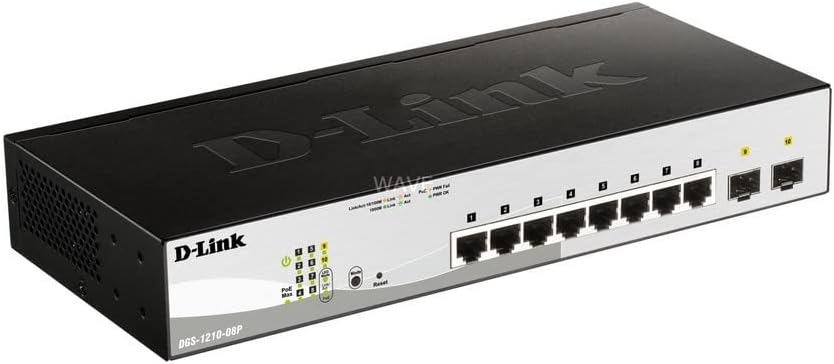
รูปที่ 1: มุม view of the D-Link DGS-1210-08P Smart Switch, showcasinด้วยการออกแบบที่กะทัดรัดและการจัดวางพอร์ต

รูปที่ 2 : ด้านหน้า view of the D-Link DGS-1210-08P Smart Switch, highlighting the 8 Gigabit Ethernet ports and 2 SFP ports, along with LED indicators.

รูปที่ 3: ด้านหลัง view of the D-Link DGS-1210-08P Smart Switch, showing the power input and grounding screw.

Figure 4: D-Link DGS-1210-08P Smart Switch with key dimensions indicated: 28 cm length, 12.6 cm width, and 4.4 cm height.
3. การตั้งค่า
3.1 การติดตั้งทางกายภาพ
- การจัดวาง: Position the switch on a flat, stable surface or mount it in a standard 19-inch equipment rack using the provided rackmount kit. Ensure adequate ventilation around the unit.
- สิ่งแวดล้อม: ควรหลีกเลี่ยงการวางสวิตช์ไว้ในที่ที่มีแสงแดดส่องโดยตรง ใกล้แหล่งความร้อน หรือในบริเวณที่มีความชื้นสูงหรือมีฝุ่นละอองมาก
3.2 การเชื่อมต่อสายไฟ
- ต่ออะแดปเตอร์แปลงไฟเข้ากับพอร์ตรับไฟที่ด้านหลังของสวิตช์
- เสียบปลายอีกด้านหนึ่งของอะแดปเตอร์จ่ายไฟเข้ากับเต้ารับไฟฟ้าที่เหมาะสม
- Verify that the Power LED on the front panel illuminates, indicating the switch is receiving power.
3.3 การเชื่อมต่อเครือข่าย
- Connect your network devices (computers, servers, network cameras, IP phones) to the RJ45 Ethernet ports (1-8) on the front panel using standard Ethernet cables.
- For fiber optic connections, insert SFP transceivers into the SFP ports (9-10) and connect fiber optic cables.
- For PoE-powered devices, connect them to any of the 8 PoE-enabled ports. The switch will automatically detect and provide power to compatible devices.
3.4 การกำหนดค่าเริ่มต้น
The DGS-1210-08P is a managed switch, allowing for advanced configuration via a web-based graphical user interface (GUI). Refer to the detailed D-Link documentation for specific instructions on accessing and configuring the web interface, including default IP addresses and login credentials.
4. คู่มือการใช้งาน
4.1 ฟังก์ชัน Power over Ethernet (PoE)
The switch's 8 PoE ports automatically detect and supply power to IEEE 802.3af compliant devices. This eliminates the need for separate power cables for devices like IP cameras or VoIP phones, simplifying deployment and reducing cable clutter.
4.2 การถ่ายโอนข้อมูล
The Gigabit Ethernet ports support high-speed data transfer up to 1000 Mbps, while the SFP ports provide flexible uplink options. The switch operates automatically to forward data packets between connected devices.
5. การบำรุงรักษา
5.1 การทำความสะอาด
ควรทำความสะอาดภายนอกสวิตช์เป็นประจำด้วยผ้าแห้งเนื้อนุ่ม ห้ามใช้น้ำยาทำความสะอาดหรือสเปรย์ ตรวจสอบให้แน่ใจว่าช่องระบายอากาศไม่มีฝุ่นและสิ่งกีดขวาง
การอัปเดตเฟิร์มแวร์ 5.2 รายการ
Periodically check the D-Link support website for firmware updates. Keeping the switch's firmware up-to-date ensures optimal performance, security, and access to new features.
6 การแก้ไขปัญหา
6.1 ปัญหาพลังงาน
- If the Power LED is off, ensure the power adapter is securely connected to both the switch and a working power outlet.
- ทดสอบเต้ารับไฟฟ้าด้วยอุปกรณ์อื่นเพื่อยืนยันว่าใช้งานได้
6.2 ปัญหาการเชื่อมต่อ
- Check that Ethernet cables are securely connected to both the switch and the network device.
- Verify that the Link/Act LED for the connected port is illuminated or blinking, indicating a valid connection and activity.
- ตรวจสอบให้แน่ใจว่าอุปกรณ์ที่เชื่อมต่อเปิดใช้งานอยู่และตั้งค่าอย่างถูกต้อง
6.3 ปัญหา PoE
- Confirm that the connected device is IEEE 802.3af compliant.
- Check the PoE status LEDs on the switch for any error indications.
- Ensure the total power budget (65W) is not exceeded by all connected PoE devices.
7. ข้อมูลจำเพาะ
| ขนาดสินค้า | 28L x 12.6W x 4.4H ซม |
| น้ำหนักสินค้า | 1.23 กิโลกรัม |
| เล่มที่tage | 240 โวลต์ |
| Housing Material Type | พลาสติก |
| กำลังไฟสูงสุด (งบประมาณ PoE) | 65 วัตต์ |
| ประเภทอินเทอร์เฟซ | เอสเอฟพี, อาร์เจ45 |
| อัตราการถ่ายโอนข้อมูล | 2000 เมกะบิตต่อวินาที |
| กระแสไฟฟ้าที่ได้รับการจัดอันดับ | 2 Ampที่นั่น |
| ผู้ผลิต | D-Link Mediterraneo S.r.l. |
| ยี่ห้อ | ดีลิงค์ |
| ชุด | ดีจีเอส-1210-08P |
| สี | สีดำ |
| หมายเลขรุ่นสินค้า | ดีจีเอส-1210-08P |
| จำนวนพอร์ตอีเธอร์เน็ต | 8 |
| รวมวัดtage | 97 วัตต์ |
| ประเภทแหล่งจ่ายไฟ | Type F Connector (EU) |
| ส่วนประกอบที่รวมอยู่ | หน่วยสวิตช์ |
8. การรับประกันและการสนับสนุน
8.1 ข้อมูลการรับประกัน
This product originates from and is shipped within the European Economic Area (EEA). It is an original product from manufacturer-authorized distributors. For specific warranty terms and conditions, please refer to the warranty card included with your product or visit the official D-Link webเว็บไซต์.
8.2 การสนับสนุนด้านเทคนิค
For further assistance, technical support, or to download the latest drivers and firmware, please visit the official D-Link support webเว็บไซต์: www.dlink.com/support.