
1. บทนำ
The Woods 50021 Mechanical 24-Hour Programmable 2 Outlet Timer is designed to automate the operation of indoor lights and appliances. This device allows you to set specific ON/OFF times, repeating daily, to enhance convenience and manage energy consumption. It features a manual override for immediate control without altering programmed settings.
2. ข้อมูลด้านความปลอดภัยที่สำคัญ
- สำหรับใช้ภายในอาคารเท่านั้น: This timer is intended for indoor use in dry locations. Do not expose to water or moisture.
- คะแนนไฟฟ้า: Do not exceed the electrical ratings of the timer (125Vac 60Hz, 15A / 1875W Resistive, 8A / 1000W Tungsten, 5A Ballast, 1/2Hp).
- การต่อลงดิน: ตรวจสอบให้แน่ใจว่าตัวจับเวลาเสียบเข้ากับเต้าเสียบ 3 ขาที่มีการต่อสายดินอย่างถูกต้อง
- เด็ก: เก็บให้พ้นจากมือเด็ก
- การทำความสะอาด: Unplug the timer before cleaning. Use a dry cloth; do not use liquid cleaners.
- การซ่อมแซม: ห้ามถอดประกอบหรือซ่อมแซมตัวตั้งเวลาด้วยตนเอง โปรดส่งซ่อมโดยช่างผู้ชำนาญการเท่านั้น
3. คุณสมบัติหลัก
- Automatic nightlight that turns ON in the absence of light.
- 48 ON/OFF settings programmable in 30-minute intervals, repeating daily.
- Two (2) grounded outlets for connecting multiple devices.
- Compatible with CFL, LED, and incandescent bulbs.
- Electrical Rating: 125Vac 60Hz, 15A / 1875W Resistive, 8A / 1000W Tungsten, 5A Ballast, 1/2Hp.
4. การตั้งค่าและการเขียนโปรแกรม
This section guides you through setting up and programming your Woods 50021 timer. For a visual demonstration, please refer to the video below.
Video: Demonstration of setting a Woods Indoor Mechanical Timer. This video illustrates how to set the current time, program ON/OFF intervals using the pins, and utilize the manual override switch.
4.1 การตั้งเวลาปัจจุบัน
- เสียบตัวจับเวลาเข้ากับเต้ารับติดผนัง
- Rotate the dial clockwise until the current approximate time aligns with the arrow labeled "TIME NOW". PM hours are shaded on the dial for easy identification.
4.2 การตั้งเวลาเปิด/ปิด
The timer dial has segment pins around its circumference. Each segment pin represents 30 minutes.
- Ensure all segment pins are initially pulled UP (OFF position).
- Push the segment pins ลง for the period(s) of time you want the connected device to be ON.
- Leave the segment pins UP for the period(s) of time you want the connected device to be ปิด.
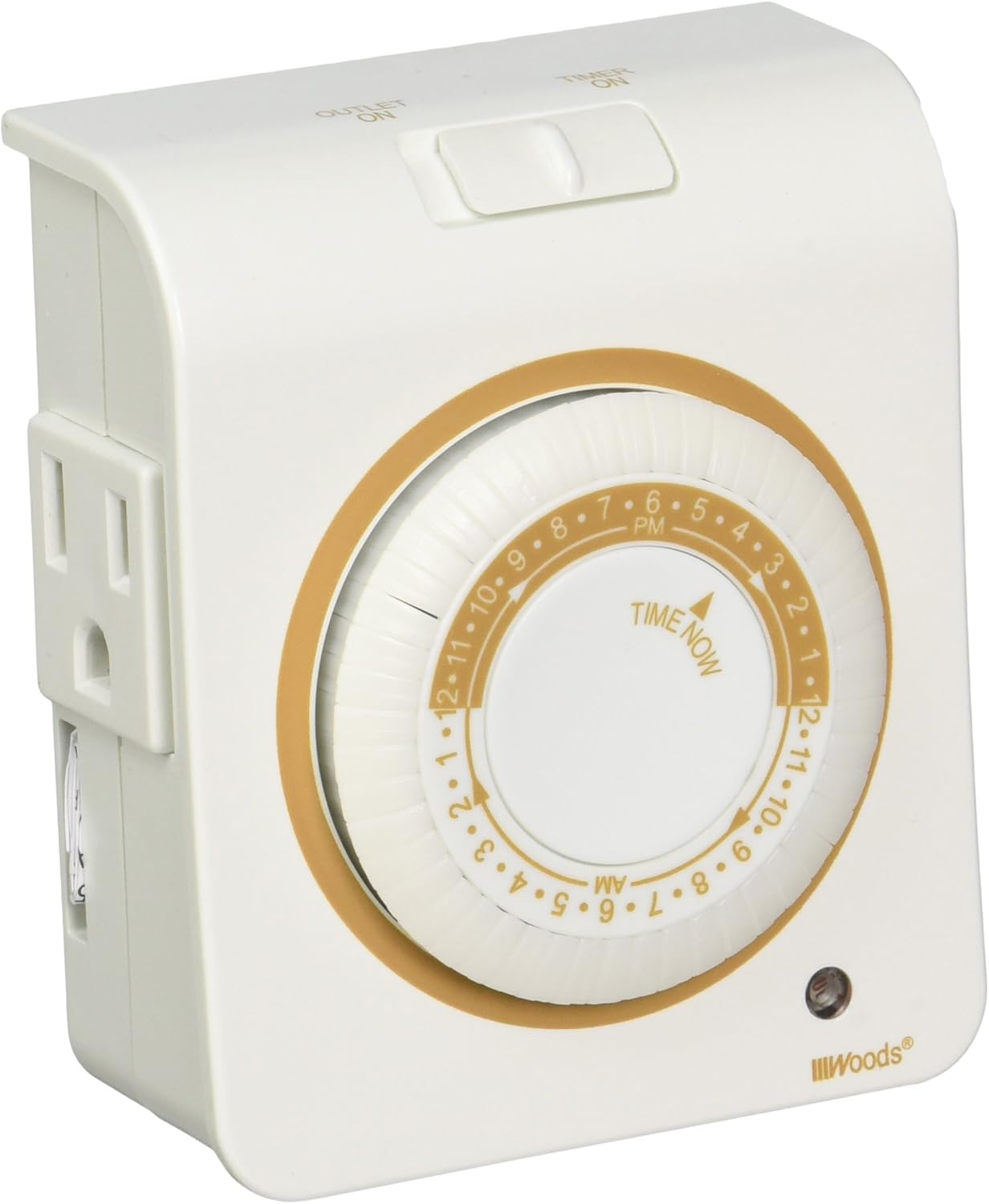
ภาพ: ด้านหน้า view of the Woods 50021 Mechanical Timer, showing the central 24-hour dial with programmable pins and the two grounded outlets on the side.
4.3 การแทนที่ด้วยตนเอง
The timer includes a manual override switch located on the top of the unit.
- To permanently turn the connected device ON, slide the switch to the "OUTLET ON" position. This bypasses all programmed settings.
- To revert to the programmed timer settings, slide the switch back to the "TIMER ON" position.
5. การดำเนินการ
Once the current time is set and the ON/OFF intervals are programmed, the timer will automatically activate and deactivate connected devices according to your settings. The dial will continuously rotate, indicating the current time and progressing through the programmed cycles.
6. ข้อมูลจำเพาะ

ภาพ: ด้านหลัง view of the Woods 50021 Mechanical Timer, displaying the electrical rating and manufacturing information.
| ข้อมูลจำเพาะ | รายละเอียด |
|---|---|
| หมายเลขรุ่น | 50021 |
| ยี่ห้อ | ป่า |
| สี | สีขาว |
| อินพุต Voltage | 125Vac, 60 เฮิร์ต |
| คะแนนความต้านทาน | 15A/1875W |
| เรตติ้งทังสเตน | 8A/1000W |
| Ballast Rating | 5A |
| คะแนนมอเตอร์ | 1/2 แรงม้า |
| จำนวนจุดจำหน่าย | 2.ต่อสายดิน |
| ช่วงเวลาการเขียนโปรแกรม | 30 minutes (48 settings per day) |
| ขนาด | 1 x 1 x 1 นิ้ว (ผลิตภัณฑ์) |
| น้ำหนักสินค้า | 1.6 ออนซ์ |
7 การแก้ไขปัญหา
- อุปกรณ์ไม่เปิด/ปิด:
- ตรวจสอบให้แน่ใจว่าได้เสียบตัวตั้งเวลาเข้ากับเต้ารับที่มีกระแสไฟฟ้าอย่างแน่นหนาแล้ว
- Verify the connected device is functioning correctly when plugged directly into a wall outlet.
- Check that the segment pins are correctly pushed down for ON times and pulled up for OFF times.
- Confirm the manual override switch is in the "TIMER ON" position.
- ตรวจสอบให้แน่ใจว่าเวลาปัจจุบันบนหน้าปัดถูกตั้งค่าอย่างถูกต้อง
- Timer dial not rotating:
- Ensure the timer is plugged into a live electrical outlet.
- If the timer is new, it may take a few minutes for the mechanism to start after plugging in.
- ไฟกลางคืนไม่ทำงาน:
- The nightlight activates in low-light conditions. Ensure the surrounding area is dark enough for it to turn on.
8. การรับประกันและการสนับสนุน
For warranty information or technical support, please refer to the product packaging or contact Woods customer service directly. Keep your purchase receipt as proof of purchase.


