
ซุปเปอร์โซนิก SC-25
SuperSonic SC-25 2.0 Channel DVD Player with USB Input User Manual
รุ่น : SC-25
การแนะนำ
ขอบคุณสำหรับการซื้อasing the SuperSonic SC-25 2.0 Channel DVD Player with USB Input. This manual provides essential information for the safe and efficient operation of your new device. Please read it thoroughly before use and retain it for future reference.
ข้อควรระวังเพื่อความปลอดภัย
- อย่าให้เครื่องโดนฝนหรือความชื้นเพื่อป้องกันไฟไหม้หรือไฟฟ้าช็อต
- อย่าเปิดcasinก. ส่งต่อการบริการทั้งหมดให้กับบุคลากรที่มีคุณสมบัติเหมาะสม
- ตรวจสอบให้แน่ใจว่ามีการระบายอากาศที่เหมาะสมรอบๆ ตัวเครื่อง
- หลีกเลี่ยงการวางเครื่องบนพื้นผิวที่ไม่มั่นคง
- ถอดสายไฟออกในระหว่างที่เกิดพายุฝนฟ้าคะนองหรือเมื่อไม่ได้ใช้งานเป็นเวลานาน
เนื้อหาแพ็คเกจ
Before setup, please verify that all items are present:
- 1 SuperSonic SC-25 DVD Player Unit
- 1 การควบคุมระยะไกล
- 1. คู่มือผู้ใช้ (เอกสารฉบับนี้)
- สายไฟ
- Audio/Video (AV) Cable
คำแนะนำการตั้งค่า
1. การเชื่อมต่อกับโทรทัศน์
- Ensure both the DVD player and your television are powered off.
- Connect one end of the AV cable (red, white, yellow connectors) to the corresponding output jacks on the back of the DVD player.
- Connect the other end of the AV cable to the corresponding input jacks on your television.
- For optimal video quality, ensure the television input is set to the correct AV channel (e.g., Video 1, AV1). The player supports NTSC video format.
2. การเชื่อมต่อไฟฟ้า
- Plug the power cable into the AC IN port on the back of the DVD player.
- เสียบปลายสายไฟอีกด้านหนึ่งเข้ากับเต้ารับไฟฟ้ามาตรฐาน
3. เปิดเครื่องครั้งแรก
- Press the Power button on the front panel of the DVD player or on the remote control.
- Turn on your television and select the correct input source (e.g., AV1, Video 1) to see the DVD player's display.
คำแนะนำการใช้งาน
1. การเล่นแผ่นดิสก์
- กดปุ่มเปิด/ปิดที่แผงด้านหน้าหรือรีโมทคอนโทรลเพื่อเปิดถาดใส่แผ่นดิสก์
- Place a compatible disc (DVD, CD, VCD, SVCD, MP3, Picture CD, CD-R, CD-RW) onto the disc tray with the label side facing up.
- กดปุ่มเปิด/ปิดอีกครั้งเพื่อปิดถาดใส่แผ่น เครื่องเล่นจะเริ่มอ่านแผ่นโดยอัตโนมัติ
- ใช้ปุ่มเล่น หยุดชั่วคราว หยุด กรอไปข้างหน้า และกรอถอยหลัง บนรีโมทคอนโทรลเพื่อควบคุมการเล่น
- The player supports multi-level fast forward and backward scan functionalities.
2. การเล่นผ่าน USB
- Insert a USB flash drive into the USB input port on the front of the DVD player.
- The player should automatically detect the USB device and display its contents. If not, use the SOURCE or USB button on the remote to switch to USB mode.
- นำทางผ่านของคุณ files using the arrow keys and SELECT/ENTER button on the remote.
- เครื่องเล่นนี้รองรับไฟล์ MP3 file format for audio playback.
3. Language and Subtitle Settings
- During DVD playback, press the AUDIO button on the remote to cycle through available audio languages (up to 8 languages supported).
- Press the SUBTITLE button on the remote to cycle through available subtitle languages (up to 32 subtitles supported).
การซ่อมบำรุง
1. การทำความสะอาดตัวเครื่อง
- Wipe the exterior of the DVD player with a soft, dry cloth.
- ห้ามใช้น้ำยาทำความสะอาดชนิดเหลวหรือสเปรย์กระป๋อง เนื่องจากอาจทำให้พื้นผิวหรือชิ้นส่วนภายในเสียหายได้
2. แผ่นทำความสะอาด
- จับแผ่นดิสก์โดยจับที่ขอบเพื่อหลีกเลี่ยงรอยนิ้วมือ
- หากแผ่นดิสก์สกปรก ให้เช็ดเบาๆ จากตรงกลางออกไปด้านนอกด้วยผ้าเนื้อนุ่มที่ไม่เป็นขุย
- Do not use abrasive cleaners or solvents on discs.
3. การจัดเก็บ
- เก็บเครื่องเล่นดีวีดีไว้ในที่แห้งและเย็น หลีกเลี่ยงแสงแดดโดยตรงและอุณหภูมิที่สูงหรือต่ำเกินไป
- When not in use, store discs in their cases to protect them from dust and scratches.
การแก้ไขปัญหา
| ปัญหา | สาเหตุที่เป็นไปได้ | สารละลาย |
|---|---|---|
| ไม่มีไฟฟ้า | ไม่ได้เสียบสายไฟ; ปลั๊กไฟไม่ทำงาน | ตรวจสอบให้แน่ใจว่าเสียบสายไฟแน่นดีแล้ว ทดสอบเต้ารับกับอุปกรณ์อื่น |
| ไม่มีภาพหรือเสียง | AV cables incorrectly connected; Incorrect TV input selected. | Check AV cable connections. Select the correct input source on your TV. |
| แผ่นไม่เล่น | Disc is dirty or scratched; Disc is incompatible; Disc inserted incorrectly. | Clean the disc. Ensure the disc type is supported. Insert disc with label side up. |
| อุปกรณ์ USB ไม่ได้รับการรู้จัก | USB device not properly inserted; Unsupported file format on USB. | Re-insert the USB device. Ensure files อยู่ในรูปแบบ MP3 |
ข้อมูลจำเพาะ
- ยี่ห้อ: เหนือเสียง
- หมายเลขรุ่น: SC-25
- ประเภทสื่อ : CD, DVD (Compatible with DVD/CD/VCD/SVCD/MP3/Picture/CD-R/CD-RW)
- เทคโนโลยีการเชื่อมต่อ: Powerline (Implies standard AC power connection)
- สี: สีดำ
- น้ำหนักสินค้า: 1.9 ปอนด์
- อุปกรณ์ที่รองรับ: โทรทัศน์
- Input Video Compatibility: กทส.
- จำนวนช่องสัญญาณ: 2
- รูปแบบวิดีโออะนาล็อก: กทส.
- ประเภทตัวควบคุม: รีโมทคอนโทรล
- File Format (USB): เอ็มพี 3
- ยูพีซี: 639131000254
- ผู้ผลิต: บริษัท ซูเปอร์โซนิค อิงค์
- ขนาดแพ็คเกจ: 7.874 สูง x 24.13 ล x 24.13 กว้าง (เซนติเมตร)
- น้ำหนักแพ็คเกจ: 2.160 ปอนด์
- ประเทศต้นกำเนิด: จีน
การรับประกันและการสนับสนุน
This SuperSonic SC-25 DVD Player is covered by a การรับประกันจากผู้ผลิต. For specific details regarding warranty terms and conditions, please refer to the documentation included with your purchase or contact SuperSonic customer support.
For technical assistance or customer service inquiries, please visit the official SuperSonic website or contact their support channels. Keep your purchase receipt for warranty claims.
สินค้าเกินview
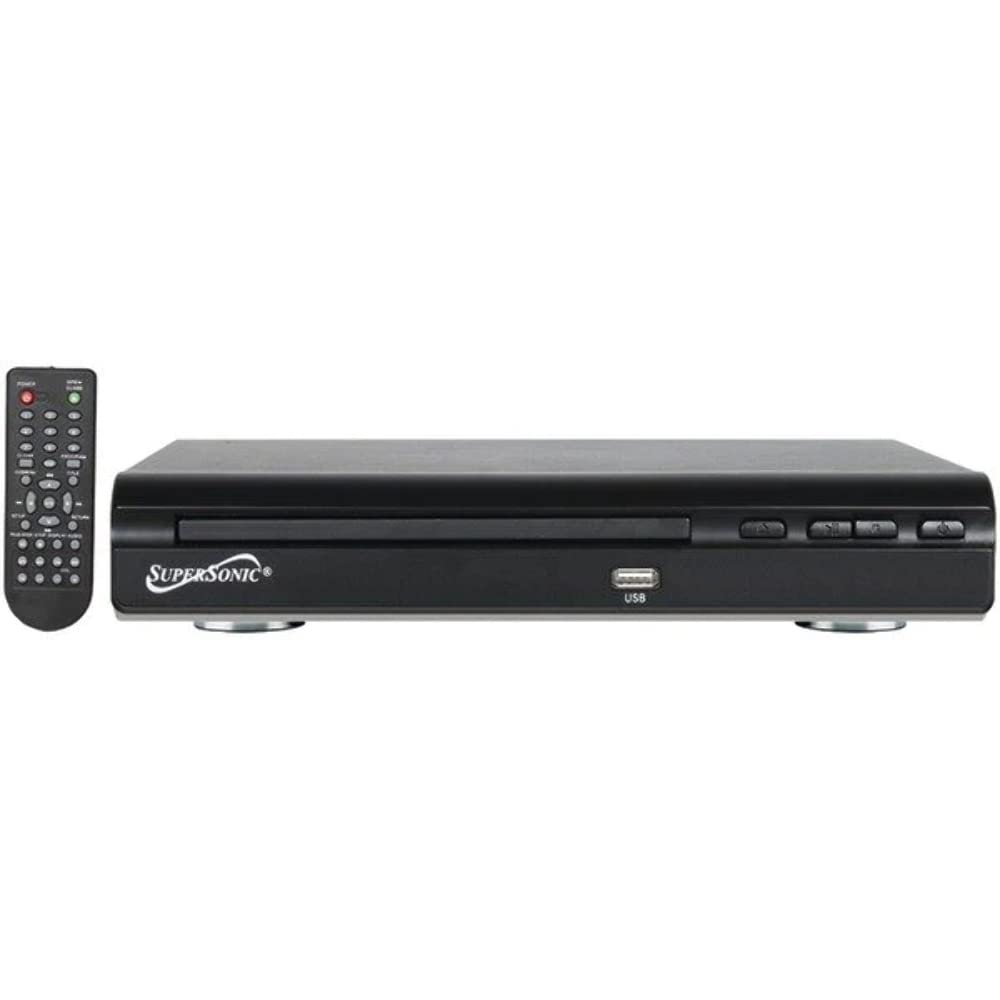
ด้านหน้า view of the SuperSonic SC-25 DVD player, showing the disc tray, USB port, and control buttons.
Ask a question about this manual
Ask about setup, troubleshooting, compatibility, parts, safety, or missing instructions. Manuals+ will review the question and use this page’s manual context to help answer it.