
คู่มือการใช้งานรีโมทคอนโทรล DIRECTV RC71
รุ่น : RC71
การแนะนำ
The DIRECTV RC71 Remote Control is designed for efficient access to functions for your DIRECTV system. This remote is compatible with various DIRECTV receivers and can also control your television's volume and power functions. It supports both Infrared (IR) and Radio Frequency (RF) communication modes.
In IR mode, the RC71 is compatible with all legacy and current DIRECTV receivers. In RF mode, it is specifically designed to work with the DIRECTV HR44 Genie and Genie clients C41 and C41W. When operating in RF mode, the remote utilizes the RF4CE protocol for enhanced speed and accuracy, confirming each button press to reduce missed inputs. For TV and AV functions, the remote will still use IR communication even when in RF mode for the receiver.
การตั้งค่า
1. การติดตั้งแบตเตอรี่
The RC71 remote control requires two (2) AA alkaline batteries for operation.
- ค้นหาฝาปิดช่องใส่แบตเตอรี่ที่ด้านหลังของรีโมทคอนโทรล
- เลื่อนฝาครอบลงด้านล่างแล้วยกออก
- ใส่แบตเตอรี่ AA สองก้อน โดยตรวจสอบให้แน่ใจว่าขั้วบวก (+) และขั้วลบ (-) ตรงกับเครื่องหมายภายในช่องใส่แบตเตอรี่
- ปิดฝาช่องใส่แบตเตอรี่กลับเข้าที่โดยเลื่อนกลับเข้าที่จนกระทั่งล็อคเข้าที่อย่างแน่นหนา
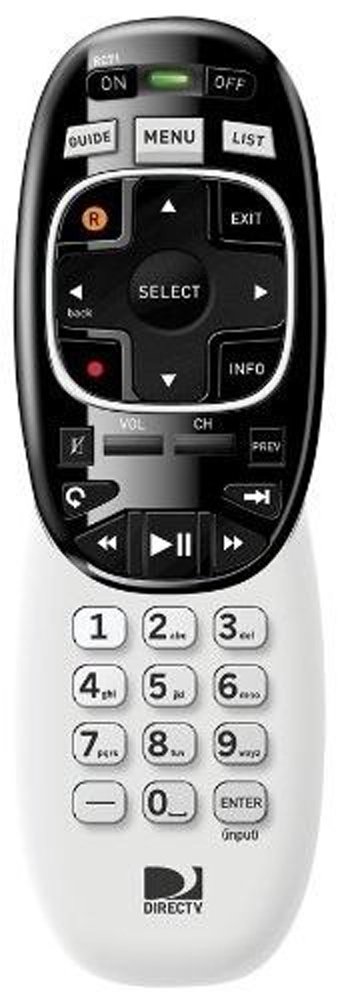
Image: The DIRECTV RC71 Remote Control, showing its ergonomic design and button layout.
2. Pairing with DIRECTV Receiver
The RC71 remote can operate in two modes: Infrared (IR) and Radio Frequency (RF).
IR Mode (for all DIRECTV receivers)
In IR mode, the remote requires a direct line of sight to the receiver. No special pairing is typically required; the remote should function immediately after battery installation.
RF Mode (for HR44 Genie, C41, C41W clients)
For RF mode functionality with compatible receivers, follow these steps:
- Ensure your DIRECTV receiver (HR44 Genie or C41/C41W client) is powered on.
- Point the RC71 remote at the receiver.
- กดปุ่มค้างไว้ MUTE และ เข้า กดปุ่มทั้งสองพร้อมกันจนกว่าไฟสีเขียวด้านบนของรีโมทจะกะพริบสองครั้ง
- Release the buttons. The remote is now attempting to pair in RF mode.
- Follow any on-screen prompts that may appear on your television to confirm the pairing.
3. Programming for TV/AV Functions
To control your television's volume and power, the remote needs to be programmed with your TV's code. This process typically involves using the receiver's on-screen menu.
- กดปุ่ม เมนู button on your RC71 remote.
- นำทางไปที่ Settings & Help, แล้ว การตั้งค่าและในที่สุด รีโมทคอนโทรล.
- เลือก โปรแกรมระยะไกล or a similar option.
- Follow the on-screen instructions to select your television brand and program the remote.
- Test the volume and power buttons to ensure successful programming.
การใช้งานรีโมทคอนโทรล
The RC71 remote control features a streamlined button layout for intuitive operation.
- ปุ่มเปิด/ปิด: Toggles power for the DIRECTV receiver and, once programmed, for the television.
- แนะนำ: แสดงคำแนะนำรายการ
- รายการ: Accesses your recorded programs.
- ช่องขึ้น/ลง: เปลี่ยนช่อง
- เพิ่ม/ลดระดับเสียง: Adjusts television volume (after programming).
- ปิดเสียง: Mutes television audio (after programming).
- Directional Pad (Arrows) and SELECT: นำทางเมนูและเลือกตัวเลือก
- REW, PLAY, FWD, PAUSE, STOP, RECORD: Controls playback of recorded content.
- Numbers (0-9): กรอกหมายเลขช่องโดยตรง
- ข้อมูล: แสดงข้อมูลโปรแกรม
- EXIT: ออกจากเมนูหรือกลับไปยังรายการทีวีสด
The ergonomic design of the RC71 is intended for comfortable handling during extended use.
การซ่อมบำรุง
การเปลี่ยนแบตเตอรี่
Replace batteries when the remote's response becomes sluggish or the indicator light fails to flash. Always replace both AA batteries simultaneously with new ones to ensure optimal performance.
การทำความสะอาด
ในการทำความสะอาดรีโมท ให้เช็ดพื้นผิวเบาๆ ด้วยผ้าแห้งนุ่มๆ สำหรับคราบสกปรกที่ติดแน่น ให้ใช้ผ้าชุบน้ำหมาดๆ เช็ดเบาๆamp cloth can be used, followed by immediate drying. Avoid using harsh chemicals or abrasive cleaners, as these can damage the remote's finish or internal components.
การแก้ไขปัญหา
- รีโมตไม่ตอบสนอง:
- ตรวจสอบการติดตั้งแบตเตอรี่และเปลี่ยนหากจำเป็น
- Ensure a clear line of sight between the remote and the receiver/TV for IR functions.
- If in RF mode, ensure the remote is properly paired with the receiver. Repeat the pairing steps if needed.
- TV/AV functions not working:
- Verify that the remote has been correctly programmed for your television model. Re-program if unsure.
- ตรวจสอบให้แน่ใจว่ารีโมทชี้ไปที่เซ็นเซอร์อินฟราเรดของทีวีโดยตรง
- Remote feels sluggish or inconsistent:
- เปลี่ยนแบตเตอรี่ด้วยแบตเตอรี่ใหม่
- Consider resetting the remote to factory settings (consult your DIRECTV receiver's on-screen help or DIRECTV support for specific instructions, as this process can vary).
ข้อมูลจำเพาะ
| ยี่ห้อ | ไดเร็คทีวี |
| ชื่อรุ่น | RC71 |
| หมายเลขรุ่น | RC71 |
| สี | สีขาว |
| เทคโนโลยีการเชื่อมต่อ | อินฟราเรด, ความถี่วิทยุ |
| อุปกรณ์ที่รองรับ | DIRECTV Receivers (all in IR, HR44 Genie/C41/C41W in RF), Television |
| จำนวนอุปกรณ์ที่รองรับสูงสุด | 1 (DIRECTV Receiver) + 1 (Television) |
| จำนวนปุ่ม | 20 |
| ประเภทตัวควบคุม | ปุ่มควบคุม |
| ระยะสูงสุด | 10 Meters (RF) |
| ประเภทแบตเตอรี่ | แบตเตอรี่อัลคาไลน์ AA 2 ก้อน |
| น้ำหนักสินค้า | 3.52 ออนซ์ |
| คุณสมบัติพิเศษ | การออกแบบตามหลักสรีรศาสตร์ |
ข้อมูลการรับประกัน
The DIRECTV RC71 Remote Control comes with a manufacturer warranty for 90 days from the date of purchase. Please retain your proof of purchase for warranty claims. For detailed terms and conditions, refer to the warranty documentation provided with your product or contact DIRECTV customer support.
สนับสนุน
For further assistance, technical support, or to inquire about specific programming codes for your television, please contact DIRECTV customer support. You can find contact information on the official DIRECTV website or through your DIRECTV service provider.