
1. บทนำ
ขอบคุณสำหรับการซื้อasing the Fonestar AS-170RU Hi-Fi Amplifier. This device is designed to provide high-fidelity stereo audio amplification, featuring a built-in USB/MP3 player, AM/FM digital tuner, and multiple audio inputs. This manual provides detailed instructions for safe installation, operation, and maintenance of your ampเครื่องขยายเสียง โปรดอ่านคู่มือนี้อย่างละเอียดก่อนใช้งานและเก็บไว้เพื่อใช้อ้างอิงในอนาคต
2. คำแนะนำด้านความปลอดภัย
- แหล่งจ่ายไฟ: ให้แน่ใจว่า amplifier is connected to a power supply matching the voltage specified on the unit. Disconnect the power cord from the outlet if the unit will not be used for an extended period.
- การระบายอากาศ : Do not block ventilation openings. Ensure adequate space around the unit for proper airflow to prevent overheating.
- น้ำและความชื้น: อย่าให้ตัวเครื่องโดนฝน ความชื้น หรือของเหลวที่หยด/กระเด็นใส่ อย่าวางสิ่งของที่บรรจุของเหลว เช่น แจกัน ไว้บนตัวเครื่อง
- แหล่งความร้อน: เก็บเครื่องให้ห่างจากแหล่งความร้อน เช่น หม้อน้ำ เครื่องทำความร้อน เตา หรืออุปกรณ์อื่นๆ (รวมถึง ampเครื่องให้ความร้อน) ที่ผลิตความร้อน
- การทำความสะอาด: ทำความสะอาดด้วยผ้าแห้งเท่านั้น ห้ามใช้น้ำยาทำความสะอาดของเหลวหรือน้ำยาทำความสะอาดสเปรย์
- การบริการ: อย่าพยายามให้บริการผลิตภัณฑ์นี้ด้วยตนเอง ส่งต่อการบริการทั้งหมดไปยังช่างบริการที่ผ่านการรับรอง
- การจัดวาง: วางอุปกรณ์บนพื้นผิวที่มั่นคงและเรียบ หลีกเลี่ยงการวางในที่ที่มีแสงแดดโดยตรงหรือใกล้สนามแม่เหล็กแรงสูง
3. เนื้อหาบรรจุภัณฑ์
กรุณาตรวจสอบว่ารายการต่อไปนี้รวมอยู่ในแพ็คเกจของคุณ:
- Fonestar AS-170RU Hi-Fi Ampชีวิต
- รีโมทคอนโทรล
- AM เสาอากาศ
- เสาอากาศเอฟเอ็ม
- คู่มือการใช้งาน (เอกสารนี้)
4. สินค้าหมดview
4.1 แผงด้านหน้า
The front panel provides access to essential controls and the display.
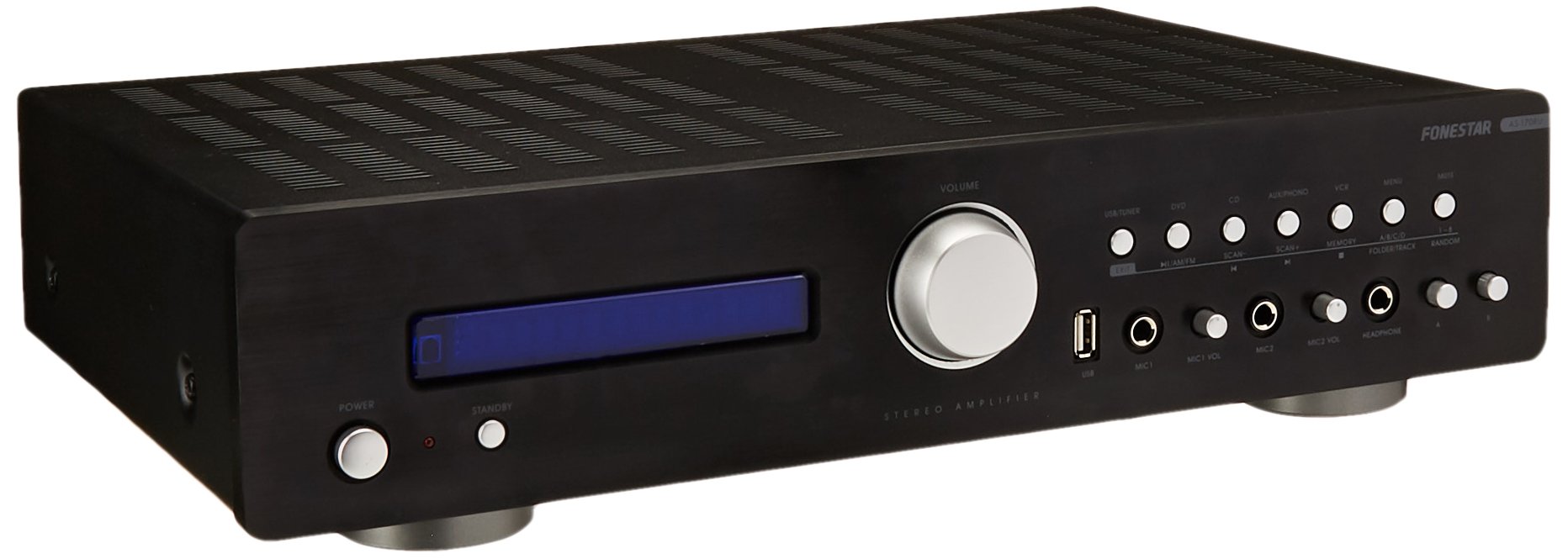
Image: Fonestar AS-170RU Front Panel. ภาพนี้แสดงด้านหน้า view ของ amplifier, showing the VFD display, USB port, headphone output, input selectors, volume knob, and other control buttons.
- ปุ่มเปิด/ปิด: เปลี่ยนเป็น amplifier เปิดหรือปิด
- จอแสดงผล VFD: Shows current input, volume level, tuner information (frequency, RDS), and USB/MP3 track details (ID3 tag).
- พอร์ต USB: สำหรับเชื่อมต่ออุปกรณ์จัดเก็บข้อมูล USB เพื่อเล่นไฟล์ MP3 files.
- เอาท์พุตหูฟัง: แจ็ค 6.3 มม. สำหรับเชื่อมต่อหูฟัง
- ตัวเลือกอินพุต: Buttons for choosing audio sources (CD, DVD, VCR, AUX/Phono, USB/Tuner).
- การควบคุมระดับเสียง: Rotary knob to adjust the master volume level.
- อินพุตไมโครโฟน: Two 6.3mm microphone jacks with independent volume control.
- การควบคุมโทนเสียง: Buttons or menu options for adjusting Bass, Treble, and Balance.
4.2 แผงด้านหลัง
The rear panel contains all the necessary connections for your audio sources, speakers, and antennas.

Image: Fonestar AS-170RU Rear Panel. This image illustrates the rear connections of the amplifier, including speaker terminals (A/B), various RCA input jacks (CD, DVD, VCR, AUX/Phono), REC OUT, PRE OUT, AMP IN, and antenna connections (FM COAX, AM LOOP ANT).
- ช่องต่อลำโพง (A/B): Terminals for connecting two pairs of speakers. Supports 4-16 ohms for A or B, or 8-16 ohms for A+B.
- ช่องรับสัญญาณเสียง (RCA):
- อินพุตซีดี: สำหรับเชื่อมต่อเครื่องเล่นซีดี
- ช่องเสียบ DVD: For connecting a DVD player or other audio source.
- VCR Input: For connecting a VCR or other audio source.
- AUX/PHONO Input: For connecting auxiliary devices or a turntable (Phono input may require a pre-amplifier if your turntable does not have one built-in).
- REC ออก: RCA output for connecting to a recording device.
- ก่อนออก: RCA output for connecting to an external power ampชีวิต.
- AMP ใน: RCA input for connecting an external pre-ampชีวิต.
- การเชื่อมต่อเสาอากาศ:
- FM COAX 75Ω: สำหรับเชื่อมต่อเสาอากาศวิทยุ FM
- AM LOOP ANT: For connecting the supplied AM loop antenna.
4.3 การควบคุมระยะไกล
The included remote control allows convenient operation of the ampลิไฟเออร์จากระยะไกล

Image: Fonestar AS-170RU Remote Control. This image shows the remote control unit with various buttons for power, input selection, volume, mute, tuner functions, USB playback controls, and tone adjustments.
- รอ: เปิด/ปิดเครื่อง.
- ตัวเลือกอินพุต: Buttons for CD, DVD, VCR, AUX/PHONO, USB/TUNER.
- เพิ่ม/ลดระดับเสียง (VOL +/-): ปรับระดับเสียงหลัก
- ใบ้: ปิดเสียงเอาต์พุตเสียง
- น./เอฟเอ็ม: Switches between AM and FM tuner modes.
- สแกน: สแกนหาคลื่นวิทยุ
- หน่วยความจำ: Stores radio station presets.
- USB Playback Controls: Play/Pause, Stop, Skip Track, Folder/Track navigation.
- EQ OFF / BASS / TREBLE: Access tone controls.
- RDS / ID3: Displays RDS information for radio or ID3 tag สำหรับ MP3 files.
5. การตั้งค่า
5.1 การเชื่อมต่อลำโพง
- ให้แน่ใจว่า ampเครื่องเสียงถูกปิดและถอดปลั๊กออกจากเต้าเสียบไฟฟ้า
- Connect your speakers to the "SPEAKERS OUTPUT" terminals on the rear panel.
- Match the positive (+) terminal of the amplifier (red) to the positive (+) terminal of your speaker, and the negative (-) terminal (black) to the negative (-) terminal.
- The AS-170RU supports two groups of speakers (A and B). You can connect one pair to "SPEAKERS A" and another to "SPEAKERS B".
- Ensure your speakers' impedance matches the amplifier's specifications: 4-16 ohms for A or B, or 8-16 ohms for A+B.
5.2 การเชื่อมต่อแหล่งเสียง
Use RCA cables to connect your audio components to the corresponding input jacks on the rear panel.
- เครื่องเล่นซีดี: เชื่อมต่อเข้ากับช่อง "CD"
- เครื่องเล่นดีวีดี: Connect to the "DVD" input.
- วีซีอาร์: Connect to the "VCR" input.
- Auxiliary Device (e.g., smartphone, tablet): Connect to the "AUX/PHONO" input.
- เครื่องเล่นแผ่นเสียง: Connect to the "AUX/PHONO" input. If your turntable does not have a built-in pre-amplifier, you may need an external phono pre-ampชีวิต.
5.3 การเชื่อมต่อเสาอากาศ
- เสาอากาศ FM: Connect the supplied FM wire antenna to the "FM COAX 75Ω" terminal. Extend the wire for optimal reception.
- เสาอากาศ AM: Connect the supplied AM loop antenna to the "AM LOOP ANT" terminals. Position the loop for best reception.
5.4 การเชื่อมต่อสายไฟ
เมื่อเชื่อมต่อสายสัญญาณเสียงและลำโพงเรียบร้อยแล้ว ให้เสียบปลั๊ก amplifier's power cord into a suitable AC power outlet.
6. คู่มือการใช้งาน
6.1 การทำงานพื้นฐาน
- เปิด/ปิดเครื่อง: Press the Power button on the front panel or the STANDBY button on the remote control to turn the amplifier เปิดหรือปิด
- เลือกแหล่งสัญญาณเข้า: Press the desired input selector button on the front panel (CD, DVD, VCR, AUX/PHONO) or the remote control (CD, DVD, VCR, AUX/PHONO, USB/TUNER).
- ปรับระดับเสียง: Rotate the Volume knob on the front panel or use the VOL +/- buttons on the remote control to adjust the sound level.
- ปิดเสียง: Press the MUTE button on the remote control to temporarily silence the audio. Press it again to restore sound.
6.2 การเล่นไฟล์ MP3 ผ่าน USB
- Insert a USB storage device (flash drive) into the USB port on the front panel.
- Select "USB/TUNER" as the input source. The amplifier will automatically detect and begin playing MP3 files.
- Use the playback controls on the remote control (Play/Pause, Stop, Skip Track, Folder/Track) to navigate and control your music.
- The VFD display will show track information, including ID3 tags หากมี
- การ amplifier supports up to 65,000 indexable folders and files, with a maximum of 8 folder levels.
6.3 AM/FM Tuner Operation
- Select "USB/TUNER" as the input source, then press the AM/FM button on the remote control to switch between AM and FM bands.
- การสแกนอัตโนมัติ: Press the SCAN button on the remote control to automatically search for and store available radio stations.
- การปรับด้วยตนเอง: Use the tuning buttons (usually arrow keys) on the remote control to manually adjust the frequency.
- สถานีที่ตั้งไว้ล่วงหน้า: การ amplifier supports 64 presets. Use the MEMORY button to store and recall your favorite stations.
- ฟังก์ชัน RDS: If available, press the RDS button on the remote control to display Radio Data System information (e.g., station name, program type).
6.4 อินพุตไมโครโฟน
- Connect microphones to the 6.3mm MIC 1 and MIC 2 jacks on the front panel.
- Adjust the independent volume controls for each microphone to achieve the desired level.
6.5 Tone and Balance Control
การ amplifier allows adjustment of bass, treble, and balance through its menu system or dedicated buttons on the remote control. Refer to the remote control section for specific buttons like EQ OFF, BASS, TREBLE.
7. การบำรุงรักษา
- การทำความสะอาด: ถอดปลั๊กไฟก่อนทำความสะอาด ใช้ผ้าแห้งนุ่มเช็ดทำความสะอาดพื้นผิวภายนอก ห้ามใช้สารทำความสะอาดที่มีฤทธิ์กัดกร่อน แว็กซ์ หรือตัวทำละลาย
- การระบายอากาศ : ตรวจสอบเป็นระยะว่าช่องระบายอากาศไม่มีฝุ่นและเศษสิ่งสกปรกอุดตัน
- พื้นที่จัดเก็บ: หากต้องเก็บรักษาเครื่องไว้เป็นเวลานาน ควรดึงปลั๊กออกจากเต้ารับไฟฟ้าและเก็บไว้ในที่แห้งและเย็น หลีกเลี่ยงแสงแดดโดยตรงและอุณหภูมิที่สูงหรือต่ำเกินไป
8 การแก้ไขปัญหา
If you encounter problems with your amplifier, refer to the following table for possible solutions.
| ปัญหา | สาเหตุที่เป็นไปได้ | สารละลาย |
|---|---|---|
| ไม่มีไฟฟ้า | สายไฟไม่ได้เชื่อมต่อ; เต้าเสียบไฟฟ้าชำรุด; Ampไฟแสดงสถานะอยู่ในโหมดสแตนด์บาย | Ensure power cord is securely plugged in. Test the outlet with another device. Press the Power/STANDBY button. |
| ไม่มีเสียง | เลือกอินพุตไม่ถูกต้อง; ระดับเสียงต่ำเกินไป; ลำโพงไม่ได้เชื่อมต่ออย่างถูกต้อง; ฟังก์ชันปิดเสียงทำงานอยู่ | Select the correct input source. Increase volume. Check speaker connections. Deactivate MUTE. |
| การรับสัญญาณวิทยุไม่ดี | เสาอากาศไม่ได้เชื่อมต่อหรือติดตั้งในตำแหน่งที่ไม่เหมาะสม; สัญญาณรบกวน | Connect and adjust the position of the AM/FM antennas. Move the ampวางเครื่องขยายเสียงให้ห่างจากอุปกรณ์อิเล็กทรอนิกส์อื่นๆ |
| การเล่น USB ไม่ทำงาน | USB device not inserted correctly; Incompatible file format; USB device faulty. | Ensure USB device is fully inserted. Check if fileไฟล์เหล่านั้นเป็นรูปแบบ MP3 ลองใช้ USB อุปกรณ์อื่นดู |
| Amplifier turns off unexpectedly or cycles power | Overheating; Short circuit in speaker wiring; Internal fault. | Ensure adequate ventilation. Check speaker wires for frayed strands causing short circuits. If the problem persists, disconnect power and contact qualified service personnel. |
9. ข้อมูลจำเพาะ
- แบบอย่าง: AS-170RU
- กำลังขับ: 80 + 80 W RMS at 4 Ω
- ความต้านทานของลำโพง: 4-16 Ω (A or B), 8-16 Ω (A+B)
- การป้องกัน: 3 circuits (short circuits, overload, overvoltage)
- เครื่องเล่นยูเอสบี: เอ็มพี 3 file การเล่นซ้ำ, ID3 tag support. Max 65,000 indexable folders/files, max 8 folder levels.
- จูนเนอร์: Digital AM/FM, 64 presets, RDS.
- ข้อมูลอินพุต: 2 x Microphone (6.3mm), 4 x RCA (CD, DVD, VCR, AUX/Phono), 1 x RCA (AMP ใน).
- เอาท์พุต: 1 x RCA (REC OUT), 1 x RCA (PRE OUT), Headphone (6.3mm).
- แสดง: Blue VFD.
- การควบคุมเสียง: Bass, Treble, Balance (via menu/remote).
- ขนาด : 40 x 40 x 60 ซม. (ประมาณ 15.7 x 15.7 x 23.6 นิ้ว)
- น้ำหนัก: 7.2 กก. (ประมาณ 15.87 ปอนด์)
10. การรับประกันและการสนับสนุน
For warranty information and technical support, please refer to the warranty card included with your product or contact your authorized Fonestar dealer. Do not attempt to repair the unit yourself, as this may void your warranty.