
1. บทนำ
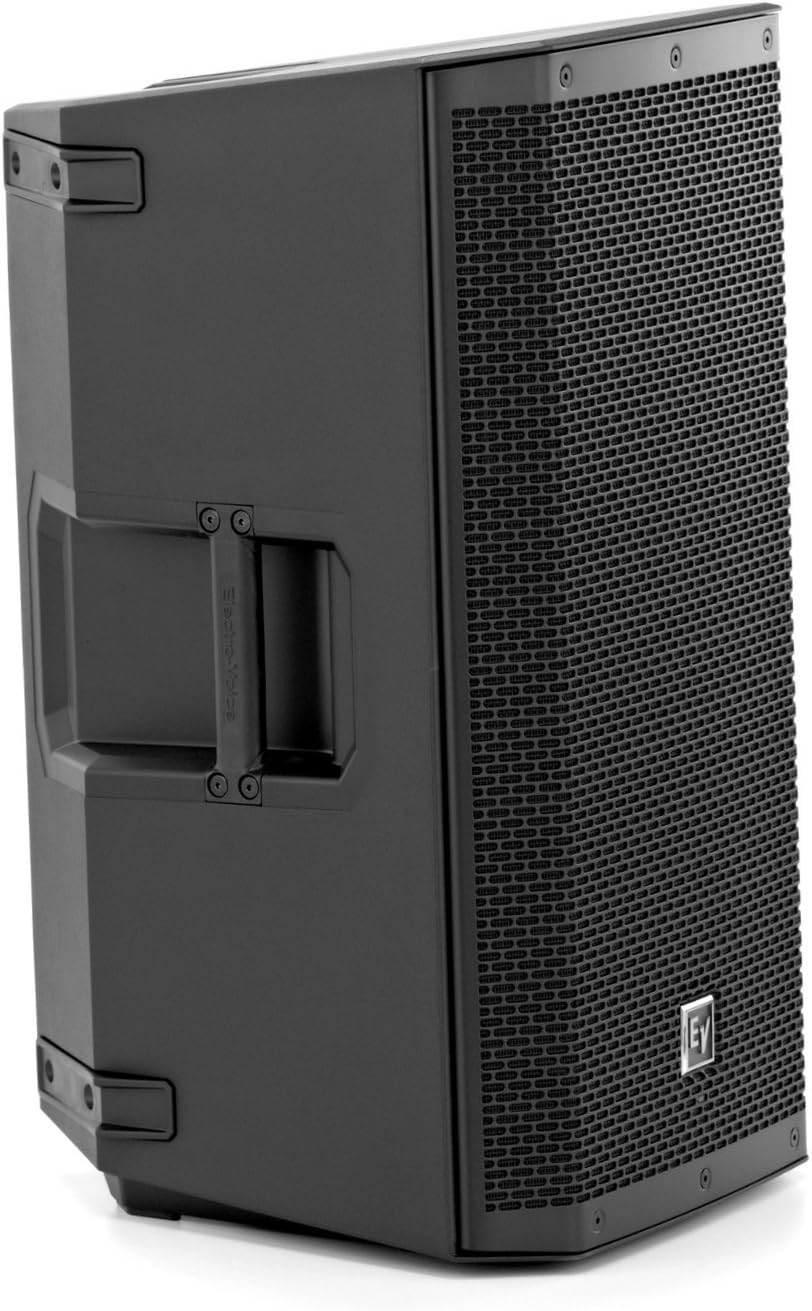
This manual provides essential information for the safe and effective operation of your Electro-Voice ZLX-15P 15-inch 2-Way 1000W Powered Loudspeaker. Please read this manual thoroughly before using the product to ensure proper setup, optimal performance, and longevity.
คุณสมบัติหลัก:
- Integrated 1000W Class-D amplifier for powerful sound.
- 15-inch woofer and 1.5-inch high-frequency titanium compression driver.
- LCD display and single-knob DSP control with presets for quick setup.
- เมตรระดับอินพุตและอิสระ amplifier control for optimal gain structure.
- Lightweight, durable polypropylene composite construction with ergonomic hi/lo grip design.
- Patented split-baffle design for superior driver time alignment.
2. ข้อมูลด้านความปลอดภัย
Always observe the following safety precautions to prevent electric shock, injury, or damage to the equipment.
- แหล่งพลังงาน: เชื่อมต่อลำโพงเข้ากับแหล่งจ่ายไฟประเภทที่ระบุไว้ในคู่มือนี้และมีเครื่องหมายกำกับไว้บนตัวเครื่องเท่านั้น
- การต่อลงดิน: Ensure the power cord is properly grounded to prevent electrical shock. Do not defeat the safety purpose of the polarized or grounding-type plug.
- การระบายอากาศ : อย่าปิดกั้นช่องระบายอากาศใดๆ ติดตั้งตามคำแนะนำของผู้ผลิต
- น้ำและความชื้น: อย่าให้อุปกรณ์นี้โดนฝนหรือความชื้น ห้ามใช้ใกล้แหล่งน้ำ
- ความร้อน: ห้ามติดตั้งใกล้แหล่งความร้อน เช่น หม้อน้ำ เครื่องทำความร้อน เตา หรืออุปกรณ์อื่น ๆ (รวมถึง ampเครื่องให้ความร้อน) ที่ผลิตความร้อน
- สาย: ปกป้องสายไฟไม่ให้ถูกเหยียบหรือถูกหนีบ โดยเฉพาะที่ปลั๊ก เต้ารับไฟฟ้า และจุดที่สายไฟออกจากเครื่อง
- การบริการ: แจ้งบริการทั้งหมดให้ช่างที่ผ่านการรับรองทราบ จำเป็นต้องให้บริการเมื่ออุปกรณ์ได้รับความเสียหายในลักษณะใดก็ตาม เช่น สายไฟหรือปลั๊กชำรุด ของเหลวหกหรือมีวัตถุตกลงไปในอุปกรณ์ อุปกรณ์โดนฝนหรือความชื้น ไม่สามารถทำงานได้ตามปกติ หรือตกหล่น
- คำเตือนข้อเสนอ 65: ผลิตภัณฑ์นี้อาจมีสารเคมีที่รัฐแคลิฟอร์เนียรู้จักว่าก่อให้เกิดมะเร็งและความพิการ แต่กำเนิดหรือเป็นอันตรายต่อระบบสืบพันธุ์อื่น ๆ
3. การตั้งค่า
3.1 การแกะกล่อง
Carefully remove the loudspeaker from its packaging. Inspect the unit for any signs of damage that may have occurred during transit. Retain the original packaging for future transport or storage.
3.2 ตัวเลือกการจัดวาง
The ZLX-15P is designed for versatile placement:
- การติดตั้งเสา: The loudspeaker features a standard pole mount socket for use with speaker stands. Ensure the stand is stable and rated for the weight of the ZLX-15P.
- เครื่องตรวจสอบพื้น: The cabinet design allows for use as a floor monitor, angled towards the performer.
- การซ้อน: For larger setups, multiple units can be safely stacked on a stable surface.

3.3 การเชื่อมต่อ
The rear panel of the ZLX-15P provides various input and output options:
- Input 1 & 2 (XLR/TRS Combo Jacks): Connect your audio sources (mixers, microphones, instruments) to these inputs. Each input has independent gain control.
- มิกซ์เอาท์ (XLR): Provides a mixed output of Input 1 and Input 2, useful for linking to additional loudspeakers or sending a signal to a recording device.
- ช่องจ่ายไฟ: เชื่อมต่อสายไฟ AC ที่ให้มาที่นี่
- สวิตช์ไฟ: เปิดหรือปิดเครื่อง

4. การดำเนินการ
4.1 การเปิด/ปิดเครื่อง
Ensure all connections are secure before powering on. Turn on your mixer or audio source first, then the ZLX-15P. When powering off, turn off the ZLX-15P first, then your audio source.
4.2 DSP Control and Presets
The ZLX-15P features an intuitive LCD display and a single-knob DSP (Digital Signal Processing) control. Rotate the knob to navigate menus and press to select. Available presets optimize the loudspeaker's performance for various applications:
- ดนตรี: Optimized for general music playback.
- สโมสร: Enhanced bass response for dance music.
- สด: เสียงที่สมดุลสำหรับการแสดงสดที่มีทั้งเครื่องดนตรีและเสียงร้อง
- คำพูด: Clear vocal reproduction, often with reduced bass.
You can also adjust parameters like EQ, crossover, and input sensitivity through the DSP menu.
4.3 Input Level and Gain Control
Each input has an independent gain control knob. Use the input level meters on the LCD display to set appropriate levels. Avoid clipping (indicated by a red 'LIMIT' LED on the front panel) to prevent distortion and potential damage to the speaker.
4.4 การเชื่อมต่อบลูทูธ
The ZLX-15P supports Bluetooth wireless communication. Refer to the DSP menu for pairing instructions to stream audio wirelessly from compatible devices.
5. การบำรุงรักษา
Proper maintenance ensures the longevity and optimal performance of your ZLX-15P loudspeaker.
- การทำความสะอาด: ใช้ผ้าแห้งนุ่มเช็ดทำความสะอาดภายนอกลำโพง สำหรับคราบสกปรกฝังแน่น ให้ใช้ผ้าชุบน้ำหมาดๆ เช็ดเบาๆamp สามารถใช้ผ้าชุบสบู่เหลวอ่อนๆ เช็ดทำความสะอาดได้ จากนั้นเช็ดตามด้วยผ้าแห้ง ห้ามใช้สารทำความสะอาดที่มีฤทธิ์กัดกร่อนหรือตัวทำละลาย
- ตะแกรง: The metal grille can be gently cleaned with a soft brush to remove dust or debris.
- พื้นที่จัดเก็บ: When not in use, store the loudspeaker in a cool, dry environment, away from direct sunlight and extreme temperatures. Using a protective cover or the original packaging is recommended.
- การจัดการ: While the composite construction is durable, avoid impacts and rough handling to prevent cosmetic damage such as scratches or chips. Always use the integrated handles for lifting and carrying.
6 การแก้ไขปัญหา
If you encounter issues with your ZLX-15P, refer to the following common troubleshooting steps:
- ไม่มีเสียง:
- Check if the loudspeaker is powered on and the power LED is illuminated.
- ตรวจสอบว่าแหล่งกำเนิดเสียงทำงานอยู่และส่งสัญญาณหรือไม่
- Ensure input cables are securely connected and not damaged.
- Check the input gain levels on the ZLX-15P and your audio source.
- Confirm the correct DSP preset is selected.
- เสียงผิดเพี้ยน:
- Reduce the input gain on the ZLX-15P or the output level from your audio source to prevent the 'LIMIT' LED from illuminating.
- ตรวจสอบสายเคเบิลที่เสียหาย
- Ensure the DSP settings are appropriate for your application.
- เสียงฮัมหรือเสียงรบกวน:
- ตรวจสอบให้แน่ใจว่าอุปกรณ์ทั้งหมดมีการต่อสายดินอย่างเหมาะสม
- Try using balanced XLR cables instead of unbalanced TRS cables if possible.
- Isolate the loudspeaker from other electrical devices that may cause interference.
If the issue persists after attempting these steps, contact qualified service personnel.
7. ข้อมูลจำเพาะ
| คุณสมบัติ | ข้อมูลจำเพาะ |
|---|---|
| แบบอย่าง | ZLX-15P |
| ประเภทลำโพง | Powered Loudspeaker, 2-Way |
| เส้นผ่านศูนย์กลางวูฟเฟอร์ | 15 นิ้ว |
| เส้นผ่านศูนย์กลางทวีตเตอร์ | 1.5 นิ้ว |
| Amplifier พลังงาน | 1000 วัตต์ (คลาส D) |
| วัสดุ | โพลีโพรพีลีน |
| เทคโนโลยีการเชื่อมต่อ | มีสาย, บลูทูธ |
| วิธีการควบคุม | Touch (DSP Knob) |
| ขนาดสินค้า (ลึก x กว้าง x สูง) | 19.2" x 19" x 29" |
| น้ำหนักสินค้า | 36.6 ปอนด์ (16.6 กก.) |
| แหล่งพลังงาน | สายไฟ |

8. การรับประกันและการสนับสนุน
8.1 ข้อมูลการรับประกัน
The Electro-Voice ZLX-15P is covered by a limited warranty. For specific terms and conditions, please refer to the warranty card included with your product or visit the official Electro-Voice webไซต์นี้ โปรดเก็บหลักฐานการซื้อไว้เพื่อใช้ยืนยันการรับประกัน
8.2 การสนับสนุนลูกค้า
For technical assistance, service, or further information, please contact Electro-Voice customer support. You can find contact details on the official Electro-Voice webไซต์หรือในเอกสารประกอบที่มาพร้อมกับผลิตภัณฑ์ของคุณ
Additional resources, including a detailed user manual in PDF format, may be available online: