
1. บทนำ
This manual provides comprehensive instructions for the setup, operation, and maintenance of your D-Link DSL-2750B Wireless N ADSL2+ Modem Router. This device integrates an ADSL2+ modem with a high-speed Wireless N router, enabling internet access and local network connectivity for your home or small office.
2. เนื้อหาบรรจุภัณฑ์
ตรวจสอบว่าแพ็คเกจของคุณมีรายการต่อไปนี้:
- D-Link DSL-2750B Wireless N ADSL2+ Modem Router
- อะแดปเตอร์แปลงไฟ
- สายอีเธอร์เน็ต (RJ-45)
- สายโทรศัพท์ (RJ-11)
- Quick Installation Guide (This document serves as a detailed manual)
3. สินค้าหมดview
The D-Link DSL-2750B combines an ADSL modem and a wireless router into a single device. It supports Wireless N technology for fast wireless speeds and includes multiple Ethernet ports for wired connections.
3.1 คุณสมบัติหลัก
- Supports 802.11b/g/n wireless standards, offering speeds up to 300 Mbps (802.11n).
- Operates within the 2.4 GHz to 2.484 GHz frequency range.
- Equipped with 4 Fast Ethernet LAN ports for reliable wired connections.
- Features 1 WAN ADSL port for direct connection to ADSL lines.
- Wireless N 300 Technology provides up to 6 times faster performance than Wireless G.
- Includes a WPS (Wi-Fi Protected Setup) button for simplified, one-touch wireless encryption.
3.2 เค้าโครงอุปกรณ์
Below is an image of the D-Link DSL-2750B modem router, highlighting its physical appearance and important labels.
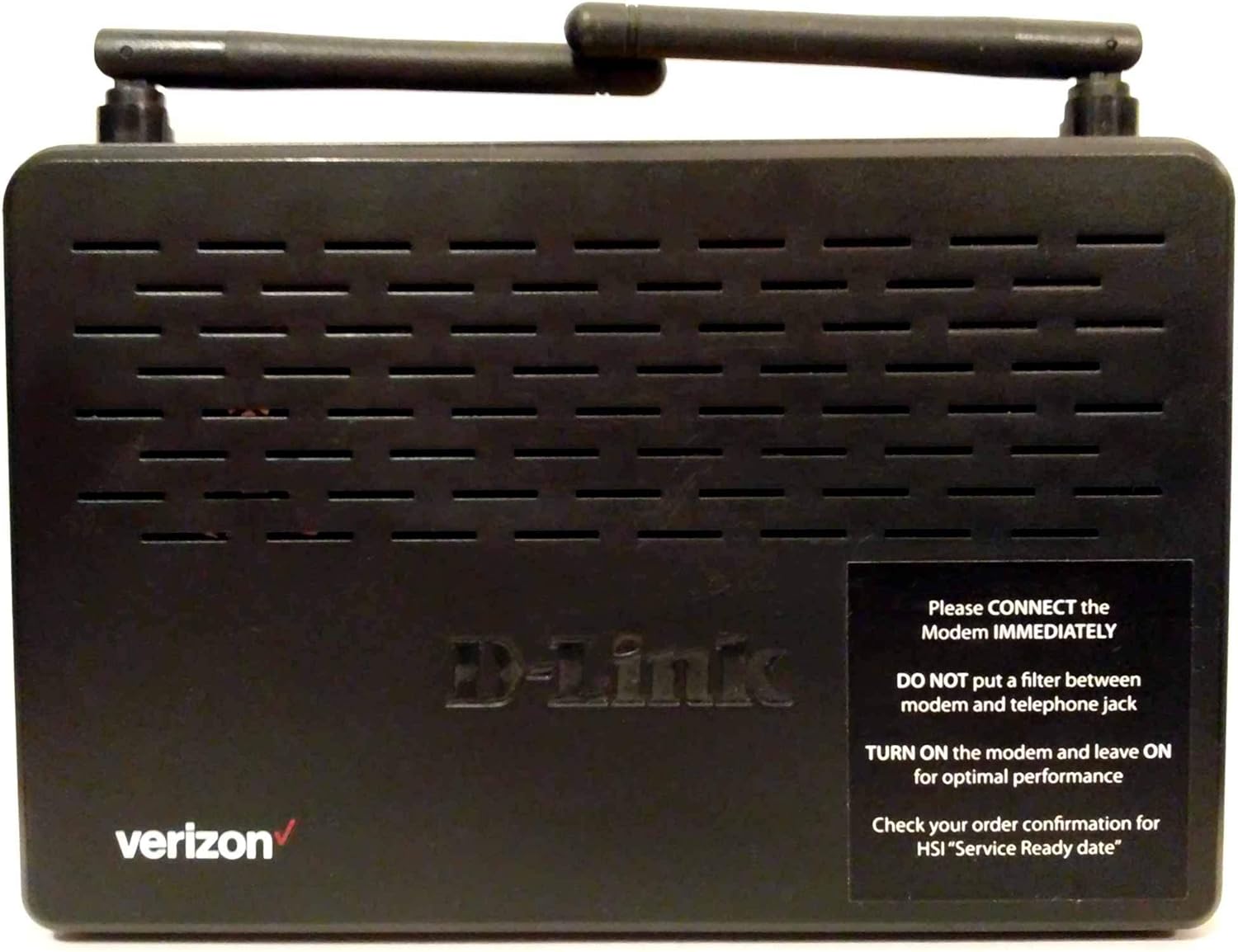
คำอธิบายภาพ: A black D-Link DSL-2750B Wireless N ADSL2+ Modem Router. The top surface features ventilation grilles and two external antennas. The front left corner displays the "verizon" logo in red. The center of the device has the "D-Link" logo embossed. A black sticker on the right side provides important setup instructions:
- "Please CONNECT the Modem IMMEDIATELY"
- "DO NOT put a filter between modem and telephone jack"
- "TURN ON the modem and leave ON for optimal performance"
- "Check your order confirmation for HSI 'Service Ready date'"
4. คู่มือการติดตั้ง
Follow these steps to set up your D-Link DSL-2750B modem router and establish an internet connection.
4.1 การเชื่อมต่อทางกายภาพ
- เชื่อมต่อกับสายโทรศัพท์: Connect one end of the telephone cable (RJ-11) to the ADSL port on the back of the DSL-2750B. Connect the other end to your telephone wall jack. Important: Ensure no additional filter is placed directly between the modem's ADSL port and the telephone wall jack, as this can interfere with the connection.
- เชื่อมต่อกับพลังงาน: Plug the power adapter into the power port on the modem router and then into a standard electrical outlet.
- เปิดเครื่อง: Press the Power button (if available) or ensure the device powers on automatically. The Power LED on the front panel should illuminate. Leave the modem on for optimal performance.
- เชื่อมต่อกับคอมพิวเตอร์ (ขั้นตอนการติดตั้งไม่บังคับ): For initial configuration, connect one end of the Ethernet cable (RJ-45) to any of the LAN ports (1-4) on the modem router and the other end to the Ethernet port on your computer.
- Verify Service Ready Date: Before expecting internet connectivity, confirm your High-Speed Internet (HSI) "Service Ready date" with your internet service provider (e.g., Verizon).
4.2 การกำหนดค่าเริ่มต้น
Once physically connected and powered on, you may need to configure the modem router via a web เบราว์เซอร์
- เข้าถึง Web อินเทอร์เฟซ: เปิด web browser on a computer connected to the router (either wired or wirelessly). Type the default IP address (e.g.,
192.168.1.1or192.168.0.1) into the address bar and press Enter. Refer to the label on the bottom of your device for the exact IP address and login credentials. - เข้าสู่ระบบ: Enter the default username and password. Common defaults are
adminสำหรับทั้งชื่อผู้ใช้และรหัสผ่าน - เรียกใช้ตัวช่วยการตั้งค่า: Most D-Link routers include a setup wizard that will guide you through configuring your ADSL connection settings (VPI/VCI, encapsulation type) and wireless network (SSID, password). Follow the on-screen prompts.
- บันทึกการตั้งค่า: After completing the wizard, save your settings and restart the router if prompted.
5. คู่มือการใช้งาน
5.1 Wireless Network Connection
วิธีเชื่อมต่ออุปกรณ์แบบไร้สาย:
- ค้นหาชื่อเครือข่าย (SSID): On your wireless device (laptop, smartphone), search for available Wi-Fi networks. The default network name (SSID) is usually printed on a sticker on the bottom of your router.
- กรอกรหัสผ่าน: Select your network name and enter the wireless password (WPA/WPA2 key), also found on the router's sticker.
- เชื่อมต่อ: ขณะนี้อุปกรณ์ของคุณควรเชื่อมต่อกับเครือข่ายไร้สายแล้ว
5.2 การเชื่อมต่อเครือข่ายแบบมีสาย
For wired devices, simply connect an Ethernet cable from the device to any of the available LAN ports (1-4) on the back of the DSL-2750B.
5.3 การใช้งาน WPS (Wi-Fi Protected Setup)
The WPS button allows for a quick and secure wireless connection without manually entering the password.
- Press the WPS button on your DSL-2750B router.
- Within two minutes, activate WPS on your wireless client device (e.g., press the WPS button on a wireless adapter or select the WPS option in its software).
- อุปกรณ์จะสร้างการเชื่อมต่อที่ปลอดภัยโดยอัตโนมัติ
6. การบำรุงรักษา
การอัปเดตเฟิร์มแวร์ 6.1 รายการ
Periodically check the D-Link support website for firmware updates for your DSL-2750B model. Firmware updates can improve performance, add features, and fix security vulnerabilities. Follow the instructions provided with the firmware download carefully.
6.2 รีเซ็ตเป็นค่าโรงงาน
A factory reset restores the router to its original default settings. This can be useful for troubleshooting or if you forget your login password.
- With the router powered on, use a paperclip or a similar pointed object to press and hold the Reset button (usually located in a small pinhole on the back panel) for about 10-15 seconds.
- Release the button. The router will restart with factory default settings. You will need to reconfigure your internet and wireless settings.
7 การแก้ไขปัญหา
If you encounter issues with your D-Link DSL-2750B, refer to the following common problems and solutions:
| ปัญหา | สารละลาย |
|---|---|
| ไม่มีไฟ LED | Ensure the power adapter is securely connected to the router and a working electrical outlet. Try a different outlet. |
| No DSL/Internet Connection |
|
| ไม่สามารถเชื่อมต่อ Wi-Fi ได้ |
|
| ความเร็วอินเตอร์เน็ตช้า |
|
8. ข้อมูลจำเพาะ
Detailed technical specifications for the D-Link DSL-2750B Wireless N ADSL2+ Modem Router:
| คุณสมบัติ | รายละเอียด |
|---|---|
| ยี่ห้อ | ดีลิงค์ |
| ชื่อรุ่น | ดีเอสแอล-2750บี |
| หมายเลขรุ่นสินค้า | ดีเอสแอล-2750บี |
| ไร้มาตรฐาน | 802.11bgn |
| ระดับย่านความถี่ | แบนด์เดียว (2.4 GHz) |
| เทคโนโลยีการเชื่อมต่อ | Wireless, Wired (ADSL, Ethernet) |
| คุณสมบัติพิเศษ | WPS (การตั้งค่าการป้องกัน Wi-Fi) |
| อุปกรณ์ที่รองรับ | คอมพิวเตอร์ส่วนบุคคลและอุปกรณ์อื่นๆ ที่เชื่อมต่อเครือข่ายได้ |
| การใช้ที่แนะนำ | เครือข่ายในบ้าน |
| ระบบปฏิบัติการ | D-Link OS |
| น้ำหนักสินค้า | 1.05 ปอนด์ (ประมาณ 0.48 กก.) |
| ขนาดแพ็คเกจ | 10.7 x 8.2 x 2.7 นิ้ว |
| ผู้ผลิต | ดี-ลิงค์ ซิสเต็มส์ อิงค์ |
| วันที่พร้อมใช้งานครั้งแรก | 30 มีนาคม 2013 |
9. การรับประกันและการสนับสนุน
9.1 ข้อสงวนสิทธิ์ทางกฎหมาย
All sales are final. Purchasers must be at least 18 years of age or older. This information is provided for general guidance; specific warranty terms and conditions are provided by the manufacturer at the time of purchase.
9.2 การสนับสนุนด้านเทคนิค
For technical assistance, product registration, or to download the latest firmware and documentation, please visit the official D-Link support website or contact D-Link customer service. Contact information can typically be found on the D-Link webเว็บไซต์หรือในบรรจุภัณฑ์เดิมของผลิตภัณฑ์
ผู้ผลิต: ดี-ลิงค์ ซิสเต็มส์ อิงค์