
1. บทนำ
Welcome to the Dometic CFX 40 user manual. This portable compressor cooler is designed for reliable cooling and freezing in various mobile environments, including cars, trucks, boats, and campers. It offers efficient performance with a capacity of 36 liters and can reach temperatures as low as -22 °C. This manual provides essential information for the safe and effective use of your Dometic CFX 40.
2. ข้อมูลด้านความปลอดภัย
Please read this manual carefully before operating the Dometic CFX 40. Failure to follow these instructions may result in product damage or personal injury. Keep this manual for future reference.
- ตรวจสอบแหล่งจ่ายไฟ voltage matches the specifications on the product label.
- Do not operate the cooler if it appears damaged.
- รักษาช่องระบายอากาศให้ไม่มีสิ่งกีดขวางเพื่อป้องกันความร้อนสูงเกินไป
- Do not use electrical devices inside the cooler unless they are recommended by the manufacturer.
- Avoid contact with moving parts, such as the fan.
- ถอดปลั๊กไฟก่อนทำความสะอาดหรือบำรุงรักษาใดๆ
- เครื่องใช้ไฟฟ้าตัวนี้ไม่ได้มีวัตถุประสงค์เพื่อให้บุคคล (รวมทั้งเด็ก) ที่มีความบกพร่องทางร่างกาย ทางประสาทสัมผัส หรือทางจิตใจ หรือขาดประสบการณ์และความรู้ ใช้งาน เว้นแต่จะมีการดูแลหรือคำแนะนำเกี่ยวกับการใช้เครื่องใช้ไฟฟ้าโดยบุคคลที่รับผิดชอบด้านความปลอดภัยของบุคคลดังกล่าว
- ห้ามเก็บวัตถุระเบิด เช่น กระป๋องสเปรย์ที่มีเชื้อเพลิงไวไฟไว้ในเครื่องใช้ไฟฟ้านี้
3. สินค้าหมดview
The Dometic CFX 40 is a robust portable compressor cooler designed for demanding outdoor and mobile use. Below are key features and components.
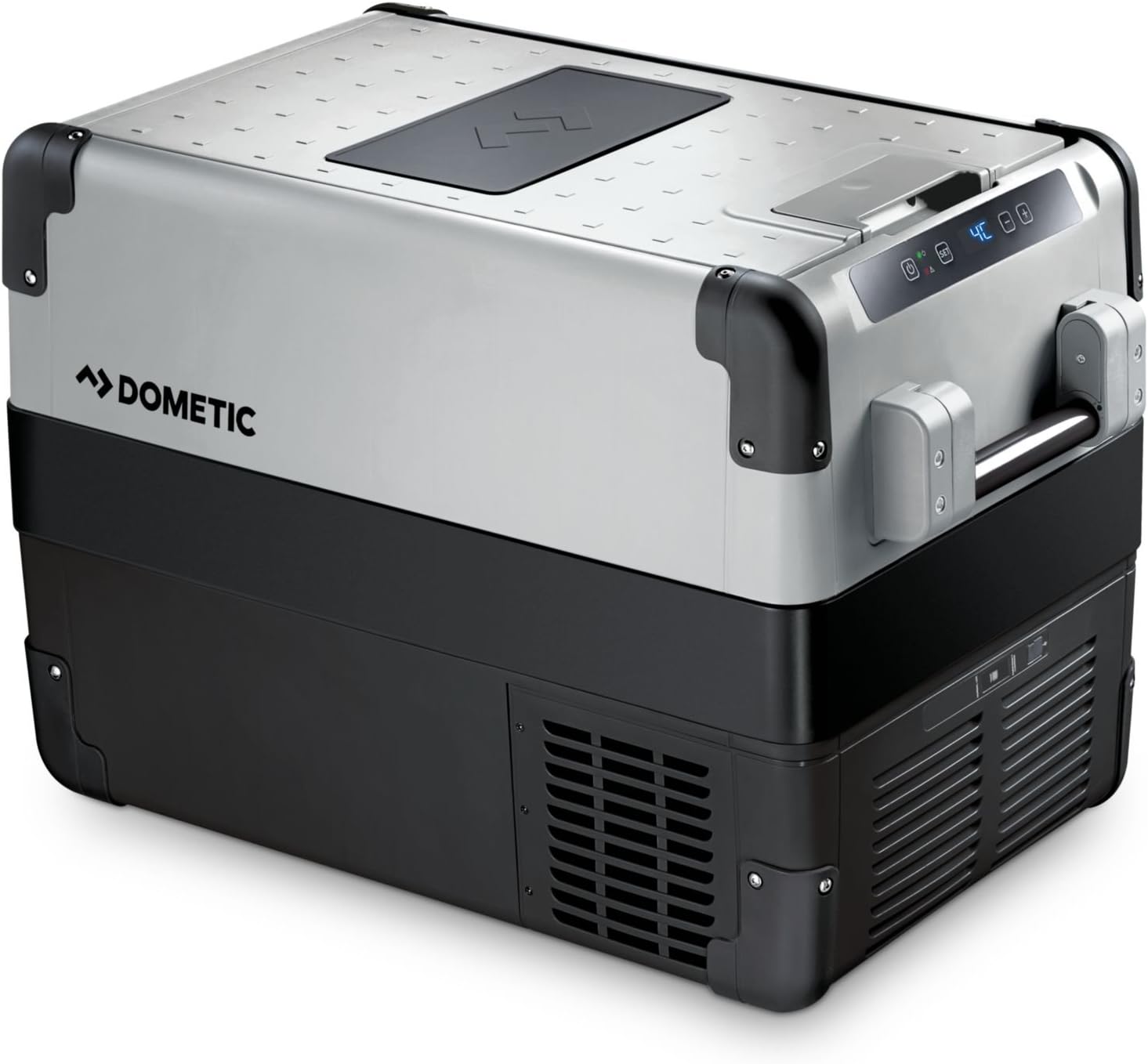
รูปที่ 1: Dometic CFX 40 main unit with lid open, revealing internal storage and several water bottles.
แผงควบคุม
The intuitive control panel allows you to adjust settings and monitor the cooler's operational status and temperature.

รูปที่ 2: รายละเอียด view of the control panel, showing the power button, 'SET' button, and digital temperature readout.
Robust Design Features
The cooler features reinforced corners and sturdy handles for enhanced durability and ease of transport in challenging environments.

รูปที่ 3: Reinforced corner and robust handle attachment, highlighting the cooler's durable construction.
Internal Storage and USB Port
The interior includes a removable wire basket for organized storage, and an integrated USB port allows for charging small electronic devices.

รูปที่ 4: Interior of the cooler with a wire basket, demonstrating efficient storage for food and beverages.

รูปที่ 5: Integrated USB port for convenient charging of external devices.
ขนาด
Refer to the diagram for detailed product dimensions to ensure proper fit and placement.

รูปที่ 6: Dimensional drawing of the Dometic CFX 40, indicating length, width, and height in millimeters.
4. การตั้งค่า
การแกะกล่อง
Remove all packaging materials. Inspect the cooler for any damage incurred during transit. If damage is found, contact your retailer immediately and do not operate the unit.
การทำความสะอาดเบื้องต้น
Before first use, clean the interior and exterior of the cooler with a damp cloth and a mild, non-abrasive detergent. Dry thoroughly to prevent odors and ensure hygiene.
การเชื่อมต่อไฟฟ้า
The Dometic CFX 40 can be powered by 12V/24V DC (direct current) from a vehicle or 100V-240V AC (alternating current) from a mains power supply. Use the appropriate power cable provided with your unit.
- การเชื่อมต่อ DC: Plug the 12V/24V cable into your vehicle's cigarette lighter socket or a dedicated DC power outlet. Ensure the connection is secure.
- การเชื่อมต่อไฟฟ้ากระแสสลับ: Plug the 230V cable into a standard wall outlet.
Always ensure the power source is stable and capable of supplying the required current for optimal performance.
การจัดวาง
Place the cooler on a firm, level surface. Ensure adequate ventilation around the unit, especially around the compressor area and air vents. Avoid direct sunlight and proximity to heat sources to maximize cooling efficiency and minimize power consumption.
5. คู่มือการใช้งาน
การเปิด/ปิดเครื่อง
To turn the unit on or off, press the power button (U) located on the control panel.
การตั้งอุณหภูมิ
Follow these steps to adjust the desired temperature:
- Press the 'SET' button. The current temperature display will flash.
- Use the '+' and '-' buttons to increase or decrease the desired temperature. The Dometic CFX 40 can achieve temperatures as low as -22 °C.
- Press 'SET' again or wait a few seconds for the new temperature setting to be saved. The display will return to showing the actual internal temperature.
ระบบป้องกันแบตเตอรี่
The cooler incorporates a 3-level battery monitor system to prevent excessive discharge of your vehicle's battery. You can select between 'High', 'Medium', and 'Low' protection levels via the control panel settings. Refer to the comprehensive Dometic CFX manual for detailed instructions on adjusting battery protection levels to suit your specific power source.
พอร์ตชาร์จ USB
The integrated USB port (5V, 500mA) provides a convenient charging point for small electronic devices such as smartphones or tablets when the cooler is powered on.
6. การบำรุงรักษา
การทำความสะอาด
การทำความสะอาดอย่างสม่ำเสมอช่วยให้ประสิทธิภาพและสุขอนามัยอยู่ในระดับสูงสุด:
- Always disconnect the cooler from the power supply before cleaning.
- Clean the interior regularly with a damp cloth and a mild, non-abrasive detergent. Avoid using harsh chemicals or abrasive cleaning agents.
- เช็ดภายนอกด้วยโฆษณาamp ผ้า.
- Ensure the ventilation grilles are free of dust and debris. Use a soft brush or vacuum cleaner if necessary.
การละลายน้ำแข็ง
Frost can accumulate inside the cooler, particularly when operating at freezing temperatures. To defrost the unit:
- Turn off the cooler and disconnect it from all power supplies.
- นำเนื้อหาทั้งหมดออกจากเครื่องทำความเย็น
- Open the lid and allow the frost to melt naturally. You may place a towel inside to absorb the melting water.
- The cooler is equipped with a drain plug at the bottom for easy water removal. Open the plug to drain water.
- Once defrosted, clean and dry the interior thoroughly before restarting the unit.
7 การแก้ไขปัญหา
If you encounter issues with your Dometic CFX 40, refer to the following common problems and solutions:
| ปัญหา | สาเหตุที่เป็นไปได้ | สารละลาย |
|---|---|---|
| เครื่องทำความเย็นไม่เปิด | No power supply; faulty cable; low battery voltage. | Check power connection; try a different outlet/cable; check vehicle battery charge. Adjust battery protection setting to 'Low' if necessary. |
| ประสิทธิภาพการทำความเย็นไม่ดี | Insufficient ventilation; ambient temperature too high; lid not closed properly; excessive frost buildup. | Ensure clear ventilation around the unit; move cooler to a cooler location; close lid securely; defrost the unit if necessary. |
| จอแสดงผลแสดงรหัสข้อผิดพลาด | Internal fault; sensor issue; power supply problem. | Consult the full Dometic CFX manual for specific error code meanings. If the issue persists, contact customer support. |
| เสียงรบกวนที่ผิดปกติระหว่างการทำงาน | หน่วยไม่อยู่ในระดับ พัดลมอุดตัน ปัญหาคอมเพรสเซอร์ | Place on a level surface; check for obstructions in the fan area. If noise persists or is severe, contact support. |
8. ข้อมูลจำเพาะ
The following table outlines the key technical specifications for the Dometic CFX 40 compressor cooler:
| คุณสมบัติ | ข้อมูลจำเพาะ |
|---|---|
| ชื่อรุ่น | ซีเอฟเอ็กซ์40 |
| Capacity (Freezing) | 36 ลิตร |
| Capacity (Fresh Food) | 38 ลิตร |
| ขนาด (กว้าง x ยาว x สูง) | 63.0 cm x 39.8 cm x 46.1 cm (main body, based on diagram) |
| น้ำหนัก | 18.5 กิโลกรัม |
| เล่มที่tage | 12V/24V DC, 100V-240V AC |
| วิธีการทำความเย็น | คอมเพรสเซอร์ |
| การควบคุมอุณหภูมิ | Adjustable, down to -22 °C |
| เอาท์พุต USB | ใช่ (5V, 500mA) |
| ระบบละลายน้ำแข็ง | อัตโนมัติ |
| การใช้พลังงาน (รายปี) | 37 กิโลวัตต์ชั่วโมง/ปี |
| ผู้ผลิต | WAECO (Dometic) |
9. การรับประกันและการสนับสนุน
ข้อมูลการรับประกัน
The Dometic CFX 40 compressor cooler comes with a รับประกัน 2 ปี from the date of purchase. Please retain your proof of purchase for all warranty claims. The warranty covers manufacturing defects and material faults under normal use conditions. For full terms and conditions, please refer to the warranty card included with your product or visit the Dometic webเว็บไซต์.
การสนับสนุนลูกค้า
For technical assistance, spare parts, or warranty inquiries, please contact Dometic customer support or your authorized dealer. You can find contact information on the official Dometic webไซต์หรือในเอกสารประกอบที่มาพร้อมกับผลิตภัณฑ์ของคุณ
For more information, visit the official Dometic webเว็บไซต์: www.dometic.com