
คำแนะนำด้านความปลอดภัยที่สำคัญ
Please read and save these important safety instructions before using this fan. Failure to follow these instructions may result in electric shock, fire, or serious personal injury.
- ควรถอดปลั๊กพัดลมทุกครั้งก่อนทำความสะอาดหรือซ่อมบำรุง
- ห้ามใช้งานพัดลมหากสายไฟหรือปลั๊กชำรุด
- ควรเก็บพัดลมให้ห่างจากน้ำและความชื้น
- ตรวจสอบให้แน่ใจว่าพัดลมวางอยู่บนพื้นผิวที่มั่นคงและระดับเพื่อป้องกันการพลิกคว่ำ
- ห้ามสอดนิ้วหรือวัตถุใดๆ เข้าไปในตะแกรงขณะที่พัดลมกำลังทำงาน
- พัดลมนี้สำหรับใช้ภายในอาคารเท่านั้น
สินค้าเกินview
The PELONIS FS40-8JR is a 16-inch oscillating pedestal fan designed to provide efficient airflow and cooling in various indoor environments. Its adjustable height and wide-angle oscillation ensure comprehensive air distribution.
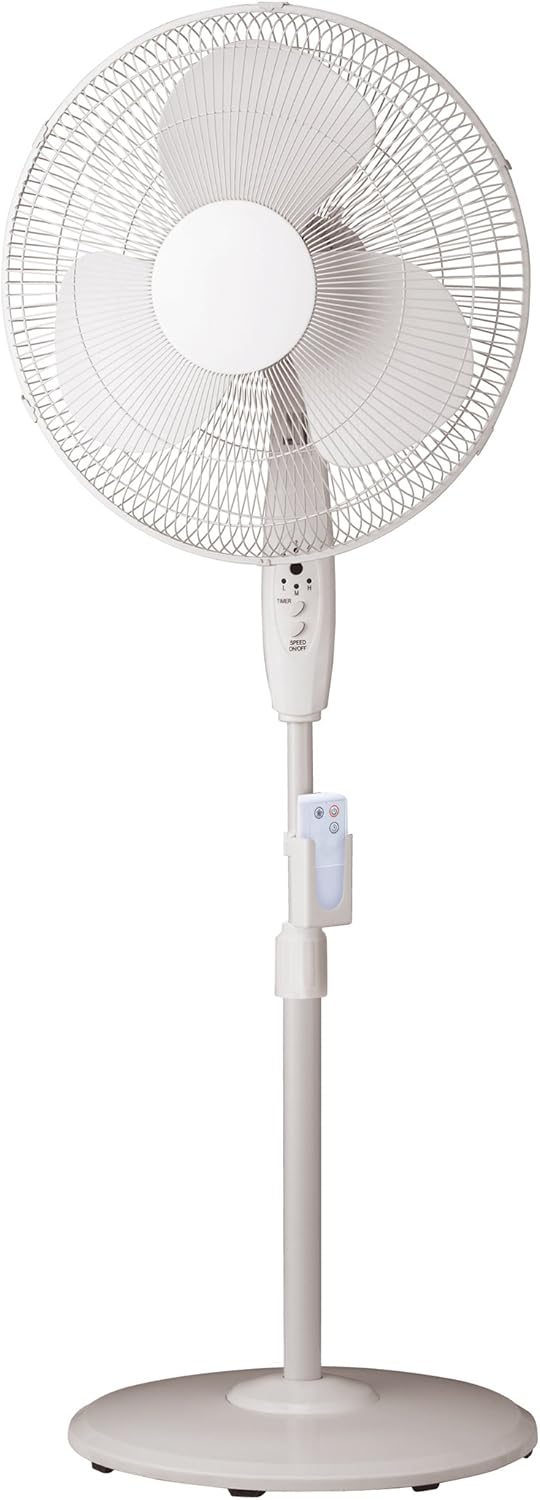
Figure 1: PELONIS FS40-8JR Pedestal Fan. This image displays the complete fan assembly, highlighting its white finish, the protective grille, fan blades, central control panel, the adjustable stand with a remote control holder, and the stable round base.
คุณสมบัติหลัก:
- Wide-angle oscillation and tilt for broad air coverage.
- Convenient 4-hour timer function.
- Remote control with a dedicated holder for easy access.
- Adjustable height to suit different cooling needs.
- Stable round base for secure placement.
- Three-speed settings (Low, Medium, High).
รายการชิ้นส่วน
Before assembly, ensure all parts are present and undamaged. Refer to the diagram in the Product Overview section for visual identification.
- กระจังหน้า
- กระจังหลัง
- ใบพัดลม
- ตัวเรือนมอเตอร์
- แผงควบคุม
- ขาตั้งปรับระดับได้
- ฐานกลม
- รีโมทคอนโทรล
- รีโมทควบคุม
- Fasteners (nuts, screws, washers - specific types may vary)
การติดตั้งและการประกอบ
Minimal assembly is required to set up your PELONIS pedestal fan. Follow these steps carefully:
- ประกอบฐาน: Attach the adjustable stand pole securely to the round base using the provided fasteners. Ensure it is stable and upright.
- Attach Motor Housing: Mount the motor housing onto the top of the adjustable stand pole. Secure it firmly.
- ติดตั้งกระจังหลัง: Place the rear grille onto the motor housing, aligning it correctly.
- Mount Fan Blades: Carefully slide the fan blades onto the motor shaft. Secure them with the retaining cap or nut.
- ติดตั้งกระจังหน้า: Position the front grille over the fan blades and secure it to the rear grille using the clips or screws provided. Ensure the grille is fully closed and locked for safety.
- ใส่แบตเตอรี่รีโมท: Open the battery compartment on the remote control and insert 3 AAA batteries (not included), observing polarity.
- Attach Remote Holder: Clip the remote control holder onto the adjustable stand pole at a convenient height.
Once assembled, place the fan on a firm, level surface and plug it into a standard electrical outlet.
คำแนะนำการใช้งาน
Your PELONIS fan can be operated using the control panel on the fan unit or the included remote control.
ฟังก์ชั่นแผงควบคุม:
- เปิด/ปิดเครื่อง: Press the "ON/OFF" button to turn the fan on or off.
- การควบคุมความเร็ว: Press the "SPEED" button repeatedly to cycle through Low (L), Medium (M), and High (H) speed settings.
- ตัวจับเวลา: Press the "TIMER" button to set the fan to operate for a specific duration (e.g., 1, 2, 4 hours). The fan will automatically turn off after the set time.
- การสั่น: Press the "OSC" button (if present on the panel, otherwise use remote) to activate or deactivate the oscillation function, allowing the fan head to sweep from side to side.
ฟังก์ชั่นการควบคุมระยะไกล:
The remote control provides convenient operation from a distance. Ensure the remote is pointed towards the fan's control panel for optimal response.
- ปุ่มเปิด/ปิด: เปิดหรือปิดพัดลม
- ปุ่มความเร็ว: Separate buttons for Low, Medium, and High speeds, or a single button to cycle through them.
- ปุ่มตั้งเวลา: ตั้งค่าตัวจับเวลาการทำงาน
- ปุ่มสั่น: Activates or deactivates the oscillation feature.
การปรับความสูงและความเอียง:
- ความสูง: Loosen the height adjustment knob on the stand pole, raise or lower the fan to the desired height, and then tighten the knob securely.
- เอียง: Gently push the fan head up or down to adjust the vertical angle of airflow.
การบำรุงรักษาและการทำความสะอาด
การทำความสะอาดและบำรุงรักษาอย่างสม่ำเสมอจะช่วยให้พัดลมของคุณมีอายุการใช้งานยาวนานและทำงานได้อย่างมีประสิทธิภาพสูงสุด
- ถอดปลั๊กพัดลมทุกครั้ง จากเต้าเสียบไฟก่อนการทำความสะอาด
- การทำความสะอาดภายนอก: ใช้แบบนุ่มๆamp ใช้ผ้าเช็ดทำความสะอาดพื้นผิวภายนอกของพัดลม ห้ามใช้น้ำยาทำความสะอาดที่มีฤทธิ์กัดกร่อนหรือตัวทำละลาย
- การทำความสะอาดกระจังหน้า: Dust and lint can accumulate on the grilles and blades. Periodically remove the front grille (refer to assembly instructions in reverse) to clean the fan blades and inside of the grilles with a soft cloth or vacuum cleaner. Ensure all parts are dry before reassembling.
- พื้นที่จัดเก็บ: เมื่อไม่ได้ใช้งานเป็นเวลานาน ควรเก็บพัดลมไว้ในที่แห้งและเย็น โดยควรอยู่ในบรรจุภัณฑ์เดิม เพื่อป้องกันฝุ่นละอองและความเสียหาย
การแก้ไขปัญหา
If you experience issues with your fan, consult the following table for common problems and solutions.
| ปัญหา | สาเหตุที่เป็นไปได้ | สารละลาย |
|---|---|---|
| พัดลมไม่เปิด | Not plugged in; Power outlet not working; Fan switch off. | Ensure fan is securely plugged into a working outlet; Check household circuit breaker; Press the power button on the fan or remote. |
| การไหลเวียนของอากาศอ่อน | Fan speed set too low; Grilles or blades are dirty. | Increase fan speed; Clean the fan grilles and blades as per maintenance instructions. |
| พัดลมมีเสียงดัง | Loose parts; Fan not on a level surface; Obstruction. | Check for loose screws or components and tighten; Place fan on a stable, level surface; Ensure nothing is obstructing the fan blades. |
| รีโมทคอนโทรลไม่ทำงาน | แบตเตอรี่หมดหรือใส่ไม่ถูกต้อง; มีสิ่งกีดขวางระหว่างรีโมทและพัดลม | Replace batteries (3 AAA); Ensure correct polarity; Remove any obstructions and point remote directly at the fan's control panel. |
ข้อมูลจำเพาะ
| คุณลักษณะ | รายละเอียด |
|---|---|
| หมายเลขรุ่น | FS40-8JR |
| ยี่ห้อ | เปโลนิส |
| ประเภทพัดลม | พัดลมตั้งพื้น |
| ขนาดพัดลม | 16 นิ้ว |
| จำนวนความเร็ว | 3 (ต่ำ, ปานกลาง, สูง) |
| คุณสมบัติพิเศษ | Oscillating, Adjustable Height, Timer, Remote Control |
| ตัวจับเวลา | นานถึง 4 ชั่วโมง |
| แหล่งพลังงาน | สายไฟ |
| วัดtage | 60 วัตต์ |
| สี | สีขาว |
| น้ำหนักสินค้า | 8.16 ปอนด์ (ประมาณ 3.7 กก.) |
| ขนาดสินค้า (กว้าง x ยาว x สูง) | 57.71 x 11.99 x 46.41 ซม. |
| จำเป็นต้องประกอบ | การประกอบขั้นต่ำ |
| แบตเตอรี่สำหรับรีโมท | 3 x AAA (ไม่รวม) |
การรับประกันและการสนับสนุน
For warranty information or technical support, please refer to the warranty card included with your product or visit the official PELONIS website. You may also contact customer service for assistance with product operation, parts, or troubleshooting beyond this manual.
ติดต่อฝ่ายบริการลูกค้า: Please refer to the contact information provided on the product packaging or the manufacturer's official webเว็บไซต์.