
1. บทนำ
This user manual provides comprehensive instructions for the installation, operation, and maintenance of your D-Link DHP-W310AV Powerline Network Adapter. The DHP-W310AV extends your home network by utilizing your existing electrical wiring to transmit network data, offering both wired Ethernet and wireless 802.11n connectivity. Please read this manual carefully to ensure proper setup and optimal performance of your device.
2. เนื้อหาบรรจุภัณฑ์
ตรวจสอบว่าแพ็คเกจของคุณมีรายการต่อไปนี้:
- D-Link DHP-W310AV Powerline Network Adapter
- สายเคเบิลอีเทอร์เน็ต
- คู่มือการติดตั้งแบบด่วน
If any of the above items are missing or damaged, please contact your local D-Link reseller for assistance.
3. สินค้าหมดview
The DHP-W310AV is designed for ease of use and compact integration into your home. Below are descriptions of its physical features and indicators.
3.1 แผงด้านหน้าและไฟแสดงสถานะ LED

รูปที่ 1: ด้านหน้า view of the D-Link DHP-W310AV, showing the D-Link logo, model number, and four LED indicators on the left side. These indicators provide status information for power, Powerline connection, Ethernet activity, and Wi-Fi status.
- กำลังไฟ LED: แสดงสถานะพลังงานของอุปกรณ์
- ไฟ LED แสดงสถานะสายไฟ: Indicates the status of the Powerline connection to other adapters.
- อีเธอร์เน็ต LED: แสดงกิจกรรมบนพอร์ตอีเธอร์เน็ต
- LED Wi-Fi: บ่งชี้สถานะของเครือข่ายไร้สาย
3.2 Rear Panel (Power Plug)
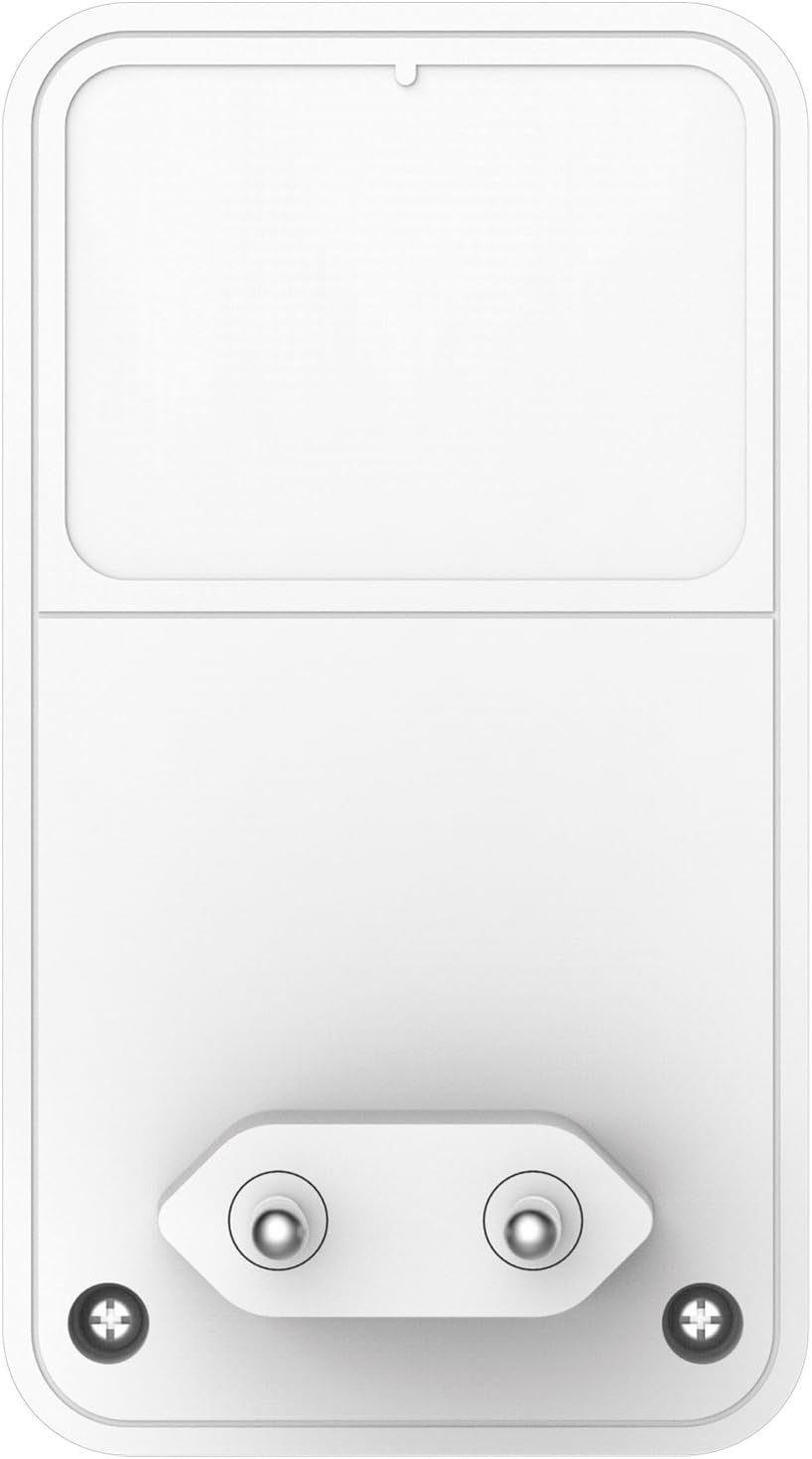
รูปที่ 2: หลัง view of the D-Link DHP-W310AV, displaying the integrated power plug designed for direct insertion into a wall outlet. This design ensures a compact form factor and direct power supply.
3.3 Side Panel (LAN Port and Reset Button)

รูปที่ 3: ด้านข้าง view of the D-Link DHP-W310AV, highlighting the LAN (Ethernet) port for wired connections and the recessed Reset button. The Reset button is used to restore the device to factory default settings.
- พอร์ต LAN: An RJ-45 Ethernet port for connecting wired devices such as computers, gaming consoles, or smart TVs.
- ปุ่มรีเซ็ต: Used to restore the device to its factory default settings. Press and hold for approximately 10 seconds while the device is powered on.
4. การตั้งค่า
Follow these steps to set up your D-Link DHP-W310AV Powerline Network Adapter. This device requires at least one other Powerline adapter (e.g., D-Link DHP-308AV, DHP-P308AV, or similar) connected to your router to function.
4.1 การจัดวางเริ่มต้น
- Plug in the Main Powerline Adapter: Connect your primary Powerline adapter (not included with DHP-W310AV) to an electrical outlet near your internet router. Use an Ethernet cable to connect this adapter to your router.
- Plug in the DHP-W310AV: Plug the DHP-W310AV into an electrical outlet in the room where you want to extend your network coverage. Ensure it is plugged directly into a wall outlet, not a power strip or surge protector, for optimal performance.
- Wait for Powerline LED: Wait for the Powerline LED on the DHP-W310AV to turn solid green, indicating a successful connection to your existing Powerline network. This may take a few moments.
4.2 Securing the Powerline Network (Pairing)
For security, it is recommended to pair your Powerline adapters to create a private, encrypted network.
- Press Security Button on Existing Adapter: On your existing Powerline adapter (connected to the router), press the Simple Connect or Security button. Refer to that adapter's manual for exact button location and timing.
- Press Security Button on DHP-W310AV: Within two minutes, press the Simple Connect or Security button on the DHP-W310AV. This button is typically located on the side or bottom of the device.
- ตรวจสอบการจับคู่: The Powerline LED on both adapters should turn solid green, indicating a successful and secure connection.
4.3 การตั้งค่าระบบไร้สาย
The DHP-W310AV broadcasts a Wi-Fi network. The default Wi-Fi network name (SSID) and password (WPA/WPA2 key) are usually printed on a label on the bottom or back of the device.
- เชื่อมต่อกับ Wi-Fi: On your wireless device (laptop, smartphone, tablet), search for available Wi-Fi networks and select the SSID corresponding to your DHP-W310AV.
- กรอกรหัสผ่าน: Enter the Wi-Fi password (WPA/WPA2 key) when prompted.
- การเข้าถึงอินเทอร์เน็ต: Once connected, your device should have internet access through the Powerline network.
For advanced Wi-Fi settings, such as changing the SSID or password, you may need to access the device's web-based configuration utility. Refer to the full D-Link DHP-W310AV manual for detailed instructions on accessing and configuring these settings.
5. คู่มือการใช้งาน
5.1 การเชื่อมต่อแบบมีสาย
To connect a wired device to your Powerline network:
- Ensure the DHP-W310AV is powered on and the Powerline LED is solid green.
- Connect one end of an Ethernet cable to the LAN port on the DHP-W310AV.
- Connect the other end of the Ethernet cable to the Ethernet port on your wired device (e.g., computer, game console).
- The Ethernet LED on the DHP-W310AV should illuminate, indicating an active connection.
5.2 การเชื่อมต่อไร้สาย
To connect a wireless device to your Powerline network via Wi-Fi:
- Ensure the DHP-W310AV is powered on and the Wi-Fi LED is illuminated.
- On your wireless device, open the Wi-Fi settings and select the network name (SSID) of the DHP-W310AV.
- Enter the Wi-Fi password (WPA/WPA2 key) when prompted.
- Once connected, your device will have wireless internet access.
6. การบำรุงรักษา
To ensure the longevity and optimal performance of your DHP-W310AV:
- การทำความสะอาด: เช็ดอุปกรณ์เบาๆ ด้วยผ้าแห้งเนื้อนุ่ม ห้ามใช้น้ำยาทำความสะอาดชนิดเหลวหรือสเปรย์
- การจัดวาง: Avoid placing the device in direct sunlight, near heat sources, or in areas with high humidity. Ensure adequate ventilation around the device.
- อัพเดตเฟิร์มแวร์: Periodically check the D-Link support webเว็บไซต์สำหรับการอัปเดตเฟิร์มแวร์ การอัปเดตเฟิร์มแวร์สามารถปรับปรุงประสิทธิภาพ เพิ่มฟีเจอร์ใหม่ และแก้ไขข้อบกพร่องได้
- วงจรไฟฟ้า: If you experience intermittent issues, try unplugging the device from the power outlet for 10 seconds and then plugging it back in.
7 การแก้ไขปัญหา
This section provides solutions to common issues you might encounter with your DHP-W310AV.
7.1 No Power LED
- Ensure the DHP-W310AV is securely plugged into a working electrical outlet.
- Try plugging another device into the same outlet to confirm the outlet is functional.
7.2 Powerline LED is Off or Blinking
- Ensure all Powerline adapters are plugged directly into wall outlets, not power strips or surge protectors.
- Verify that all Powerline adapters are on the same electrical circuit. Powerline technology works best within the same electrical phase.
- Ensure the main Powerline adapter is connected to your router and powered on.
- Try re-pairing the adapters as described in Section 4.2.
7.3 No Internet Access via Wired or Wireless Connection
- Check the Powerline LED status. If it's off or blinking, refer to the previous troubleshooting steps.
- ตรวจสอบว่าเราเตอร์หลักของคุณมีการเชื่อมต่ออินเทอร์เน็ตที่ใช้งานได้
- For wired connections, ensure the Ethernet cable is securely connected to both the DHP-W310AV and your device.
- For wireless connections, ensure you are connected to the correct Wi-Fi network (SSID) and have entered the correct password.
- Try restarting your router, all Powerline adapters, and the connected devices.
7.4 ความเร็วเครือข่ายช้า
- Powerline performance can be affected by electrical interference. Avoid plugging adapters into outlets shared with high-power appliances (e.g., washing machines, refrigerators).
- Ensure adapters are plugged directly into wall outlets.
- คุณภาพของระบบสายไฟภายในบ้านอาจส่งผลต่อประสิทธิภาพการทำงานได้
- Ensure your main internet connection speed is adequate.
8. ข้อมูลจำเพาะ
| คุณสมบัติ | คำอธิบาย |
|---|---|
| หมายเลขรุ่น | DHP-W310AV |
| ประเภทไร้สาย | 802.11n |
| อัตราการถ่ายโอนข้อมูล | Up to 500 Mbps (Powerline), 300 Mbps (Wireless) |
| โปรโตคอลการเชื่อมโยงข้อมูล | Ethernet, HomePlug AV |
| ฮาร์ดแวร์อินเตอร์เฟซ | 1 x 10/100 Ethernet Port (RJ-45) |
| อุปกรณ์ที่รองรับ | Desktop computers, Laptops, Gaming Consoles, Smart TVs, etc. |
| ขนาด (กxยxส) | 2.4 x 1.67 x 2.68 นิ้ว (6.1 x 4.24 x 6.81 ซม.) |
| น้ำหนักสินค้า | 4.4 ออนซ์ (125.6 กรัม) |
| กำลังไฟเข้า | แรงดันไฟฟ้า 100-240 โวลต์ 50/60 เฮิรตซ์ |
9. การรับประกันและการสนับสนุน
For detailed warranty information and technical support, please refer to the warranty card included with your product or visit the official D-Link support website. You can find drivers, firmware updates, and additional documentation there.
การสนับสนุน D-Link Webเว็บไซต์: www.dlink.com/support


