
Rademacher 36500512
Rademacher 36500512 Built-in Timer Instruction Manual
รุ่น : 36500512
การแนะนำ
This manual provides detailed instructions for the installation, operation, and maintenance of your Rademacher 36500512 Built-in Timer. Please read this manual thoroughly before installation and use to ensure safe and efficient operation of the device. Keep this manual for future reference.
คุณสมบัติผลิตภัณฑ์
The Rademacher 36500512 Built-in Timer offers advanced functionality for automated control of electrical devices. Key features include:
- Daily and Weekly Programming: Set specific on/off times for each day of the week.
- Daylight-Dependent Program (Astro Function): Automatically adjusts switching times based on sunrise and sunset.
- Dawn/Dusk Sensor Compatibility: Connect an external sensor for enhanced light-dependent control.
- การเปลี่ยนเวลาอัตโนมัติ (ฤดูร้อน/ฤดูหนาว): The timer automatically adjusts for daylight saving time.
- แบตเตอรี่สำรอง: Retains settings and time during power outagใช่
คำแนะนำด้านความปลอดภัยที่สำคัญ
คำเตือน: Electrical installation should only be performed by a qualified electrician in accordance with local wiring regulations and standards. Failure to follow these instructions may result in electric shock, fire, or serious injury.
- ควรตัดการเชื่อมต่อไฟฟ้าที่เบรกเกอร์วงจรหลักทุกครั้งก่อนติดตั้งหรือซ่อมบำรุงอุปกรณ์
- ห้ามติดตั้งในที่เปียกหรืองamp สถานที่
- ตรวจสอบให้แน่ใจว่าการเชื่อมต่อทั้งหมดมีความปลอดภัยและมีฉนวนป้องกันอย่างเหมาะสม
- อย่าใช้โหลดเกินพิกัดสูงสุดของตัวตั้งเวลา
- เก็บอุปกรณ์ให้ห่างจากเด็ก
เนื้อหาแพ็คเกจ
กรุณาตรวจสอบว่าสินค้าทั้งหมดมีอยู่ในแพ็คเกจ:
- Rademacher 36500512 Built-in Timer Unit
- คู่มือการใช้งาน
- สกรูยึด (ถ้ามี)
การติดตั้งและการตั้งค่าเริ่มต้น
The Rademacher 36500512 is designed for flush-mounted installation. It is recommended that installation be carried out by a qualified electrician.
1. Mounting the Timer
- การตัดการเชื่อมต่อไฟฟ้า: ก่อนเริ่มดำเนินการ โปรดตรวจสอบให้แน่ใจว่าได้ปิดสวิตช์ไฟหลักของพื้นที่ติดตั้งที่เบรกเกอร์แล้ว
- เตรียมกล่องติดผนัง: The timer is designed to fit into a standard flush-mounted wall box.
- การเดินสายไฟ: Connect the electrical wires to the terminals on the back of the timer according to the wiring diagram provided in the separate wiring instructions (not part of this manual). Ensure correct phase, neutral, and load connections.
- การรักษาความปลอดภัยหน่วย: Carefully place the timer into the wall box and secure it using the provided mounting screws.
- ติดตั้งแผงด้านหน้า: Snap the front panel with the display and buttons onto the mounted unit.

ภาพที่ 1: ด้านหน้า view of the Rademacher 36500512 Built-in Timer with its unlit display and control buttons. This shows the overall aesthetic and button layout before power-up.
2. Initial Power-Up and Basic Settings
- คืนค่าพลัง: Once installation is complete and secure, restore power at the main circuit breaker.
- การใช้ครั้งแรก: The display will illuminate. You may need to set the current time and date.
- การตั้งเวลาและวันที่: ใช้ M (Menu) button to navigate and the ขึ้น/ลง arrows to adjust values. Confirm with OK. Refer to the "Operating Instructions" section for detailed navigation.
คำแนะนำการใช้งาน
The Rademacher 36500512 timer is controlled via its integrated display and buttons. Familiarize yourself with the controls:
- ปุ่ม M: เข้าถึงเมนูหลักและนำทางผ่านตัวเลือก
- ลูกศรขึ้น/ลง: Adjust values, scroll through menu items, or manually control the connected device (e.g., blinds).
- ปุ่มตกลง: ยืนยันการเลือกและบันทึกการตั้งค่า
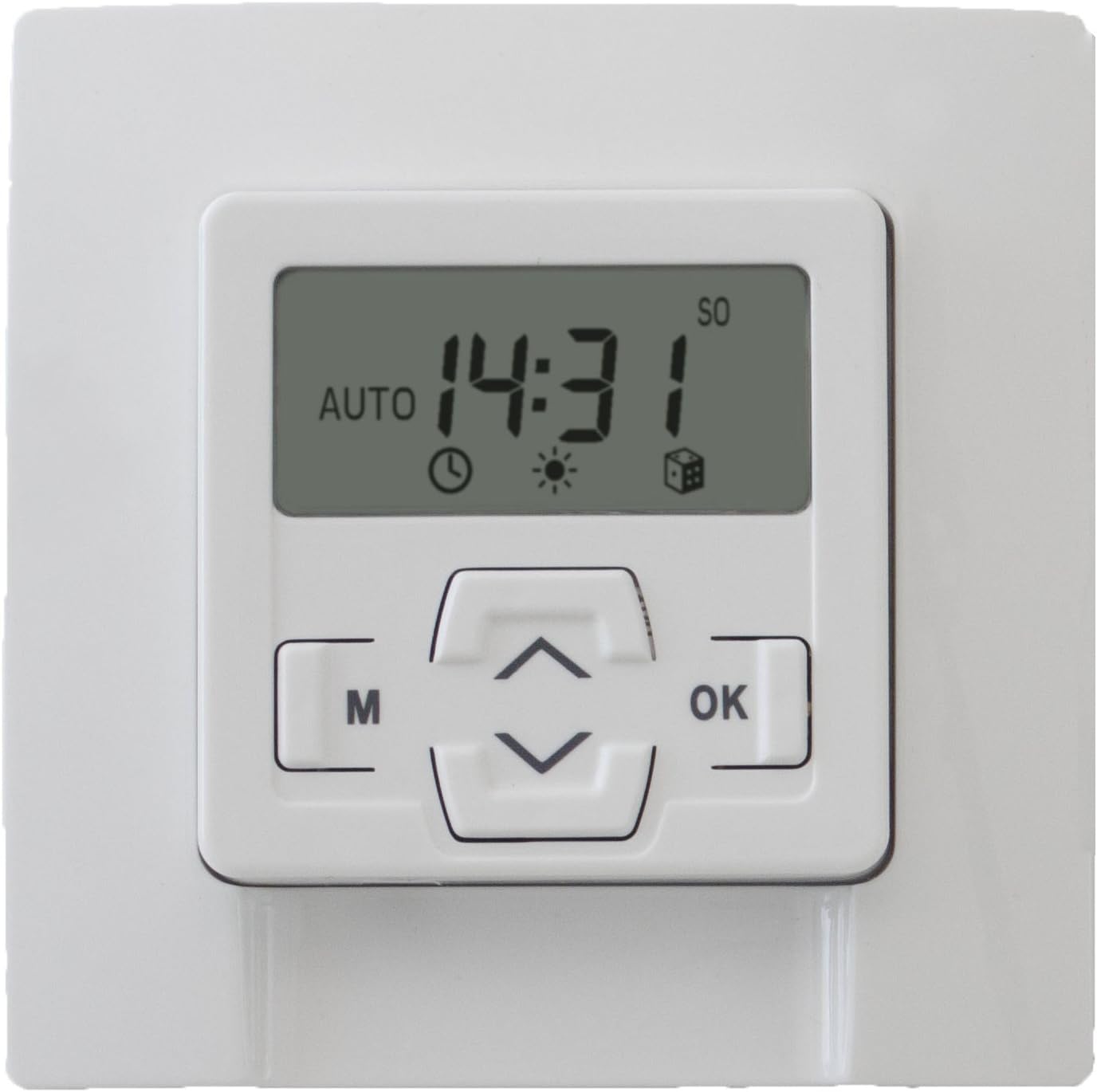
ภาพที่ 2: ด้านหน้า view of the Rademacher 36500512 Built-in Timer with its display illuminated, showing the current time (14:31) and indicating 'AUTO' mode, along with various status icons.
1. Setting Current Time and Date
- กด M เพื่อเข้าสู่เมนูหลัก
- Navigate using ขึ้น/ลง arrows to find "Time/Date" or similar option. Press OK.
- Adjust hours, minutes, day, month, and year using ขึ้น/ลง arrows and confirm each with OK.
- Exit the menu by pressing M repeatedly or waiting for timeout.
2. Programming Daily/Weekly Schedules
- กด M เพื่อเข้าสู่เมนูหลัก
- Select "Program" or "Schedule" and press OK.
- Choose between "Daily Program" or "Weekly Program".
- For each desired switching time (e.g., open, close), set the specific time and day(s) of the week. Use ขึ้น/ลง เพื่อปรับและ OK เพื่อยืนยัน.
- Save all settings before exiting the programming menu.
3. Astro Function (Daylight-Dependent Control)
The Astro function automatically adjusts switching times based on sunrise and sunset, which are calculated based on your geographical location (if configured) or a default setting. This provides a natural control rhythm.
- Access the main menu with M.
- Select "Astro" or "Daylight Program" and press OK.
- Activate the function and configure any offset times (e.g., close 15 minutes after sunset) if available.
- Ensure your location settings are accurate for optimal performance.
4. คู่มือการแทนที่
You can temporarily override the programmed schedule at any time:
- กดปุ่ม Up or ลง arrow buttons to manually activate or deactivate the connected device.
- The timer will return to its programmed schedule after the manual action is completed or after a set period, depending on the specific model's configuration.
การซ่อมบำรุง
The Rademacher 36500512 Built-in Timer requires minimal maintenance.
- การทำความสะอาด: Wipe the surface of the timer with a soft, dry cloth. Do not use abrasive cleaners or solvents.
- แบตเตอรี่สำรอง: The internal backup battery ensures settings are retained during power outages. This battery is typically long-lasting and not user-replaceable. If the timer consistently loses settings after power interruptions, professional service may be required.
การแก้ไขปัญหา
| ปัญหา | สาเหตุที่เป็นไปได้ | สารละลาย |
|---|---|---|
| หน้าจอแสดงผลของตัวจับเวลาว่างเปล่า | ไม่มีแหล่งจ่ายไฟ | ตรวจสอบเบรกเกอร์วงจรและการเชื่อมต่อสายไฟ ตรวจสอบให้แน่ใจว่าไฟฟ้ากลับมาใช้งานได้แล้ว |
| Timer does not switch at programmed times. | Incorrect programming; Manual override active; Astro function interfering. | Review programmed schedules. Deactivate manual override. Check Astro settings. Ensure the timer is in automatic mode. |
| เวลา/วันที่ไม่ถูกต้องหลังจากไฟดับtage. | Backup battery depleted or faulty. | Reset time and date. If issue persists, contact customer support for service. |
| ปุ่มต่างๆ ไม่ตอบสนอง | ความผิดพลาดของซอฟต์แวร์ชั่วคราว; ความเสียหายทางกายภาพ | Try cycling power to the unit (turn off at breaker, wait 30 seconds, turn on). If issue persists, contact customer support. |
ข้อมูลจำเพาะ
| ยี่ห้อ | ราเดมาเคอร์ |
| หมายเลขรุ่น | 36500512 |
| เล่มที่tage | 230 โวลต์ |
| วัสดุ | พลาสติก |
| ขนาดสินค้า (กว้าง x ยาว x สูง) | 4.8 x 8 x 8 ซม. |
| น้ำหนักสินค้า | 159 กรัม |
| สี | Ultra-white |
การรับประกันและการสนับสนุนลูกค้า
Your Rademacher 36500512 Built-in Timer is covered by a manufacturer's warranty. Please refer to the warranty card included with your purchase for specific terms and conditions.
For technical assistance, troubleshooting not covered in this manual, or warranty claims, please contact Rademacher customer support through their official webไซต์หรือผู้ค้าปลีกที่ซื้อผลิตภัณฑ์
Ask a question about this manual
Ask about setup, troubleshooting, compatibility, parts, safety, or missing instructions. Manuals+ will review the question and use this page’s manual context to help answer it.