
1. บทนำ
Thank you for choosing the Linq HB-02 Mini Speaker. This portable speaker is designed to provide amplified audio from a variety of devices, including smartphones, MP3/MP4 players, notebooks, and more. Its compact design and rechargeable battery make it ideal for on-the-go use. Please read this manual carefully before using the product to ensure proper operation and longevity.
2. ข้อมูลด้านความปลอดภัย
- อย่าให้ลำโพงโดนน้ำหรือความชื้นมากเกินไป
- หลีกเลี่ยงอุณหภูมิที่สูงหรือต่ำเกินไป
- ห้ามถอดประกอบหรือพยายามซ่อมลำโพงด้วยตนเอง การกระทำดังกล่าวจะทำให้การรับประกันเป็นโมฆะ
- เก็บให้พ้นจากมือเด็ก
- ใช้เฉพาะสาย USB ที่ให้มาในการชาร์จ
- ทิ้งแบตเตอรี่อย่างถูกวิธีตามระเบียบข้อบังคับของท้องถิ่น
3. เนื้อหาบรรจุภัณฑ์
The Linq HB-02 Mini Speaker package typically includes:
- Linq HB-02 Mini Speaker
- สายชาร์จ USB
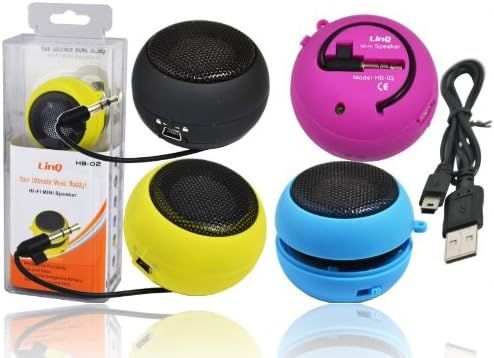
Image: Linq HB-02 Mini Speaker shown in its retail packaging, alongside other speakers and the included USB charging cable. This illustrates the typical contents and appearance of the product.
4. คุณสมบัติของผลิตภัณฑ์
- Mini Pocket Speaker: การออกแบบที่กะทัดรัดและพกพาสะดวก
- เข้ากันได้สากล: Connects via 3.5mm audio jack to devices like iPhones, iPods, MP3/MP4 players, smartphones, notebooks, PSP, CD players, and more.
- แบตเตอรี่แบบชาร์จไฟได้: Built-in lithium-ion battery for wireless use.
- Retractable Sound Resonator: Features a pneumatic suspension system that allows the acoustic membrane to be extended from one side, enhancing amplification and sound quality.
- การชาร์จ USB: Conveniently recharges via the included USB cable.
- Ampเสียงที่สดใส: Delivers excellent and pleasant acoustic performance despite its small size.

Image: Four Linq HB-02 Mini Speakers in pink, yellow, purple, and blue, shown with their retractable sound resonators extended, demonstrating the design and color variety.
5. การตั้งค่า
5.1 การชาร์จเริ่มต้น
- ก่อนใช้งานครั้งแรก ควรชาร์จลำโพงให้เต็ม
- Connect the small end of the included USB charging cable to the mini USB port on the speaker.
- เชื่อมต่อปลาย USB มาตรฐานของสายเคเบิลเข้ากับแหล่งจ่ายไฟ USB (เช่น พอร์ต USB ของคอมพิวเตอร์ อะแดปเตอร์ติดผนัง USB)
- ไฟแสดงสถานะการชาร์จ (ถ้ามี) จะสว่างขึ้นขณะชาร์จ และจะดับลงหรือเปลี่ยนสีเมื่อชาร์จเต็มแล้ว
5.2 การเชื่อมต่อกับอุปกรณ์เสียง
- Locate the integrated 3.5mm audio jack on the speaker. This jack is often stored neatly within the speaker's body.
- Plug the 3.5mm audio jack into the headphone port of your audio device (e.g., smartphone, MP3 player, notebook).
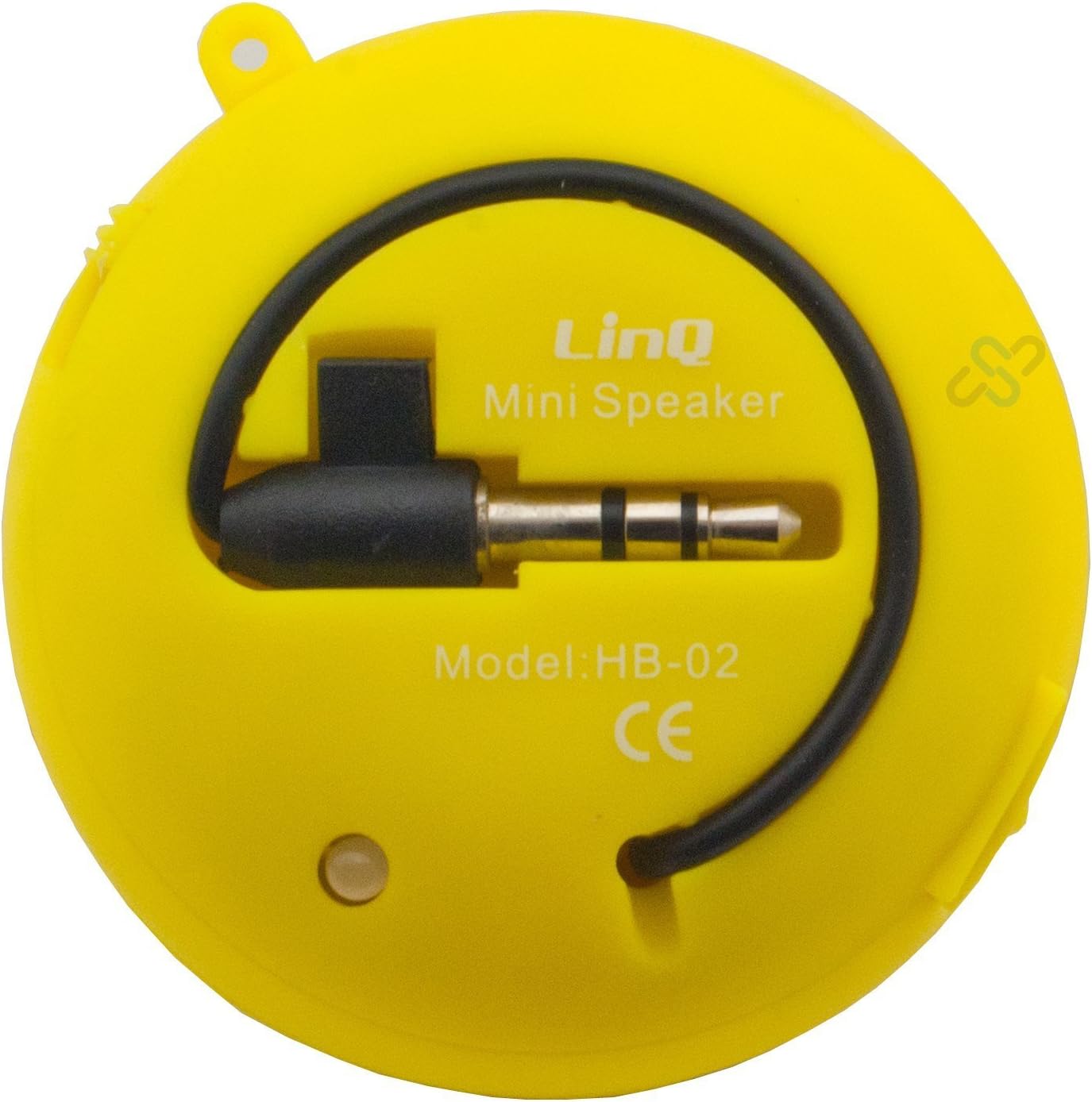
Image: A yellow Linq HB-02 Mini Speaker, viewed from the back, clearly showing the integrated 3.5mm audio jack coiled around the speaker and the model number 'HB-02'.
6. คู่มือการใช้งาน
6.1 การเปิด/ปิดเครื่อง
Locate the power switch on the speaker. Slide it to the 'ON' position to turn on the speaker. Slide it to the 'OFF' position to turn it off.
6.2 การเล่นเสียง
- Ensure the speaker is connected to your audio device via the 3.5mm jack.
- เปิดลำโพง
- Start playing audio on your connected device. The sound will now be amplified through the Linq HB-02 speaker.
- Adjust the volume directly from your connected audio device. The speaker itself does not have volume controls.
6.3 Using the Retractable Sound Resonator
เพื่อเพิ่มประสิทธิภาพ amplification and sound quality, gently pull and extend the acoustic membrane from one side of the speaker. This engages the 'Retractable Sound Resonator' system. To return to a more compact form, gently push the membrane back into the speaker body.
7. การบำรุงรักษา
- การทำความสะอาด: ใช้ผ้าแห้งนุ่มเช็ดทำความสะอาดภายนอกลำโพง ห้ามใช้น้ำยาทำความสะอาดหรือสเปรย์กระป๋อง
- พื้นที่จัดเก็บ: เมื่อไม่ใช้งาน ควรเก็บลำโพงไว้ในที่แห้งและเย็น หลีกเลี่ยงแสงแดดโดยตรงและอุณหภูมิที่สูงหรือต่ำเกินไป
- การดูแลแบตเตอรี่ เพื่อยืดอายุการใช้งานแบตเตอรี่ ควรหลีกเลี่ยงการปล่อยประจุแบตเตอรี่จนหมดบ่อยๆ ควรชาร์จลำโพงเป็นประจำ แม้จะไม่ได้ใช้งานเป็นเวลานานก็ตาม
8 การแก้ไขปัญหา
8.1 ไม่มีเสียง
- Ensure the speaker is turned ON.
- Check if the 3.5mm audio jack is fully inserted into both the speaker and your audio device.
- Verify that your audio device's volume is turned up and not muted.
- Ensure the speaker's battery is charged.
8.2 คุณภาพเสียงไม่ดี
- ตรวจสอบแหล่งเสียงเพื่อดูปัญหาด้านคุณภาพ
- Ensure the 3.5mm audio jack connection is secure.
- Try extending the 'Retractable Sound Resonator' for improved sound.
- Ensure the speaker is fully charged. Low battery can affect sound quality.
8.3 ลำโพงไม่ชาร์จ
- Verify that the USB cable is correctly connected to both the speaker and the power source.
- ลองใช้พอร์ต USB หรืออะแดปเตอร์จ่ายไฟอื่น
- ตรวจสอบให้แน่ใจว่าสาย USB ไม่ชำรุดเสียหาย
9. ข้อมูลจำเพาะ
| ยี่ห้อ | Linq |
| แบบอย่าง | เอชบี-02 |
| กำลังขับสูงสุด | 2 วัตต์ |
| เทคโนโลยีการเชื่อมต่อ | AUX (3.5mm Jack), USB (for charging) |
| ประเภทการติดตั้ง | โต๊ะวางของ |
| ประเภทลำโพง | ลำโพงแบบพกพา |
| อิมพีแดนซ์ | 8 โอห์ม |
| แหล่งพลังงาน | ใช้พลังงานจากแบตเตอรี่ (ชาร์จใหม่ได้) |
| น้ำหนัก | Not specified, designed for portability. |
10. การรับประกันและการสนับสนุน
This product comes with a standard manufacturer's warranty. Please refer to the warranty card included with your purchase or contact your retailer for specific warranty terms and conditions. For technical support or further assistance, please contact the retailer or the manufacturer's customer service.