
การแนะนำ
This manual provides essential instructions for the safe and effective use of your Fujifilm FinePix HS50EXR digital camera. Please read this manual thoroughly before using the camera and keep it in a safe place for future reference.

รูปที่ 1 : ด้านหน้า view of the Fujifilm FinePix HS50EXR Digital Camera, showcasing ดีไซน์เลนส์และตัวกล้อง
การตั้งค่า
1. การแกะกล่องและการตรวจสอบเบื้องต้น
นำสินค้าทั้งหมดออกจากบรรจุภัณฑ์อย่างระมัดระวัง ตรวจสอบให้แน่ใจว่ามีส่วนประกอบต่อไปนี้:
- Fujifilm FinePix HS50EXR Digital Camera body
- แบตเตอรี่ลิเธียมไอออนแบบชาร์จไฟได้
- เครื่องชาร์จแบตเตอรี่
- สายสะพายไหล่
- สาย USB
- ฝาปิดเลนส์
- ซีดีรอม (บรรจุซอฟต์แวร์และคู่มือฉบับเต็ม)
2. การชาร์จแบตเตอรี่
Before first use, fully charge the supplied rechargeable Li-ion battery. Insert the battery into the charger and connect the charger to a power outlet. The charging indicator will show the charging status and turn off when charging is complete.
3. Inserting Battery and Memory Card
- เปิดฝาปิดช่องใส่แบตเตอรี่/การ์ดหน่วยความจำที่ด้านล่างของกล้อง
- ใส่แบตเตอรี่ที่ชาร์จแล้วโดยให้อยู่ในตำแหน่งที่ถูกต้องจนกระทั่งล็อคเข้าที่
- Insert a compatible SD or microSD memory card (sold separately) into the card slot until it clicks. Ensure the card is facing the correct direction.
- ปิดฝาปิดช่องใส่ให้แน่น
4. การติดสายสะพายไหล่
Thread the shoulder strap through the strap lugs on the camera body as illustrated in the full manual on the CD-ROM. Ensure it is securely fastened to prevent accidental drops.
การใช้งานกล้อง
1. เปิด/ปิดเครื่อง
To power on the camera, slide the power switch located on the top of the camera. To power off, slide the switch again.
2 โหมดการถ่ายภาพพื้นฐาน
แป้นหมุนเลือกโหมดที่ด้านบนของกล้องช่วยให้คุณสามารถเลือกโหมดการถ่ายภาพต่างๆ ได้:
- อัตโนมัติ: For fully automatic shooting, where the camera selects optimal settings.
- P (โปรแกรม AE): The camera sets aperture and shutter speed for optimal exposure, while you can adjust other settings.
- A (โหมดปรับรูรับแสงอัตโนมัติ): You set the aperture, and the camera automatically adjusts the shutter speed.
- S (โหมดถ่ายภาพต่อเนื่องแบบเน้นความเร็วชัตเตอร์): You set the shutter speed, and the camera automatically adjusts the aperture.
- M (คู่มือ): คุณสามารถควบคุมทั้งค่ารูรับแสงและความเร็วชัตเตอร์เพื่อการสร้างสรรค์ผลงานได้อย่างสมบูรณ์แบบ
- เอ็กซ์อาร์: Utilizes the EXR CMOS II sensor's capabilities for enhanced image quality in various conditions.
- ฉาก: Select from various scene presets (e.g., Portrait, Landscape, Sport) for specific shooting situations.
3. การดำเนินการซูม
The FinePix HS50EXR features a manual Fujinon 42x optical zoom lens (24-1000mm equivalent). Rotate the zoom barrel on the lens directly to adjust the focal length. This manual control provides precise and intuitive zooming.
4. การโฟกัส
The camera employs an Intelligent Hybrid AF system, combining high-speed phase detection AF and contrast AF for rapid and accurate focusing. You can also switch to manual focus by rotating the focus ring on the lens.
- ระบบโฟกัสอัตโนมัติแบบเดี่ยว (AF-S): Focuses when the shutter button is pressed halfway.
- ภาวะหัวใจห้องบนสั่นพลิ้วต่อเนื่อง (AF-C): Continuously adjusts focus for moving subjects.
- โฟกัสแบบแมนนวล (MF): หมุนวงแหวนปรับโฟกัสบนเลนส์เพื่อปรับโฟกัสด้วยตนเอง
5. ระบบป้องกันภาพสั่นไหว
The camera features lens shift optical image stabilization to reduce blur caused by camera shake, especially when shooting at longer focal lengths or in low light conditions.
6. LCD and Viewตัวค้นหา
The camera is equipped with a 3.0-inch Vari-angle LCD screen (920K-dot) that can be rotated and tilted for flexible shooting angles. It also has a high-resolution electronic viewfinder (EVF) with an eye sensor, which automatically switches between the LCD and EVF when you bring your eye to the viewตัวค้นหา
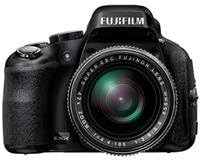
รูปที่ 2: ด้านข้าง view of the Fujifilm FinePix HS50EXR Digital Camera, showing the vari-angle LCD screen extended for flexible viewการไอเอ็นจี
7. การบันทึกวิดีโอ
To record movies, set the mode dial to the movie icon. The camera supports Full HD (1080p) video recording at 60 frames per second (60fps) with continuous phase detection autofocus.
8. ถ่ายภาพต่อเนื่อง
The FinePix HS50EXR can capture images at up to 11 frames per second (fps) in full resolution, allowing you to capture fast-moving action.
9. การใช้งานแฟลช
The camera has a built-in flash. Press the flash button to pop it up. Various flash modes (e.g., Auto, Fill-in, Slow Sync) can be selected via the menu.
10. การเชื่อมต่อ
The camera supports HDMI and USB connectivity for transferring images and videos to a computer or displaying them on a TV. It also features Wi-Fi for wireless image transfer and remote control via a compatible smartphone app.
การซ่อมบำรุง
1. การทำความสะอาดกล้อง
- เลนส์: Use a soft, lint-free cloth or a lens brush to gently remove dust. For stubborn smudges, use a lens cleaning solution applied to a cloth, not directly to the lens.
- ร่างกาย: Wipe the camera body with a soft, dry cloth. For heavy dirt, use a cloth lightly dampล้างด้วยน้ำสะอาด แล้วเช็ดให้แห้ง หลีกเลี่ยงการใช้ตัวทำละลายอินทรีย์
- หน้าจอ LCD: ใช้ผ้าแห้งนุ่มๆ เช็ด หลีกเลี่ยงการกดแรงๆ บนหน้าจอ
2. การดูแลแบตเตอรี่
- Always use the genuine Fujifilm battery and charger.
- เก็บแบตเตอรี่ไว้ในที่เย็นและแห้งเมื่อไม่ได้ใช้งาน
- อย่าให้แบตเตอรี่สัมผัสกับอุณหภูมิที่สูงเกินไปหรือถูกแสงแดดโดยตรง
3. การจัดเก็บ
When storing the camera for extended periods, remove the battery and memory card. Store the camera in a dry, well-ventilated area, away from dust and direct sunlight. Use a desiccant if storing in a humid environment.
การแก้ไขปัญหา
หากคุณพบปัญหาเกี่ยวกับกล้อง โปรดดูปัญหาทั่วไปและวิธีแก้ไขต่อไปนี้:
| ปัญหา | สาเหตุที่เป็นไปได้ / วิธีแก้ไข |
|---|---|
| กล้องไม่สามารถเปิดได้ | แบตเตอรี่หมดหรือใส่ไม่ถูกต้อง โปรดตรวจสอบให้แน่ใจว่าได้ชาร์จแบตเตอรี่แล้วและใส่แบตเตอรี่อย่างถูกต้อง |
| ภาพมีความเบลอ | Camera shake: Use image stabilization, a faster shutter speed, or a tripod. Incorrect focus: Ensure the camera is properly focused on the subject. |
| แฟลชไม่ทำงาน | Flash is closed or disabled. Pop up the flash and check flash settings in the menu. |
| ข้อผิดพลาดการ์ดหน่วยความจำ | Card is full, damaged, or incorrectly inserted. Try reinserting the card, using a different card, or formatting the card (this will erase all data). |
| แบตเตอรี่หมดเร็วมาก | Frequent use of LCD, flash, or video recording. Reduce usage or carry a spare charged battery. |
For more detailed troubleshooting, refer to the full instruction manual on the supplied CD-ROM.
ข้อมูลจำเพาะ
| คุณสมบัติ | รายละเอียด |
|---|---|
| ประเภทเซนเซอร์ | 1/2-inch 16 MP BSI-CMOS |
| เลนส์ | Fujinon 42x Optical Zoom (24-1000mm equivalent), f/2.8-f/11 aperture |
| ระบบป้องกันภาพสั่นไหว | ออฟติคอล |
| หน้าจอ LCD | 3.0-inch Vari-angle, 920K-dot |
| Viewตัวค้นหา | Electronic (EVF), 920K-dot, with eye sensor |
| ความละเอียดวิดีโอ | Full HD 1080p ที่ 60fps |
| File รูปแบบ | JPEG (Exif Ver 2.3), RAW (RAF format), RAW+JPEG |
| ความเร็วชัตเตอร์ | 30 วินาที ถึง 1/4000 วินาที |
| การควบคุมการรับแสง | Program AE, Shutter Priority AE, Aperture Priority AE, Manual |
| ระบบโฟกัส | Intelligent Hybrid AF (Phase Detection, Contrast AF), Manual Focus |
| การเชื่อมต่อ | HDMI, USB, Wi-Fi |
| สื่อบันทึกข้อมูล | SD, microSD (UHS-I compatible) |
| น้ำหนัก | น้ำหนักประมาณ 2.3 ปอนด์ (1.04 กิโลกรัม) |
ข้อมูลการรับประกัน
Your Fujifilm FinePix HS50EXR Digital Camera comes with a manufacturer's warranty. Please refer to the warranty card included in your product packaging or visit the official Fujifilm webเว็บไซต์สำหรับข้อกำหนดและเงื่อนไขโดยละเอียดเกี่ยวกับการรับประกันและการบริการ
สนับสนุน
For further assistance, technical support, or to download the full instruction manual and software updates, please visit the official Fujifilm support webเว็บไซต์:
You may also contact Fujifilm customer service directly through the contact information provided on their webเว็บไซต์.