
1. บทนำ
This manual provides essential information for the proper use and care of your Case Logic 14.1-Inch Slim Laptop and iPad Case, model AUA-314ANTH. Designed for practicality and protection, this slim case offers dedicated compartments for your laptop, iPad, and essential accessories, making it ideal for daily commutes or travel.
2. คุณสมบัติหลัก
- Dedicated Device Protection: Separate, protective pockets are designed for a laptop up to 14.1 inches and an iPad, ensuring both devices are securely stored and protected from scratches.
- การจัดเก็บที่จัดระเบียบ: Files remain crisp and unbent in their designated pocket, separated from electronics. A front pocket neatly stores bulky power cords at the bottom, keeping them out of the way.
- Quick Access Pocket: A zippered front pocket provides secure yet easily accessible storage for your smartphone or other small essentials.
- Accessory Panel: The front pocket includes an organizer panel with dedicated slots for an external hard drive, pens, and other small accessories.
- Comfortable Portability: Features a comfortable, removable shoulder strap and a padded handle for versatile carrying options.
- การออกแบบที่เป็นมิตรต่อการเดินทาง: A luggage strap allows for secure attachment of the slim case to most rolling luggage handles, simplifying travel.
- ขนาดกะทัดรัด: Designed to fit devices up to 13.5 x 1.2 x 9.6 inches, maintaining a slim profile.

รูปที่ 1 : ด้านหน้า view of the Case Logic Slim Case, highlighting its sleek design and front pocket.
3. การตั้งค่า
- แกะกล่อง: Remove the case from its packaging.
- ติดสายสะพายไหล่ (ไม่จำเป็น): Locate the removable shoulder strap. Attach the swivel hooks on each end of the strap to the D-rings located on the sides of the case. Adjust the strap length for comfortable carrying.
- Prepare Compartments: Open all zippered compartments to familiarize yourself with the internal layout and pockets.

รูปที่ 2: ด้านข้าง view of the case showing the attachment points for the removable shoulder strap.
4. คู่มือการใช้งาน
4.1. Inserting Your Laptop and iPad
- Open Main Compartment: Unzip the main compartment of the case.
- Insert Laptop: Carefully slide your laptop (up to 14.1 inches) into the larger padded sleeve. Ensure it sits snugly within the compartment.
- ใส่ iPad: Place your iPad into the dedicated, smaller padded sleeve.
- อุปกรณ์ที่ปลอดภัย: Close the main compartment zipper completely.

รูปที่ 3 : ภายใน view showing a laptop and iPad securely placed in their respective padded sleeves.
4.2. Organizing Accessories
- กระเป๋าซิปด้านหน้า: Use this pocket for quick access items like your smartphone, keys, or wallet.

Figure 4: Front pocket designed for easy access to a smartphone.
- Main Front Compartment: This larger front compartment features an organizer panel. Store pens, cards, and an external hard drive in the designated slots. The bottom section is ideal for power adapters and charging cables.

Figure 5: The main front compartment showing space for a power adapter and other accessories.
- Document Pocket: Utilize the dedicated pocket within the main compartment to keep documents and files flat and protected.
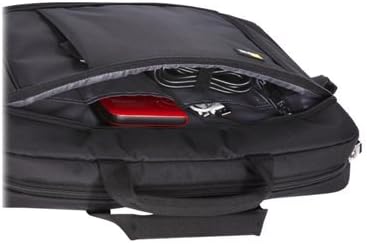
Figure 6: A separate compartment for keeping documents flat and secure.
4.3. Attaching to Rolling Luggage
For convenient travel, slide the luggage strap located on the back of the case over the handle of your rolling luggage. This secures the case on top of your suitcase, allowing for easier transport.
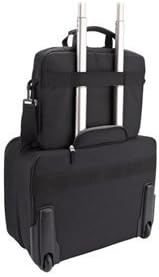
Figure 7: The luggage strap on the back of the case, designed to slide over a rolling luggage handle.
5. การบำรุงรักษา
- การทำความสะอาด: เช็ดภายนอกเคสด้วยผ้าamp cloth and mild soap. Do not use harsh chemicals or abrasive cleaners. Allow to air dry completely.
- การดูแลซิป: Periodically check zippers for any debris and clean as needed. Lubricate with a zipper lubricant if they become stiff.
- พื้นที่จัดเก็บ: ควรเก็บกล่องไว้ในที่แห้งและเย็น หลีกเลี่ยงแสงแดดโดยตรงเมื่อไม่ใช้งาน
6 การแก้ไขปัญหา
| ปัญหา | สาเหตุที่เป็นไปได้ | สารละลาย |
|---|---|---|
| ซิปติดขัดหรือปิดยาก | Debris in zipper teeth, lack of lubrication. | Clean zipper teeth with a small brush. Apply a small amount of zipper lubricant or wax. |
| Devices do not fit snugly. | Device dimensions exceed case specifications. | Ensure your devices (laptop up to 14.1 inches, iPad) fit within the specified dimensions (13.5 x 1.2 x 9.6 inches). |
| Shoulder strap detaches. | Improper attachment or excessive force. | Verify swivel hooks are securely fastened to D-rings. Avoid overloading the case. |
7. ข้อมูลจำเพาะ
| คุณสมบัติ | รายละเอียด |
|---|---|
| ยี่ห้อ | Case ลอจิก |
| หมายเลขรุ่น | AUA-314ANTH |
| สี | แอนทราไซต์ (สีเทา) |
| น้ำหนักสินค้า | 14.7 ออนซ์ |
| ขนาดสินค้า (กxยxส) | 14.6 x 2.8 x 11.4 นิ้ว |
| Max Device Dimensions (Laptop/iPad) | 13.5 x 1.2 x 9.6 นิ้ว |
| วัสดุ | ผ้ามีความทนทาน |
| สายสะพายไหล่ | Removable, adjustable |
| ช่องส่งสัมภาระ | ใช่ |
8. การรับประกันและการสนับสนุน
For warranty information and customer support, please refer to the official Case Logic webหรือติดต่อฝ่ายบริการลูกค้าโดยตรง โปรดเก็บใบเสร็จรับเงินไว้เป็นหลักฐานการซื้อสำหรับการเรียกร้องการรับประกันใดๆ
หมายเหตุ: เงื่อนไขการรับประกันเฉพาะอาจแตกต่างกันไปตามภูมิภาคและผู้ค้าปลีก