
การแนะนำ
This manual provides comprehensive instructions for the safe and efficient use of your Marmitek BoomBoom 560 Bluetooth Over-Ear Headphones. These headphones offer excellent digital sound quality with clear mid-tones and deep bass, along with passive noise reduction for an immersive audio experience. Please read this manual thoroughly before operating the device.

Image: Marmitek BoomBoom 560 Bluetooth Over-Ear Headphones, black, shown from a slight angle.
เนื้อหาแพ็คเกจ
โปรดตรวจสอบว่าสินค้าทั้งหมดที่ระบุไว้ด้านล่างนี้มีอยู่ในพัสดุของคุณหรือไม่:
- 1x Marmitek BoomBoom 560 Bluetooth Over-Ear Headphones
- 1x Micro USB to USB charging cable
- 1x 3.5mm Mini-jack audio cable (160 cm)
- 1x คู่มือผู้ใช้ (เอกสารนี้)

Image: Visual representation of the Marmitek BoomBoom 560 package contents, including the headphones, charging cable, audio cable, and user manual.
สินค้าเกินview: การควบคุมและพอร์ต
Familiarize yourself with the controls and ports on your BoomBoom 560 headphones:
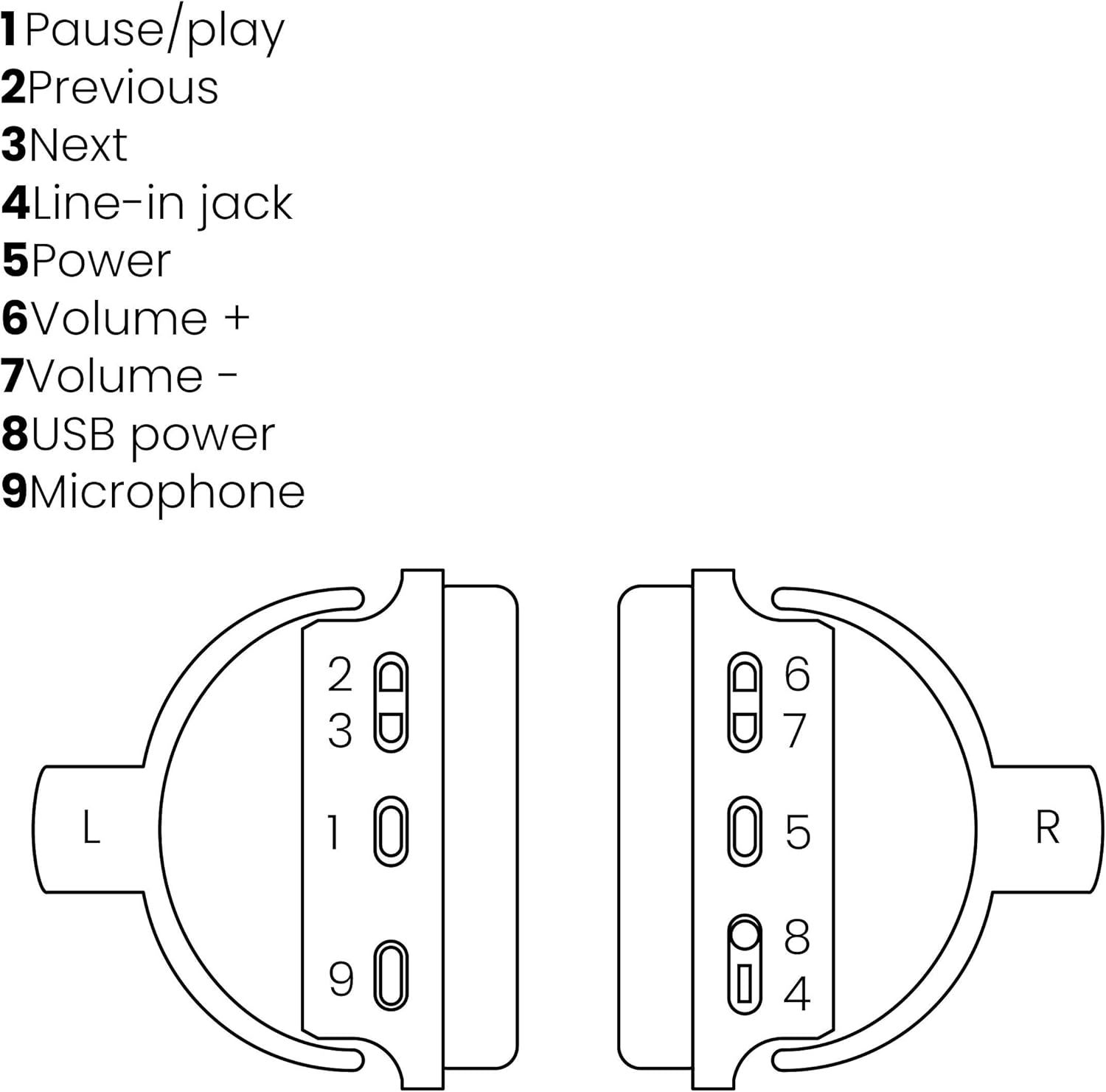
Image: A line drawing illustrating the left and right ear cup controls and ports, numbered for identification.
- ปุ่มหยุดชั่วคราว/เล่น: ควบคุมการเล่นเพลง
- ปุ่มติดตามก่อนหน้า: ข้ามไปยังเพลงก่อนหน้า
- ปุ่มติดตามถัดไป: ข้ามไปยังเพลงถัดไป
- แจ็คสัญญาณเข้า: For wired audio connection using the 3.5mm cable.
- ปุ่มเปิด/ปิด: Turns the headphones on/off and initiates Bluetooth pairing.
- ระดับเสียง + ปุ่ม: เพิ่มระดับเสียง
- ปุ่มปรับระดับเสียง: ลดระดับเสียง
- พอร์ตจ่ายไฟ USB: For charging the headphones using the Micro USB cable.
- ไมโครโฟน: ไมโครโฟนในตัวสำหรับการโทรแบบแฮนด์ฟรี
การตั้งค่า
1. การชาร์จหูฟัง
Before first use, fully charge your headphones. Connect the Micro USB end of the charging cable to the USB Power Port (8) on the headphones and the standard USB end to a USB power adapter (not included) or a computer's USB port. The LED indicator will show charging status. A full charge provides over 8 hours of playback time.
2. การจับคู่บลูทู ธ
วิธีเชื่อมต่อหูฟังแบบไร้สายกับอุปกรณ์ที่รองรับบลูทูธ:
- ตรวจสอบให้แน่ใจว่าหูฟังปิดอยู่
- กดปุ่มค้างไว้ ปุ่มเปิด/ปิด (5) จนกว่าไฟ LED จะกะพริบเป็นสีน้ำเงินและสีแดง ซึ่งแสดงว่าอยู่ในโหมดจับคู่
- บนสมาร์ทโฟน แท็บเล็ต หรืออุปกรณ์ Bluetooth อื่นๆ ของคุณ เปิดใช้งาน Bluetooth และค้นหาอุปกรณ์ที่มีอยู่
- Select "BoomBoom 560" from the list of found devices.
- เมื่อเชื่อมต่อแล้ว ไฟ LED จะกะพริบเป็นสีน้ำเงินช้าๆ

Image: Illustration depicting various Bluetooth-enabled devices (laptop, smartphone, tablet) wirelessly transmitting audio to the headphones.
3. การเชื่อมต่อแบบมีสาย
If Bluetooth is not available or the battery is depleted, you can use the included 3.5mm audio cable. Connect one end of the cable to the Line-in Jack (4) on the headphones and the other end to the audio output of your device.
คำแนะนำการใช้งาน
เปิด/ปิดเครื่อง
- การเปิดเครื่อง: กดปุ่มค้างไว้ ปุ่มเปิด/ปิด (5) for approximately 3 seconds until the LED indicator flashes blue.
- วิธีปิดเครื่อง: กดปุ่มค้างไว้ ปุ่มเปิด/ปิด (5) เป็นเวลาประมาณ 3 วินาที จนกว่าไฟแสดงสถานะ LED จะดับลง
การเล่นเพลง
- เล่น/หยุดชั่วคราว: กดปุ่ม Pause/Play Button (1) ครั้งหนึ่ง.
- เพลงถัดไป: กดปุ่ม Next Track Button (3) ครั้งหนึ่ง.
- แทร็กก่อนหน้า: กดปุ่ม Previous Track Button (2) ครั้งหนึ่ง.
การจัดการการโทร
When connected via Bluetooth, you can manage phone calls using the built-in microphone (9):
- รับ/วางสาย: กดปุ่ม Pause/Play Button (1) ครั้งหนึ่ง.
- ปฏิเสธสาย: กดปุ่มค้างไว้ Pause/Play Button (1) เป็นเวลาประมาณ 2 วินาที
การควบคุมระดับเสียง
- เพิ่มปริมาณ: กดปุ่ม Volume + Button (6).
- ลดระดับเสียง: กดปุ่ม Volume - Button (7).

Image: A user enjoying music or media with the Marmitek BoomBoom 560 headphones while relaxing at home.
การซ่อมบำรุง
เพื่อให้หูฟังของคุณมีอายุการใช้งานยาวนานและทำงานได้อย่างมีประสิทธิภาพสูงสุด:
- ทำความสะอาดหูฟังด้วยผ้านุ่มและแห้ง ห้ามใช้น้ำยาทำความสะอาดหรือสารละลายที่มีฤทธิ์กัดกร่อน
- หลีกเลี่ยงการให้หูฟังสัมผัสกับอุณหภูมิที่สูงหรือความชื้นสูงหรือแสงแดดโดยตรง
- เก็บหูฟังไว้ในที่แห้งและเย็นเมื่อไม่ใช้งาน
- อย่าพยายามถอดประกอบหรือซ่อมแซมหูฟังด้วยตัวเอง เพราะจะทำให้การรับประกันเป็นโมฆะ
การแก้ไขปัญหา
If you encounter issues with your BoomBoom 560 headphones, refer to the following common solutions:
- ไม่มีไฟฟ้า: ตรวจสอบให้แน่ใจว่าหูฟังชาร์จเต็มแล้ว เสียบหูฟังเข้ากับแหล่งจ่ายไฟโดยใช้สายชาร์จ USB
- ไม่สามารถจับคู่ผ่านบลูทูธ:
- ตรวจสอบให้แน่ใจว่าหูฟังอยู่ในโหมดจับคู่ (ไฟ LED กระพริบเป็นสีน้ำเงินและสีแดง)
- Ensure your Bluetooth device's Bluetooth function is enabled and within range (typically 10 meters).
- Try turning off and on both the headphones and your Bluetooth device.
- Delete "BoomBoom 560" from your device's Bluetooth list and attempt to pair again.
- ไม่มีเสียง:
- ตรวจสอบระดับเสียงทั้งบนหูฟังและอุปกรณ์ที่เชื่อมต่อของคุณ
- ตรวจสอบให้แน่ใจว่าหูฟังจับคู่กันอย่างถูกต้อง หรือเสียบสายสัญญาณเสียง 3.5 มม. แน่นสนิทแล้ว
- If using Bluetooth, try disconnecting and reconnecting.
- คุณภาพเสียงไม่ดี:
- ขยับเข้าใกล้อุปกรณ์บลูทูธของคุณเพื่อลดสัญญาณรบกวน
- Ensure there are no obstacles between the headphones and the device.
- ตรวจสอบแหล่งเสียงเพื่อดูปัญหาด้านคุณภาพ
- Loose Earcup Bracket: If the earcup bracket feels loose, handle the headphones with care. Avoid excessive force when adjusting or folding. If the issue persists and affects functionality, contact customer support.
ข้อมูลจำเพาะ
| ชื่อรุ่น | บูมบูม 560 |
| หมายเลขรุ่น | 8122 |
| ยี่ห้อ | มาร์มิเท็ก |
| เทคโนโลยีการเชื่อมต่อ | Wireless (Bluetooth), Wired (3.5mm jack) |
| ความเข้ากันได้กับบลูทูธ | ใช่ |
| ฟอร์มแฟกเตอร์ | ครอบหู |
| วัสดุ | หนัง (ที่ครอบหู) |
| คุณสมบัติพิเศษ | การลดเสียงรบกวน |
| เทคโนโลยีไมโครโฟน | Omni (Built-in) |
| คำอธิบายแบตเตอรี่ | ลิเธียมไอออน (Li-Ion) |
| อายุการใช้งานแบตเตอรี่ | Over 8 hours (approx.) |
| อัตราส่วนสัญญาณต่อเสียงรบกวน (SNR) | 82 เดซิเบล |
| ขนาดสินค้า | 23 x 5 x 18 ซม.; 100 กรัม |
การรับประกันและการสนับสนุน
Marmitek products are designed and manufactured to high quality standards. For information regarding warranty terms and conditions, please refer to the documentation provided with your purchase or visit the official Marmitek webเว็บไซต์.
หากต้องการความช่วยเหลือเพิ่มเติมหรือการสนับสนุนทางเทคนิค โปรดไปที่ [ที่อยู่เว็บไซต์] Marmitek Store on Amazon or the official Marmitek support channels.

Image: Logo indicating "Dutch Quality" and compliance with "EU European Standards".