
1. บทนำ
The D-Link GO-SW-5G is a 5-Port Unmanaged Gigabit Desktop Switch designed for home and small office environments. This device provides a simple and cost-effective solution to expand your network connectivity, offering high-speed Gigabit Ethernet ports for reliable data transfer. It incorporates D-Link's Green Technology for energy efficiency, reduced heat generation, and extended product lifespan.
This switch is a plug-and-play device, requiring no complex configuration or software installation, making it easy to integrate into an existing network.
2. เนื้อหาบรรจุภัณฑ์
โปรดตรวจสอบว่ารายการทั้งหมดที่ระบุไว้ด้านล่างมีอยู่ในแพ็คเกจของคุณหรือไม่:
- D-Link GO-SW-5G 5-Port Gigabit Desktop Switch
- อะแดปเตอร์แปลงไฟ
- คู่มือการติดตั้งด่วน
หากมีสินค้าใดสูญหายหรือเสียหาย โปรดติดต่อผู้ค้าปลีกเพื่อขอความช่วยเหลือ
3. คำแนะนำในการตั้งค่า
The D-Link GO-SW-5G switch is designed for easy plug-and-play installation. Follow these steps to set up your device:
3.1. เชื่อมต่ออะแดปเตอร์ไฟฟ้า
- Locate the power input port on the side of the D-Link GO-SW-5G switch.
- เสียบอะแดปเตอร์แปลงไฟที่ให้มาเข้ากับพอร์ตนี้
- เสียบปลายอีกด้านของอะแดปเตอร์แปลงไฟเข้ากับเต้ารับไฟฟ้าทั่วไป
- The power LED on the front of the switch will illuminate, indicating that the device is receiving power.

รูปที่ 1: ด้านข้าง view of the D-Link GO-SW-5G switch with the power input port.
3.2. เชื่อมต่อกับเครือข่ายของคุณ
- Using a standard Ethernet cable (RJ45), connect one end to an available LAN port on your router (not your modem).
- Connect the other end of this Ethernet cable to any of the five available ports on the back of the D-Link GO-SW-5G switch.
- The corresponding LED on the front of the switch will light up, indicating an active connection.
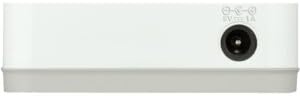
รูปที่ 2: หลัง view of the D-Link GO-SW-5G switch with five Ethernet ports.
3.3. Connect Network Devices
- Connect your network devices (e.g., computers, gaming consoles, network printers, smart TVs) to the remaining available Ethernet ports on the D-Link GO-SW-5G switch using Ethernet cables.
- Each connected device will have its corresponding LED on the front of the switch illuminate, confirming a successful connection.

รูปที่ 3: ด้านหน้า view of the D-Link GO-SW-5G switch showing active port LEDs.
4. คู่มือการใช้งาน
The D-Link GO-SW-5G is an unmanaged switch, meaning it operates automatically without requiring user configuration. Once connected as described in the Setup section, it will begin forwarding network traffic between connected devices.
- การเจรจาอัตโนมัติ: The switch automatically detects the network speed (10/100/1000 Mbps) and duplex mode (half/full) of connected devices and adjusts accordingly.
- ระบบ MDI/MDIX อัตโนมัติ: All ports support automatic MDI/MDIX crossover, eliminating the need for crossover cables when connecting to other switches or hubs.
- ไฟ LED แสดงสถานะ: Each port has an LED indicator on the front panel. A lit LED indicates an active link, and blinking indicates network activity.
5. การบำรุงรักษา
To ensure optimal performance and longevity of your D-Link GO-SW-5G switch, consider the following maintenance guidelines:
- การจัดวาง: วางสวิตช์ไว้ในที่แห้งและเย็น หลีกเลี่ยงแสงแดดโดยตรง แหล่งความร้อน และความชื้นมากเกินไป ตรวจสอบให้แน่ใจว่ามีการระบายอากาศที่ดีรอบๆ อุปกรณ์
- การทำความสะอาด: Use a soft, dry cloth to clean the exterior of the switch. Avoid using liquid or aerosol cleaners, as they may damage the device.
- การจัดการสายเคเบิล: ควรจัดเก็บสายอีเธอร์เน็ตให้เป็นระเบียบเรียบร้อยเพื่อป้องกันการพันกันและการหลุดการเชื่อมต่อโดยไม่ตั้งใจ
- วงจรไฟฟ้า: If you experience network issues, a simple power cycle (unplugging the power adapter for 10 seconds and then plugging it back in) can often resolve minor problems.
6 การแก้ไขปัญหา
If you encounter issues with your D-Link GO-SW-5G switch, refer to the following common troubleshooting steps:
- ไม่มีไฟ LED แสดงสถานะ:
- ตรวจสอบให้แน่ใจว่าได้เสียบอะแดปเตอร์แปลงไฟเข้ากับสวิตช์และเต้ารับไฟฟ้าที่ใช้งานได้สนิทแล้ว
- ตรวจสอบว่าเต้ารับไฟฟ้าใช้งานได้โดยเสียบอุปกรณ์อื่น
- No Link/Activity LED for a Connected Device:
- ตรวจสอบให้แน่ใจว่าเสียบสายอีเธอร์เน็ตเข้ากับพอร์ตของสวิตช์และอุปกรณ์เครือข่ายอย่างแน่นหนาแล้ว
- ลองใช้สายเคเบิลอีเทอร์เน็ตอื่นเพื่อตัดสายเคเบิลที่ผิดปกติออกไป
- ตรวจสอบให้แน่ใจว่าอุปกรณ์ที่เชื่อมต่อเปิดอยู่และอะแดปเตอร์เครือข่ายทำงานได้อย่างถูกต้อง
- ลองเชื่อมต่ออุปกรณ์เข้ากับพอร์ตอื่นบนสวิตช์
- ความเร็วเครือข่ายช้า:
- Verify that all connected devices and cables support Gigabit Ethernet (1000 Mbps) for optimal performance. The switch will operate at the lowest common speed.
- Ensure your router and internet service provider (ISP) plan support the desired speeds.
- Perform a power cycle on the switch and your router.
- การเชื่อมต่อไม่ต่อเนื่อง:
- ตรวจสอบการเชื่อมต่อสายเคเบิลหลวม
- Ensure the switch is not overheating; provide adequate ventilation.
- Test with different Ethernet cables.
7. ข้อมูลจำเพาะ
| ยี่ห้อ | ดีลิงค์ |
| หมายเลขรุ่น | GO-SW-5G/B |
| จำนวนพอร์ต | 5 |
| ประเภทสวิตซ์ | ไม่ได้รับการจัดการ |
| อัตราการถ่ายโอนข้อมูล | 1 กิกะบิตต่อวินาที (10/100/1000 Mbps) |
| อินเทอร์เฟซ | RJ45 |
| สี | สีขาว |
| น้ำหนักสินค้า | 0.22 ปอนด์ |
| เล่มที่tage | 100-240 โวลต์ |
| อุปกรณ์ที่รองรับ | PC, Mac, and other Ethernet-enabled devices |
| การเปลี่ยนผ้า | 10 กิกะบิตต่อวินาที |
| ยูพีซี | 790069365669 |
8. การรับประกันและการสนับสนุน
การรับประกันแบบจำกัด: The D-Link GO-SW-5G switch comes with a 3-year limited warranty. For detailed terms and conditions, please refer to the warranty information included in your package or visit the official D-Link webเว็บไซต์.
การสนับสนุนด้านเทคนิค: For technical assistance, product registration, or to download the latest firmware and documentation, please visit the การสนับสนุน D-Link Webเว็บไซต์ or contact D-Link customer service.