
ATI 100-505746
คู่มือผู้ใช้การ์ดกราฟิก ATI AMD FirePro W600
รุ่น: 100-505746
1. บทนำ
This user manual provides comprehensive instructions for the installation, operation, and maintenance of your ATI AMD FirePro W600 2GB GDDR5 6Mini DisplayPort PCI-Express Video Card. The FirePro W600 is designed for professional graphics applications, offering high performance and multi-display capabilities. Please read this manual thoroughly before installing and operating the graphics card to ensure proper functionality and safety.
2. ข้อมูลด้านความปลอดภัย
โปรดปฏิบัติตามข้อควรระวังด้านความปลอดภัยต่อไปนี้เสมอ เพื่อป้องกันความเสียหายต่อผลิตภัณฑ์หรือการบาดเจ็บต่อตัวคุณเอง
- ตรวจสอบให้แน่ใจว่าระบบคอมพิวเตอร์ของคุณปิดอยู่และถอดปลั๊กออกจากเต้าเสียบที่ผนังก่อนการติดตั้ง
- Discharge any static electricity from your body by touching a grounded metal object (e.g., the computer chassis) before handling the graphics card.
- Handle the graphics card by its edges; avoid touching the components or gold-plated connectors.
- อย่าให้การ์ดจอโดนความชื้นหรือโดนอุณหภูมิที่สูงหรือสูงเกินไป
- Only use the card in a well-ventilated computer case to prevent overheating.
3. เนื้อหาบรรจุภัณฑ์
ตรวจสอบว่ามีรายการทั้งหมดอยู่ในแพ็คเกจของคุณ:
- ATI AMD FirePro W600 Graphics Card
- คู่มือเริ่มต้นใช้งานฉบับย่อ (ถ้ามี)
- Driver CD (if included, otherwise download from manufacturer's webงาน)
- Mini DisplayPort to DVI adapters (quantity may vary, often sold separately)
4. การตั้งค่าและการติดตั้ง
4.1 ข้อกำหนดของระบบ
- PCI-Express x16 slot available on motherboard.
- Sufficient power supply (consult your system's power supply specifications).
- Compatible operating system (e.g., Windows 7/8/10, Linux).
- Minimum 2GB system memory.
4.2 การติดตั้งฮาร์ดแวร์
- เตรียมคอมพิวเตอร์ของคุณให้พร้อม: Power off your computer and unplug the power cord. Open the computer case.
- Locate an available PCI-Express x16 slot: Identify an empty PCI-Express x16 slot on your motherboard. Remove the corresponding expansion slot cover from the computer case.
- ติดตั้งการ์ดจอ: Carefully align the graphics card with the PCI-Express x16 slot. Press down firmly and evenly until the card is securely seated in the slot. Secure the card with the screw or latch mechanism of your computer case.
- Connect power (if applicable): The FirePro W600 typically does not require additional power connectors beyond the PCIe slot, but always verify your specific model's requirements.
- ปิดเคสคอมพิวเตอร์: Once the card is securely installed, close your computer case and reconnect all cables.
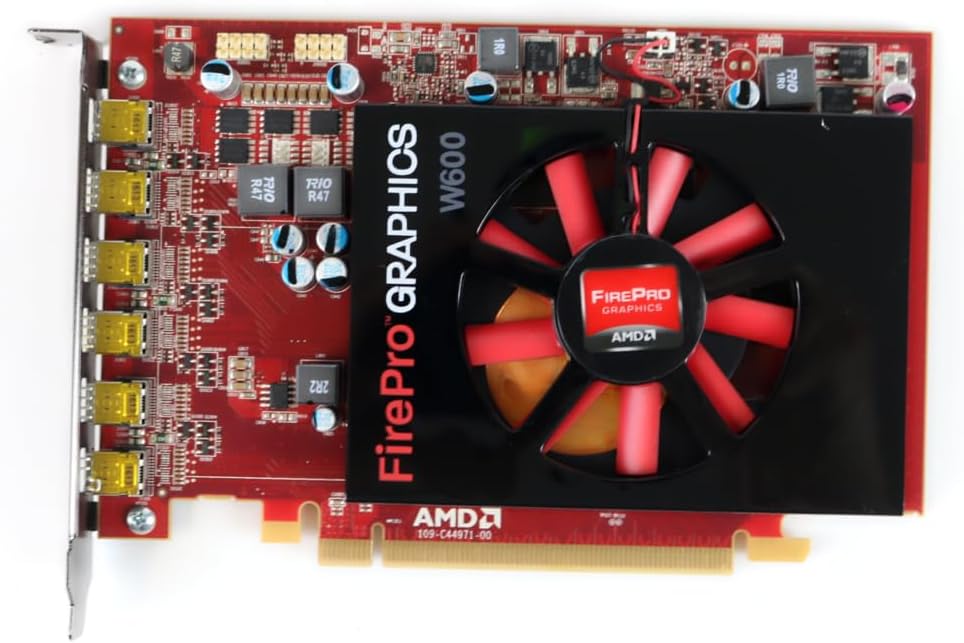
รูปที่ 1 : ด้านหน้า view of the ATI AMD FirePro W600 graphics card, showing the cooling fan and the FirePro Graphics branding.

รูปที่ 2: ด้านหลัง view of the ATI AMD FirePro W600 graphics card, displaying the intricate circuitry and components on the back of the PCB.
4.3 การติดตั้งไดรเวอร์
- เปิดเครื่องคอมพิวเตอร์ของคุณ: Boot your computer. The operating system may automatically detect the new hardware and install a basic driver.
- Download the latest drivers: For optimal performance and stability, it is highly recommended to download the latest professional drivers directly from the AMD official website. Navigate to the support section and search for "FirePro W600" drivers.
- Install the drivers: Run the downloaded driver installer and follow the on-screen prompts. You may need to restart your computer after installation.
5. การใช้งานการ์ดจอ
5.1 การเชื่อมต่อจอแสดงผล
The ATI AMD FirePro W600 features six Mini DisplayPort outputs. You will need Mini DisplayPort cables or Mini DisplayPort to DVI/HDMI/VGA adapters (active adapters are recommended for multi-monitor setups, especially for AMD Eyefinity features) to connect your monitors.
- Connect your Mini DisplayPort cables or adapters to the Mini DisplayPort outputs on the graphics card.
- Connect the other end of the cables to your monitors.
- Power on your monitors.

Figure 3: Detail of the six Mini DisplayPort outputs on the FirePro W600, indicating its multi-display capability.
5.2 Configuring Multi-Monitor Setups (AMD Eyefinity)
The FirePro W600 supports AMD Eyefinity technology, allowing you to combine multiple displays into a single large desktop or create independent display groups.
- After driver installation, right-click on your desktop and select "AMD Radeon Settings" or "AMD Catalyst Control Center" (depending on driver version).
- Navigate to the "Display" or "Eyefinity" section.
- Follow the on-screen instructions to detect and configure your connected displays. You can arrange displays, set resolutions, and create Eyefinity display groups for a panoramic viewการสร้างประสบการณ์
- For optimal performance with Eyefinity, ensure you are using active Mini DisplayPort adapters for any non-DisplayPort monitors.
6. การบำรุงรักษา
การบำรุงรักษาตามปกติจะช่วยให้การ์ดจอของคุณมีอายุการใช้งานยาวนานและมีประสิทธิภาพเหมาะสมที่สุด
- การกำจัดฝุ่น: Periodically clean dust from the graphics card's fan and heatsink using compressed air. Ensure the computer is powered off and unplugged before cleaning. Hold the fan blades gently to prevent over-spinning during cleaning.
- การอัปเดตไดรเวอร์: Keep your graphics drivers updated by regularly checking the AMD official webเว็บไซต์สำหรับเวอร์ชั่นล่าสุด
- ระบบระบายอากาศ: Ensure your computer case has adequate airflow to prevent the graphics card from overheating.
7 การแก้ไขปัญหา
หากคุณพบปัญหาเกี่ยวกับการ์ดจอ โปรดดูปัญหาทั่วไปและวิธีแก้ไขต่อไปนี้:
| ปัญหา | สาเหตุที่เป็นไปได้ / วิธีแก้ไข |
|---|---|
| ไม่มีภาพแสดงผลหลังจากติดตั้งเสร็จ |
|
| Driver installation failure. |
|
| Only some monitors are detected in a multi-monitor setup. |
|
| ระบบล่มหรือค้างระหว่างการทำงานที่ใช้กราฟิกหนัก |
|
8. ข้อมูลจำเพาะ
| คุณสมบัติ | รายละเอียด |
|---|---|
| ชิปเซ็ต | AMD FirePro W600 |
| นาฬิกาเครื่องยนต์ | 600 เมกะเฮิรตซ์ |
| หน่วยความจำ | แรม 2GB GDDR5 |
| อินเทอร์เฟซหน่วยความจำ | 128 บิต |
| ความละเอียดสูงสุด | 4096 x 2304 |
| ตัวเชื่อมต่อ | 6x Mini DisplayPorts |
| อินเทอร์เฟซ | พีซีไอเอ็กซ์เพรส x16 |
| น้ำหนักสินค้า | 7 ออนซ์ |
| ขนาดสินค้า (กxยxส) | 1.57 x 4.21 x 6.45 นิ้ว |
9. ข้อมูลการรับประกัน
For detailed warranty information regarding your ATI AMD FirePro W600 graphics card, please refer to the warranty card included with your product or visit the official ATI/AMD support website. Warranty terms and conditions may vary by region and retailer. Keep your proof of purchase for warranty claims.
10. การสนับสนุน
For technical support, driver downloads, and frequently asked questions, please visit the official AMD support webเว็บไซต์:www.amd.com/th/support
You may also contact your retailer or point of purchase for assistance.
Ask a question about this manual
Ask about setup, troubleshooting, compatibility, parts, safety, or missing instructions. Manuals+ will review the question and use this page’s manual context to help answer it.