
1. บทนำ
This manual provides comprehensive instructions for the installation, operation, maintenance, and troubleshooting of your D-Link DGS-1100-08 8 Port Easy Smart Managed Gigabit Network Internet Desktop Switch. Please read this manual thoroughly before using the device to ensure proper functionality and to prevent damage.
2. ข้อมูลด้านความปลอดภัย
Observe the following safety guidelines to ensure safe operation of the device:
- Ensure the power adapter is connected to a compatible power source.
- อย่าให้เครื่องโดนน้ำหรือความชื้นมากเกินไป
- อย่าเปิดอุปกรณ์casinง. ส่งต่อการบริการทั้งหมดให้กับบุคลากรที่มีคุณสมบัติ
- Place the device on a stable, flat surface with adequate ventilation.
- หลีกเลี่ยงการวางอุปกรณ์ใกล้แหล่งความร้อนหรือแสงแดดโดยตรง
3. เนื้อหาบรรจุภัณฑ์
ตรวจสอบว่าแพ็คเกจของคุณมีรายการต่อไปนี้:
- D-Link DGS-1100-08 8 Port Easy Smart Managed Gigabit Network Internet Desktop Switch
- อะแดปเตอร์แปลงไฟ
- เอกสารประกอบ (คู่มือการติดตั้งอย่างรวดเร็ว, ใบรับประกัน)
4. สินค้าหมดview
The DGS-1100-08 is an 8-port Gigabit Ethernet switch designed for small and medium businesses, offering essential management functions.
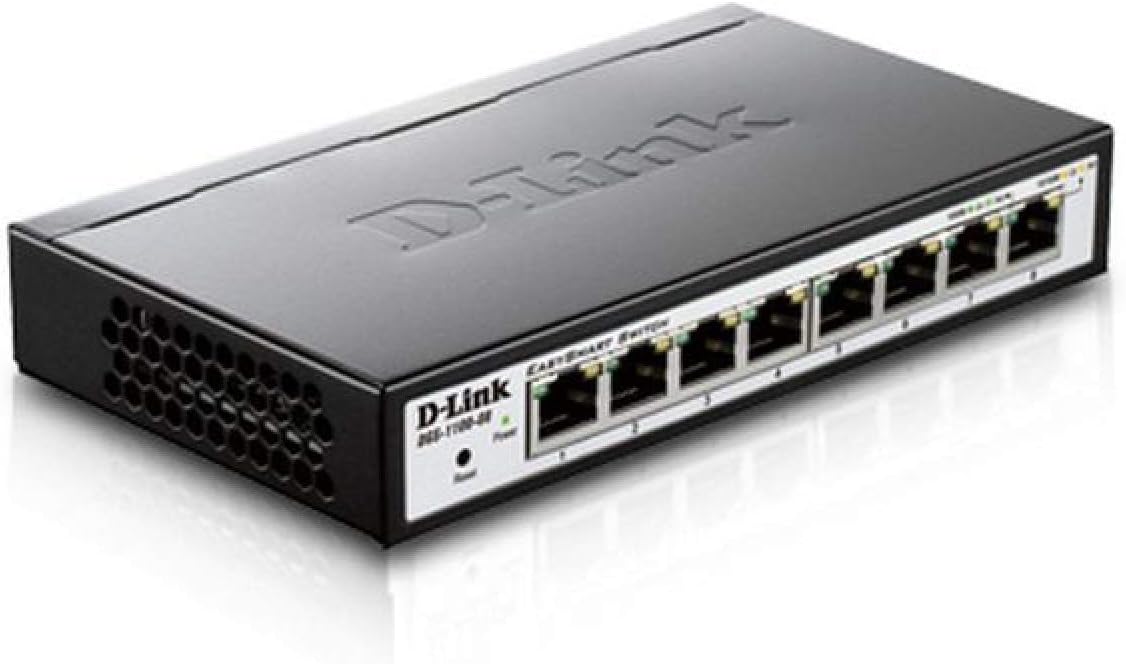
รูปที่ 4.1: มุม view of the D-Link DGS-1100-08 switch, showing the D-Link logo, model number, power and reset buttons, and the eight Gigabit Ethernet ports with their corresponding LED indicators.

รูปที่ 4.2 : ด้านหน้า view of the D-Link DGS-1100-08 switch, clearly displaying the eight Gigabit Ethernet ports labeled 1 through 8, along with the Power LED and Reset button.
4.1 แผงด้านหน้า
- พอร์ตอีเทอร์เน็ต (1-8): Eight 10/100/1000BASE-T Gigabit Ethernet ports for network connections.
- กำลังไฟ LED: ระบุสถานะพลังงานของอุปกรณ์
- ปุ่มรีเซ็ต: ใช้สำหรับรีเซ็ตอุปกรณ์กลับสู่การตั้งค่าเริ่มต้นจากโรงงาน
4.2 ไฟแสดงสถานะ LED
| นำ | สถานะ | คำอธิบาย |
|---|---|---|
| พลัง | สีเขียวทึบ | อุปกรณ์เปิดอยู่ |
| ลิงค์/แอคชั่น (ต่อพอร์ต) | สีเขียวทึบ | A valid network connection is established at Gigabit speed. |
| ลิงค์/แอคชั่น (ต่อพอร์ต) | สีเหลืองอำพัน | A valid network connection is established at 10/100 Mbps speed. |
| ลิงค์/แอคชั่น (ต่อพอร์ต) | กระพริบ | Data is being transmitted or received on the port. |
5. การตั้งค่า
Follow these steps to set up your DGS-1100-08 switch:
- การเชื่อมต่อทางกายภาพ: Connect your network devices (computers, servers, network printers) to the Ethernet ports (1-8) on the switch using standard Ethernet cables.
- การเชื่อมต่อไฟฟ้า: Connect the provided power adapter to the power input on the switch and then plug it into a power outlet. The Power LED should illuminate.
- การเข้าถึงครั้งแรก: The switch has a default IP address of 10.90.90.90 and a default username/password of แอดมิน/แอดมิน. เพื่อเข้าถึง web management interface, you may need to temporarily configure your computer's IP address to be in the same subnet (e.g., 10.90.90.100 with a subnet mask of 255.0.0.0).
- Web การเข้าถึงอินเทอร์เฟซ: เปิด web เบราว์เซอร์และเข้าสู่
http://10.90.90.90in the address bar. Log in with the default credentials. - อัพเดตเฟิร์มแวร์: It is recommended to check for and install the latest firmware version from the D-Link support website to ensure optimal performance and access to the latest features and bug fixes.
6. คู่มือการใช้งาน
The DGS-1100-08 is a managed switch, offering various features configurable via its web อินเทอร์เฟซการจัดการ:
- VLAN (เครือข่ายพื้นที่เสมือน): Configure 802.1Q VLANs for network segmentation and enhanced security.
- คุณภาพการบริการ (QoS): จัดลำดับความสำคัญของปริมาณการรับส่งข้อมูลเครือข่ายสำหรับแอปพลิเคชันที่สำคัญ เช่น เสียงและวิดีโอ
- Bandwidth Limiting: Control the maximum bandwidth for specific ports to manage network congestion.
- การรวมลิงค์: รวมลิงก์ทางกายภาพหลายลิงก์เข้าเป็นลิงก์เชิงตรรกะเดียว เพื่อเพิ่มแบนด์วิดท์และความซ้ำซ้อน
- การสอดแนม IGMP: Optimize multicast traffic delivery, preventing unnecessary flooding to all ports.
- มิเรอร์พอร์ต: Copy traffic from one or more source ports to a destination port for network monitoring and analysis.
Refer to the online help within the web management interface for detailed configuration steps for each feature.
7. การบำรุงรักษา
To ensure the longevity and optimal performance of your switch:
- รักษาอุปกรณ์ให้สะอาดและปราศจากฝุ่น ใช้ผ้านุ่มและแห้งทำความสะอาด
- Ensure proper ventilation by keeping the vents clear of obstructions.
- Regularly check the D-Link support website for firmware updates and apply them as recommended.
- Perform periodic backups of your switch configuration to a local file.
8 การแก้ไขปัญหา
If you encounter issues with your DGS-1100-08 switch, consider the following:
- ไม่มีไฟฟ้า: Ensure the power adapter is securely connected to both the switch and a working power outlet. Check the Power LED.
- ไม่มีลิงค์บนพอร์ต: Verify that the Ethernet cable is properly connected at both ends. Test with a different cable or port. Ensure the connected device is powered on and functioning correctly.
- ไม่สามารถเข้าถึง Web อินเทอร์เฟซ: Double-check your computer's IP address configuration to ensure it is in the same subnet as the switch (default 10.90.90.90). Clear your browser's cache or try a different browser.
- ปัญหาประสิทธิภาพเครือข่าย: Check for excessive network traffic, loopbacks (ensure loopback detection is enabled), or incorrect QoS configurations.
- รีเซ็ตเป็นค่าเริ่มต้นจากโรงงาน: If issues persist, use the reset button on the front panel to restore the switch to its original factory settings. This will erase all custom configurations.
9. ข้อมูลจำเพาะ
| คุณสมบัติ | รายละเอียด |
|---|---|
| หมายเลขรุ่น | ดีจีเอส-1100-08 |
| จำนวนพอร์ต | 8 x 10/100/1000BASE-T Gigabit Ethernet |
| อัตราการถ่ายโอนข้อมูล | 1000 เมกะบิตต่อวินาที |
| ขนาดสินค้า (กxยxส) | 6.75 x 3.94 x 1.13 นิ้ว |
| น้ำหนักสินค้า | 15 ออนซ์ |
| ประเภทการบริหารจัดการ | Easy Smart Managed |
| การประหยัดพลังงาน | D-Link Green Technology, IEEE 802.3az (Energy Efficient Ethernet) |
| ส่วนประกอบที่รวมอยู่ | Switch - 8 ports - managed |
10. การรับประกันและการสนับสนุน
D-Link provides a รับประกันตลอดอายุการใช้งาน for the DGS-1100-08 switch, ensuring long-term reliability and peace of mind.
For further assistance, technical support, or to download the full user guide and latest firmware, please visit the official D-Link support website or refer to the User Guide (PDF) available at https://manuals.plus/m/ecc0db5b29561c67ba510c6e291c2f520d486733cbbed65950841084a1c2cb4f.
You can also visit the D-Link Store for more product information and resources: D-Link Store on Amazon.