
1. บทนำ
The iBall Dhwani 5.1 Multimedia Speaker system is designed to provide a rich and immersive audio experience. Featuring a 5.1 channel configuration with a powerful subwoofer and four satellite speakers, this system delivers surround sound quality for various multimedia applications. Its wooden cabinet construction enhances sound depth and clarity. The system offers versatile connectivity options including USB, SD/MMC card slots, AUX (2.1CH Stereo), and 5.1 channel input, along with a built-in FM radio.
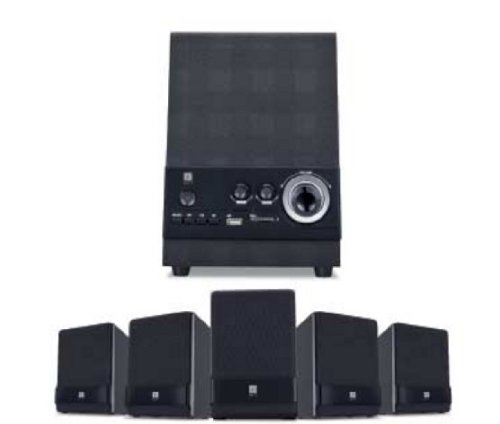
Figure 1: iBall Dhwani 5.1 Multimedia Speaker System
2. คำแนะนำในการตั้งค่า
Follow these steps to set up your iBall Dhwani 5.1 Multimedia Speaker system:
- การแกะกล่อง: Carefully remove all components from the packaging. Ensure you have one subwoofer and four satellite speakers.
- ตำแหน่งลำโพง:
- Place the subwoofer on the floor, preferably near a wall or corner for optimal bass response.
- Position the four satellite speakers around your listening area. For a true surround sound experience, place two satellites at the front (left and right of your display) and two at the rear (left and right behind your listening position). Ensure wires are not stretched or obstructed.
- การเชื่อมต่อลำโพงแซทเทิลไลท์: Connect each satellite speaker to the corresponding output ports on the rear of the subwoofer unit. Ensure a secure connection for each speaker.
- เชื่อมต่อแหล่งสัญญาณเสียง:
- For 5.1 Channel Input: Use the provided 5.1 audio cables to connect the subwoofer to your 5.1 channel sound card or DVD player. Match the color-coded plugs to the corresponding jacks (e.g., Front L/R, Rear L/R, Center/Sub).
- For AUX (2.1CH Stereo) Input: Use a 3.5mm stereo audio cable to connect the subwoofer's AUX input to the audio output of your PC, laptop, smartphone, or other audio device.
- การเชื่อมต่อไฟฟ้า: Plug the power cord from the subwoofer into a standard AC power outlet.
- เปิดเครื่องครั้งแรก: Turn on the power switch located on the subwoofer unit. The system should power on, indicated by an LED light.
3. คู่มือการใช้งาน
This section details how to operate your iBall Dhwani 5.1 speaker system.
3.1 เปิด/ปิดเครื่อง
Locate the power switch on the subwoofer unit. Flip the switch to the 'ON' position to power on the speakers. Flip it to 'OFF' to power down.
3.2 การเลือกแหล่งที่มาของอินพุต
Use the 'MODE' button on the front panel of the subwoofer or the remote control to cycle through available input sources:
- 5.1 ช่อง: For true 5.1 surround sound from compatible devices.
- AUX (2.1 CH Stereo): For stereo audio input from PCs, laptops, mobile phones, etc.
- ยูเอสบี: สำหรับการเล่นเสียง files from a USB pen drive.
- SD/MMC: สำหรับการเล่นเสียง files from an SD or MMC memory card.
- เอฟเอ็ม: For listening to the built-in FM radio.
3.3 การควบคุมระดับเสียง
Adjust the master volume using the main volume knob on the subwoofer's front panel or the volume buttons on the remote control. Individual channel volume adjustments (e.g., bass, center, surround) may also be available via the remote control.
3.4 USB/SD/MMC Playback
Insert a USB pen drive or an SD/MMC card into the respective slot on the subwoofer. The system will automatically switch to USB/SD mode and begin playing compatible audio files. Use the playback controls (Play/Pause, Next, Previous) on the subwoofer or remote control.
การใช้งานวิทยุ FM 3.5
- Switch the input mode to 'FM'.
- Press the 'SCAN' button (if available) to automatically scan and save available FM stations.
- Use the 'NEXT' and 'PREVIOUS' buttons to navigate through the saved stations.
- ยืดเสาอากาศวิทยุ FM (ถ้ามี) เพื่อการรับสัญญาณที่ดีขึ้น
4. การบำรุงรักษา
Proper care and maintenance will ensure the longevity and optimal performance of your speaker system.
- การทำความสะอาด: Use a soft, dry cloth to wipe the surfaces of the speakers and subwoofer. Do not use liquid cleaners, aerosols, or abrasive materials, as these can damage the wooden finish and electronic components.
- การกำจัดฝุ่น: ปัดฝุ่นที่ตะแกรงและช่องระบายอากาศของลำโพงเป็นประจำเพื่อป้องกันการสะสม ซึ่งอาจส่งผลต่อคุณภาพเสียงและการระบายความร้อนภายในได้
- การจัดวาง: ควรหลีกเลี่ยงการวางลำโพงไว้ในที่ที่มีแสงแดดส่องโดยตรง ใกล้แหล่งความร้อน หรือในบริเวณที่มีความชื้นสูง ตรวจสอบให้แน่ใจว่ามีการระบายอากาศที่เพียงพอรอบๆ ซับวูฟเฟอร์
- การจัดการสายเคเบิล: Ensure all cables are securely connected and not pinched or tangled. Avoid placing heavy objects on cables.
- ปิดเครื่องเมื่อไม่ใช้งาน: For extended periods of inactivity, it is recommended to power off the speaker system and unplug it from the power outlet.
5 การแก้ไขปัญหา
If you encounter issues with your iBall Dhwani 5.1 speaker system, refer to the following common problems and solutions:
| ปัญหา | สาเหตุที่เป็นไปได้ | สารละลาย |
|---|---|---|
| ไม่มีเสียงออกจากลำโพง |
|
|
| เสียงผิดเพี้ยนหรือไม่ชัดเจน |
|
|
| ไม่สามารถเล่นไฟล์จาก USB/SD การ์ดได้ |
|
|
| การรับสัญญาณวิทยุ FM ไม่ดี |
|
|
6. ข้อมูลจำเพาะ
| ชื่อรุ่น | Dhwani 5.1 |
| พิมพ์ | ระบบลำโพงมัลติมีเดีย |
| การกำหนดค่าช่อง | 5.1 |
| Total Power Output (RMS) | 23 วัตต์ |
| Frequency Response (Satellite) | 40 ถึง 20000 เฮิรตซ์ |
| อัตราส่วนสัญญาณต่อเสียงรบกวน | 75 เดซิเบล |
| Satellite Driver | 3-inch full-range |
| การเชื่อมต่อ | 5.1 Channel Input, AUX (2.1CH Stereo), USB, SD/MMC |
| คุณสมบัติเพิ่มเติม | Built-in FM Radio, Full Volume Controls, Magnetically Shielded Satellites |
| ขนาดแพ็คเกจ | 40.6 x 39.4 x 21 ซม. |
| น้ำหนักสินค้า | 4.46 กก. |
7. การรับประกันและการสนับสนุน
For warranty information and customer support, please refer to the warranty card included with your product or visit the official iBall webไซต์ โปรดเก็บใบเสร็จรับเงินไว้เป็นหลักฐานการซื้อสำหรับการเรียกร้องการรับประกัน
For technical assistance or service inquiries, please contact iBall customer support through their official channels.