
1. บทนำ
The D-Link DGS-1500-28 SmartPro 24-Port Gigabit Switch is a high-performance Layer 3 managed switch designed for small to medium-sized businesses. It offers 24 Gigabit Ethernet ports and 4 SFP+ expansion slots, providing flexible connectivity and advanced management features. This manual provides essential information for the proper installation, configuration, operation, and maintenance of your DGS-1500-28 switch.
2. เนื้อหาบรรจุภัณฑ์
Verify the following items are present in your DGS-1500-28 package. If any item is missing or damaged, please contact your local D-Link reseller for assistance.
- DGS-1500-28 SmartPro 24-Port Gigabit Switch
- สายไฟ
- Rack Mount Kit (two brackets and screws)
- ขายาง (สำหรับติดตั้งบนเดสก์ท็อป)
- Console Cable (RJ-45 to RS-232)
- คู่มือการติดตั้งแบบด่วน
- CD-ROM (containing product documentation)
3. คำอธิบายทางกายภาพ
3.1 แผงด้านหน้า
The front panel of the DGS-1500-28 switch features the Gigabit Ethernet ports, SFP+ slots, and LED indicators for monitoring the switch's status and activity.
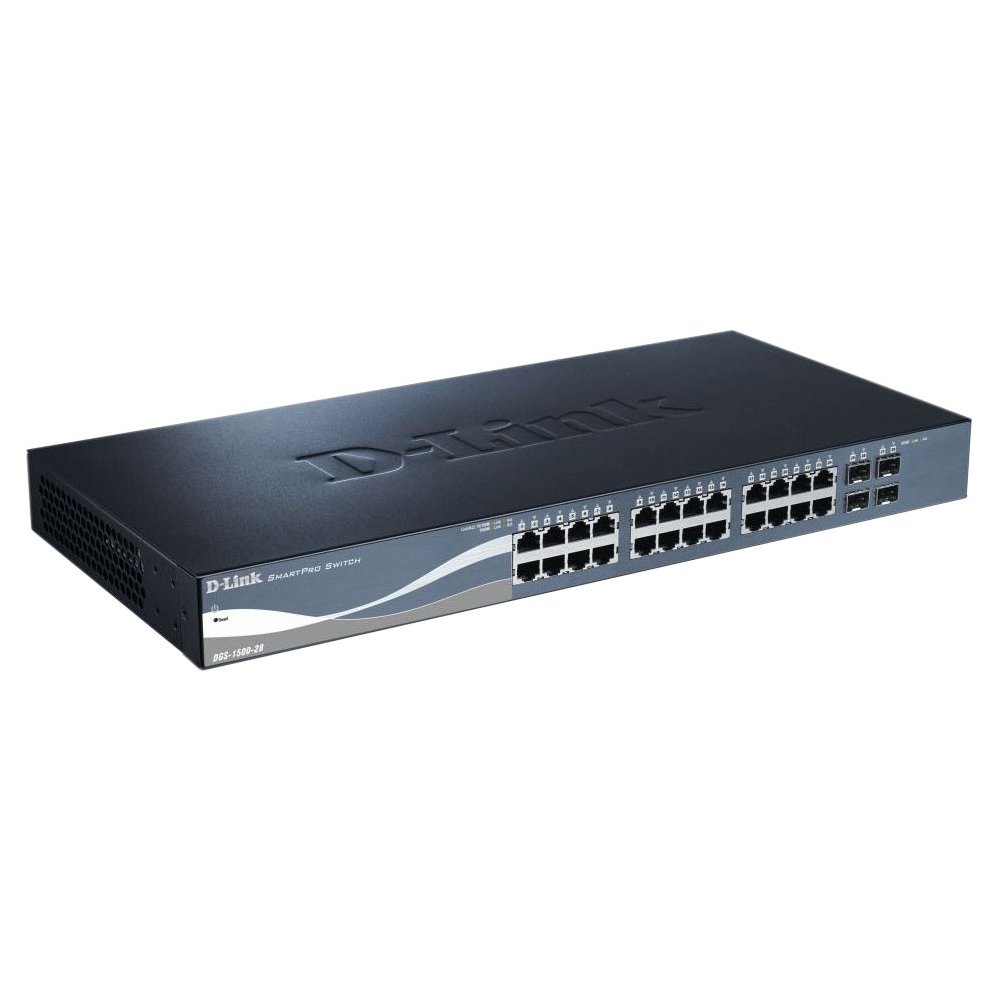
This image displays the front panel of the D-Link DGS-1500-28 switch, featuring 24 RJ-45 Gigabit Ethernet ports and LED indicators for status and activity.
- พอร์ต RJ-45 (1-24): 10/100/1000 Mbps Gigabit Ethernet ports for connecting network devices.
- สล็อต SFP+ (25-28): 10 Gigabit Ethernet SFP+ ports for fiber optic connections or stacking.
- ไฟ LED แสดงสถานะ:
- กำลังไฟ LED: บ่งชี้สถานะพลังงาน
- Link/Act LED (per port): Indicates network link and data activity.
- Speed LED (per port): Indicates connection speed (e.g., green for Gigabit, amber for 10/100 Mbps).
3.2 แผงด้านหลัง
The rear panel typically includes the power connector, grounding screw, and a console port for out-of-band management.
- เต้ารับไฟฟ้ากระแสสลับ: Connects to the provided AC power cord.
- สกรูดิน: Provides an optional connection for grounding the switch.
- พอร์ตคอนโซล: RJ-45 port for connecting a console cable to a computer for command-line interface (CLI) management.
4. การติดตั้ง
4.1 การติดตั้งเดสก์ท็อป
- Attach the four rubber feet to the recessed areas on the bottom of the switch.
- Place the switch on a sturdy, level surface that can support its weight.
- ตรวจสอบให้แน่ใจว่ามีการระบายอากาศเพียงพอรอบ ๆ สวิตช์
4.2 การติดตั้งแร็ค
- Attach the two rack-mounting brackets to the sides of the switch using the provided screws.
- ติดตั้งสวิตช์เข้ากับแร็คอุปกรณ์มาตรฐานขนาด 19 นิ้ว โดยใช้สกรูยึดแร็คที่เหมาะสม (ไม่ได้รวมอยู่ในชุด)
- Ensure proper airflow and avoid placing the switch near heat sources.
4.3 การเปิดสวิตช์
- Connect the AC power cord to the power receptacle on the rear panel of the switch.
- เสียบปลายอีกด้านของสายไฟเข้ากับเต้ารับไฟฟ้าที่เหมาะสม
- ไฟ LED แสดงสถานะพลังงานบนแผงด้านหน้าจะสว่างขึ้น แสดงว่าสวิตช์กำลังรับพลังงาน
5. การกำหนดค่าเริ่มต้น
The DGS-1500-28 switch can be managed via a webผ่านทางอินเทอร์เฟซผู้ใช้แบบกราฟิก (GUI) หรืออินเทอร์เฟซบรรทัดคำสั่ง (CLI) ผ่านพอร์ตคอนโซล
5.1 การเข้าถึง Web- อินเทอร์เฟซการจัดการตาม
- Connect a computer to any of the switch's RJ-45 ports using an Ethernet cable.
- Configure your computer's IP address to be in the same subnet as the switch's default IP address (e.g., if the switch is 10.90.90.90, set your computer to 10.90.90.100).
- เปิด web browser and enter the switch's default IP address (e.g., http://10.90.90.90) ในแถบที่อยู่
- ป้อนชื่อผู้ใช้และรหัสผ่านเริ่มต้น (โปรดดูคู่มือการติดตั้งฉบับย่อสำหรับข้อมูลประจำตัวเริ่มต้น)
- Upon successful login, you will access the switch's web อินเทอร์เฟซการจัดการ
บันทึก: It is highly recommended to change the default password immediately after initial login for security purposes.
6. การใช้งานสวิตช์
Once configured, the DGS-1500-28 operates as a network switch, forwarding data between connected devices. The LED indicators provide visual feedback on the operational status of the switch and its ports.
6.1 ฟังก์ชันการทำงานของพอร์ต
- พอร์ต RJ-45: Automatically detect the speed and duplex mode of connected devices (10/100/1000 Mbps).
- SFP+ Slots: Support 10 Gigabit Ethernet transceivers for high-speed uplinks or stacking. Ensure compatible SFP+ modules are used.
คุณสมบัติขั้นสูง 6.2 ประการ
The DGS-1500-28 series integrates advanced features to enhance network performance and management:
- Virtual Stacking: Allows up to 32 DGS-1500 series devices to be managed as a single unit with one IP address, simplifying network administration and scalability.
- Layer 3 Static Routing: Enables the switch to forward IP packets between different IP subnets based on static routes configured by the administrator. This feature is crucial for inter-VLAN routing and basic network segmentation.
7. การบำรุงรักษา
Regular maintenance ensures optimal performance and longevity of your DGS-1500-28 switch.
- อัพเดตเฟิร์มแวร์: Periodically check the D-Link support webเว็บไซต์สำหรับเฟิร์มแวร์เวอร์ชันล่าสุด การอัปเดตเฟิร์มแวร์สามารถมอบคุณสมบัติใหม่ การปรับปรุงประสิทธิภาพ และแพตช์ความปลอดภัย
- สภาพแวดล้อม : ตรวจสอบให้แน่ใจว่าสวิตช์ทำงานอยู่ในช่วงอุณหภูมิและความชื้นที่แนะนำ ระวังอย่าให้ช่องระบายอากาศมีสิ่งกีดขวาง
- การทำความสะอาด: ใช้ผ้านุ่มและแห้งเช็ดทำความสะอาดภายนอกสวิตช์ ห้ามใช้น้ำยาทำความสะอาดชนิดน้ำหรือสเปรย์
- การสำรองข้อมูลการกำหนดค่า: Regularly back up your switch configuration to an external device. This allows for quick restoration in case of a factory reset or device replacement.
8 การแก้ไขปัญหา
This section provides solutions to common issues you might encounter with your DGS-1500-28 switch.
8.1 ไฟ LED แสดงสถานะเปิดเครื่องดับ
- ตรวจสอบให้แน่ใจว่าสายไฟเชื่อมต่อกับสวิตช์และเต้ารับไฟฟ้าที่ใช้งานได้แน่นหนา
- ตรวจสอบว่าเต้ารับไฟฟ้าใช้งานได้โดยเสียบอุปกรณ์อื่น
8.2 ไม่มีลิงก์/กิจกรรมบนพอร์ต
- ตรวจสอบการเชื่อมต่อสายอีเธอร์เน็ตทั้งสองด้าน ลองใช้สายอื่น
- ตรวจสอบให้แน่ใจว่าอุปกรณ์ที่เชื่อมต่อเปิดอยู่และทำงานอย่างถูกต้อง
- Verify the port status in the switch's web อินเทอร์เฟซการจัดการ
- For SFP+ ports, ensure the SFP+ module is correctly inserted and compatible.
8.3 ไม่สามารถเข้าถึงได้ Web อินเตอร์เฟซการจัดการ
- Confirm your computer's IP address is in the same subnet as the switch's IP address.
- Verify the switch's IP address. If unknown, you may need to reset the switch to factory defaults (refer to the Quick Installation Guide for reset procedures).
- ตรวจสอบให้แน่ใจว่าไม่มีความขัดแย้งของที่อยู่ IP ในเครือข่าย
- ลองเข้าใช้งานอินเทอร์เฟซจากอุปกรณ์อื่นดู web browser or computer.
9. ข้อมูลจำเพาะ
| คุณสมบัติ | คำอธิบาย |
|---|---|
| ยี่ห้อ | ดีลิงค์ |
| หมายเลขรุ่น | ดีจีเอส150028 |
| พอร์ต | 24 x 10/100/1000 Mbps RJ-45 Gigabit Ports, 4 x 10 Gigabit SFP+ Expansion Slots |
| ประเภทอินเทอร์เฟซ | RJ45, เอสเอฟพี+ |
| ความสามารถในการสลับ | Up to 128 Gbps (non-blocking) |
| การรองรับเลเยอร์ | Layer 3 (Static Routing) |
| การจัดการ | Web-based GUI, CLI, SNMP |
| อุปกรณ์ที่รองรับ | Desktop, Rack-mount devices |
| น้ำหนักสินค้า | 0.01 Ounces (Note: This value may be a placeholder or incorrect. Refer to product packaging for accurate weight.) |
| ยูพีซี | 790069362927 |
| ASIN | B007TL1DHM |
10. การรับประกันและการสนับสนุน
D-Link products are backed by a limited warranty. The specific terms and conditions of the warranty may vary by region and product. Please refer to the warranty information included with your product or visit the official D-Link website for detailed warranty statements.
For technical support, product documentation, firmware updates, and FAQs, please visit the D-Link support webเว็บไซต์: www.dlink.com/support
You may also contact D-Link technical support directly through the contact information provided on their webไซต์สำหรับภูมิภาคเฉพาะของคุณ