
1. บทนำ
This manual provides essential information for the safe and efficient operation of your Alto Professional TMX160 DFX 16-Channel Powered Mixer. The TMX160 DFX is a versatile audio mixing console featuring 16 input channels, a built-in Alesis digital effects processor, and an integrated power amplifier capable of delivering 750W stereo output at 4Ω or 1500W mono output at 8Ω. It includes 12 XLR microphone inputs with phantom power, 16 line inputs, and stereo RCA inputs, along with a 3-band equalizer on each mono and stereo channel.
Please read this manual thoroughly before using the product to ensure proper setup and operation. Keep this manual for future reference.
2. ข้อมูลด้านความปลอดภัย
ปฏิบัติตามข้อควรระวังด้านความปลอดภัยพื้นฐานเสมอเมื่อใช้ผลิตภัณฑ์นี้ เพื่อลดความเสี่ยงต่อการเกิดไฟไหม้ ไฟฟ้าช็อต และการบาดเจ็บต่อบุคคล
- แหล่งพลังงาน: เชื่อมต่ออุปกรณ์เข้ากับเต้ารับไฟฟ้ากระแสสลับที่มีแรงดันไฟฟ้าตามที่กำหนดเท่านั้นtage.
- การต่อลงดิน: Ensure the unit is properly grounded. Do not defeat the safety purpose of the polarized or grounding-type plug.
- น้ำและความชื้น: Do not expose this equipment to rain or moisture. Do not use near water.
- การระบายอากาศ : ตรวจสอบให้แน่ใจว่ามีการระบายอากาศที่เพียงพอ อย่าปิดกั้นช่องระบายอากาศ
- ความร้อน: ห้ามติดตั้งใกล้แหล่งความร้อน เช่น หม้อน้ำ เครื่องทำความร้อน เตา หรืออุปกรณ์อื่น ๆ (รวมถึง ampเครื่องให้ความร้อน) ที่ผลิตความร้อน
- สาย: ป้องกันสายไฟไม่ให้ถูกเดินทับหรือถูกหนีบ
- การบริการ: โปรดส่งผลิตภัณฑ์นี้ให้ช่างผู้ชำนาญการเป็นผู้ดำเนินการซ่อมบำรุง ห้ามซ่อมแซมผลิตภัณฑ์นี้ด้วยตนเอง
3. การตั้งค่า
3.1 การแกะบรรจุภัณฑ์และการตรวจสอบ
Carefully unpack the TMX160 DFX mixer and inspect it for any signs of damage that may have occurred during transit. If any damage is found, contact your dealer immediately.
3.2 การต่อสายไฟ
Connect the supplied AC power cord to the mixer's power input and then to a suitable grounded AC power outlet. Ensure the mixer's power switch is in the OFF position before connecting to power.
3.3 การเชื่อมต่ออินพุต
The TMX160 DFX offers a variety of input options:
- ช่องรับสัญญาณไมโครโฟน (MIC 1-12): Use XLR cables to connect microphones to the 12 XLR inputs. Phantom power (+48V) can be activated for condenser microphones.
- อินพุตไลน์ (ช่อง 1-16): Use 1/4-inch TRS or TS cables for line-level instruments or devices. Channels 13/14 and 15/16 are stereo line inputs, also accepting RCA for 2-Track In.
- 2-Track In: เชื่อมต่อแหล่งสัญญาณเสียงภายนอก เช่น เครื่องเล่นซีดี หรือเครื่องเล่นมีเดีย โดยใช้สาย RCA
3.4 การเชื่อมต่อเอาท์พุต
Connect your speakers or monitoring system to the appropriate outputs:
- เอาต์พุตลำโพง: Connect passive speakers to the power amplifier outputs. Ensure the impedance of your speakers matches the mixer's output capabilities (e.g., 4Ω for 750W stereo, 8Ω for 1500W mono).
- Monitor/Aux Outputs: Use these outputs to send signals to stagจอภาพหรือตัวประมวลผลเอฟเฟกต์ภายนอก
- Stereo Out/Mono Out: These outputs provide the main mix signal for recording or connecting to additional sound systems.
3.5 การเปิดเครื่องครั้งแรก
After all connections are made, ensure all channel faders and the main mix fader are at their lowest settings. Turn on any connected devices (e.g., microphones, instruments) first, then power on the TMX160 DFX mixer. Finally, turn on your power ampเครื่องขยายเสียงหรือลำโพงแอคทีฟ
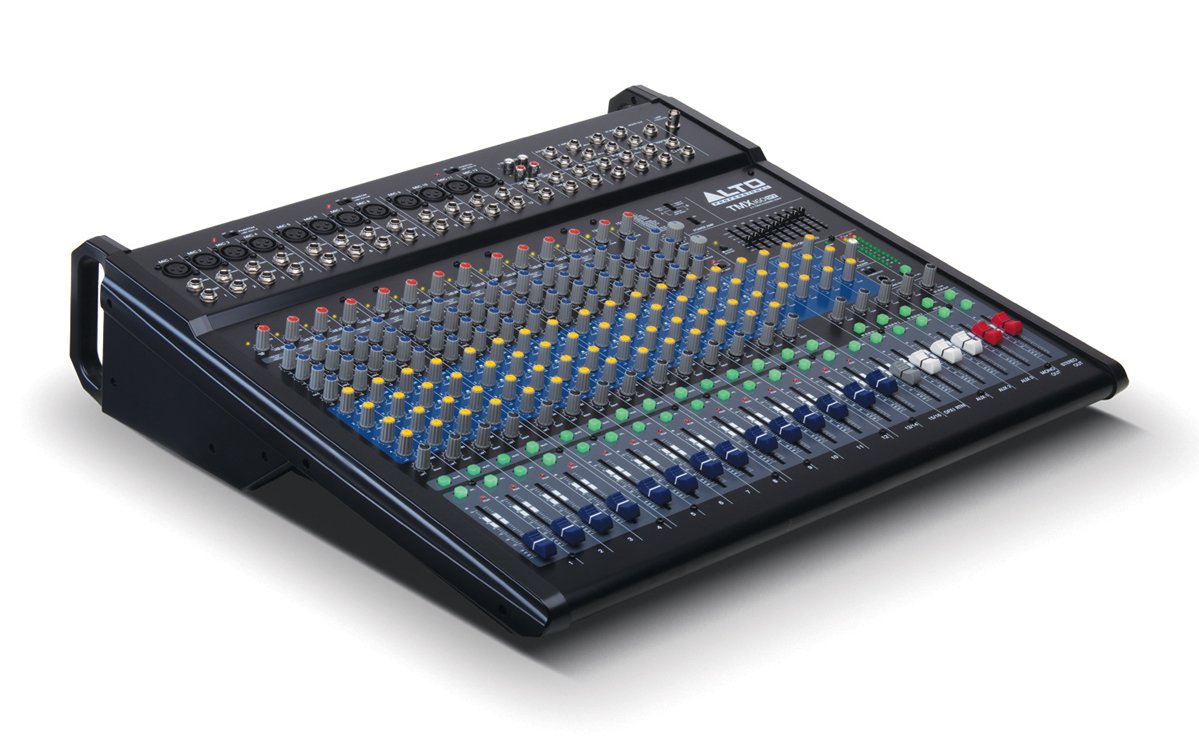
รูปที่ 1: แผงด้านหน้าด้านบนview of the Alto Professional TMX160 DFX mixer. This image shows the comprehensive layout including microphone and line inputs at the top, channel controls in the middle, and faders at the bottom.
4. การดำเนินการ
4.1 การควบคุมช่องสัญญาณ
Each input channel (1-16) features a set of controls to shape its sound:
- ได้รับ: Adjusts the input sensitivity for the connected microphone or line-level device. Set this to achieve a strong signal without clipping (distortion).
- EQ (สูง, กลาง, ต่ำ): A 3-band equalizer allows you to boost or cut frequencies (treble, midrange, bass) for each channel.
- AUX ส่ง: Controls the amount of signal sent from the channel to the auxiliary outputs (e.g., for monitors or external effects).
- กระทะ: กำหนดตำแหน่งสัญญาณของช่องสัญญาณภายในสนามเสียงสเตอริโอ (จากซ้ายไปขวา)
- ตัวปรับระดับเสียง: ควบคุมระดับเสียงโดยรวมของช่องสัญญาณในมิกซ์หลัก
4.2 หัวข้อหลัก
The master section controls the overall output of the mixer:
- เฟดเดอร์ปรับระดับเสียงหลัก: Control the overall volume of the stereo output.
- DFX (Digital Effects) Controls: Select and adjust parameters for the built-in Alesis digital effects.
- Stereo Graphic EQ: A 7-band graphic equalizer allows for fine-tuning the overall frequency response of the main mix.
- พลัง Amp การควบคุม: Adjust the output level and mode (Stereo/Mono) for the integrated power ampชีวิต.
4.3 Built-in Alesis Digital Effects
The TMX160 DFX features a high-quality Alesis digital effects processor. Use the DFX controls in the master section to browse and select from various effects such as reverb, delay, chorus, and more. Adjust the effect send levels on individual channels and the overall effect return level in the master section to blend the effects into your mix.
รูปที่ 2: รายละเอียด view of the input channels, showing individual GAIN, EQ, AUX, PAN, and LEVEL controls for precise audio shaping.
5. การบำรุงรักษา
Proper maintenance ensures the longevity and optimal performance of your TMX160 DFX mixer.
- การทำความสะอาด: ใช้ผ้านุ่มและแห้งเช็ดทำความสะอาดภายนอกของเครื่องผสม หลีกเลี่ยงการใช้น้ำยาทำความสะอาดที่มีฤทธิ์กัดกร่อน ตัวทำละลาย หรือแว็กซ์
- ฝุ่น: ควรทำความสะอาดฝุ่นละอองออกจากช่องระบายอากาศเป็นประจำเพื่อป้องกันความร้อนสูงเกินไป
- พื้นที่จัดเก็บ: เมื่อไม่ได้ใช้งานเป็นเวลานาน ควรเก็บเครื่องผสมอาหารไว้ในที่แห้งและเย็น หลีกเลี่ยงแสงแดดโดยตรงและอุณหภูมิที่สูงหรือต่ำเกินไป
- เฟเดอร์และลูกบิด: Avoid applying excessive force to faders and knobs. Keep them free from dust and debris.
6 การแก้ไขปัญหา
If you encounter issues with your TMX160 DFX, refer to the following common problems and solutions:
- ไม่มีไฟฟ้า:
- Check if the power cord is securely connected to both the mixer and the AC outlet.
- ตรวจสอบว่าปลั๊กไฟใช้งานได้ปกติ
- ตรวจสอบให้แน่ใจว่าสวิตช์เปิด/ปิดของมิกเซอร์อยู่ในตำแหน่งเปิด (ON)
- ไม่มีเสียงออก:
- ตรวจสอบการเชื่อมต่อสายเคเบิลขาเข้าและขาออกทั้งหมด
- Ensure channel GAIN and LEVEL faders are appropriately set.
- Verify the Main Mix faders are raised.
- Check if connected speakers or power amplifiers are turned on and functioning.
- มั่นใจได้ถึงพลัง Amp controls are set correctly for your speaker configuration.
- เสียงผิดเพี้ยน:
- Reduce the GAIN setting for the input channel.
- Lower the channel LEVEL fader or Main Mix faders.
- ตรวจสอบสายเคเบิลที่เสียหาย
- ไม่ได้ยินเสียงเอฟเฟกต์:
- Ensure the DFX send controls on the channels are turned up.
- Verify the DFX return level in the master section is raised.
- Check the selected effect program.
If the problem persists after trying these steps, contact Alto Professional customer support.
7. ข้อมูลจำเพาะ
| คุณสมบัติ | ข้อมูลจำเพาะ |
|---|---|
| ยี่ห้อ | อัลโตโปรเฟสชั่นแนล |
| แบบอย่าง | TMX160 DFX |
| จำนวนช่องสัญญาณ | 16 |
| น้ำหนักสินค้า | 12.5 กิโลกรัม |
| เทคโนโลยีการเชื่อมต่อ | ตัวช่วย |
| อินพุตเสียง | XLR, RCA, Line, AUX, 2-Track |
| ผู้ผลิต | ในดนตรี |
| ASIN | B007T1VZ52 |
| กำลังขับ (สเตอริโอ) | 750 วัตต์ @ 4 Ω |
| Power Output (Mono) | 1500 วัตต์ @ 8 Ω |
| อีควอไลเซอร์ | 3-band EQ per channel, Stereo Graphic EQ |
| ผลกระทบ | Built-in Alesis Digital Effector (24-bit A/D and D/A converters) |
| ขนาด (กว้าง x ลึก x สูง) | ประมาณ 21.9 x 22.2 x 5.7 นิ้ว (555 x 565 x 145 มม.) |
8. การรับประกันและการสนับสนุน
For warranty information and technical support, please refer to the documentation included with your product or visit the official Alto Professional webไซต์ โปรดเก็บใบเสร็จรับเงินไว้เป็นหลักฐานการซื้อสำหรับการเรียกร้องการรับประกัน
For further assistance, you may contact Alto Professional customer service directly.