
การแนะนำ
The Eton American Red Cross FRX2 is a versatile, multi-powered emergency weather radio designed to keep you informed and connected during emergencies. It features AM/FM and NOAA weather band reception, multiple charging options including solar and hand turbine, an LED flashlight, and a USB port for charging small devices. This manual provides detailed instructions for the proper setup, operation, and maintenance of your FRX2 radio.

Figure 1: Eton American Red Cross FRX2 Emergency Weather Radio
ข้อมูลด้านความปลอดภัย
- ห้ามให้เครื่องสัมผัสกับอุณหภูมิที่สูงหรือต่ำเกินไป แสงแดดโดยตรงเป็นเวลานาน หรือความชื้นสูง
- เก็บเครื่องให้ห่างจากน้ำและของเหลวอื่นๆ
- ห้ามถอดประกอบหรือดัดแปลงวิทยุด้วยตนเอง การกระทำดังกล่าวจะทำให้การรับประกันเป็นโมฆะ และอาจก่อให้เกิดความเสียหายหรืออันตรายได้
- Use only the specified charging methods (USB, solar, hand crank).
- Ensure the hand turbine crank is fully retracted when not in use to prevent damage.
- ทิ้งแบตเตอรี่ตามระเบียบข้อบังคับในท้องถิ่น
สินค้าเกินview
Familiarize yourself with the various components and controls of your FRX2 radio.
แผงด้านหน้า

รูปที่ 2: การควบคุมแผงด้านหน้า
- ปรับหน้าปัด: Used to select AM, FM, or Weather Band frequencies.
- การควบคุมระดับเสียง: ปรับระดับเอาต์พุตเสียง
- ตัวเลือกคลื่นความถี่: Switches between AM, FM, and Weather Band (WB) modes.
- ไฟแสดงสถานะ LED: Shows charging status and alert status.
Side and Back Panels

Figure 3: Side Panel with Solar Panel
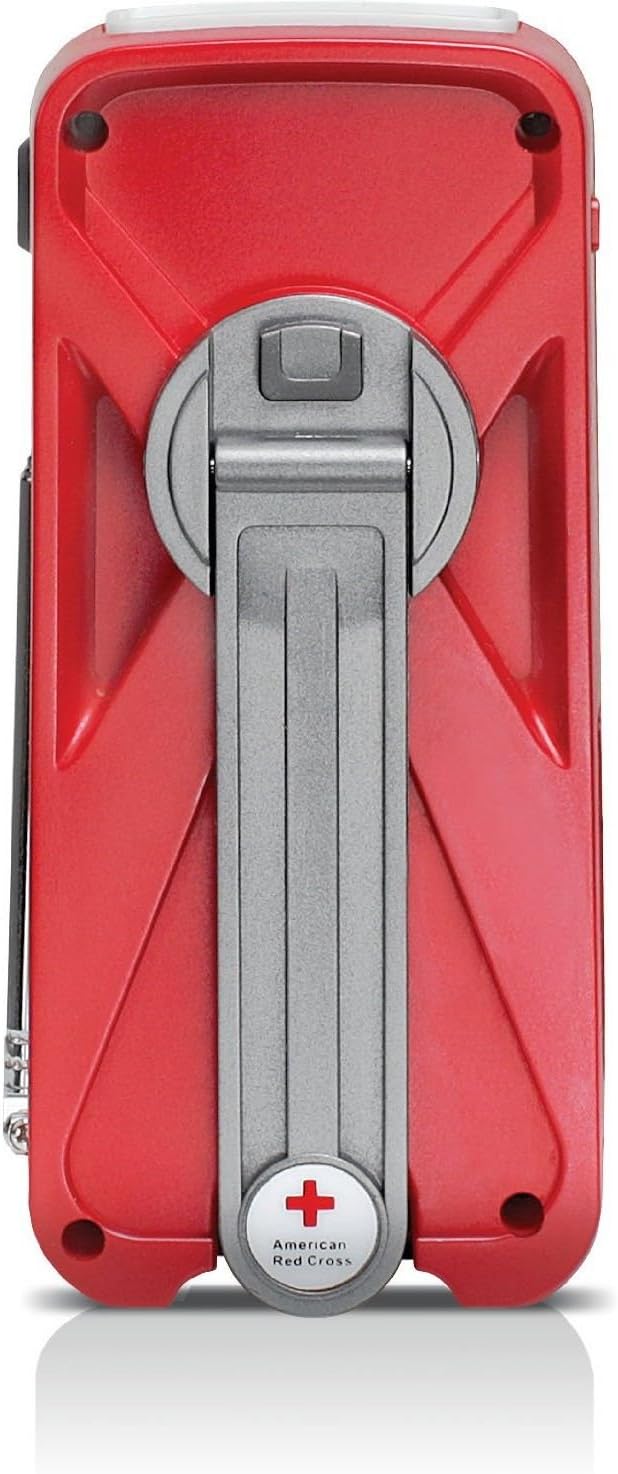
Figure 4: Back Panel with Hand Turbine Crank
- แผงโซล่าเซลล์: Located on the top/side for solar charging.
- Hand Turbine Crank: Fold-out crank on the back for manual power generation.
- เสาอากาศยืดไสลด์: เสาอากาศแบบยืดหดได้เพื่อเพิ่มประสิทธิภาพการรับสัญญาณวิทยุ
- ไฟฉาย: ไฟฉาย LED ในตัว
พอร์ตและขั้วต่อ
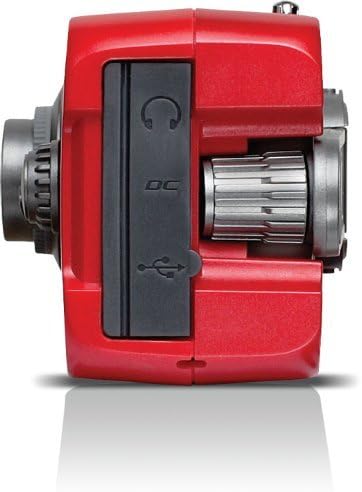
Figure 5: Top Panel Ports
- Mini-USB DC Input: For charging the internal battery via an AC adapter (not included) or computer USB port.
- เอาท์พุต USB: สำหรับชาร์จอุปกรณ์ภายนอก เช่น สมาร์ทโฟน
- แจ็คหูฟัง: สำหรับการฟังส่วนตัว
การตั้งค่า
การชาร์จเบื้องต้น
Before first use, fully charge the internal battery using one of the following methods:
- การชาร์จ USB: Connect the supplied USB cable to the radio's Mini-USB DC input and to a powered USB port (e.g., computer, USB wall adapter). The charging indicator LED will illuminate.
- การชาร์จพลังงานแสงอาทิตย์: Place the radio with the solar panel facing direct sunlight. The solar panel charges the internal battery. This method is slower and best for maintaining charge or trickle charging.
- Hand Turbine Charging: Unfold the hand turbine crank and rotate it clockwise or counter-clockwise for 1-2 minutes. This provides power for immediate use or a quick boost to the internal battery.
ข้อมูลแบตเตอรี่
The FRX2 is powered by a built-in 1000mAh rechargeable internal battery. This battery is designed for long-term use and is not user-replaceable. For optimal performance, ensure the battery is regularly charged.
คำแนะนำการใช้งาน
เปิด/ปิดเครื่อง
หมุน การควบคุมระดับเสียง knob clockwise to turn the radio on. Rotate it counter-clockwise until it clicks to turn the radio off.
Radio Tuning (AM/FM/Weather Band)
- ยืดเสาอากาศแบบยืดหดได้ออกเพื่อให้รับสัญญาณได้ดีที่สุด
- ใช้ ตัวเลือกวงดนตรี switch to choose between AM, FM, or WB (Weather Band).
- หมุน แป้นหมุนปรับ to find your desired station. The tuning indicator LED will light up when a strong signal is received.
- ปรับแต่ง การควบคุมระดับเสียง สู่ระดับการฟังที่สะดวกสบาย
ฟังก์ชันแจ้งเตือนสภาพอากาศของ NOAA
In WB mode, the radio can receive NOAA weather alerts. When an alert is broadcast, the radio will automatically switch from standby to the alert broadcast. Ensure the radio is in WB mode to receive these alerts.
การทำงานของไฟฉาย
Press the flashlight button to cycle through different modes: On, SOS (flashing), and Off. The flashlight provides illumination during power outagหรือในสภาพแวดล้อมที่มืด
Smartphone Charging (Dump Charge)
The FRX2 can provide a 'dump charge' to small USB-powered devices like smartphones. This means it will transfer its stored battery power to the connected device. It is not designed for a full charge but can provide enough power for emergency communication.

Figure 6: Charging a Smartphone
- Ensure the FRX2's internal battery has sufficient charge.
- Connect your smartphone's USB charging cable to the FRX2's USB output port.
- The radio will begin transferring power to your device.
การซ่อมบำรุง
- การทำความสะอาด: เช็ดวิทยุด้วยผ้านุ่มdamp ผ้า ห้ามใช้สารทำความสะอาดที่มีฤทธิ์กัดกร่อนหรือตัวทำละลาย
- พื้นที่จัดเก็บ: Store the radio in a cool, dry place when not in use. For long-term storage, ensure the internal battery is charged every 3-6 months to maintain its lifespan.
- เสาอากาศ: Handle the telescopic antenna with care to prevent bending or breakage. Retract it when not in use.
การแก้ไขปัญหา
| ปัญหา | สาเหตุที่เป็นไปได้ | สารละลาย |
|---|---|---|
| No power/Radio not turning on | แบตเตอรี่ภายในหมดแล้ว | Charge the radio using USB, solar, or hand turbine. |
| การรับสัญญาณวิทยุไม่ดี | เสาอากาศไม่ยืดออก สัญญาณอ่อน หรือมีสัญญาณรบกวน | ยืดเสาอากาศแบบยืดหดได้ออกจนสุด ลองขยับตำแหน่งวิทยุดู |
| Smartphone not charging | Radio battery too low, incorrect cable, or device incompatibility. | Ensure radio is sufficiently charged. Use the correct USB cable. Note that the FRX2 provides a 'dump charge' and may not fully charge all devices. |
| ที่หมุนมือฝืดหรือไม่ชาร์จไฟ | Mechanism obstruction or internal issue. | Ensure the crank moves freely. If issues persist, contact customer support. |
ข้อมูลจำเพาะ
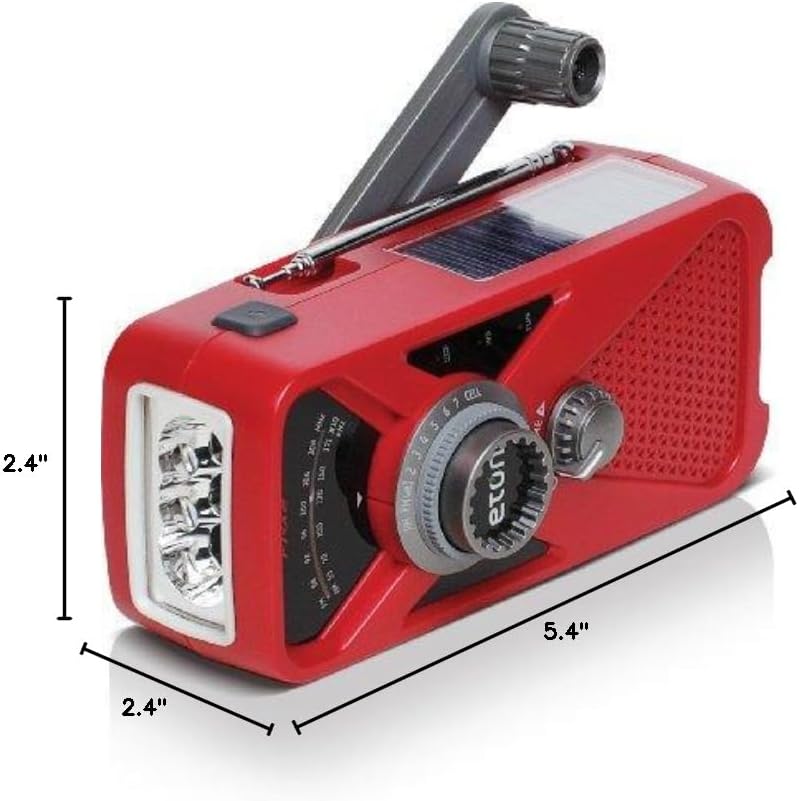
รูปที่ 7: ขนาดผลิตภัณฑ์
- แบบอย่าง: ARCFRX2WXR
- ขนาด (ยาว x กว้าง x สูง): 5.4" x 2.4" x 2.4"
- น้ำหนัก: 0.56 ปอนด์
- วงวิทยุ: คลื่นวิทยุ AM, FM และคลื่นพยากรณ์อากาศ NOAA
- แหล่งพลังงาน: Internal Rechargeable Battery (1000mAh), Solar Panel, Hand Turbine, Mini-USB DC Input
- เอาท์พุต: พอร์ต USB (สำหรับชาร์จอุปกรณ์ภายนอก)
- คุณสมบัติ: LED Flashlight, Headphone Jack
ข้อมูลการรับประกัน
Eton products are designed for reliability and performance. For specific warranty details, please refer to the warranty card included with your product or visit the official Eton webไซต์นี้ โปรดเก็บหลักฐานการซื้อไว้เพื่อใช้ยืนยันการรับประกัน
สนับสนุน
If you have any questions or require assistance with your Eton American Red Cross FRX2 radio, please contact Eton Customer Support:
- Webเว็บไซต์: www.etoncorp.com
- อีเมล: อ้างถึง webเว็บไซต์สำหรับกรอกแบบฟอร์มติดต่อหรือที่อยู่อีเมล
- โทรศัพท์: อ้างถึง webไซต์สำหรับหมายเลขโทรศัพท์ฝ่ายสนับสนุนปัจจุบัน