
ATI HD3450
ATI Radeon HD 3450 Video Card Instruction Manual
Model: HD3450 (ATI-102-B62902(B))
PCIe x16 Low Profile
การแนะนำ
This manual provides comprehensive instructions for the installation, operation, maintenance, and troubleshooting of your ATI Radeon HD 3450 PCIe x16 Low Profile video card. Please read this manual carefully before installation and use to ensure optimal performance and longevity of your product.
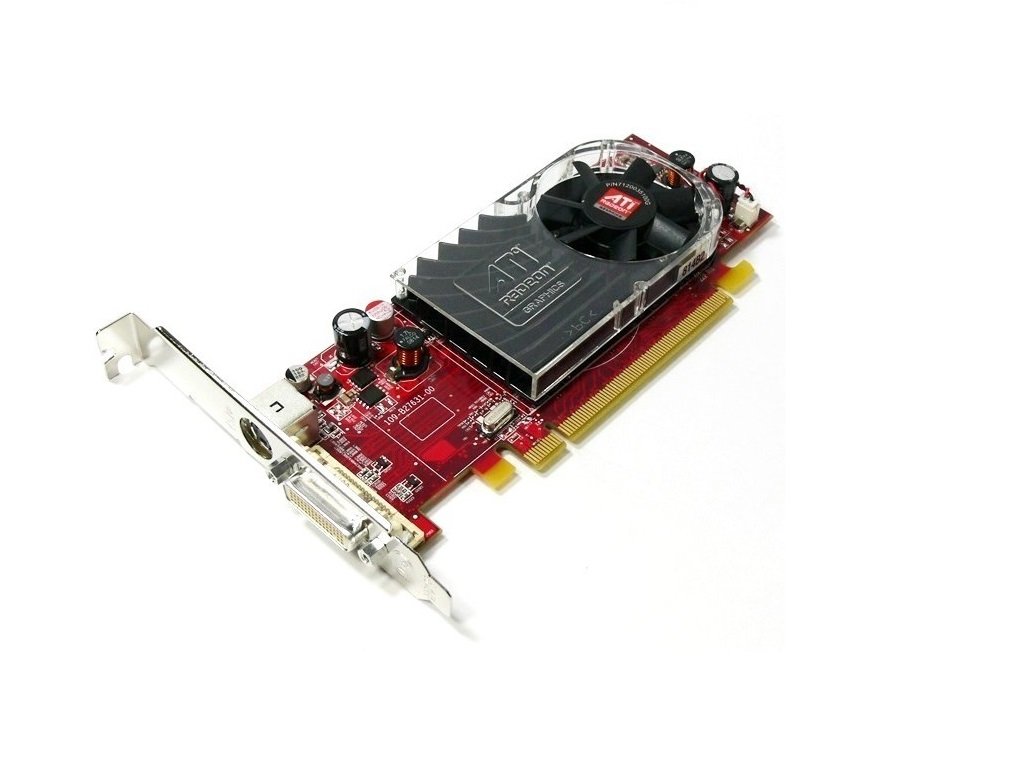
An image showing the ATI Radeon HD 3450 video card. It features a red PCB, a low-profile bracket, a cooling fan with an ATI Radeon logo, and a DVI output port. The PCIe x16 connector is visible at the bottom.
การตั้งค่า
1. การติดตั้งทางกายภาพ
- หมดแรง: ตรวจสอบให้แน่ใจว่าคอมพิวเตอร์ของคุณปิดเครื่องอย่างสมบูรณ์และถอดปลั๊กออกจากเต้าเสียบที่ผนัง
- เปิดเคส: เปิดเคสคอมพิวเตอร์เพื่อเข้าถึงเมนบอร์ด
- Locate PCIe x16 Slot: Identify an available PCI Express x16 slot on your motherboard. This is typically the longest PCIe slot.
- ถอดฝาครอบช่อง: Remove the metal slot cover from the back of your computer case corresponding to the chosen PCIe x16 slot.
- Insert Video Card: Carefully align the video card with the PCIe x16 slot and press down firmly until it is securely seated. You should hear a click from the retention clip.
- บัตรที่ปลอดภัย: Secure the video card to the computer case with a screw or retention clip.
- ปิดคดี: ปิดเคสคอมพิวเตอร์ของคุณและเชื่อมต่อสายเคเบิลทั้งหมดอีกครั้ง
2. การติดตั้งไดร์เวอร์
- เปิดเครื่อง: Power on your computer. The operating system may install a generic display driver automatically.
- ดาวน์โหลดไดรเวอร์: Visit the official AMD (formerly ATI) website or your computer manufacturer's support page to download the latest drivers for the Radeon HD 3450.
- ติดตั้งไดรเวอร์: Run the downloaded driver installer and follow the on-screen prompts. You may need to restart your computer after installation.
- ตรวจสอบการติดตั้ง: After restarting, verify that the drivers are correctly installed by checking your operating system's Device Manager (Windows) or System Information (Linux/macOS).
การดำเนินงาน
Once installed and drivers are updated, your ATI Radeon HD 3450 video card is ready for use. It supports multiple display outputs.
- การเชื่อมต่อจอแสดงผล: Connect your monitor(s) to the available ports on the video card (VGA, DisplayPort, HDMI). Use appropriate cables and adapters.
- การตั้งค่าการแสดงผล: Access your operating system's display settings to configure resolution, refresh rate, and multiple monitor setups (extend, duplicate).
- AMD Catalyst Control Center (or equivalent): For advanced settings and performance tuning, use the AMD software suite installed with the drivers.
การซ่อมบำรุง
Regular maintenance helps ensure the longevity and stable performance of your video card.
- การกำจัดฝุ่น: Periodically open your computer case and gently clean dust from the video card's fan and heatsink using compressed air. Ensure the fan blades do not spin rapidly during cleaning.
- การอัปเดตไดรเวอร์: Check the AMD website regularly for updated drivers. Newer drivers often include performance improvements, bug fixes, and compatibility updates.
- การตรวจติดตามอุณหภูมิ: Use system monitoring software to keep an eye on the GPU temperature, especially during heavy load. Excessive temperatures can indicate poor airflow or a failing fan.
การแก้ไขปัญหา
If you encounter issues with your video card, consider the following troubleshooting steps:
- ไม่มีการแสดงผล:
- Ensure the monitor is connected securely to the video card and powered on.
- Verify the video card is fully seated in the PCIe slot.
- ทดสอบด้วยจอภาพหรือสายเคเบิลอื่นหากเป็นไปได้
- Driver Issues (e.g., low resolution, artifacts):
- Reinstall the latest drivers from the AMD webเว็บไซต์.
- Try uninstalling existing drivers completely before installing new ones.
- ความไม่เสถียรของระบบ/การขัดข้อง:
- Ensure your power supply unit (PSU) meets the minimum requirements for your system, including the video card.
- Check for overheating (refer to Maintenance section).
For persistent issues, consult the AMD support website or your computer manufacturer's support resources.
ข้อมูลจำเพาะ
| คุณสมบัติ | รายละเอียด |
|---|---|
| ยี่ห้อ | เอทีไอ |
| หมายเลขรุ่น | Ati Radeon HD3450 (ATI-102-B62902(B)) |
| โคโปรเซสเซอร์กราฟิก | เอเอ็มดี เรเดียน |
| ขนาดแรมกราฟิก | 256MB |
| อินเทอร์เฟซเอาท์พุตวิดีโอ | VGA, ดิสเพลย์พอร์ต, HDMI |
| อินเทอร์เฟซ | PCIe x16 |
| ฟอร์มแฟกเตอร์ | โปรต่ำfile |
| น้ำหนักสินค้า | 0.01 ออนซ์ |
| ผู้ผลิต | ATI Technologies |
ข้อมูลการรับประกัน
Specific warranty terms for the ATI Radeon HD 3450 video card may vary depending on the retailer and region of purchase. Please refer to your purchase documentation or contact the seller for detailed warranty information. Keep your proof of purchase for any warranty claims.
สนับสนุน
For further technical assistance, driver downloads, or product information, please visit the official AMD support website. You may also contact your computer manufacturer's support if the card was pre-installed in a system.
- AMD Support: www.amd.com/support (Please note: ATI is now part of AMD)
Ask a question about this manual
Ask about setup, troubleshooting, compatibility, parts, safety, or missing instructions. Manuals+ will review the question and use this page’s manual context to help answer it.