
สินค้าเกินview
The iSound Twist Portable Bluetooth Wireless Speaker offers a unique design combined with superior sound quality. Its compact form factor allows for portability, while its advanced features enable wireless music streaming and hands-free calling. The speaker features full stereo sound with 6 watts total output from two 40mm drivers and a passive radiator for enhanced bass.
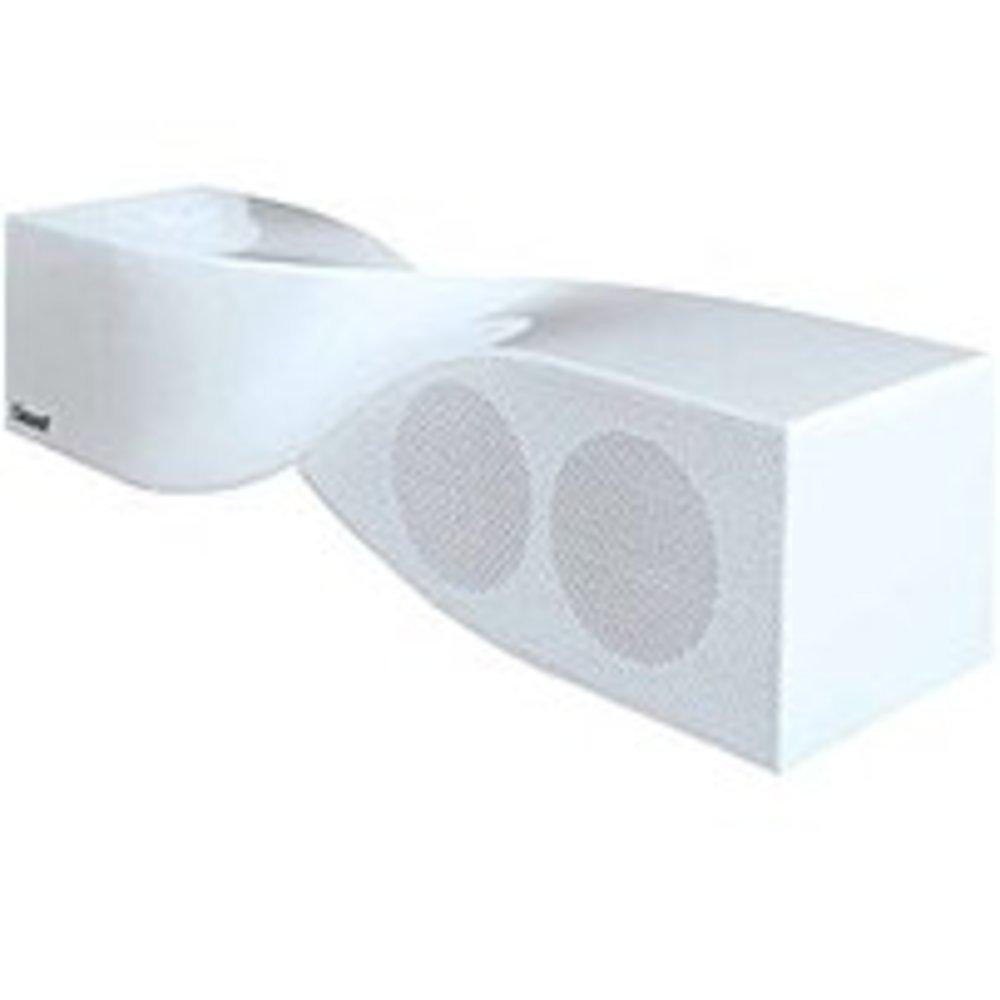
Image: The iSound Twist Portable Bluetooth Wireless Speaker in white, showcasing its unique twisted design.
เนื้อหาแพ็คเกจ
- iSound Twist Portable Bluetooth Wireless Speaker
- สายชาร์จ USB
- สายอินพุต AUX 3.5 มม.
- คู่มือการใช้งาน (เอกสารนี้)
การตั้งค่า
1. ชาร์จลำโพง
Before initial use, fully charge the iSound Twist speaker. Connect the provided USB charging cable to the speaker's USB charging port and the other end to a powered USB source (e.g., computer, USB wall adapter). The charging indicator light will illuminate during charging and turn off when fully charged. A full charge provides up to 5 hours of continuous play.

Image: Rear panel of the speaker, highlighting the USB charging port, ON/OFF switch, and AUX IN port.
2. การเปิด/ปิดเครื่อง
Locate the ON/OFF switch on the rear panel of the speaker. Slide the switch to the "ON" position to power on the device. Slide it to the "OFF" position to power off.
3. การจับคู่บลูทู ธ
- Ensure the speaker is powered on and within close proximity to your Bluetooth-enabled device (e.g., smartphone, tablet, laptop).
- The speaker will automatically enter Bluetooth pairing mode. A blue indicator light will flash, indicating it is discoverable.
- On your device, navigate to the Bluetooth settings and enable Bluetooth.
- ค้นหา available devices. The iSound Twist speaker should appear in the list, typically named "iSound Twist" or similar.
- Select the speaker from the list to initiate pairing. If prompted for a password, enter "0000".
- Once successfully paired, the blue indicator light on the speaker will stop flashing and remain solid. You will hear an audible confirmation.
- Your device is now connected, and you can stream audio wirelessly.
4. ช่องต่ออินพุต AUX
For devices without Bluetooth capability, or if you prefer a wired connection, use the provided 3.5mm AUX cable.
- Connect one end of the 3.5mm AUX cable to the AUX IN port on the rear of the speaker.
- Connect the other end of the cable to the headphone jack or audio output port of your audio device.
- ลำโพงจะเปลี่ยนไปใช้โหมดอินพุต AUX โดยอัตโนมัติ
คำแนะนำการใช้งาน
ฟังก์ชั่นแผงควบคุม
The speaker features onboard controls located on its top surface for convenient operation.
- ปุ่มเปิด / ปิดโหมด: Press and hold to power on/off. Short press to switch between Bluetooth and AUX modes.
- ปุ่มเล่น/หยุดชั่วคราว/โทรออก: Short press to play or pause music. During an incoming call, short press to answer or end the call. Press and hold to reject an incoming call.
- ปุ่มเพิ่มเสียง/ปุ่มเปลี่ยนเพลงถัดไป: Short press to increase volume. Press and hold to skip to the next track.
- ปุ่มลดเสียง/ปุ่มเล่นเพลงก่อนหน้า: กดสั้นๆ เพื่อลดระดับเสียง กดค้างไว้เพื่อไปยังเพลงก่อนหน้า
การโทรแบบแฮนด์ฟรี
When connected via Bluetooth, the iSound Twist speaker's built-in microphone allows for hands-free phone calls.
- รับสาย: When a call comes in, the music will pause. Press the Play/Pause/Call button once to answer.
- การวางสาย: ระหว่างการโทร ให้กดปุ่มเล่น/หยุดชั่วคราว/โทรออกหนึ่งครั้งเพื่อวางสาย
- การปฏิเสธสาย: Press and hold the Play/Pause/Call button to reject an incoming call.
การซ่อมบำรุง
- ควรเก็บลำโพงให้ห่างจากน้ำ ความชื้น และอุณหภูมิที่สูงหรือต่ำเกินไป
- ทำความสะอาดลำโพงด้วยผ้านุ่มและแห้ง ห้ามใช้น้ำยาทำความสะอาดหรือสารละลายที่มีฤทธิ์กัดกร่อน
- หลีกเลี่ยงการทำตกหรือให้ลำโพงได้รับแรงกระแทกรุนแรง
- เมื่อไม่ได้ใช้งานเป็นเวลานาน ควรเก็บลำโพงไว้ในที่แห้งและเย็น และชาร์จแบตเตอรี่เป็นระยะเพื่อรักษาอายุการใช้งานของแบตเตอรี่
การแก้ไขปัญหา
| ปัญหา | สารละลาย |
|---|---|
| ลำโพงไม่เปิดเครื่อง | ตรวจสอบให้แน่ใจว่าแบตเตอรี่ชาร์จเต็มแล้ว เชื่อมต่อลำโพงเข้ากับแหล่งจ่ายไฟโดยใช้สาย USB แล้วลองใหม่อีกครั้ง |
| ไม่สามารถจับคู่ผ่านบลูทูธได้ |
|
| ไม่มีเสียงหรือเสียงเบา |
|
| คุณภาพการโทรไม่ดี |
|
ข้อมูลจำเพาะ
| คุณสมบัติ | รายละเอียด |
|---|---|
| ชื่อรุ่น | ไอซาวน์-1691 |
| ยี่ห้อ | ไอซาวน์ |
| ประเภทลำโพง | หอคอย |
| คุณสมบัติพิเศษ | ไมโครโฟนในตัว |
| การใช้ที่แนะนำ | For Smartphones or Tablets, Music Players |
| อุปกรณ์ที่รองรับ | คอมพิวเตอร์ตั้งโต๊ะ, แล็ปท็อป, เครื่องเล่น MP3, โปรเจ็กเตอร์, สมาร์ทโฟน, แท็บเล็ต, โทรทัศน์ |
| การกำหนดค่าช่องเสียงรอบทิศทาง | 2.0 |
| สี | สีขาว |
| น้ำหนักสินค้า | 13.6 ออนซ์ |
| กันน้ำได้ | เท็จ |
| เทคโนโลยีการสื่อสารไร้สาย | บลูทูธ |
| ขนาดลำโพง | 0.75 นิ้ว |
| แหล่งพลังงาน | ใช้พลังงานจากแบตเตอรี่ |
| จำนวนแบตเตอรี่ | ต้องใช้แบตเตอรี่ลิเธียมไอออน 1 ก้อน (รวมอยู่ด้วย) |
| ประเภทไดร์เวอร์เสียง | ไดร์เวอร์แบบไดนามิก |
| ขนาดไดร์เวอร์เสียง | 40 มิลลิเมตร |
| ขนาดสินค้า | 5 x 4 x 11.75 นิ้ว |
| กำลังขับสูงสุดของลำโพง | 6 วัตต์ |
| เทคโนโลยีการเชื่อมต่อ | ไร้สาย |
| โหมดเอาต์พุตเสียง | สเตอริโอ |
| ประเภทการติดตั้ง | ที่วางบนโต๊ะ |
วิดีโอผลิตภัณฑ์อย่างเป็นทางการ
Video: Official product video for the iSound Twist Bluetooth Speaker, demonstrating its features and design. This video showcases the speaker's ability to stream audio from various devices and handle calls.
การรับประกันและการสนับสนุน
The iSound Twist Portable Bluetooth Wireless Speaker comes with a การรับประกันแบบจำกัด. For specific warranty terms, conditions, and support inquiries, please refer to the warranty card included in your product packaging or visit the official iSound webเว็บไซต์.
For further assistance, please contact iSound customer support.