
การแนะนำ
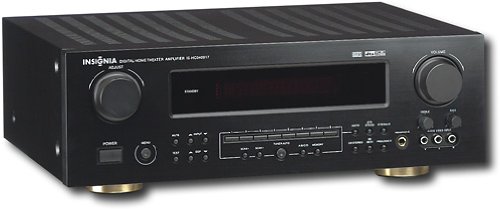
This manual provides essential instructions for the setup, operation, maintenance, and troubleshooting of your Insignia 6.1-Channel 600W Digital Home Theater Receiver, model IS-HC040917. Please read this manual thoroughly before using the receiver to ensure proper and safe operation.
คำแนะนำด้านความปลอดภัยที่สำคัญ
- อย่าปิดกั้นช่องระบายอากาศใดๆ ติดตั้งตามคำแนะนำของผู้ผลิต
- ห้ามติดตั้งใกล้แหล่งความร้อน เช่น หม้อน้ำ เครื่องทำความร้อน เตา หรืออุปกรณ์อื่น ๆ (รวมถึง ampเครื่องให้ความร้อน) ที่ผลิตความร้อน
- ปกป้องสายไฟไม่ให้ถูกเหยียบหรือถูกหนีบ โดยเฉพาะที่ปลั๊ก เต้ารับไฟฟ้า และจุดที่สายไฟออกจากเครื่อง
- ใช้เฉพาะอุปกรณ์เสริม/สิ่งที่แนบตามที่ผู้ผลิตกำหนดเท่านั้น
- ถอดปลั๊กอุปกรณ์นี้ในระหว่างพายุฝนฟ้าคะนองหรือเมื่อไม่ได้ใช้งานเป็นเวลานาน
- ส่งต่อการบริการทั้งหมดไปยังช่างบริการที่ผ่านการรับรอง จำเป็นต้องเข้ารับบริการเมื่ออุปกรณ์ได้รับความเสียหายแต่อย่างใด
คู่มือการติดตั้ง
1. การแกะกล่อง
Carefully remove the receiver and all accessories from the packaging. Ensure all components are present:
- Insignia IS-HC040917 Receiver
- รีโมทคอนโทรล
- AM เสาอากาศแบบวนรอบ
- เสาอากาศลวด FM
- คู่มือการใช้งาน (เอกสารนี้)
2. การเชื่อมต่อลำโพง
The IS-HC040917 receiver supports a 6.1-channel speaker configuration. Connect your speakers to the corresponding terminals on the rear panel. Ensure correct polarity (+ to + and - to -) for each speaker.
- ด้านหน้าซ้าย/ขวา: สำหรับระบบเสียงสเตอริโอหลัก
- ศูนย์: For dialogue.
- เซอร์ราวด์ซ้าย/ขวา: For ambient sound effects.
- ล้อมรอบด้านหลัง: For additional rear channel effects in 6.1 setups.
- Subwoofer (Pre-out): Connect to a powered subwoofer's LFE input.
Note: The receiver is designed for speakers with an impedance of 8 ohms.
3. การเชื่อมต่อแหล่งเสียง/วิดีโอ
Connect your external devices (e.g., DVD player, Blu-ray player, game console, cable box) to the appropriate input jacks on the receiver.
- ช่องต่อ HDMI: Use HDMI cables for high-definition audio and video signals. The receiver has 3 HDMI input ports.
- เสียงดิจิตอล (ออปติคอล/โคแอกเชียล): For digital audio from devices like CD players or set-top boxes.
- เสียงอะนาล็อก (RCA): For standard stereo audio connections from devices like VCRs or older CD players.
- เอส-วิดีโอ: For video signals from compatible devices.
4. การเชื่อมต่อเสาอากาศ
Connect the supplied AM loop antenna and FM wire antenna to their respective terminals on the rear panel for radio reception.
5. การเชื่อมต่อไฟฟ้า
Once all audio/video and speaker connections are made, plug the receiver's power cord into a standard AC wall outlet.
ภาพ: Rear panel of the Insignia IS-HC040917 receiver, showing various input and output connections for speakers, audio/video sources (HDMI, RCA, S-Video, Digital), and antenna terminals. This diagram is crucial for correctly wiring the home theater system.
คำแนะนำการใช้งาน
1. เปิด/ปิดเครื่อง
กดปุ่ม พลัง ปุ่มบนแผงด้านหน้าหรือรีโมทคอนโทรลเพื่อเปิดหรือปิดเครื่องรับ
2. การเลือกอินพุต
ใช้ ตัวเลือกอินพุต knob/buttons on the front panel or the remote control to choose the desired audio/video source (e.g., HDMI 1, DVD, CD, Tuner).
3. การควบคุมระดับเสียง
ปรับระดับเสียงหลักโดยใช้ปุ่มขนาดใหญ่ ปริมาณ ปุ่มหมุนที่แผงด้านหน้าหรือ ปริมาณ +/- ปุ่มบนรีโมทคอนโทรล
4. โหมดเสียง
The receiver supports various audio modes, including 6.1-channel surround sound. Use the โหมด or ดีเอสพี buttons on the remote to cycle through available sound modes (e.g., Stereo, Dolby Digital, DTS, Pro Logic).
5. Tuner Operation (AM/FM Radio)
Select the "Tuner" input. Use the วงดนตรี button to switch between AM and FM. Use the ปรับ +/- buttons to manually tune to stations or ค่าที่ตั้งไว้ล่วงหน้า +/- to select stored stations. Refer to the remote control for specific tuner functions.
การซ่อมบำรุง
1. การทำความสะอาด
Wipe the exterior of the receiver with a soft, dry cloth. Do not use liquid cleaners or aerosol sprays, as they may damage the finish or internal components. Ensure the unit is unplugged before cleaning.
2. การระบายอากาศ
Ensure that the ventilation openings on the top and sides of the receiver are not blocked. Proper airflow is essential to prevent overheating and ensure long-term performance.
3. การจัดการสายเคเบิล
Periodically check all cable connections to ensure they are secure. Loose connections can lead to poor audio or video quality.
การแก้ไขปัญหา
| ปัญหา | สาเหตุที่เป็นไปได้ | สารละลาย |
|---|---|---|
| ไม่มีไฟฟ้า | ถอดสายไฟออกแล้ว ปลั๊กไฟไม่ทำงาน | ตรวจสอบการเชื่อมต่อสายไฟ ลองใช้เต้ารับอื่น |
| ไม่มีเสียง | เลือกอินพุตไม่ถูกต้อง สายลำโพงหลวม ระดับเสียงต่ำเกินไป ปิดเสียงเปิดใช้งาน | เลือกอินพุตที่ถูกต้อง ตรวจสอบการเชื่อมต่อลำโพง เพิ่มระดับเสียง ปิดเสียง |
| ไม่มีวีดีโอ | Incorrect input selected; video cables loose or incorrect. | Select correct input; check video cable connections (HDMI, S-Video, RCA). |
| รีโมตคอนโทรลไม่ทำงาน | แบตเตอรี่หมด; มีสิ่งกีดขวางระหว่างรีโมทและตัวรับสัญญาณ; โหมดรีโมทไม่ถูกต้อง | Replace batteries; remove obstructions; ensure remote is in the correct operating mode. |
ข้อมูลจำเพาะ
- แบบอย่าง: IS-HC040917
- ยี่ห้อ: INSIGNIA
- กำลังขับ: 600 วัตต์
- จำนวนช่องสัญญาณ: ช่อง 6.1
- โหมดเอาต์พุตเสียง: ล้อมรอบ
- พอร์ต HDMI ทั้งหมด: 3
- ประเภทของตัวเชื่อมต่อ: 3.5mm Jack, HDMI, RCA, USB
- อุปกรณ์ที่รองรับ: ลำโพง
- วิธีการควบคุม: ระยะไกล
- สี: สีดำ
- ยูพีซี: 799530659962
- ASIN: B0075C3DN2
การรับประกันและการสนับสนุน
สำหรับข้อมูลการรับประกันและการบริการลูกค้า โปรดดูบัตรรับประกันที่แนบมากับผลิตภัณฑ์ของคุณ หรือเยี่ยมชมเว็บไซต์อย่างเป็นทางการของ Insignia webไซต์นี้ โปรดเก็บใบเสร็จรับเงินที่ซื้อไว้เพื่อใช้เรียกร้องการรับประกัน
For further assistance, you may contact Insignia customer service. Contact details are typically available on the manufacturer's webเว็บไซต์หรือในบรรจุภัณฑ์ของผลิตภัณฑ์