
1. บทนำ
ขอบคุณสำหรับการซื้อasing the Gemini PS3-USB 3 Channel 10-Inch Mixer. This manual provides essential information for the proper setup, operation, and maintenance of your mixer. Please read this manual thoroughly before use to ensure optimal performance and to prevent damage.
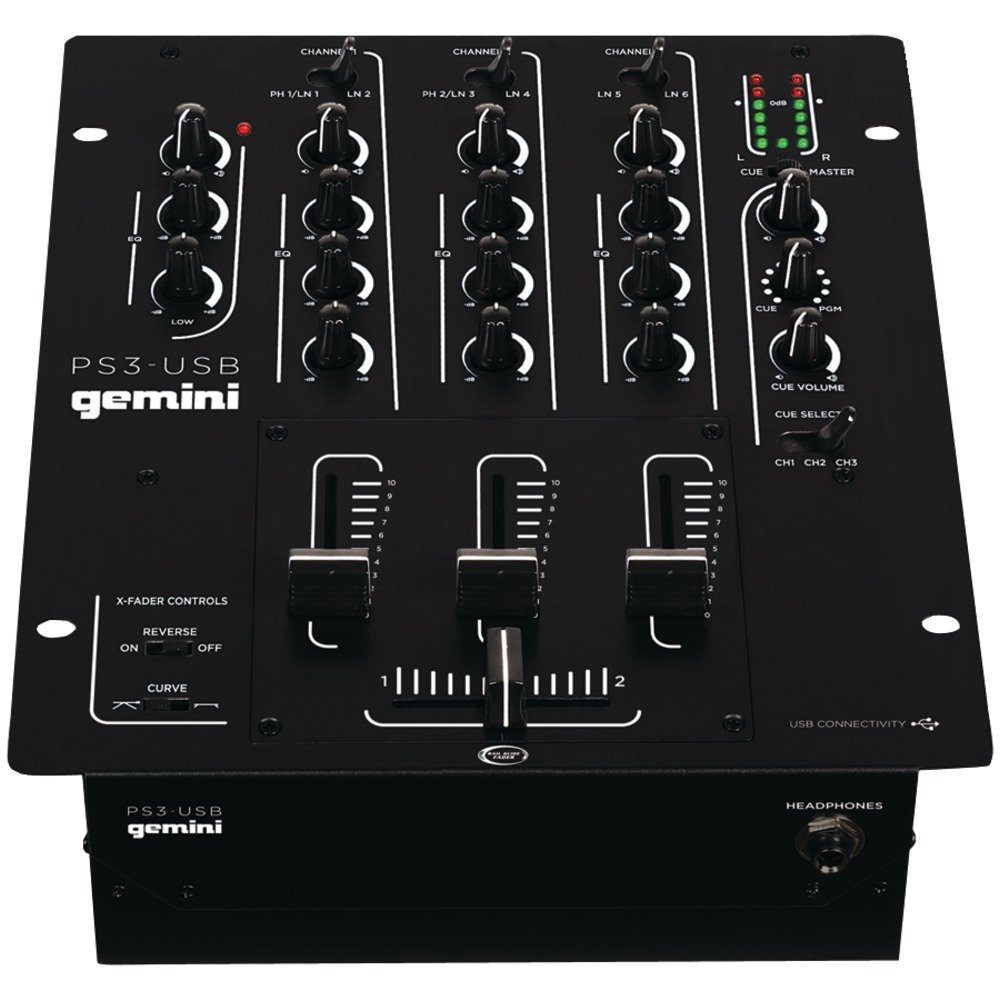
รูปที่ 1 : ด้านหน้า view of the Gemini PS3-USB Mixer, showing controls and inputs.
2. คำแนะนำด้านความปลอดภัย
- แหล่งพลังงาน: เชื่อมต่ออุปกรณ์เข้ากับแหล่งจ่ายไฟที่ระบุไว้เท่านั้น
- การระบายอากาศ : ตรวจสอบให้แน่ใจว่ามีการระบายอากาศที่เหมาะสม อย่าปิดกั้นช่องระบายอากาศ
- น้ำและความชื้น: อย่าให้ตัวเครื่องโดนฝนหรือความชื้น อย่าวางสิ่งของที่บรรจุของเหลวไว้บนตัวเครื่อง
- ความร้อน: เก็บเครื่องให้ห่างจากแหล่งความร้อน เช่น หม้อน้ำ เครื่องทำความร้อน เตา หรืออุปกรณ์อื่นๆ (รวมถึง ampเครื่องให้ความร้อน) ที่ผลิตความร้อน
- การทำความสะอาด: ทำความสะอาดด้วยผ้าแห้งเท่านั้น
- การบริการ: โปรดส่งผลิตภัณฑ์นี้ให้ช่างผู้ชำนาญการเป็นผู้ดำเนินการซ่อมบำรุง ห้ามซ่อมแซมผลิตภัณฑ์นี้ด้วยตนเอง
3. การตั้งค่า
3.1 การแกะกล่อง
Carefully unpack the mixer and check for any signs of damage. Retain the packaging materials for future transport or storage.
3.2 การต่อสายไฟ
Connect the provided power adapter to the mixer's power input and then to a suitable electrical outlet.
3.3 การเชื่อมต่อเสียง
The PS3-USB features 5-line, 3-channel inputs with 2 convertible Phono/Line RCA inputs.
- ช่องรับสัญญาณ Phono/Line: Connect turntables or line-level devices (CD players, media players) to the RCA inputs. Use the Phono/Line switch to select the appropriate input type for each channel.
- เอาต์พุตหลัก: Connect the Master RCA outputs to your ampเครื่องขยายเสียงหรือลำโพงที่มีกำลังขยาย
- บันทึกผลลัพธ์: Connect the Record RCA outputs to a recording device if you wish to record your mix.
- หูฟัง: Plug your 1/4" (6.3mm) headphones into the front panel headphone connector.
3.4 การเชื่อมต่อ USB
Connect the mixer to your Mac or PC using a standard USB cable. This allows for simultaneous playback and recording through your computer's media player software.
4. คู่มือการใช้งาน
4.1 การควบคุมและฟังก์ชันต่างๆview
Familiarize yourself with the mixer's layout:
- Channel Gain Control: ปรับระดับสัญญาณอินพุตสำหรับแต่ละช่องสัญญาณ
- 3-Band Rotary EQ: Provides control over High, Mid, and Low frequencies for each channel.
- Channel Fader: ควบคุมระดับเสียงของแต่ละช่องสัญญาณได้อย่างอิสระ
- ครอสเฟเดอร์: A user-replaceable Rail Glide crossfader with curve and reverse controls for blending between channels.
- ปริมาณหลัก: ควบคุมระดับเอาต์พุตโดยรวมของเครื่องผสม
- VU เมตร: Visual indicators for master or cue levels.
- ส่วนคิว: Includes rotary cue volume, CUE/PGM controls, and a split cue switch for headphone monitoring.
- ส่วนไมโครโฟน: Features a rotary microphone volume control and a 2-band EQ for microphone input.
4.2 การผสมพื้นฐาน
- Connect your audio sources to the appropriate Phono/Line inputs.
- Set the Phono/Line switch for each channel to match your source.
- Adjust the Gain control for each active channel to achieve a healthy input level without clipping (distortion).
- Use the channel faders to bring up the volume of your desired audio sources.
- Utilize the 3-band EQ to shape the sound of each channel.
- Use the crossfader to smoothly transition between channels.
- Monitor your mix using headphones via the Cue section and adjust the Master Volume for the main output.
4.3 การเล่นและบันทึก USB
Once connected via USB, your computer should recognize the PS3-USB as an audio device.
- การเล่นซ้ำ: Select the PS3-USB as the output device in your computer's sound settings or media player software to route audio through the mixer.
- การบันทึก: Select the PS3-USB as the input device in your recording software. The mixer's master output will be sent to your computer for recording.
5. การบำรุงรักษา
- การทำความสะอาด: ใช้ผ้านุ่มและแห้งเช็ดทำความสะอาดภายนอกของเครื่องผสม ห้ามใช้น้ำยาทำความสะอาดหรือตัวทำละลาย
- Crossfader Replacement: The Rail Glide crossfader is user-replaceable. Refer to the Gemini website or authorized service centers for replacement parts and instructions if needed.
- พื้นที่จัดเก็บ: When not in use for extended periods, store the mixer in a cool, dry place, preferably in its original packaging.
6 การแก้ไขปัญหา
| ปัญหา | สาเหตุที่เป็นไปได้ | สารละลาย |
|---|---|---|
| No sound output from master. | Master volume too low; incorrect input selection; ampปัญหาเกี่ยวกับเครื่องขยายเสียง/ลำโพง | Increase Master Volume. Check Phono/Line switches. Verify ampการเชื่อมต่อเครื่องขยายเสียง/ลำโพงและแหล่งจ่ายไฟ |
| ไม่มีเสียงจากช่องสัญญาณใดช่องหนึ่ง | Channel fader down; Gain too low; incorrect Phono/Line selection; source device off/muted. | Raise channel fader. Adjust Gain. Correct Phono/Line switch. Check source device. |
| เสียงผิดเพี้ยน | Input Gain too high; Master Volume too high; faulty cable. | Reduce channel Gain. Reduce Master Volume. Replace cables. |
| USB recording/playback not working. | Incorrect USB connection; computer audio settings incorrect; driver issues. | Ensure USB cable is securely connected. Select PS3-USB as audio device in computer settings. Restart computer. |
7. ข้อมูลจำเพาะ
- แบบอย่าง: PS3USB
- ช่องทางการรับชม: 3
- ข้อมูลอินพุต: 5-Line, 2 Convertible Phono/Line RCA, USB
- เอาท์พุต: Master RCA, Record RCA, 1/4" (6.3mm) Headphone
- EQ: 3-Band Rotary EQ per channel, 2-Band EQ for Microphone
- ครอสเฟเดอร์: User-replaceable Rail Glide with Curve and Reverse controls
- การเชื่อมต่อ: USB for Mac/PC Playback & Recording
- Dimensions (Approximate Shipping): 12.00 นิ้ว x 10.00 นิ้ว x 3.25 นิ้ว
- Weight (Approximate Shipping): 6.2 ปอนด์ (2.8 กก.)
- ยูพีซี: 747705208149
8. การรับประกันและการสนับสนุน
This Gemini product is covered by a รับประกัน 90 วัน from the date of purchase. This warranty covers manufacturing defects and workmanship under normal use. It does not cover damage caused by misuse, accident, modification, or unauthorized repair.
For technical support, service inquiries, or warranty claims, please contact your authorized Gemini dealer or visit the official Gemini webเว็บไซต์สำหรับข้อมูลการติดต่อ
โปรดเก็บหลักฐานการซื้อไว้เพื่อใช้ยืนยันการรับประกัน