
1. บทนำ
This manual provides detailed instructions for the safe and effective use of the PeakTech P 4980 Dual Laser Pointer IR Thermometer. This device is designed for non-contact temperature measurements across a wide range, from -50 to +800 °C. It features dual laser pointers for precise targeting of the measurement area. Please read this manual thoroughly before operating the device and keep it for future reference.
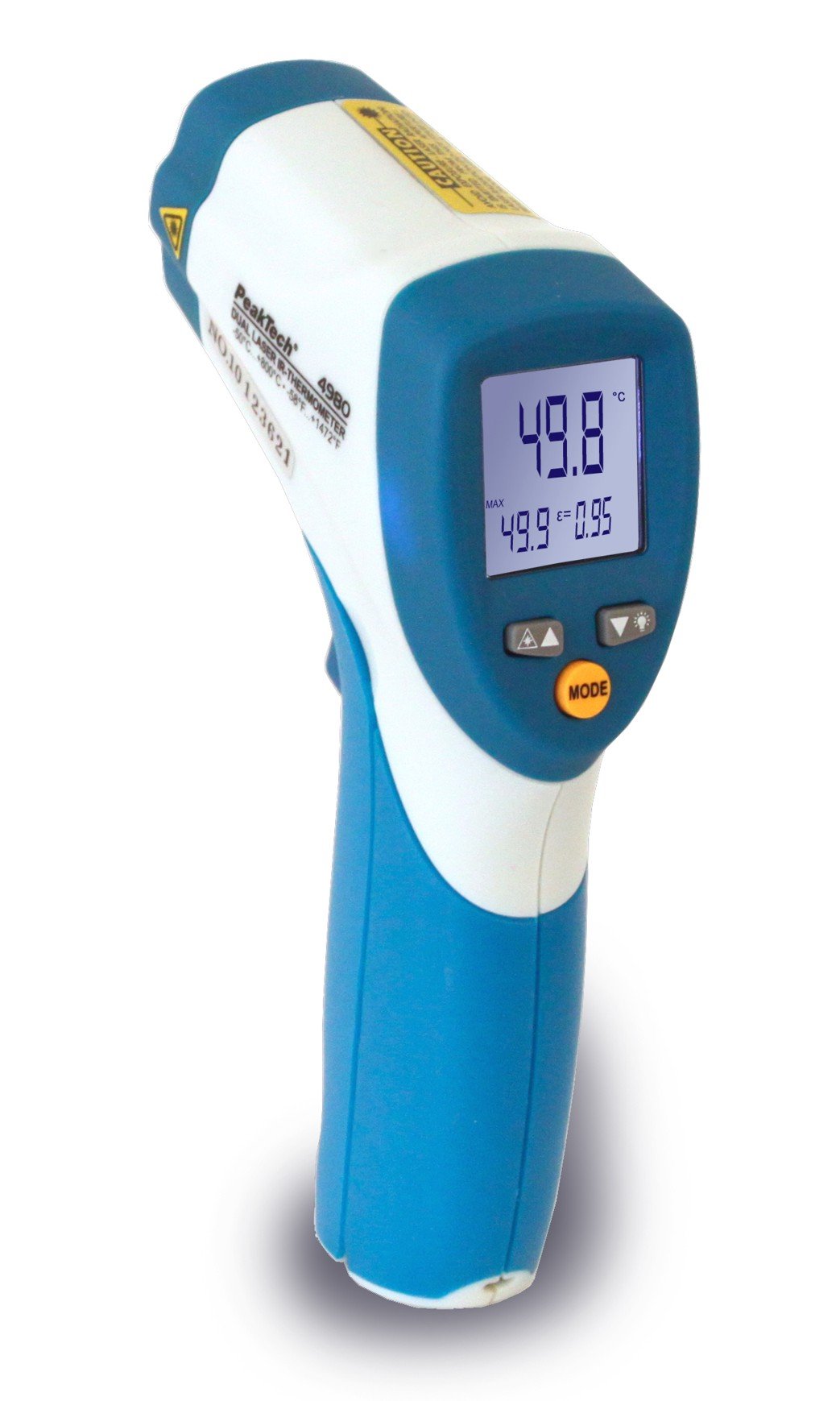
Image 1.1: The PeakTech P 4980 Dual Laser Pointer IR Thermometer, showing its ergonomic design and display.
2. ข้อมูลด้านความปลอดภัย
Always observe the following safety precautions to prevent injury and avoid damage to the device:
- ความปลอดภัยของเลเซอร์: This device uses Class 2 lasers. Do not stare directly into the laser beam or direct it at people or animals. Avoid direct eye exposure.
- สภาพแวดล้อมการทำงาน: Do not use the thermometer in environments with explosive gases, vapor, or dust.
- ขีดจำกัดอุณหภูมิ: Do not expose the device to extreme temperatures outside its specified operating range.
- การซ่อมบำรุง: ควรให้บุคลากรที่มีคุณสมบัติเหมาะสมทำการซ่อมแซมเท่านั้น ห้ามดัดแปลงอุปกรณ์ด้วยตนเอง
- การทำความสะอาด: ใช้ผ้าแห้งนุ่มๆ เช็ดทำความสะอาด ห้ามใช้สารทำความสะอาดที่มีฤทธิ์กัดกร่อนหรือตัวทำละลาย
- การจัดการแบตเตอรี่: Ensure correct battery polarity. Remove batteries if the device will not be used for an extended period. Dispose of batteries according to local regulations.
3. คุณสมบัติของผลิตภัณฑ์
The PeakTech P 4980 offers advanced features for accurate and convenient temperature measurement:
- ตัวชี้เลเซอร์คู่: Provides precise targeting, indicating the exact measurement spot.
- ช่วงอุณหภูมิที่กว้าง: Measures temperatures from -50 °C to +800 °C (-58 °F to +1472 °F).
- การวัดแบบไม่สัมผัส: Safely measure hot, hazardous, or hard-to-reach surfaces.
- จอแสดงผล LCD: Clear digital display for easy reading of temperature values.
- ปรับ Emissivity: Allows for accurate measurements on various surface types (refer to operating instructions for details).
- ฟังก์ชั่นการเก็บข้อมูล: หยุดภาพหน้าจอขณะอ่านค่า เพื่อให้บันทึกได้ง่าย
- แสงไฟด้านหลัง: Improves visibility in dimly lit conditions.
- ปิดเครื่องอัตโนมัติ: ช่วยประหยัดอายุการใช้งานแบตเตอรี่
4. การตั้งค่า
4.1 การติดตั้งแบตเตอรี่
- หาฝาปิดช่องใส่แบตเตอรี่ที่ด้ามจับของอุปกรณ์
- เปิดฝาครอบโดยการเลื่อนหรือปลดล็อค
- Insert the included battery, ensuring correct polarity (+ and - terminals).
- ปิดฝาช่องใส่แบตเตอรี่ให้แน่น
4.2 การเปิด/ปิดเครื่อง
- To power on the device, press the trigger. The display will illuminate.
- อุปกรณ์จะปิดเครื่องโดยอัตโนมัติหลังจากไม่มีการใช้งานเป็นระยะเวลาหนึ่ง เพื่อประหยัดพลังงานแบตเตอรี่
5. คู่มือการใช้งาน
5.1 การวัดผล
- หันเทอร์โมมิเตอร์ไปที่พื้นผิวเป้าหมาย
- กดไกปืนค้างไว้ เลเซอร์คู่จะทำงานและชี้ไปยังพื้นที่ที่ต้องการวัด
- The measured temperature will be displayed on the LCD.
- ปล่อยไกปืนเพื่อล็อกค่าที่แสดงบนหน้าจอ (ฟังก์ชันล็อกข้อมูล)
5.2 Distance-to-Spot Ratio
The accuracy of the measurement depends on the distance-to-spot ratio. Ensure the target area is larger than the measurement spot size at your chosen distance. The dual lasers help define this spot.
5.3 การปรับค่าการแผ่รังสี
Different materials emit infrared energy differently. For accurate readings, adjust the emissivity setting to match the surface being measured. Consult a standard emissivity table for common materials. The P 4980 allows adjustment via dedicated buttons (refer to device interface for specific controls).
5.4 การเลือกหน่วย (°C/°F)
To switch between Celsius (°C) and Fahrenheit (°F), locate the unit selection button (usually labeled '°C/°F' or similar) and press it. The display will change accordingly.
6. การบำรุงรักษา
6.1 การทำความสะอาดเครื่อง
- ล้างอุปกรณ์ casing กับ d อ่อนamp ผ้า. ห้ามใช้วัสดุที่มีฤทธิ์กัดกร่อนหรือตัวทำละลาย
- For the lens, use a soft cloth or cotton swab with a small amount of isopropyl alcohol.
6.2 การเปลี่ยนแบตเตอรี่
When the low battery indicator appears on the display, replace the battery as described in Section 4.1. Always use the specified battery type.
6.3 พื้นที่จัดเก็บ
เก็บเทอร์โมมิเตอร์ไว้ในที่แห้งและเย็น หลีกเลี่ยงแสงแดดโดยตรงและอุณหภูมิที่สูงหรือต่ำเกินไป ถอดแบตเตอรี่ออกหากเก็บไว้นาน
7 การแก้ไขปัญหา
| ปัญหา | สาเหตุที่เป็นไปได้ | สารละลาย |
|---|---|---|
| อุปกรณ์ไม่เปิดเครื่อง | แบตเตอรี่เสียหรือติดตั้งไม่ถูกต้อง | ตรวจสอบขั้วแบตเตอรี่ หรือเปลี่ยนแบตเตอรี่ใหม่ |
| การอ่านที่ไม่ถูกต้อง | Incorrect emissivity setting; distance too far; lens dirty. | Adjust emissivity; move closer to target; clean lens. |
| Laser pointers not visible. | Laser function disabled (if applicable); bright ambient light. | Check laser activation button; use in less bright conditions. |
| Display shows 'ERR' or similar. | Measurement outside range; internal error. | Ensure target temperature is within -50 to +800 °C. If error persists, contact support. |
8. ข้อมูลจำเพาะ
| คุณสมบัติ | ข้อมูลจำเพาะ |
|---|---|
| แบบอย่าง | พี 4980 |
| ช่วงอุณหภูมิ | -50 ° C ถึง +800 ° C (-58 ° F ถึง +1472 ° F) |
| ปณิธาน | 0.1 องศาเซลเซียส / 0.1 องศาฟาเรนไฮต์ |
| ประเภทจอภาพ | จอแอลซีดี |
| คุณสมบัติพิเศษ | Non-contact, Dual Laser Pointer |
| แหล่งพลังงาน | ใช้พลังงานจากแบตเตอรี่ |
| ส่วนประกอบที่รวมอยู่ | แบตเตอรี่ |
| วัสดุภายนอก | พลาสติก |
| สี | สีขาว/น้ำเงิน |
9. การรับประกันและการสนับสนุน
9.1 ข้อมูลการรับประกัน
This PeakTech product is backed by a 3-year manufacturer's warranty, ensuring quality and reliability. Please retain your proof of purchase for warranty claims.
9.2 การสนับสนุนลูกค้า
For technical assistance, troubleshooting, or warranty inquiries, please contact PeakTech customer support. Refer to the official PeakTech webไซต์หรือบรรจุภัณฑ์ผลิตภัณฑ์เพื่อให้มีข้อมูลติดต่อล่าสุด