
การแนะนำ
Thank you for choosing the Tele System TS6512HD Digital Terrestrial Receiver. This device allows you to receive digital terrestrial television broadcasts and offers additional features such as multimedia playback via USB and recording capabilities. This manual provides essential information for the safe and efficient use of your receiver, including setup, operation, maintenance, and troubleshooting.
ข้อมูลด้านความปลอดภัยที่สำคัญ
- แหล่งจ่ายไฟ: ใช้เฉพาะอะแดปเตอร์ไฟฟ้าที่ระบุเท่านั้น ตรวจสอบให้แน่ใจว่าระดับเสียงtage ตรงกับแหล่งจ่ายไฟในพื้นที่ของคุณ
- การระบายอากาศ : Do not block ventilation openings. Place the receiver on a stable, flat surface with adequate space around it for proper airflow.
- น้ำและความชื้น: Do not expose the receiver to rain, moisture, or liquids. Do not place objects filled with liquids, such as vases, on the receiver.
- แหล่งความร้อน: Keep the receiver away from heat sources such as radiators, heat registers, stoves, or other heat-producing appliances.
- การทำความสะอาด: Unplug the receiver from the power outlet before cleaning. Use a soft, dry cloth. Do not use liquid or aerosol cleaners.
- การบริการ: อย่าพยายามให้บริการผลิตภัณฑ์นี้ด้วยตนเอง ส่งต่อการบริการทั้งหมดไปยังช่างบริการที่ผ่านการรับรอง
- ฟ้าผ่า: Unplug the receiver during lightning storms or when unused for long periods.
เนื้อหาแพ็คเกจ
กรุณาทำเครื่องหมายในช่องสำหรับรายการต่อไปนี้:
- Tele System TS6512HD Digital Terrestrial Receiver
- รีโมทคอนโทรล
- อะแดปเตอร์แปลงไฟ
- คู่มือการใช้งาน (เอกสารนี้)
คู่มือการติดตั้ง
1. การเชื่อมต่อเครื่องรับ
- เชื่อมต่อกับทีวี:
- For optimal picture quality, connect an HDMI cable (not included) from the receiver's HDMI OUT port to an available HDMI IN port on your television.
- Alternatively, if your TV does not have an HDMI port, connect a SCART cable (not included) from the receiver's SCART port to the SCART IN port on your television.
- เชื่อมต่อเสาอากาศ: Connect your terrestrial antenna cable to the ANT IN port on the back of the receiver.
- เชื่อมต่อพลังงาน: เสียบอะแดปเตอร์แปลงไฟเข้ากับพอร์ต DC IN บนตัวรับสัญญาณ จากนั้นเสียบอะแดปเตอร์เข้ากับเต้ารับที่ผนัง
- ใส่แบตเตอรี่: Open the battery compartment on the remote control and insert two AAA batteries (not included), observing the correct polarity.
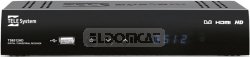
รูปที่ 1 : ด้านหน้า view of the Tele System TS6512HD receiver, showing its compact design and essential indicators.
2 การติดตั้งครั้งแรก
- Turn on your TV and select the correct input source (HDMI or SCART) corresponding to where you connected the receiver.
- Power on the Tele System TS6512HD receiver.
- หน้าต่างแนะนำการติดตั้งครั้งแรกจะปรากฏบนหน้าจอทีวีของคุณ ทำตามคำแนะนำบนหน้าจอเพื่อเลือกภาษา ประเทศ และเริ่มการสแกนช่องอัตโนมัติ
- Once the scan is complete, the receiver will save the found channels, and you can begin watching TV.
คำแนะนำการใช้งาน
ฟังก์ชันพื้นฐานของรีโมทคอนโทรล
- พลัง: Turns the receiver on or off (standby mode).
- ช +/-: เปลี่ยนช่องขึ้นหรือลง
- ฉบับ +/-: ปรับระดับเสียง
- ใบ้: ปิดเสียงหรือเปิดเสียง
- เมนู: เข้าสู่เมนูหลักเพื่อเข้าถึงการตั้งค่าและคุณสมบัติต่างๆ
- EXIT: ออกจากเมนูหรือหน้าจอแสดงผลปัจจุบัน
- ตกลง: ยืนยันการเลือกในเมนู
- ปุ่มลูกศร (ขึ้น/ลง/ซ้าย/ขวา): นำทางผ่านเมนูและตัวเลือก
- ข้อมูล: แสดงข้อมูลช่องปัจจุบัน
- อีพีจี: เข้าถึงคู่มือรายการอิเล็กทรอนิกส์
การนำทางช่อง
ใช้ ช +/- buttons to browse channels sequentially. To directly enter a channel number, use the numeric keypad on the remote control.
การใช้เมนูหลัก
กดปุ่ม เมนู button to access the receiver's main menu. Here you can configure various settings, including:
- ค้นหาช่อง: Rescan for channels or perform a manual search.
- การตั้งค่าระบบ: Adjust language, time, parental control, and other system preferences.
- การตั้งค่ารูปภาพ: Configure aspect ratio, resolution, and other display options.
- การตั้งค่าเสียง: Adjust audio output preferences.
- ยูเอสบี: Access multimedia files from a connected USB device or manage recordings.
Recording TV Programs (PVR Function)
The TS6512HD receiver supports recording of TV programs to an external USB storage device (e.g., USB flash drive or external hard drive, not included). Ensure your USB device is formatted correctly (FAT32 or NTFS) and has sufficient free space.
- Connect a compatible USB storage device to the USB port on the receiver.
- To record instantly, press the บันทึก button on the remote control while watching a program. Press หยุด เพื่อสิ้นสุดการบันทึก
- To schedule a recording, use the อีพีจี (Electronic Program Guide) to select a program and follow the on-screen prompts to set a timer recording. Alternatively, access the Timer settings via the main menu.
- Recorded programs can be accessed and played back through the "USB" section in the main menu.
Multimedia Playback via USB
เครื่องรับสัญญาณสามารถเล่นมัลติมีเดียได้หลากหลายประเภท files (video, audio, photos) from a connected USB storage device.
- Connect a USB storage device containing your multimedia fileเข้ากับพอร์ต USB
- กดปุ่ม เมนู button, navigate to the "USB" section, and select "Multimedia" or "Player".
- เรียกดูของคุณ files และกด OK ที่จะเล่น
- Note: The receiver supports specific file formats (e.g., H.264, MPEG2, MPEG4 for video; AAC+, LC-AAC for audio). Compatibility with all file types is not guaranteed.
การซ่อมบำรุง
การทำความสะอาด
To clean the receiver, first unplug it from the power outlet. Use a soft, dry, lint-free cloth to wipe the exterior surfaces. Do not use liquid cleaners, abrasive pads, or chemical solvents, as these can damage the finish or internal components.
การอัพเดตซอฟต์แวร์
Periodically, Tele System may release software updates to improve performance or add new features. Check the manufacturer's website for available updates and instructions on how to install them via USB.
การแก้ไขปัญหา
| ปัญหา | สาเหตุที่เป็นไปได้ | สารละลาย |
|---|---|---|
| No power / Receiver does not turn on. | Power cable not connected properly; Power outlet not working; Faulty power adapter. | Check power cable connection. Try a different power outlet. Ensure the power adapter is working. |
| ไม่มีภาพหรือเสียง | Incorrect TV input selected; HDMI/SCART cable loose or faulty; Antenna not connected or signal too weak. | Select the correct TV input source. Check HDMI/SCART cable connections. Ensure antenna is connected and try rescanning channels. |
| รีโมทคอนโทรลไม่ทำงาน | แบตเตอรี่หมดหรือใส่ไม่ถูกต้อง; มีสิ่งกีดขวางระหว่างรีโมทและตัวรับสัญญาณ; เซ็นเซอร์รีโมทถูกปิดกั้น | Replace batteries, ensuring correct polarity. Remove any obstructions. Ensure the remote sensor on the receiver is clear. |
| Poor picture quality / Pixelation. | Weak antenna signal; Antenna alignment issue; Interference. | Check antenna connection and alignment. Consider using a signal amplifier if signal is consistently weak. |
| Cannot record to USB device. | USB device not connected; USB device not formatted correctly; Insufficient storage space; USB device incompatible. | Ensure USB device is connected. Format the USB device to FAT32 or NTFS. Check available space. Try a different USB device. |
ข้อมูลจำเพาะทางเทคนิค
| ชื่อรุ่น | TS6512HD |
| หมายเลขรุ่น | 21005197 |
| ยี่ห้อ | Tele System |
| ประเภทจูนเนอร์ | Terrestrial, DVB |
| ความละเอียดวิดีโอ | 1920 x 810 พิกเซล |
| ตัวแปลงสัญญาณวิดีโอ | H.264, MPEG2, MPEG4 |
| ตัวแปลงสัญญาณเสียง | AAC+, LC-AAC |
| พอร์ต USB รวม | 1 |
| พอร์ต HDMI ทั้งหมด | 1 |
| อุปกรณ์ที่รองรับ | โทรทัศน์ |
| สี | สีดำ |
| ขนาด (แพ็คเกจ) | 24 x 23.4 x 5.2 ซม. |
| น้ำหนัก (แพ็คเกจ) | 421.84 กรัม |
| GTIN (EAN/UPC) | 08024427014350 |
การรับประกันและการสนับสนุน
The Tele System TS6512HD receiver comes with a standard manufacturer's warranty. For specific warranty terms and conditions, please refer to the warranty card included with your product or visit the official Tele System website. For technical support, troubleshooting assistance beyond this manual, or service inquiries, please contact Tele System customer support through their official channels.