
การแนะนำ
The Tecsun PL-505 is a compact and versatile digital portable radio designed for enthusiasts and casual listeners alike. Featuring Digital Signal Processing (DSP) technology, it offers enhanced reception and audio clarity across AM, FM, and Shortwave bands. Its Easy Tuning Method (ETM) simplifies station discovery, making it an ideal companion for travel or home use.
คุณสมบัติหลัก
- AM/FM Shortwave receiver with DSP (Digital Signal Processing) & ETM (Easy Tuning Method).
- 30" telescopic antenna extender greatly enhances FM & Shortwave reception.
- Tecsun's patented ETM tuning offers easy & comprehensive access to all local stations.
- Alarm clock + sleep timer + 550 memories.
- Compact size with outstanding sound quality.
เนื้อหาแพ็คเกจ
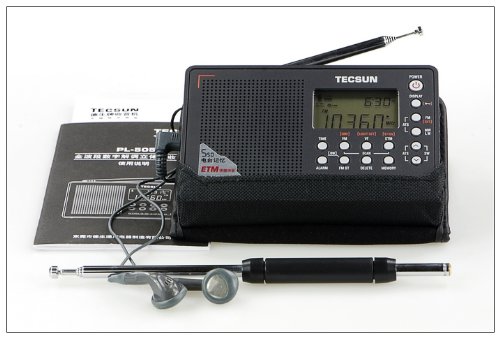
Image: The Tecsun PL-505 radio displayed with its standard accessories, including an external telescopic antenna, a pair of earphones, and the printed user manual. This image illustrates the complete package contents.
โปรดตรวจสอบว่าสินค้าทั้งหมดมีอยู่ในแพ็คเกจ:
- Tecsun PL-505 Radio Unit
- External Telescopic Antenna
- หูฟังสเตอริโอ
- สายชาร์จ USB (ถ้ามี)
- คู่มือการใช้งาน
- Carrying Pouch (if included)
การตั้งค่า
การเปิดเครื่องวิทยุ
The Tecsun PL-505 can be powered via its USB interface. Connect the provided USB cable to the radio's USB port and to a compatible USB power adapter (not always included) or a computer's USB port. Ensure the power source provides stable voltage.
การเชื่อมต่อเสาอากาศ
For optimal FM and Shortwave reception, extend the built-in telescopic antenna fully. For enhanced reception, especially on Shortwave bands, connect the external 30" telescopic antenna extender to the radio's antenna jack. Position the antenna away from metallic objects for best performance.

ภาพ: ด้านหน้าที่ใส view of the Tecsun PL-505 radio, showcasing its digital display and control buttons. The telescopic antenna is extended, indicating readiness for reception.
คำแนะนำการใช้งาน
เปิด/ปิดเครื่อง
กดปุ่ม พลัง ปุ่มที่อยู่ด้านบนขวาของวิทยุใช้สำหรับเปิดหรือปิดเครื่อง
การเลือกวงดนตรี
กดปุ่ม เอฟเอ็ม/เอเอ็ม/ซว button repeatedly to cycle through the available frequency bands: FM, AM (Medium Wave), and Shortwave (SW).
วิธีการปรับแต่ง
- การปรับด้วยตนเอง: ใช้ การปรับแต่ง knob on the right side of the radio to manually adjust the frequency.
- การปรับแต่งการสแกนอัตโนมัติ: กดปุ่ม สแกน button to automatically scan for and stop at strong signals.
- Easy Tuning Method (ETM): กดปุ่ม อีทีเอ็ม button. The radio will scan and store all receivable stations into a temporary ETM memory bank. You can then browse these stations using the tuning knob or memory buttons. This method is ideal for travel, as it quickly finds local stations without overwriting your main memories.
การจัดการหน่วยความจำ
The PL-505 supports up to 550 memories for storing your favorite stations.
- การรักษาไว้ซึ่งสถานี: ปรับไปที่สถานีที่ต้องการ กดปุ่มค้างไว้ หน่วยความจำ button until the memory location flashes. Use the tuning knob to select a memory slot, then press หน่วยความจำ เพื่อยืนยันอีกครั้ง
- ย้อนรำลึกถึงสถานี: กดปุ่ม หน่วยความจำ button briefly. Use the tuning knob to scroll through stored stations, then press หน่วยความจำ or wait a few seconds for the radio to tune to the selected station.
- การลบสถานี: Recall the station you wish to delete. Press and hold the ลบ button until the station is removed from memory.
นาฬิกาปลุกและตัวตั้งเวลาปิดเครื่อง
- การตั้งปลุก: กดปุ่ม เตือน button. Use the tuning knob to set the alarm time. Press เตือน again to confirm. The radio will turn on at the set time to the last tuned station or a preset alarm tone.
- การตั้งค่าตัวตั้งเวลาปิดเครื่อง: กดปุ่ม นอน button repeatedly to cycle through available sleep timer durations (e.g., 120, 90, 60, 30, 15, 5 minutes, OFF). The radio will automatically turn off after the selected duration.
การควบคุมระดับเสียง
ปรับระดับเสียงโดยใช้ปุ่ม ปริมาณ knob located on the right side of the radio.
ภาพ: โปรด้านข้างfile of the Tecsun PL-505 radio, clearly showing the physical tuning and volume control knobs on its right side, essential for operation.
การซ่อมบำรุง
- การทำความสะอาด: Use a soft, dry cloth to clean the radio's exterior. Do not use abrasive cleaners, solvents, or strong chemicals, as they may damage the finish.
- พื้นที่จัดเก็บ: เมื่อไม่ได้ใช้งานเป็นเวลานาน ควรเก็บวิทยุไว้ในที่แห้งและเย็น หลีกเลี่ยงแสงแดดโดยตรงและอุณหภูมิที่สูงหรือต่ำเกินไป
- การดูแลเสาอากาศ: Handle the telescopic antenna gently to prevent bending or breakage. Retract it when not in use or when transporting the radio.
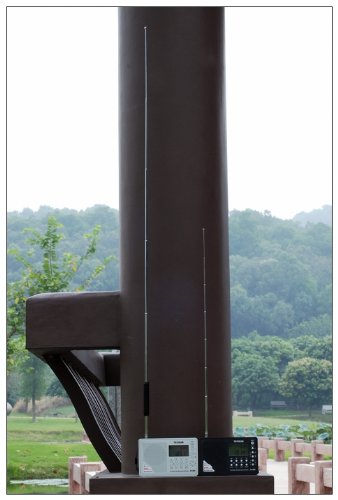
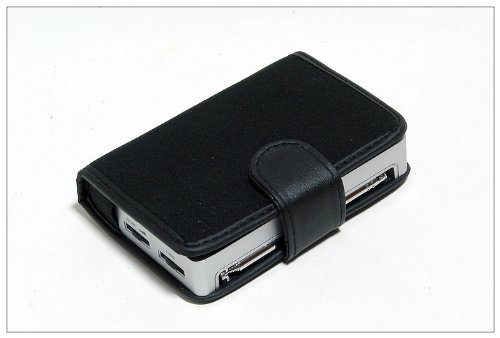
Image: The Tecsun PL-505 radio snugly fitted inside a black protective carrying case, highlighting its portability and the option for safe storage.
การแก้ไขปัญหา
| ปัญหา | สาเหตุที่เป็นไปได้ | สารละลาย |
|---|---|---|
| ไม่มีไฟฟ้า | Power cable not connected properly or power source issue. | Ensure USB cable is securely connected. Verify power adapter is working. |
| สัญญาณไม่ดี / เสียงรบกวน | เสาอากาศไม่ยืดออก สัญญาณอ่อน หรือมีสัญญาณรบกวน | Fully extend the telescopic antenna. Connect the external antenna. Move radio away from electronic devices or large metal objects. Try tuning to a different frequency. |
| จอแสดงผลไม่ทำงาน | Low power or internal fault. | Ensure adequate power supply. If problem persists, contact support. |
| ปุ่มไม่ตอบสนอง | ซอฟต์แวร์มีปัญหาชั่วคราว | Try turning the radio off and on again. If possible, disconnect and reconnect power. |
ข้อมูลจำเพาะ
| คุณสมบัติ | รายละเอียด |
|---|---|
| ยี่ห้อ | Tecsun |
| แบบอย่าง | PL-ฮิต |
| ขนาดสินค้า | 12.19 x 2.03 x 7.87 ซม. |
| น้ำหนักสินค้า | 176.9 กรัม |
| ฮาร์ดแวร์อินเตอร์เฟซ | ยูเอสบี |
| เทคโนโลยีจูนเนอร์ | เอเอ็ม,เอฟเอ็ม |
| ประเภทจอภาพ | ดิจิตอล |
| แหล่งพลังงาน | สายไฟ |
| ความถี่ GSM | 108 MHz (Likely refers to maximum FM frequency) |
| รองรับคลื่นวิทยุ | AM, FM, คลื่นสั้น |
| สี | สีดำ |
การรับประกันและการสนับสนุน
For warranty information and technical support, please refer to the documentation included with your purchase or contact Tecsun customer service directly. Details are typically available on the manufacturer's official webเว็บไซต์หรือผ่านผู้ค้าปลีกของคุณ
เก็บใบเสร็จรับเงินของคุณไว้เป็นหลักฐานการซื้อสำหรับการเรียกร้องการรับประกันใดๆ