
1. สินค้าหมดview
This manual provides instructions for the Ideal Security BK311BL Storm and Screen Door Handle with Inside Latch. This set is designed to replace existing surface mount storm door handle sets or for new installations on out-swinging storm and screen doors.

Figure 1: Ideal Security BK311BL Storm and Screen Door Handle Set.
2. เนื้อหาบรรจุภัณฑ์
ตรวจสอบว่าส่วนประกอบทั้งหมดมีอยู่ก่อนเริ่มการติดตั้ง:
- Surface Mount Push Button Handle (Exterior)
- Locking Inside Latch (Interior)
- Solid Strike Plate
- แกนหมุน (ความยาวต่างๆ)
- ฤดูใบไม้ผลิ
- Installation Hardware (screws of various lengths)
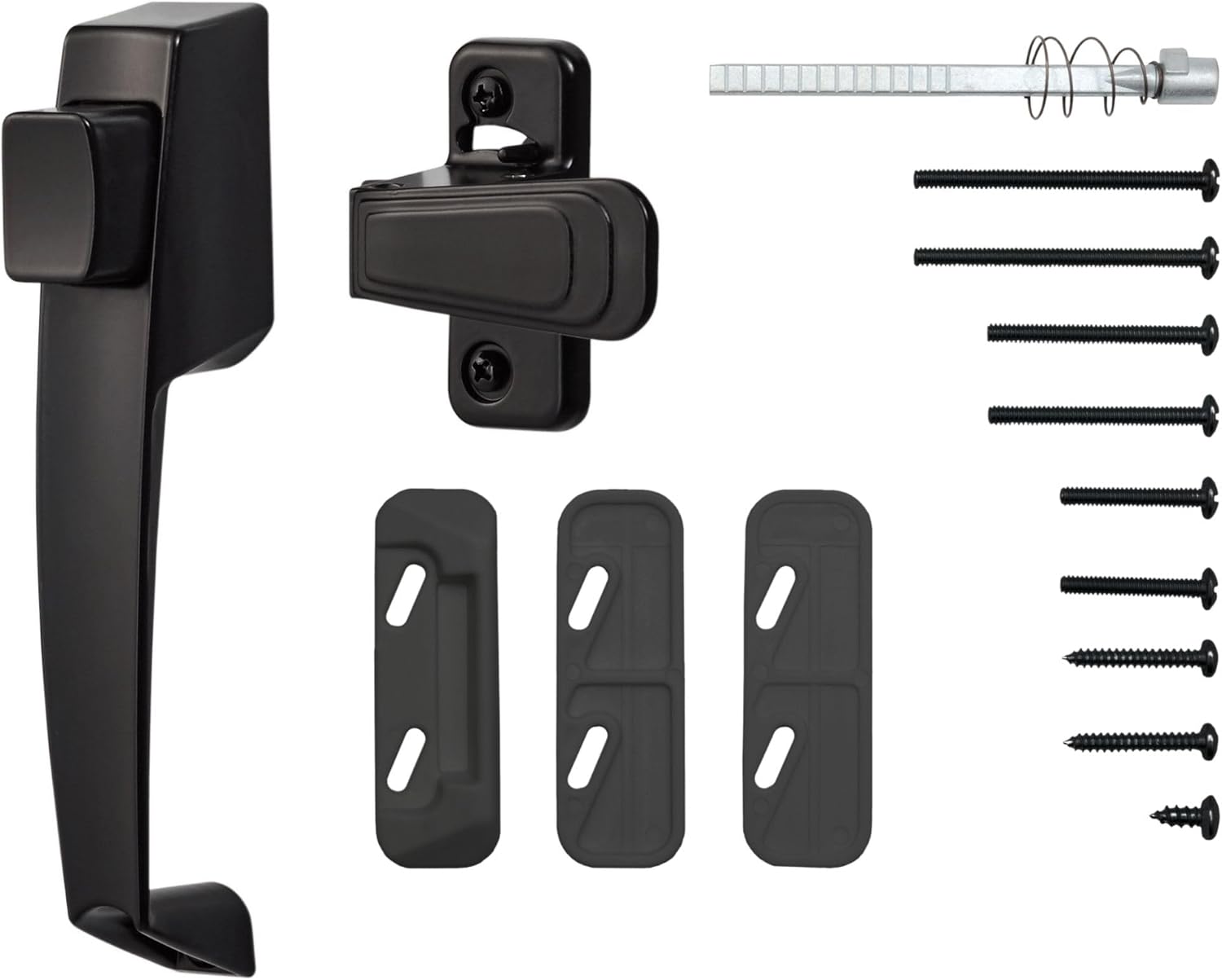
Figure 2: All components included in the BK311BL handle set.
3. การตั้งค่าและการติดตั้ง
3.1 เครื่องมือที่จำเป็น
- ไขควงหัวแฉก
- Drill with appropriate drill bits (if new holes are needed)
- สายวัด
- ดินสอหรือปากกาเมจิก
- Hacksaw or cutting tool (if spindle adjustment is required)
3.2 การตรวจสอบก่อนการติดตั้ง
- ความหนาของประตู: This handle set is compatible with storm and screen doors with a thickness of 1 inch to 2 inches. If your door is thicker, longer hardware components may be required.
- ระยะห่างของรู: Measure the distance between the centers of the existing installation holes on your door. This handle set is designed for a 1 ¾ inch hole spacing. If your existing holes do not match, new holes will need to be drilled.
- ประเภทประตู: This set is designed for out-swinging doors.
3.3 ขั้นตอนการติดตั้ง
- ถอดมือจับเก่าออก: Carefully remove any existing handle set from your storm or screen door.
- Prepare Spindle: Select the appropriate spindle length. The spindle should extend approximately 1/4 inch beyond the interior surface of the door once the exterior handle is installed. If necessary, cut the spindle at a pre-notched line using a hacksaw.
- ติดตั้งมือจับภายนอก: Insert the spindle through the door from the exterior side, ensuring the spring is correctly positioned (wide section towards the door). Align the exterior handle with the door holes and secure it using the provided screws.
- Install Interior Latch: Position the interior locking latch over the spindle and align it with the door holes. Secure the interior latch with the appropriate screws.
- Test Handle Function: Operate the handle and push button to ensure smooth movement and proper engagement of the latch mechanism.
- ติดตั้งแผ่นปิดช่องลม: Remove the old strike plate from the door frame. Position the new solid strike plate on the door frame so that it aligns with the latch bolt when the door is closed. Mark and drill pilot holes if necessary, then secure the strike plate with screws.
- Adjust Strike Plate (if needed): If the handle does not engage the strike plate properly, use the provided shims to adjust the strike plate's position for optimal latching.

Figure 3: The BK311BL handle set installed on a storm door.
3.4 วิดีโอแนะนำการติดตั้ง
Video 1: Detailed guide on how to replace a storm door handle, demonstrating the installation process.
4. คู่มือการใช้งาน
The Ideal Security BK311BL handle set offers simple and secure operation:
- เปิดจากด้านนอก: Press the push button on the exterior handle to disengage the latch and open the door.
- เปิดจากภายใน: Push down on the interior lever to disengage the latch and open the door.
- ล็อคประตู: Flip the switch on the inside latch to engage the locking mechanism, providing an additional layer of security. This prevents the exterior push button from operating the latch.
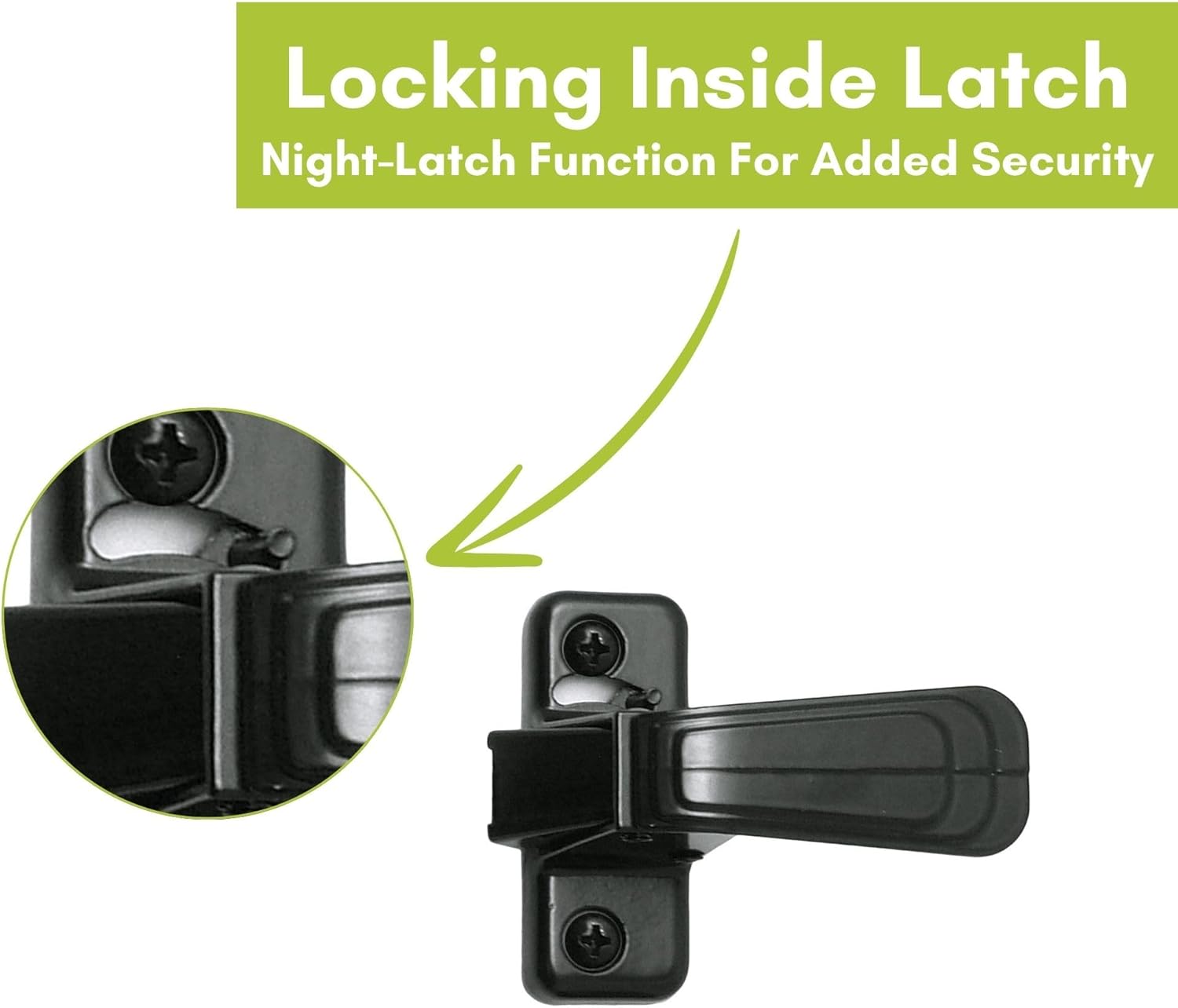
รูปที่ 4: ระยะใกล้ view of the locking inside latch, showing the security switch.
5. การบำรุงรักษา
To ensure the longevity and smooth operation of your Ideal Security door handle, follow these simple maintenance guidelines:
- การทำความสะอาด: Clean the handle and latch surfaces with a soft, damp ผ้า หลีกเลี่ยงน้ำยาทำความสะอาดที่มีฤทธิ์กัดกร่อนหรือตัวทำละลายที่อาจทำลายพื้นผิวได้
- การหล่อลื่น: Periodically apply a small amount of silicone-based lubricant to the moving parts of the latch mechanism and spindle to maintain smooth operation.
- ขันสกรูให้แน่น: Check all mounting screws periodically and tighten them if they have become loose.
6 การแก้ไขปัญหา
- ด้ามจับหลวม: Check and tighten all mounting screws on both the exterior handle and interior latch.
- Latch does not engage strike plate:
- Ensure the strike plate is correctly aligned with the latch bolt. Adjust its position if necessary.
- Use the provided shims behind the strike plate to bring it closer to the latch if there is too much gap.
- Push button or lever is stiff:
- Apply a silicone-based lubricant to the spindle and latch mechanism.
- Ensure the spindle is not too long, causing binding. Re-check spindle length and trim if needed.
- Inside latch locking mechanism does not work: Ensure the interior latch is properly installed and the switch moves freely. Check for any obstructions.
7. ข้อมูลจำเพาะ
| คุณสมบัติ | รายละเอียด |
|---|---|
| หมายเลขรุ่น | BK311BL |
| ยี่ห้อ | การรักษาความปลอดภัยในอุดมคติ |
| วัสดุ | โลหะ, ไนลอน |
| สี | สีดำ |
| เสร็จสิ้นภายนอก | สีดำ |
| ขนาดสินค้า | ยาว 2.99 นิ้ว x กว้าง 1.5 นิ้ว |
| ความเข้ากันได้ของความหนาของประตู | 1" ถึง 2" |
| ระยะห่างระหว่างรู | 1 ¾" (standard) |
| น้ำหนักสินค้า | 0.65 ปอนด์ (ประมาณ 10.4 ออนซ์) |
| ส่วนประกอบที่รวมอยู่ | Handle, Latch, Strike, Installation Hardware |
| แบตเตอรี่ที่จำเป็น | เลขที่ |
8. การรับประกันและการสนับสนุน
8.1 การรับประกันแบบจำกัดหนึ่งปี
All Ideal Security products are warranted to be free of labor and material defects for one year from the date of purchase. If you encounter any issues, please contact customer service before returning your item.
8.2 การสนับสนุนลูกค้า
For assistance, questions, or warranty claims, please contact Ideal Security customer service:
- อีเมล: info@idealnc.com
- โทรศัพท์: 1-800-361-2236
Defective products can be returned to the place of purchase with proof of purchase for replacement.