
การแนะนำ
This manual provides essential instructions for setting up, operating, and maintaining your Canon PowerShot ELPH 310 HS digital camera. Please read this manual thoroughly to ensure proper use and to maximize your camera's performance.
มีอะไรอยู่ในกล่อง
เมื่อแกะกล่องแล้ว โปรดตรวจสอบว่ามีสิ่งของต่อไปนี้ครบถ้วนหรือไม่:
- Canon PowerShot ELPH 310 HS Camera
- ชุดแบตเตอรี่ NB-4L
- Battery Charger CB-2LV
- สายรัดข้อมือ
- สาย USB
- CD-ROM (Software/Drivers)
การตั้งค่า
1. การชาร์จแบตเตอรี่
Insert the Battery Pack NB-4L into the Battery Charger CB-2LV. Plug the charger into a power outlet. The charging indicator light will show the charging status. Once fully charged, remove the battery.
2. การใส่แบตเตอรี่และการ์ดหน่วยความจำ
Open the battery/card compartment cover on the camera. Insert the charged battery pack, ensuring correct orientation. Insert a compatible SD/SDHC/SDXC memory card into the card slot until it clicks into place. Close the compartment cover securely.

ภาพ: ด้านหน้า view of the Canon PowerShot ELPH 310 HS digital camera, showcasing its silver finish and lens.
การใช้งานกล้อง
1. เปิด/ปิดเครื่อง
กดปุ่ม เปิด/ปิด button located on the top or side of the camera to power it on or off. The lens will extend when powered on.
2. การถ่ายภาพขั้นพื้นฐาน
- การโฟกัส: Gently press the shutter button halfway down to focus. The camera will emit a beep and display a green frame when focus is achieved.
- การถ่ายภาพ: กดปุ่มชัตเตอร์ลงจนสุดเพื่อถ่ายภาพ
- ซูม: Use the zoom lever around the shutter button to adjust the optical zoom (8x).
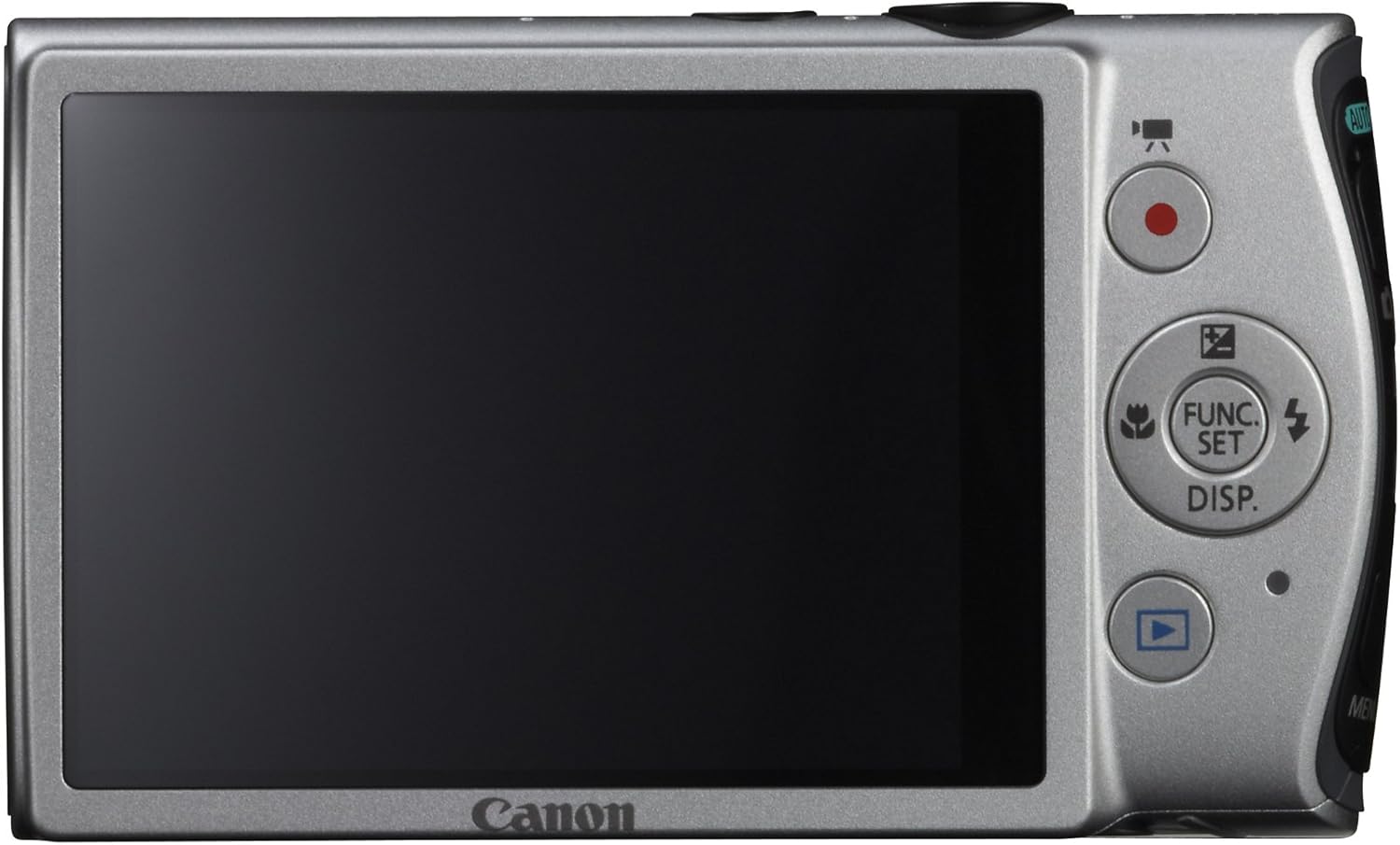
ภาพ: ด้านหลัง view of the Canon PowerShot ELPH 310 HS, displaying the 3.0-inch LCD screen and various control buttons for navigation and function selection.
3. โหมดถ่ายภาพ
The PowerShot ELPH 310 HS offers various shooting modes to suit different situations. Use the mode dial or menu to select:
- สมาร์ทออโต้: Automatically detects scenes and applies optimal settings for point-and-shoot simplicity.
- โปรแกรม (พ): Allows for automatic aperture/shutter speed selection based on conditions, with some user control.
- Movie Digest: Records a short video clip before each still image, combining them into a daily video.
- ระเบิดความเร็วสูง: Captures rapid action at approximately 8.7 frames per second.
- Super Slow Motion Movie: Records video at high frame rates (up to 240 fps) for slow-motion playback.
- โหมดฉากพิเศษ: Includes options like Handheld Night Scene, Portrait, Beach, Snow, Fireworks, Fisheye Effect, Miniature Effect, Toy Camera Effect, and more for specific photographic effects.
4. การบันทึกวิดีโอ
To record videos, press the dedicated movie button. The camera supports Full HD 1080p video at 24 fps and 720p HD video at 30 fps. The iFrame movie format is also supported for easier editing.
5. Image Stabilization (Intelligent IS)
The camera features Intelligent IS, which automatically selects the best shake correction method for your shooting situation. This includes modes for stills (Normal, Panning, Macro, Tripod) and videos (Dynamic, Powered, Macro, Tripod) to ensure steady images and footage.
การซ่อมบำรุง
1. การทำความสะอาดกล้อง
- เลนส์: Use a soft, lint-free cloth specifically designed for camera lenses. Avoid touching the lens directly with fingers.
- หน้าจอ LCD: Wipe gently with a soft, dry cloth. Do not use abrasive cleaners.
- ตัวกล้อง: Use a soft, dry cloth to wipe away dust and smudges.
2. การดูแลแบตเตอรี่
- เก็บแบตเตอรี่ไว้ในที่เย็นและแห้งเมื่อไม่ได้ใช้งาน
- หลีกเลี่ยงการปล่อยแบตเตอรี่จนหมดบ่อยครั้งเพื่อยืดอายุการใช้งาน
- อย่าให้แบตเตอรี่สัมผัสกับอุณหภูมิที่สูงหรือต่ำเกินไป
3. การจัดเก็บ
เมื่อเก็บกล้องไว้เป็นเวลานาน ควรถอดแบตเตอรี่และเมมโมรี่การ์ดออก เก็บกล้องไว้ในที่แห้ง ปราศจากฝุ่น โดยควรเก็บไว้ในกระเป๋าหรือกล่องใส่กล้อง
การแก้ไขปัญหา
| ปัญหา | สาเหตุที่เป็นไปได้ / วิธีแก้ไข |
|---|---|
| กล้องไม่สามารถเปิดได้ | Battery may be depleted or incorrectly inserted. Ensure battery is charged and inserted correctly. |
| ภาพมีความเบลอ | Camera shake, subject movement, or incorrect focus. Ensure proper grip, use Intelligent IS, or check focus settings. |
| ข้อผิดพลาดการ์ดหน่วยความจำ | Memory card may be full, corrupted, or incompatible. Try formatting the card (this will erase all data) or use a different card. |
| แฟลชไม่ทำงาน | Flash may be set to OFF or Red-Eye Reduction mode. Check flash settings in the menu. |
| ไม่สามารถบันทึกวิดีโอได้ | Memory card may be full or too slow. Ensure sufficient space and use a high-speed memory card. |
ข้อมูลจำเพาะ
| คุณสมบัติ | รายละเอียด |
|---|---|
| ชื่อรุ่น | Canon PowerShot ELPH 310 HS |
| เซ็นเซอร์รับภาพ | CMOS 12.1 ล้านพิกเซล |
| หน่วยประมวลผลภาพ | ดิจิค 4 |
| ซูมออปติคอล | 8x |
| เลนส์ | 28mm Wide-Angle (35mm equivalent: 28-224mm) |
| ระบบป้องกันภาพสั่นไหว | ระบบออปติคอล (ระบบสารสนเทศอัจฉริยะ) |
| การบันทึกวิดีโอ | Full HD 1080p (24 fps), HD 720p (30 fps) |
| หน้าจอ LCD | 3.0-inch PureColor LCD (461,000 dots) |
| สื่อบันทึกข้อมูล | SD, SDHC, SDXC Memory Cards |
| การเชื่อมต่อ | HDMI, ยูเอสบี |
| แบตเตอรี่ | NB-4L Lithium-ion Battery Pack |
| น้ำหนัก | Approx. 0.31 Pounds (including battery and memory card) |
การรับประกันและการสนับสนุน
For warranty information and technical support, please refer to the documentation included with your product or visit the official Canon webไซต์ โปรดเก็บใบเสร็จรับเงินไว้เป็นหลักฐานการซื้อสำหรับการเรียกร้องการรับประกัน
ฝ่ายสนับสนุนของแคนนอน Webเว็บไซต์: www.usa.canon.com/support