
การแนะนำ
The Kaito Voyager Solo KA450 is a versatile emergency radio designed for both daily use and emergency preparedness. It features multiple power options, AM/FM/Shortwave radio reception, and NOAA weather alerts. This manual provides instructions for setup, operation, and maintenance to ensure optimal performance.
เนื้อหาแพ็คเกจ
ตรวจสอบว่ามีรายการทั้งหมดอยู่ในแพ็คเกจ:
- Kaito KA450 Emergency Radio
- AC Adapter with mini-USB male plug
- หูฟัง
- คู่มือการใช้งาน (เอกสารนี้)
- Bonus cell phone charging kit (USB cable and various tips)
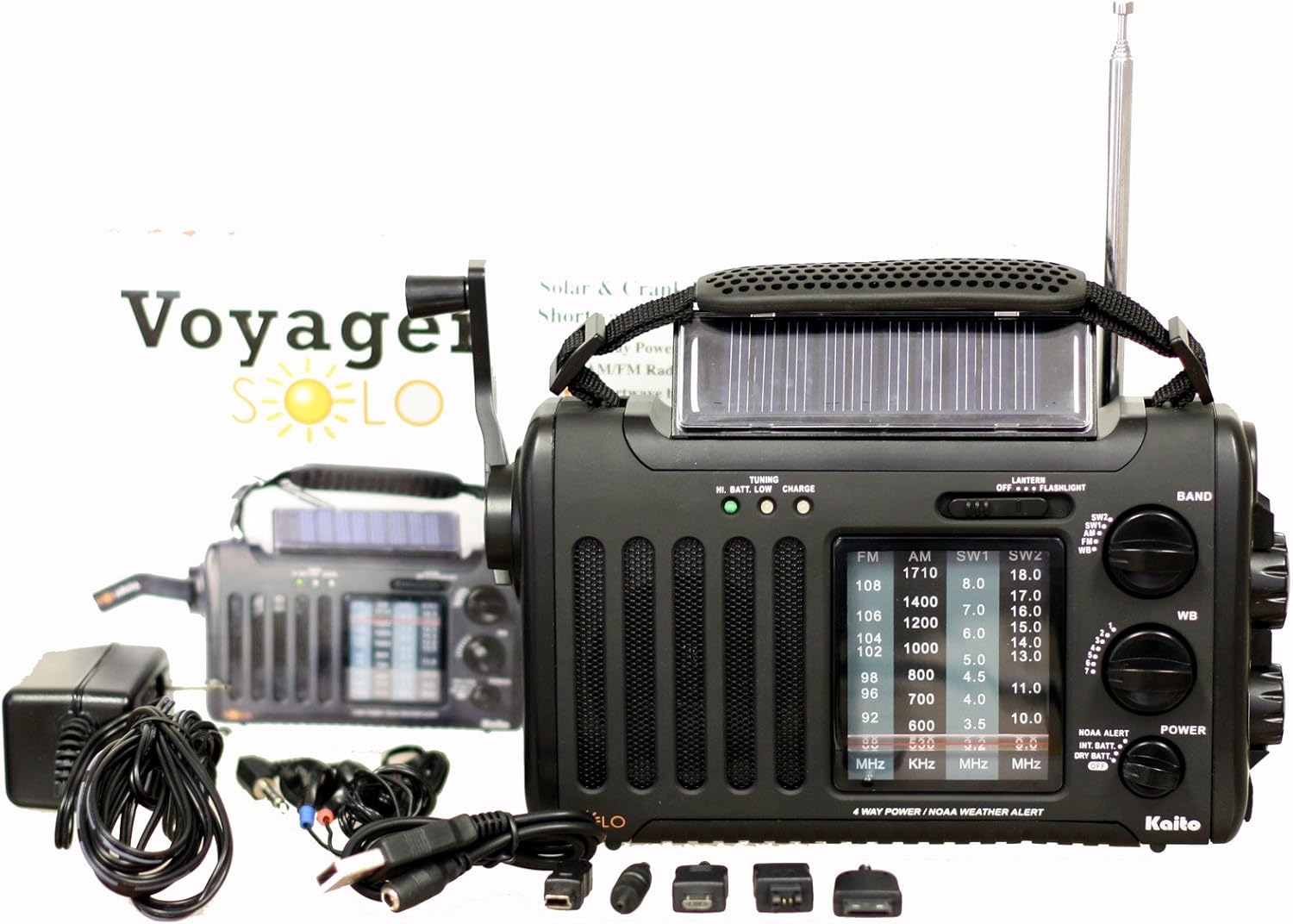
Image: The Kaito KA450 emergency radio displayed with its accompanying accessories, including the AC adapter, earphones, and various cell phone charging cables.
Setup and Powering the Radio
The KA450 offers four methods for power:
- แบตเตอรี่ AA: Insert three (3) AA batteries (not included) into the battery compartment located on the back of the radio. Ensure correct polarity.

ภาพ: ด้านหลัง view of the Kaito KA450 radio, highlighting the battery compartment cover and the telescopic antenna in its retracted position.
- อะแดปเตอร์ AC/DC: Connect the included AC adapter to a standard wall outlet and plug the mini-USB end into the "DC IN" port on the side of the radio. This also charges the internal Ni-MH battery.
- Hand Crank Dynamo: Extend the hand crank located on the side of the radio. Rotate the crank clockwise or counter-clockwise for approximately 1-3 minutes to generate power for short-term use or to charge the internal battery.

ภาพ: จากบนลงล่าง view of the Kaito KA450 radio, clearly showing the foldable hand crank and the integrated solar panel.
- แผงโซล่าเซลล์: Position the radio with the solar panel facing direct sunlight. The adjustable flip-up solar panel ensures maximum exposure. This method charges the internal Ni-MH battery and can power the radio when no other batteries are installed.
The radio includes a built-in rechargeable Ni-MH battery (600mAh) which can be charged via the AC adapter, hand crank, or solar panel.
คำแนะนำการใช้งาน
การใช้งานวิทยุ (AM/FM/SW)
- เปิด/ปิดเครื่อง: หมุน ปริมาณ knob clockwise to turn the radio on and adjust the sound level. Rotate counter-clockwise to turn off.
- การเลือกวงดนตรี: ใช้ วงดนตรี switch to select between AM, FM, SW1, SW2, or WB (Weather Band).
- จูน: หมุน การปรับแต่ง knob to find desired stations. Extend the telescopic antenna for better FM and Shortwave reception. For AM, rotate the radio for optimal signal.
- แจ็คหูฟัง: For private listening, plug 3.5mm earphones into the headset jack socket.

ภาพ: ไซด์โปรfile of the Kaito KA450 radio, illustrating the tuning and volume control knobs, the integrated flashlight, and the DC IN power input port.
NOAA Weather Band and Alert Function
- Weather Band Selection: ตั้งค่า วงดนตรี switch to "WB".
- การปรับช่องสัญญาณ: ใช้แบบเฉพาะ WB CHANNEL switch to select one of the 7 pre-programmed NOAA weather channels.
- โหมดการแจ้งเตือน: To activate the NOAA Alert feature, set the การแจ้งเตือนของ NOAA switch to "Alert". In this mode, the radio will automatically activate to broadcast hazardous weather conditions or warnings from the Emergency Alert System (EAS) via the National Weather Radio (NWR) network.
ไฟฉายและการอ่าน Lamp
- ไฟฉาย: The single LED flashlight is located on the side of the radio. Use the แสงสว่าง สลับเพื่อเปิดหรือปิด
- อ่านลamp: The 5-LED reading lamp is located on the back of the radio. Use the แสงสว่าง สลับเพื่อเปิดหรือปิด
Cell Phone Charging
- Connect your cell phone or other compatible device to the standard USB female output jack using the appropriate charging cable (included bonus kit).
- Power for charging is drawn from the radio's internal battery or generated via the hand crank/solar panel. Charging efficiency may vary depending on the device and power source.
การซ่อมบำรุง
- การทำความสะอาด: เช็ดวิทยุด้วยผ้านุ่มdamp ผ้า ห้ามใช้สารทำความสะอาดที่มีฤทธิ์กัดกร่อนหรือตัวทำละลาย
- การดูแลแบตเตอรี่ If using AA batteries, remove them if the radio will not be used for an extended period to prevent leakage. Regularly charge the internal Ni-MH battery to maintain its capacity.
- พื้นที่จัดเก็บ: เก็บวิทยุไว้ในที่แห้งและเย็น หลีกเลี่ยงแสงแดดโดยตรงและอุณหภูมิที่สูงหรือต่ำเกินไป
การแก้ไขปัญหา
- ไม่มีไฟฟ้า:
- Check if AA batteries are inserted correctly and have sufficient charge.
- ตรวจสอบให้แน่ใจว่าอะแดปเตอร์ AC เชื่อมต่ออย่างถูกต้องและเต้ารับทำงานได้
- Crank the dynamo for 1-3 minutes or expose the solar panel to direct sunlight to charge the internal battery.
- การรับสัญญาณวิทยุไม่ดี:
- ยืดเสาอากาศแบบยืดหดได้จนสุดเพื่อใช้งานกับคลื่นวิทยุ FM และคลื่นสั้น
- For AM reception, try rotating the radio to find the best signal.
- Move away from electronic devices that may cause interference.
- Cell Phone Not Charging:
- Ensure the radio has sufficient power (internal battery charged, or actively cranking/solar charging).
- Verify the USB cable and phone adapter are correctly connected and compatible with your device.
- Note that charging speed and compatibility may vary.
ข้อมูลจำเพาะ
| คุณสมบัติ | รายละเอียด |
|---|---|
| แบบอย่าง | เคเอ450 |
| แบนด์วิทยุ | ความถี่วิทยุ FM: 88 - 108 เมกะเฮิร์ตซ์ AM (MW): 530 - 1710 KHz SW 1: 3.2 - 8.0 MHz SW 2: 9.0 - 18.0 MHz NOAA Weather: 1 - 7 Channels |
| แหล่งพลังงาน | แบตเตอรี่ AA 3 ก้อน (ไม่รวม) อะแดปเตอร์ AC/DC (รวมอยู่ด้วย) มือหมุนไดนาโม แผงโซล่าเซลล์ Built-in Rechargeable Ni-MH Battery (600mAh) |
| ลำโพงภายใน | 0.5วัตต์ |
| แจ็คหูฟัง | 3.5 มม. |
| เอาท์พุต USB | Standard USB female jack for charging external devices |
| ขนาด | 8 x 4.5 x 2.5 นิ้ว (20.3 x 11.4 x 6.35 ซม.) |
| น้ำหนัก | 1 ปอนด์ (0.45 กก.) |
| คุณสมบัติพิเศษ | NOAA Weather Alert, 5-LED Reading Lamp, Single LED Flashlight |
การรับประกันและการสนับสนุน
For warranty information and technical support, please refer to the contact details provided with your purchase documentation or visit the official Kaito webไซต์ โปรดเก็บใบเสร็จรับเงินไว้เป็นหลักฐานการซื้อ
Kaito Official Webเว็บไซต์: Visit the Kaito Store on Amazon