
1. บทนำ
ขอบคุณสำหรับการซื้อasing the Caliber RMD 068-2 Car Radio USB/SD Player. This manual provides detailed instructions for the installation, operation, and maintenance of your new car radio. Please read this manual thoroughly before using the product to ensure proper functionality and safety. Keep this manual for future reference.
2. ข้อมูลด้านความปลอดภัย
- การติดตั้ง: Ensure the unit is installed by a qualified technician to prevent damage to the vehicle's electrical system. Incorrect wiring can cause fire or electrical shock.
- แหล่งจ่ายไฟ: เชื่อมต่ออุปกรณ์เข้ากับแบตเตอรี่รถยนต์ 12V DC ที่มีขั้วลบเป็นกราวด์เท่านั้น
- ฟิวส์: Always replace fuses with new ones of the specified rating. Using an incorrect fuse can cause damage to the unit or vehicle.
- ระดับเสียง: อย่าใช้งานเครื่องในระดับเสียงที่ดังเกินไป เพราะอาจทำให้คุณได้ยินเสียงการจราจรภายนอกลดลงและอาจเป็นอันตรายได้
- การทำความสะอาด: ใช้ผ้าแห้งนุ่มๆ เช็ดทำความสะอาด ห้ามใช้สารทำความสะอาดที่มีฤทธิ์กัดกร่อนหรือตัวทำละลาย
- ความชื้น: อย่าให้เครื่องโดนความชื้นหรือน้ำ
3. เนื้อหาบรรจุภัณฑ์
โปรดตรวจสอบว่ามีสิ่งของครบถ้วนหรือไม่:
- Caliber RMD 068-2 Car Radio Unit
- แผงด้านหน้าที่ถอดออกได้
- ชุดสายไฟ ISO
- กรอบการติดตั้ง
- Disassembly Keys (2 pcs)
- คู่มือการใช้งาน (เอกสารนี้)
4. สินค้าหมดview
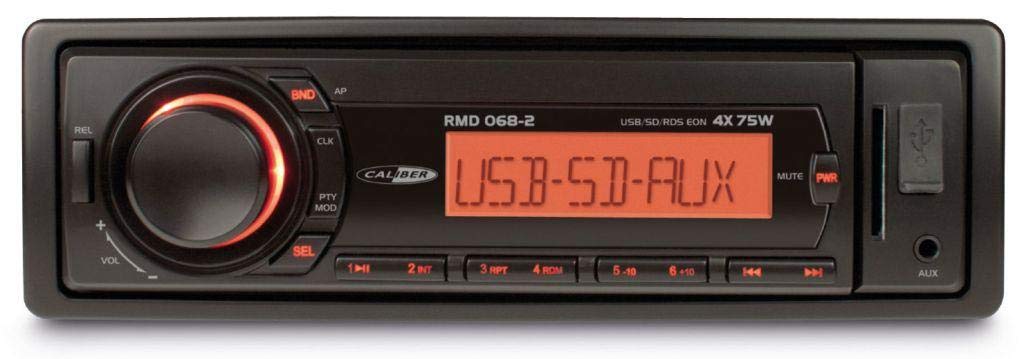
รูปที่ 1 : ด้านหน้า view of the Caliber RMD 068-2 Car Radio. This image shows the main unit with its detachable front panel, including the display, control buttons, USB port, and SD card slot.
4.1 แผงควบคุมด้านหน้า
- ปุ่มเปิด/ปิด/โหมด: Press to turn on/off. Short press to switch between Radio, USB, SD, AUX modes.
- ปุ่มปรับระดับเสียง: Rotate to adjust volume. Press to access audio settings (Bass, Treble, Balance, Fader).
- การแสดงผล: Shows current time, radio frequency, track information, etc.
- พอร์ต USB: เชื่อมต่อแฟลชไดรฟ์ USB เพื่อเล่นสื่อ
- ช่องเสียบการ์ด SD: ใส่การ์ด SD เพื่อเล่นสื่อ
- ช่องต่อ AUX (แจ็ค 3.5 มม.): เชื่อมต่ออุปกรณ์เสียงภายนอก
- BAND/AMS Button: In radio mode, press to select radio band (FM1, FM2, FM3). Long press for Automatic Memory Store.
- ปุ่มตั้งค่าล่วงหน้า (1-6): Store and recall radio stations. In USB/SD mode, use for direct track selection.
- ปุ่มเล่น/หยุดชั่วคราว: เล่นหรือหยุดการเล่นสื่อชั่วคราว
- FORWARD/BACKWARD Buttons: Skip tracks or tune radio frequency.
- ปุ่มดีดออก: Release the detachable front panel.
4.2 การเชื่อมต่อด้านหลัง
The rear of the unit features standard ISO connectors for power and speakers, along with an antenna input.
- ISO Power Connector: For connecting to the vehicle's power supply (constant 12V, ignition 12V, ground).
- ISO Speaker Connector: For connecting to the vehicle's speakers (Front Left, Front Right, Rear Left, Rear Right).
- อินพุตเสาอากาศ: สำหรับเชื่อมต่อเสาอากาศวิทยุของรถยนต์
5. การตั้งค่า
5.1 การติดตั้ง
- ถอดแบตเตอรี่: Before starting, disconnect the negative terminal of your car battery to prevent short circuits.
- ถอดหน่วยเก่าออก: ถอดวิทยุรถยนต์ที่มีอยู่ของคุณออกจากแผงหน้าปัดอย่างระมัดระวัง
- ติดตั้งโครงยึด: Insert the supplied mounting frame into the dashboard opening and bend the tabs to secure it.
- การเชื่อมต่อสายไฟ: Refer to the wiring diagram in section 5.2. Connect the ISO wiring harness to the car's wiring and then to the Caliber RMD 068-2 unit. Connect the antenna cable.
- Slide Unit In: Carefully slide the Caliber RMD 068-2 unit into the mounting frame until it clicks into place.
- เชื่อมต่อแบตเตอรี่อีกครั้ง: เชื่อมต่อขั้วลบของแบตเตอรี่รถยนต์กลับเข้าไปใหม่
- ติดตั้งแผงด้านหน้า: Attach the detachable front panel to the main unit.
5.2 แผนผังการเดินสายไฟ
The Caliber RMD 068-2 uses standard ISO connectors. Ensure correct connections as shown below. If your vehicle does not have ISO connectors, an adapter may be required.
| หมายเลขพิน | Wire Color (Typical) | การทำงาน |
|---|---|---|
| 4 | สีเหลือง | แรงดันไฟคงที่ 12V (แบตเตอรี่) |
| 7 | สีแดง | สวิตซ์ 12V (ระบบจุดระเบิด) |
| 8 | สีดำ | พื้น |
| 5 | สีฟ้า | Antenna Remote Out |
| หมายเลขพิน | Wire Color (Typical) | การทำงาน |
|---|---|---|
| 1 | สีม่วง | ด้านหลังขวา (+) |
| 2 | สีม่วง/สีดำ | ด้านหลังขวา (-) |
| 3 | สีเขียว | ด้านหลังซ้าย (+) |
| 4 | สีเขียว/สีดำ | ด้านหลังซ้าย (-) |
| 5 | สีเทา | ด้านหน้าขวา (+) |
| 6 | สีเทา/สีดำ | ด้านหน้าขวา (-) |
| 7 | สีขาว | ด้านหน้าซ้าย (+) |
| 8 | สีขาว/สีดำ | ด้านหน้าข้างซ้าย (-) |
Note: Wire colors may vary depending on vehicle manufacturer. Always consult your vehicle's wiring diagram.
6. คู่มือการใช้งาน
6.1 ฟังก์ชั่นพื้นฐาน
- เปิด/ปิดเครื่อง: กดปุ่ม พลังงาน/โหมด ปุ่มเพื่อเปิดหรือปิดเครื่อง
- การควบคุมระดับเสียง: หมุน ปริมาณ หมุนปุ่มตามเข็มนาฬิกาเพื่อเพิ่มระดับเสียง หมุนทวนเข็มนาฬิกาเพื่อลดระดับเสียง
- การเลือกโหมด: กดสั้น ๆ พลังงาน/โหมด button to cycle through available modes: Radio (FM), USB, SD, AUX.
- การตั้งค่าเสียง: กดปุ่ม ปริมาณ knob to enter audio settings. Rotate the knob to select settings like BASS, TREBLE, BALANCE, FADER. Press the knob again to confirm or move to the next setting.
6.2 การใช้งานวิทยุ
- การเลือกวงดนตรี: ในโหมดวิทยุ ให้กดปุ่ม วงดนตรี/AMS ปุ่มสำหรับสลับระหว่างคลื่นความถี่ FM1, FM2 และ FM3
- การปรับด้วยตนเอง: กดสั้น ๆ ไปข้างหน้าไปข้างหลัง ปุ่มสำหรับปรับความถี่อย่างละเอียด
- ค้นหาอัตโนมัติ: กดค้างไว้ ไปข้างหน้าไปข้างหลัง ปุ่มสำหรับค้นหาสถานีที่มีสัญญาณแรงที่สุดถัดไปโดยอัตโนมัติ
- ค่าที่ตั้งไว้ล่วงหน้าของร้านค้า: Tune to your desired station. Long press one of the ค่าที่ตั้งไว้ล่วงหน้า (1-6) buttons until you hear a beep. The station is now stored.
- เรียกคืนการตั้งค่าล่วงหน้า: Short press one of the ค่าที่ตั้งไว้ล่วงหน้า (1-6) buttons to recall a stored station.
- ระบบจัดเก็บข้อมูลอัตโนมัติ (AMS): กดค้างไว้ วงดนตรี/AMS ปุ่มสำหรับสแกนและบันทึกสถานีที่แรงที่สุดลงในค่าที่ตั้งไว้ล่วงหน้าของย่านความถี่ปัจจุบันโดยอัตโนมัติ
6.3 การเล่น USB/SD
- แทรกสื่อ: เสียบแฟลชไดรฟ์ USB เข้ากับพอร์ต USB หรือเสียบการ์ด SD เข้ากับช่องเสียบการ์ด SD เครื่องจะเปลี่ยนไปใช้โหมด USB/SD โดยอัตโนมัติและเริ่มเล่น
- เล่น/หยุดชั่วคราว: กดปุ่ม เล่น/หยุดชั่วคราว ปุ่มเพื่อหยุดชั่วคราวหรือเล่นต่อ
- ข้ามแทร็ก: กดสั้น ๆ ไปข้างหน้าไปข้างหลัง ปุ่มเพื่อข้ามไปยังแทร็กถัดไปหรือก่อนหน้า
- กรอไปข้างหน้า / ย้อนกลับ: กดค้างไว้ ไปข้างหน้าไปข้างหลัง ปุ่มสำหรับกรอไปข้างหน้าหรือย้อนกลับภายในแทร็ก
- การนำทางโฟลเดอร์: ใช้ ที่ตั้งไว้ล่วงหน้า 5 และ ที่ตั้งไว้ล่วงหน้า 6 buttons to navigate between folders on your USB/SD media.
อินพุต AUX 6.4 ช่อง
- เชื่อมต่ออุปกรณ์: Connect your external audio device (e.g., smartphone, MP3 player) to the 3.5mm AUX input jack on the front panel using an audio cable.
- เลือกโหมด AUX: กดปุ่ม พลังงาน/โหมด button repeatedly until "AUX" is displayed.
- การควบคุมการเล่น: Control playback (play, pause, skip) directly from your connected external device. The car radio will control the volume.
7. การบำรุงรักษา
- การทำความสะอาดหน่วย: Use a soft, dry cloth to wipe the front panel and display. Do not use harsh chemicals, cleaning sprays, or abrasive cloths, as these can damage the surface.
- Detachable Front Panel: When detaching the front panel, handle it carefully. Store it in a protective case (if supplied) to prevent scratches or damage.
- พอร์ต USB/SD: Keep the USB port and SD card slot free from dust and debris.
8 การแก้ไขปัญหา
| ปัญหา | สาเหตุที่เป็นไปได้ | สารละลาย |
|---|---|---|
| ไม่มีไฟฟ้า | ฟิวส์ขาด; การเดินสายไฟไม่ถูกต้อง; การเชื่อมต่อหลวม | Check and replace fuse; Verify wiring connections (Yellow to constant 12V, Red to ignition 12V, Black to ground); Ensure front panel is securely attached. |
| ไม่มีเสียง | Volume too low; Mute activated; Incorrect speaker wiring; Damaged speakers | Increase volume; Check if mute is active; Verify speaker connections; Test with known good speakers. |
| การรับสัญญาณวิทยุไม่ดี | Antenna not connected; Damaged antenna; Weak signal area | Ensure antenna is securely connected; Check antenna for damage; Try tuning to a stronger station or move to a different location. |
| USB/SD เล่นไม่ได้ | ไม่ได้รับการสนับสนุน file format; Corrupted media; Incorrectly inserted media; Max capacity exceeded | ทำให้มั่นใจ files are MP3/WMA format; Try a different USB/SD card; Reinsert media correctly; Check media capacity (max 32GB recommended). |
| Front panel cannot be detached | Eject button not fully pressed; Mechanism jammed | Press the EJECT button firmly; Do not force the panel. |
If the problem persists after trying these solutions, please contact your dealer or a qualified service center.
9. ข้อมูลจำเพาะ
- แบบอย่าง: Caliber RMD 068-2
- กำลังขับ: 4 x 75 Watts Max
- แหล่งจ่ายไฟ: 12V DC (10.8V-15.6V), Negative Ground
- ฟิวส์: 10เอ
- รูปแบบเสียงที่รองรับ: ไฟล์ MP3, WMA (ผ่าน USB/SD)
- USB/SD Compatibility: สูงสุด 32GB (รูปแบบ FAT32)
- จูนเนอร์ FM: RDS, 18 Presets
- อินพุต AUX: แจ็คสเตอริโอ 3.5 มม.
- Detachable Front Panel: ใช่
- น้ำหนัก: ประมาณ 0.95 กก. (2.09 ปอนด์)
10. การรับประกันและการสนับสนุน
This Caliber product is covered by a warranty in accordance with applicable European laws. For detailed warranty terms and conditions, please refer to the warranty card included with your product or visit the official Caliber website. For technical support, troubleshooting assistance, or service inquiries, please contact your authorized Caliber dealer or the customer service department in your region. Please have your product model number (RMD 068-2) and proof of purchase ready when contacting support.
Note: Specifications and design are subject to change without notice for improvement.