
1. บทนำ
This manual provides detailed instructions for the installation, configuration, and operation of the D-Link Xstack DGS-3120-48PC Managed L3 Switch. The DGS-3120-48PC is a high-performance Layer 3 managed switch designed for enterprise and campus networks, offering advanced features for network management, security, and quality of service.
2. คุณสมบัติหลัก
- 44 x 10/100/1000BASE-T PoE Ports: Provides power and data over a single Ethernet cable to connected devices.
- 4 x Combo SFP Ports: Offers flexible uplink options using fiber or copper transceivers.
- Layer 3 Management: Supports static routing for efficient network segmentation and traffic management.
- QoS ขั้นสูง: จัดลำดับความสำคัญของปริมาณการรับส่งข้อมูลเครือข่ายเพื่อให้มั่นใจได้ถึงประสิทธิภาพสูงสุดสำหรับแอปพลิเคชันที่สำคัญ
- คุณสมบัติด้านความปลอดภัยที่แข็งแกร่ง: Includes access control lists (ACLs), port security, and authentication mechanisms.
- Standard and Enhanced Software Images: Offers different feature sets (SI for basic L2/L3, EI for advanced L3 features like ERPS, Double VLAN, IPv6).
3. เนื้อหาบรรจุภัณฑ์
Verify the following items are included in your DGS-3120-48PC package:
- D-Link DGS-3120-48PC Switch
- สายไฟ
- ชุดติดตั้งบนแร็ค (ขายึดและสกรู)
- สายเคเบิลคอนโซล (RJ-45 ถึง DB-9)
- ขายาง (สำหรับติดตั้งบนเดสก์ท็อป)
- คู่มือการติดตั้งแบบด่วน
If any item is missing or damaged, please contact your local D-Link reseller for assistance.
4. คำอธิบายทางกายภาพ
4.1. แผงด้านหน้า
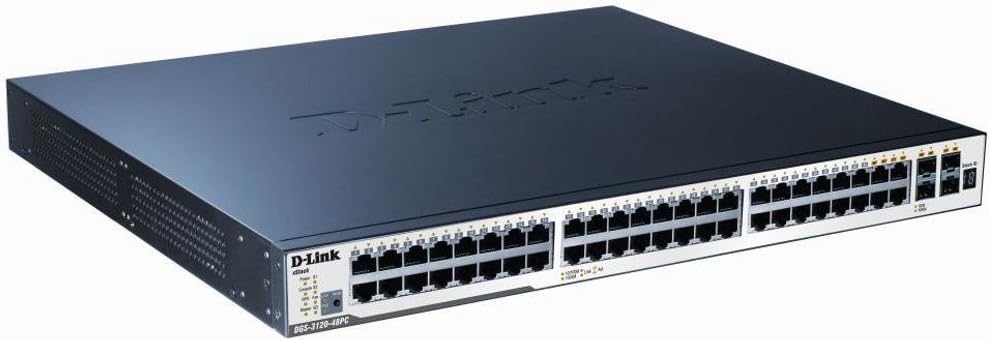
Figure 1: D-Link DGS-3120-48PC Front Panel
The front panel of the DGS-3120-48PC switch features 44 Gigabit Ethernet ports with Power over Ethernet (PoE) capabilities, and 4 additional combo SFP ports for flexible uplink connections. LED indicators provide status information for power, system, and individual port activity.
ไฟ LED แสดงสถานะ:
- กำลังไฟ LED: แสดงสถานะการทำงานของเครื่อง (เปิด/ปิด)
- ไฟ LED ระบบ: บ่งชี้สถานะการทำงานของระบบ
- Link/Act/Speed LEDs (per port): Indicates link status, activity, and connection speed (10/100/1000 Mbps).
- PoE Status LEDs (per PoE port): ระบุสถานะการส่งพลังงาน PoE
พอร์ต:
- พอร์ต RJ-45 (1-44): 10/100/1000BASE-T Gigabit Ethernet ports with PoE.
- Combo SFP Ports (45-48): Can be used with SFP transceivers for fiber connections or with corresponding RJ-45 ports for copper connections.
- พอร์ตคอนโซล: RJ-45 port for command-line interface (CLI) management.
4.2. แผงด้านหลัง
The rear panel typically includes the AC power inlet, grounding screw, and possibly ventilation openings. Specific details may vary slightly.
- ช่องจ่ายไฟ AC: เชื่อมต่อกับสายไฟ
- สกรูดิน: For connecting an earth ground cable.
5. การตั้งค่าและการติดตั้ง
5.1. ข้อควรระวังเพื่อความปลอดภัย
- ตรวจสอบแหล่งจ่ายไฟ voltage ตรงตามข้อกำหนดของสวิตช์
- อย่าปิดกั้นช่องระบายอากาศ
- Avoid placing the switch in direct sunlight, near heat sources, or in areas with high humidity.
- ตรวจสอบให้แน่ใจว่ามีสายดินที่เหมาะสมเพื่อป้องกันอันตรายจากไฟฟ้า
5.2. การติดตั้งสวิตช์
การติดตั้งเดสก์ท็อป:
- ติดแผ่นยางรองที่ให้มาไว้ที่ด้านล่างของสวิตช์
- Place the switch on a flat, stable surface with adequate ventilation.
การติดตั้งชั้นวาง:
- Attach the two rack-mounting brackets to the sides of the switch using the provided screws.
- Secure the switch in a standard 19-inch equipment rack using appropriate rack screws.
5.3. การเชื่อมต่อพลังงาน
- Connect one end of the AC power cord to the power inlet on the rear panel of the switch.
- เชื่อมต่อปลายสายไฟอีกด้านหนึ่งเข้ากับเต้ารับไฟฟ้าที่มีสายดิน
- ตรวจสอบให้แน่ใจว่าไฟ LED แสดงสถานะการทำงานที่แผงด้านหน้าติดสว่าง ซึ่งแสดงว่าสวิตช์ได้รับพลังงานแล้ว
5.4 การเชื่อมต่ออุปกรณ์เครือข่าย
- Connect Ethernet cables from your network devices (e.g., computers, servers, access points) to the RJ-45 ports (1-44) on the switch.
- For fiber uplinks, insert compatible SFP transceivers into the SFP ports (45-48) and connect fiber optic cables.
- Observe the Link/Act/Speed LEDs for each connected port to confirm proper connection and activity.
6. การใช้งานสวิตช์
6.1. การกำหนดค่าเริ่มต้น
The DGS-3120-48PC can be configured via a webผ่านทางอินเทอร์เฟซผู้ใช้แบบกราฟิก (GUI) หรืออินเทอร์เฟซบรรทัดคำสั่ง (CLI) ผ่านพอร์ตคอนโซล
Web- อิง GUI:
- Connect a computer to any of the switch's Ethernet ports.
- Configure your computer's IP address to be in the same subnet as the switch's default IP address (refer to the Quick Installation Guide for default IP).
- เปิด web เบราว์เซอร์และป้อนที่อยู่ IP เริ่มต้นของสวิตช์
- Log in using the default username and password (refer to documentation).
อินเทอร์เฟซบรรทัดคำสั่ง (CLI):
- Connect the console cable from your computer's serial port to the switch's console port.
- Use a terminal emulation program (e.g., PuTTY, Tera Term) with appropriate serial port settings (e.g., 115200 baud, 8 data bits, no parity, 1 stop bit, no flow control).
- เข้าสู่ระบบโดยใช้ชื่อผู้ใช้และรหัสผ่านเริ่มต้น
6.2 การกำหนดค่าเครือข่ายพื้นฐาน
After initial access, it is recommended to:
- เปลี่ยนรหัสผ่านผู้ดูแลระบบเริ่มต้น
- Configure the switch's IP address, subnet mask, and default gateway.
- Set up system time and NTP synchronization.
6.3. คุณสมบัติขั้นสูง
The DGS-3120-48PC supports a wide range of advanced features:
- VLAN (เครือข่ายพื้นที่เสมือน): แบ่งกลุ่มเครือข่ายของคุณเพื่อความปลอดภัยและประสิทธิภาพที่ดีขึ้น
- โปรโตคอล Spanning Tree (STP/RSTP/MSTP): Prevents network loops.
- การรวมลิงก์ (LACP): Increases bandwidth and provides link redundancy.
- คุณภาพการบริการ (QoS): Prioritizes traffic based on various criteria.
- รายการควบคุมการเข้าถึง (ACL): กรองการรับส่งข้อมูลเครือข่ายตามกฎเกณฑ์ที่กำหนดไว้
- PoE Management: Control power delivery to connected PoE devices.
- การกำหนดเส้นทางแบบคงที่: Configure routes for inter-VLAN or inter-network communication.
Refer to the D-Link DGS-3120 Series User Manual for detailed configuration instructions on these advanced features.
7. การบำรุงรักษา
7.1. การอัปเดตเฟิร์มแวร์
Regularly check the D-Link support website for the latest firmware versions. Firmware updates can provide new features, performance improvements, and security patches. Follow the instructions provided with the firmware download carefully.
7.2. การทำความสะอาด
เพื่อรักษาประสิทธิภาพให้เหมาะสมที่สุดและยืดอายุการใช้งานของสวิตช์ของคุณ:
- Ensure the switch is powered off and unplugged before cleaning.
- ใช้ผ้าแห้งนุ่มเช็ดทำความสะอาดด้านนอกของสวิตช์
- ใช้ลมเป่าอัดเพื่อกำจัดฝุ่นละอองออกจากช่องระบายอากาศ
- ห้ามใช้น้ำยาทำความสะอาดของเหลวหรือละอองลอย
8 การแก้ไขปัญหา
This section provides solutions to common issues you may encounter with the DGS-3120-48PC switch.
| ปัญหา | สาเหตุที่เป็นไปได้ | สารละลาย |
|---|---|---|
| ไม่มีไฟ LED แสดงสถานะพลังงาน | Power cord not connected; Power outlet faulty; Switch power supply issue. | Ensure power cord is securely connected. Test power outlet with another device. Contact D-Link support if issue persists. |
| No Link/Act LED on connected port | Incorrect cable type; Faulty cable; Connected device is off or faulty; Port configuration issue. | Use appropriate Ethernet cable (Cat5e/6). Replace cable. Ensure connected device is powered on and functioning. Check port status in switch management interface. |
| ไม่สามารถเข้าถึงได้ web กุ้ยช่าย | Incorrect IP address configuration on PC; Switch IP address changed; Network connectivity issue. | Verify PC's IP address is in the same subnet as the switch. Try accessing via console CLI. Check network cable connection. |
| อุปกรณ์ PoE ไม่ได้รับพลังงาน | PoE budget exceeded; Device not PoE compatible; Cable issue; PoE port disabled. | Check PoE budget in switch management. Ensure device is 802.3af/at compliant. Verify cable integrity. Enable PoE on the port if disabled. |
9. ข้อมูลจำเพาะ
| คุณสมบัติ | คำอธิบาย |
|---|---|
| แบบอย่าง | DGS-3120-48PC |
| ยี่ห้อ | ดีลิงค์ |
| พอร์ต | 44 x 10/100/1000BASE-T PoE, 4 x Combo SFP |
| ประเภทอินเทอร์เฟซ | PoE, SFP |
| อัตราการถ่ายโอนข้อมูล | 1 กิกะบิตต่อวินาที (ต่อพอร์ต) |
| การรองรับเลเยอร์ | เลเยอร์ 3 ได้รับการจัดการ |
| ขนาดสินค้า | 14.96 x 17.32 x 1.73 นิ้ว (38 x 44 x 4.4 ซม.) |
| น้ำหนักสินค้า | 19.98 ปอนด์ (9.08 กิโลกรัม) |
| ยูพีซี | 790069344510 |
| มีจำหน่ายครั้งแรก | วันที่ 8 สิงหาคม 2012 |
10. การรับประกันและการสนับสนุนทางเทคนิค
For information regarding the warranty policy, please refer to the warranty card included with your product or visit the official D-Link website. Technical support resources, including FAQs, documentation, and software downloads, are available on the D-Link support portal. Please have your product model and serial number ready when contacting support.
ดีลิงค์ Webเว็บไซต์: www.dlink.com