
การแนะนำ
This manual provides essential information for setting up, operating, maintaining, and troubleshooting your Apple Mac Mini MC815LL/A. Please read this guide thoroughly to ensure proper use and to maximize the performance and longevity of your device.

ภาพ: ด้านบน view of the Apple Mac Mini MC815LL/A.
การตั้งค่า
1. การแกะกล่อง
Carefully remove the Mac Mini from its packaging. Ensure all components are present: the Mac Mini unit, power cord, and any included documentation.
2. การเชื่อมต่ออุปกรณ์ต่อพ่วง
The Mac Mini requires an external display, keyboard, and mouse. Connect these devices to the appropriate ports on the back of the Mac Mini.
- แสดง: Connect your monitor using an HDMI cable or a Thunderbolt to DVI/VGA adapter (sold separately).
- คีย์บอร์ดและเมาส์: Connect USB keyboard and mouse to any of the four USB ports. Wireless Bluetooth devices can be paired after initial setup.
- พลัง: Connect the power cord to the Mac Mini and then to a power outlet.
- เครือข่าย (ทางเลือก): For a wired internet connection, connect an Ethernet cable to the Ethernet port.
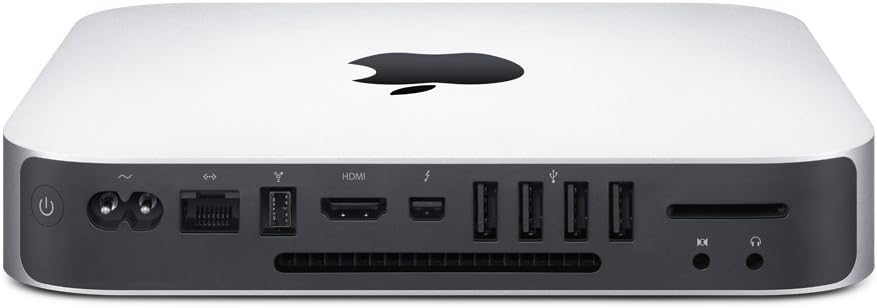
ภาพ: ด้านหลัง view of the Mac Mini showing port connections.
3. การบูตเครื่องครั้งแรก
Press the power button located on the back of the Mac Mini. The system will boot up, and the OS X Lion Setup Assistant will guide you through the initial configuration, including language selection, network setup, and user account creation.
คำแนะนำการใช้งาน
เปิด/ปิดและเข้าสู่โหมดสลีป
- เปิดเครื่อง: Press the power button on the back.
- นอน: Select "Sleep" from the Apple menu () or press the power button briefly.
- ปิดระบบ: Select "Shut Down" from the Apple menu (). Always shut down properly to prevent data loss.
- เริ่มต้นใหม่อีกครั้ง: Select "Restart" from the Apple menu ().
การเชื่อมต่อเครือข่าย
- ไวไฟ : Click the Wi-Fi icon in the menu bar, select your network, and enter the password if required.
- อีเธอร์เน็ต: If an Ethernet cable is connected, the Mac Mini will automatically detect the wired connection.
การเชื่อมต่ออุปกรณ์ภายนอก
- อุปกรณ์ยูเอสบี: Connect USB storage, printers, or other peripherals to the USB ports.
- สายฟ้า: Use the Thunderbolt port for high-speed data transfer or connecting compatible displays and devices.
- ช่องเสียบการ์ด SDXC: Insert SDXC memory cards for photo and data transfer.

ภาพ: ด้านข้าง view of the Mac Mini.
การซ่อมบำรุง
การทำความสะอาด
To clean your Mac Mini, use a soft, lint-free cloth. Dampen the cloth slightly with water if necessary, but avoid getting moisture into any openings. Do not use aerosol sprays, solvents, or abrasives.
การอัพเดตซอฟต์แวร์
Regularly check for and install software updates through the App Store to ensure your system has the latest features, security enhancements, and bug fixes.
การสำรองข้อมูล
It is highly recommended to regularly back up your data using Apple's Time Machine feature with an external hard drive. This protects your important files in case of system failure or data loss.
การแก้ไขปัญหา
ไม่มีไฟฟ้า
- Ensure the power cord is securely connected to both the Mac Mini and a working power outlet.
- ลองใช้เต้ารับไฟอื่น
ไม่มีการแสดงผล
- Check that your monitor is powered on and correctly connected to the Mac Mini.
- ตรวจสอบให้แน่ใจว่าได้เลือกแหล่งอินพุตที่ถูกต้องบนจอภาพของคุณ
ปัญหาการเชื่อมต่อเครือข่าย
- For Wi-Fi, verify your network password and ensure your router is functioning.
- สำหรับการเชื่อมต่อผ่านสาย Ethernet ให้ตรวจสอบการเชื่อมต่อสายเคเบิลและสถานะเราเตอร์
- รีสตาร์ทเราเตอร์และโมเด็มของคุณ
ปัญหาประสิทธิภาพโดยทั่วไป
- Restart the Mac Mini.
- ตรวจสอบให้แน่ใจว่าคุณมีพื้นที่จัดเก็บว่างเพียงพอ
- ปิดแอพพลิเคชันที่ไม่จำเป็น
สำหรับปัญหาที่ซับซ้อนกว่านี้ โปรดดูเอกสารสนับสนุนอย่างเป็นทางการของ Apple หรือติดต่อฝ่ายสนับสนุนของ Apple
ข้อมูลจำเพาะ
| คุณสมบัติ | รายละเอียด |
|---|---|
| ชื่อรุ่น | แม็คมินิ |
| หมายเลขรุ่น | MC815LL/เอ |
| โปรเซสเซอร์ | 2.3GHz dual-core Intel Core i5 |
| หน่วยความจำ (RAM) | 2GB 1333MHz DDR3 (expandable to 8GB) |
| พื้นที่จัดเก็บ | 500GB (5400-rpm) hard drive |
| กราฟฟิก | Intel HD Graphics 3000 processor with 288MB shared memory |
| ระบบปฏิบัติการ | Mac OS X v10.7 Lion |
| พอร์ต | 4x USB 2.0, 1x HDMI, 1x Thunderbolt, Gigabit Ethernet, SDXC card slot, Audio In/Out |
| ไร้สาย | Wi-Fi (802.11b/g/n), บลูทูธ 4.0 |
| ขนาด (สูง x กว้าง x ลึก) | 1.4 x 7.7 x 7.7 นิ้ว (3.6 x 19.7 x 19.7 ซม.) |
| น้ำหนัก | 2.7 ปอนด์ (1.22 กก.) |
ข้อมูลการรับประกัน
Every Mac comes with complimentary telephone technical support within 90 days of your Mac purchase. In addition, a limited hardware warranty covers your Mac and all included accessories against defects for one year from the original purchase date.
For detailed warranty terms and conditions, please refer to the documentation included with your product or visit the official Apple webเว็บไซต์.
สนับสนุน
For further assistance, technical support, or service, please visit the official Apple Support webไซต์หรือติดต่อฝ่ายบริการลูกค้าของ Apple โดยตรง
การสนับสนุนของ Apple Webเว็บไซต์: support.apple.com