
การแนะนำ
This manual provides detailed instructions for the safe installation, operation, and maintenance of your Utilitech 3-Light 123-Watt Bronze Dusk-to-Dawn Security Light. Please read all instructions carefully before beginning installation and retain this manual for future reference. This security light is designed for outdoor use and features a built-in motion sensor and photo-control for automated operation.
ข้อมูลด้านความปลอดภัย
คำเตือน: เสี่ยงต่อการถูกไฟฟ้าช็อต โปรดตัดกระแสไฟที่ฟิวส์หรือเบรกเกอร์ก่อนทำการติดตั้งหรือซ่อมบำรุง
- ผลิตภัณฑ์นี้ต้องได้รับการติดตั้งตามมาตรฐานการติดตั้งที่ใช้บังคับโดยบุคคลที่คุ้นเคยกับการก่อสร้างและการใช้งานผลิตภัณฑ์และอันตรายที่เกี่ยวข้อง
- ตรวจสอบปริมาณอุปทานtage is 120 Volts AC, 60 Hz.
- Use only suitable bulbs as specified in the 'Specifications' section.
- ห้ามพยายามดัดแปลงอุปกรณ์ติดตั้ง การดัดแปลงใดๆ อาจทำให้การรับประกันเป็นโมฆะและก่อให้เกิดอันตรายด้านความปลอดภัย
- This fixture is UL Safety Listed, ensuring compliance with recognized safety standards.
เนื้อหาแพ็คเกจ
Before beginning installation, ensure all parts are present. If any part is missing or damaged, do not attempt to assemble, install, or operate the product.
- Security Light Fixture (1)
- อุปกรณ์สำหรับติดตั้ง (สกรู, ตัวเชื่อมสายไฟ ฯลฯ)
- คู่มือการใช้งาน (1)
การติดตั้งและการตั้งค่า
This security light is designed for wall mount installation and requires hardwiring to an existing electrical circuit.
1. เตรียมการติดตั้ง
- ปิดสวิตช์ไฟที่เบรกเกอร์หรือกล่องฟิวส์ของเต้ารับที่กำลังจะติดตั้งโคมไฟ
- แกะอุปกรณ์และส่วนประกอบต่างๆ ออกจากบรรจุภัณฑ์อย่างระมัดระวัง
2. การติดตั้งอุปกรณ์
- ติดตั้งขายึดเข้ากับกล่องรวมสายไฟโดยใช้สกรูที่ให้มา ตรวจสอบให้แน่ใจว่ายึดแน่นดีแล้ว
- สอดสายไฟจากกล่องรวมสายไฟผ่านรูตรงกลางของขายึด
3. การเชื่อมต่อสายไฟ
- Connect the bare copper ground wire from the fixture to the ground wire from the junction box using a wire nut.
- เชื่อมต่อสายสีขาว (สายกลาง) จากโคมไฟเข้ากับสายสีขาว (สายกลาง) จากกล่องต่อสายไฟโดยใช้ตัวเชื่อมสายไฟแบบเกลียว
- เชื่อมต่อสายไฟสีดำ (สายร้อน) จากโคมไฟเข้ากับสายไฟสีดำ (สายร้อน) จากกล่องรวมสายไฟโดยใช้ตัวเชื่อมสายไฟ (wire nut)
- ค่อยๆ เก็บสายไฟทั้งหมดเข้าไปในกล่องรวมสัญญาณอย่างระมัดระวัง
4. Securing the Fixture and Installing Bulbs
- Align the fixture with the mounting bracket and secure it with the provided screws. Ensure a tight seal against the mounting surface to prevent water intrusion.
- Install three (3) Halogen or compact fluorescent bulbs (not included) into the sockets. Do not exceed the maximum wattagตามที่ระบุไว้ในส่วน 'ข้อกำหนด'
- Adjust the light heads to the desired direction.
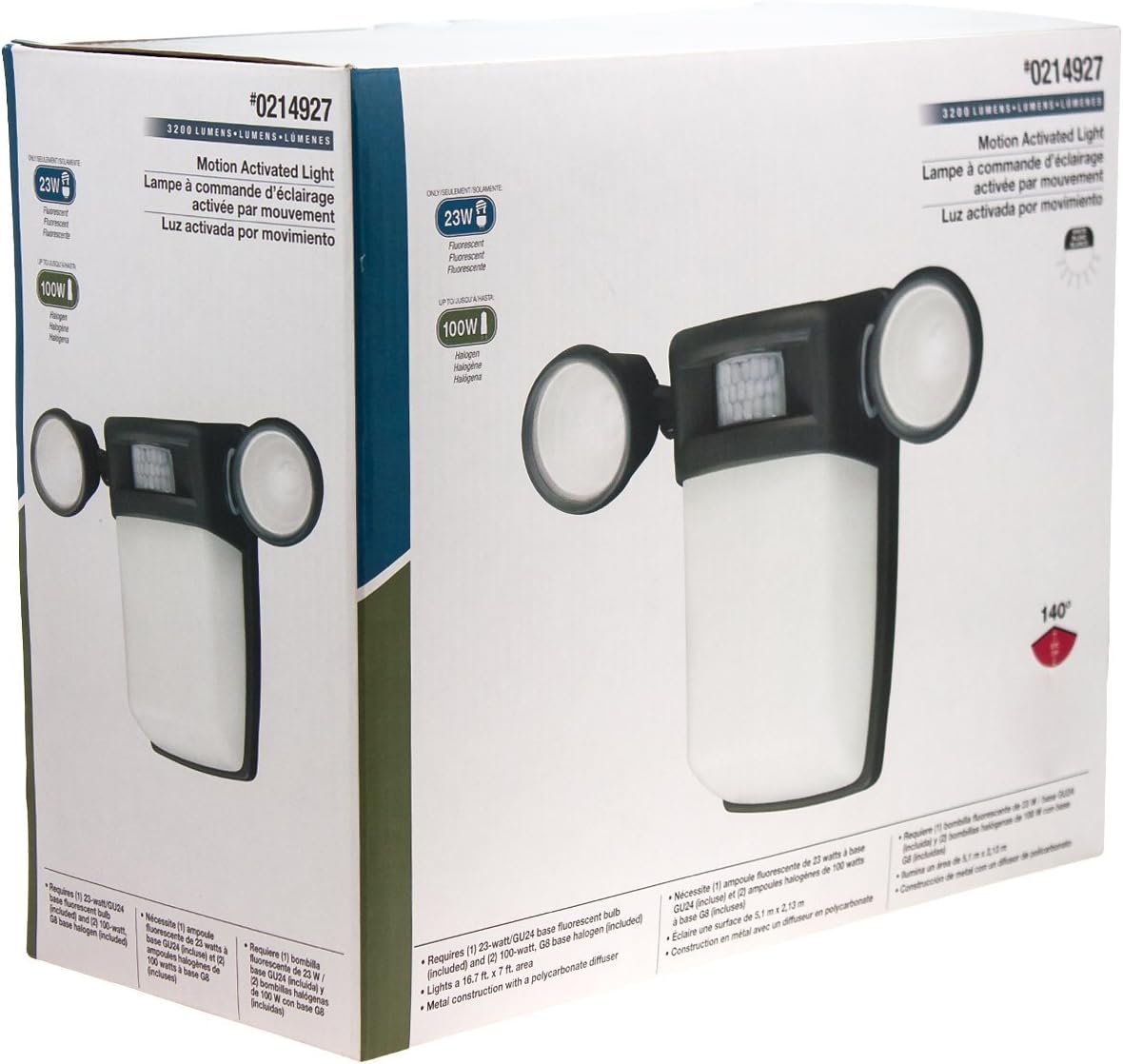
รูปที่ 1 : ด้านหน้า view of the Utilitech 3-Light 123-Watt Bronze Dusk-to-Dawn Security Light in its retail packaging. This image shows the overall design with three adjustable light heads and the central motion sensor.

รูปที่ 2: ด้านข้าง view of the Utilitech 3-Light 123-Watt Bronze Dusk-to-Dawn Security Light in its retail packaging. This perspective highlights the depth of the fixture and the positioning of the light heads relative to the main body.
คำแนะนำการใช้งาน
This security light is equipped with both a photo-control sensor for dusk-to-dawn operation and a 140° automatic motion sensor for enhanced security.
ฟีเจอร์ตั้งแต่พลบค่ำถึงรุ่งอรุณ
The integrated photo-control sensor detects ambient light levels. The light will automatically turn on at dusk and turn off at dawn, providing continuous illumination during nighttime hours. No manual adjustment is typically required for this feature.
การทำงานของเซนเซอร์จับความเคลื่อนไหว
The 140° automatic motion sensor detects movement within its range. When motion is detected, the light will activate for a set duration. The fixture may include adjustable settings for sensitivity and duration. Refer to the specific controls on your fixture for adjustment. Some models may also feature remote control capabilities for these settings.
การปรับหัวไฟ
The three light heads are adjustable. Gently pivot each light head to direct illumination to your desired coverage area.
การซ่อมบำรุง
Regular maintenance ensures optimal performance and extends the lifespan of your security light.
- การทำความสะอาด: ทำความสะอาดอุปกรณ์เป็นระยะด้วยผ้านุ่มๆamp cloth. Do not use abrasive cleaners or solvents, as they may damage the finish or electrical components. Ensure power is off before cleaning.
- การเปลี่ยนหลอดไฟ: Turn off power at the circuit breaker before replacing bulbs. Allow bulbs to cool completely before handling. Replace with three (3) Halogen or compact fluorescent bulbs of the specified wattage.
- การทำความสะอาดเซ็นเซอร์: Keep the motion sensor lens and photo-control sensor free of dirt, dust, and obstructions to ensure proper operation.
การแก้ไขปัญหา
If your security light is not functioning as expected, refer to the following common issues and solutions:
| ปัญหา | สาเหตุที่เป็นไปได้ | สารละลาย |
|---|---|---|
| Light does not turn on at all. | No power, faulty bulbs, wiring issue, or defective sensor. | Check circuit breaker. Ensure bulbs are correctly installed and not burnt out. Verify wiring connections. If issues persist, consult a qualified electrician. |
| ไฟติดสว่างต่อเนื่อง | Motion sensor sensitivity too high, duration setting too long, or photo-control sensor obstructed/faulty. | Adjust motion sensor sensitivity and duration settings. Ensure photo-control sensor is not blocked by debris or external light sources. |
| ไฟเปิดในเวลากลางวัน | Photo-control sensor is obstructed or in a shaded area. | Ensure the photo-control sensor is exposed to natural daylight and not covered by dirt or obstructions. |
| Motion sensor does not detect movement. | Sensor sensitivity too low, obstructed view, or incorrect angle. | Increase sensor sensitivity. Clear any obstructions from the sensor's field of view. Adjust the sensor's angle to cover the desired area. |
ข้อมูลจำเพาะ
| คุณสมบัติ | ข้อมูลจำเพาะ |
|---|---|
| ยี่ห้อ | ยูทิลิเทค |
| หมายเลขรุ่น | 0214927 |
| เล่มที่tage | 120 โวลต์ AC, 60 Hz |
| วัดtage | 123 วัตต์ (รวม) |
| ประเภทหลอดไฟ | Halogen or Compact Fluorescent (3 bulbs required) |
| Light Heads | 3 ปรับได้ |
| มุมเซ็นเซอร์ตรวจจับการเคลื่อนไหว | 140 องศา |
| ฟีเจอร์ตั้งแต่พลบค่ำถึงรุ่งอรุณ | Yes, photo-control sensor |
| วัสดุ | โลหะ |
| เสร็จ | บรอนซ์ |
| ประเภทการติดตั้ง | ติดผนัง |
| ขนาด (สูง x กว้าง x ลึก) | 10.25 นิ้ว x 13.5 นิ้ว x 5.75 นิ้ว |
| น้ำหนักสินค้า | 3.5 ปอนด์ |
| รายการความปลอดภัย | ได้รับการรับรองจาก UL |