
การแนะนำ
This manual provides comprehensive instructions for the Iomega Portable SCSI 1GB Jaz Drive, Model V1000S. Designed for professional, high-end removable storage, the Jaz drive offers hard drive speed and 1GB capacity per disk, enabling efficient backup and storage of large files, including video and high-quality audio. This guide covers setup, operation, maintenance, and troubleshooting to ensure optimal performance of your device.
การตั้งค่า
การแกะกล่อง
Carefully unpack the Jaz drive and all accessories. Ensure all components are present before proceeding.
การเชื่อมต่อไดรฟ์
The Iomega Jaz drive utilizes a SCSI-2 interface for connection to your computer. Locate the SCSI ports on the back of the drive and your computer. Connect the drive using a compatible SCSI cable. Ensure the SCSI ID is correctly set if your system requires it.

This image displays the rear panel of the Jaz drive, highlighting the dual SCSI ports for daisy-chaining, the power input, and the SCSI ID selector. Ensure proper cable connection and ID setting for your system.
การเชื่อมต่อไฟฟ้า
Connect the provided power adapter to the drive's power input and then to an electrical outlet.
การติดตั้งซอฟต์แวร์
For optimal functionality, install the IomegaWare software suite. This software provides necessary drivers and utilities to manage your Jaz drive and disks. Refer to the software's installation guide for detailed steps. The drive is compatible with both PC and Macintosh systems.
Operating the Jaz Drive
การใส่และการถอดแผ่นดิสก์
To insert a Jaz disk, gently push it into the drive's slot until it clicks into place. The drive will typically spin up and become ready for use. To eject a disk, use the software utility provided by IomegaWare or the physical eject button on the drive, if available.
การจัดเก็บและถ่ายโอนข้อมูล
Once a Jaz disk is inserted and recognized by your computer, it will appear as a removable storage device. You can drag and drop files, use backup software, or save directly to the disk as you would with any other hard drive. The 1GB capacity per disk allows for significant data storage, including large multimedia files.
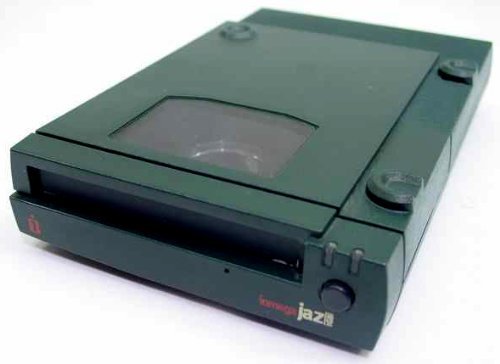
This image shows the Iomega Jaz Drive from the front, illustrating the disk insertion slot and the overall compact design of the unit.
การซ่อมบำรุง
To ensure the longevity and reliable performance of your Iomega Jaz Drive, follow these maintenance guidelines:
- การจัดวาง: Always place the drive flat on a stable, level surface. Avoid placing it on its side, as this can affect disk operation.
- การทำความสะอาด: Keep the drive's exterior clean and free from dust. Use a soft, dry cloth. Do not use liquid cleaners directly on the drive.
- Disk Handling: Handle Jaz disks with care. Avoid touching the magnetic media surface and store them in their protective cases when not in use.
- สภาพแวดล้อม : ใช้งานไดรฟ์ภายในช่วงอุณหภูมิและความชื้นที่แนะนำ หลีกเลี่ยงสภาวะที่รุนแรง
การแก้ไขปัญหา
If you encounter issues with your Iomega Jaz Drive, consider the following troubleshooting steps:
- ไม่รู้จักไดรฟ์:
- Verify all SCSI and power cables are securely connected.
- ตรวจสอบให้แน่ใจว่าไดรฟ์เปิดอยู่
- Check the SCSI ID setting on the drive and ensure it does not conflict with other SCSI devices on your system.
- Confirm that IomegaWare drivers are correctly installed and updated.
- รีสตาร์ทเครื่องคอมพิวเตอร์ของคุณ
- Disk Read/Write Errors:
- Try a different Jaz disk to rule out a faulty disk.
- ตรวจสอบให้แน่ใจว่าได้ใส่แผ่นดิสก์เข้าไปในไดรฟ์จนสุดแล้ว
- Check for any physical obstructions in the drive slot.
- ประสิทธิภาพการทำงานช้า:
- Ensure your SCSI controller and cables are functioning correctly.
- ปิดแอปพลิเคชันที่ไม่จำเป็นซึ่งทำงานอยู่เบื้องหลัง
- Verify that the drive is placed on a stable, flat surface.
ข้อมูลจำเพาะ
| คุณสมบัติ | รายละเอียด |
|---|---|
| ยี่ห้อ | ไอโอเมก้า |
| ชื่อรุ่น | V1000SI |
| หมายเลขรุ่นสินค้า | วี1000เอส |
| ความจุของหน่วยความจำ | 1GB |
| อินเทอร์เฟซฮาร์ดไดรฟ์ | เอสซีเอสไอ |
| ฮาร์ดแวร์อินเตอร์เฟซ | เอสซีเอสไอ |
| เทคโนโลยีการเชื่อมต่อ | เอสซีเอสไอ |
| แพลตฟอร์มฮาร์ดแวร์ | แมค, พีซี |
| สี | สีเขียว |
| คุณสมบัติพิเศษ | น้ำหนักเบา กะทัดรัด |
| น้ำหนักสินค้า | 3.4 ปอนด์ |
| ขนาดสินค้า | 9.29 x 7.09 x 3.7 นิ้ว |
| ผู้ผลิต | ไอโอเมก้า |
| ยูพีซี | 742709101342 |
| ASIN | B004MTOKVK |
| วันที่พร้อมใช้งานครั้งแรก | 8 กุมภาพันธ์ 2011 |
การรับประกันและการสนับสนุน
For warranty information and technical support, please refer to the documentation provided at the time of purchase or contact Iomega customer service directly. Keep your purchase receipt and product serial number handy for any inquiries.