
1. บทนำ
This manual provides detailed instructions for the operation and maintenance of your AudioSonic CL-1486 Alarm Clock Radio. Please read this manual thoroughly before use to ensure proper function and safety. Keep this manual for future reference.
2. คำแนะนำด้านความปลอดภัยที่สำคัญ
- อ่านคำแนะนำทั้งหมดก่อนใช้งานเครื่อง
- Do not expose this appliance to rain or moisture to reduce the risk of fire or electric shock.
- Do not expose the appliance to dripping or splashing. No objects filled with liquids, such as vases, shall be placed on the appliance.
- อย่าปิดกั้นช่องระบายอากาศใดๆ ติดตั้งตามคำแนะนำของผู้ผลิต
- ห้ามติดตั้งใกล้แหล่งความร้อน เช่น หม้อน้ำ เครื่องทำความร้อน เตา หรืออุปกรณ์อื่น ๆ (รวมถึง ampเครื่องให้ความร้อน) ที่ผลิตความร้อน
- ป้องกันสายไฟเดินหรือถูกบีบโดยเฉพาะที่ปลั๊กเต้ารับอำนวยความสะดวกและจุดที่ออกจากเครื่อง
- ใช้เฉพาะอุปกรณ์เสริม/สิ่งที่แนบตามที่ผู้ผลิตกำหนดเท่านั้น
- ถอดปลั๊กเครื่องใช้ไฟฟ้านี้ในระหว่างพายุฝนฟ้าคะนองหรือเมื่อไม่ได้ใช้งานเป็นเวลานาน
- ควรส่งเครื่องใช้ไฟฟ้าเข้ารับบริการจากช่างผู้ชำนาญการเท่านั้น การเข้ารับบริการเป็นสิ่งจำเป็นเมื่อเครื่องใช้ไฟฟ้าได้รับความเสียหายในลักษณะใดๆ เช่น สายไฟหรือปลั๊กชำรุด มีของเหลวหกใส่ หรือมีสิ่งของตกลงไปในเครื่อง เครื่องใช้ไฟฟ้าโดนฝนหรือความชื้น ไม่ทำงานตามปกติ หรือตกหล่น
3. สินค้าหมดview
The AudioSonic CL-1486 is a versatile alarm clock radio with a large display and projection feature. Familiarize yourself with the main components and controls:
3.1 ด้านหน้า View

รูปที่ 1 : ด้านหน้า view of the AudioSonic CL-1486, highlighting the 1.8-inch jumbo display.
The front panel features a large, clear 1.8-inch digital display for time, date, and radio frequency. It also shows indicators for alarm status, temperature, and day of the week.
3.2 ด้านบน View - Control Buttons
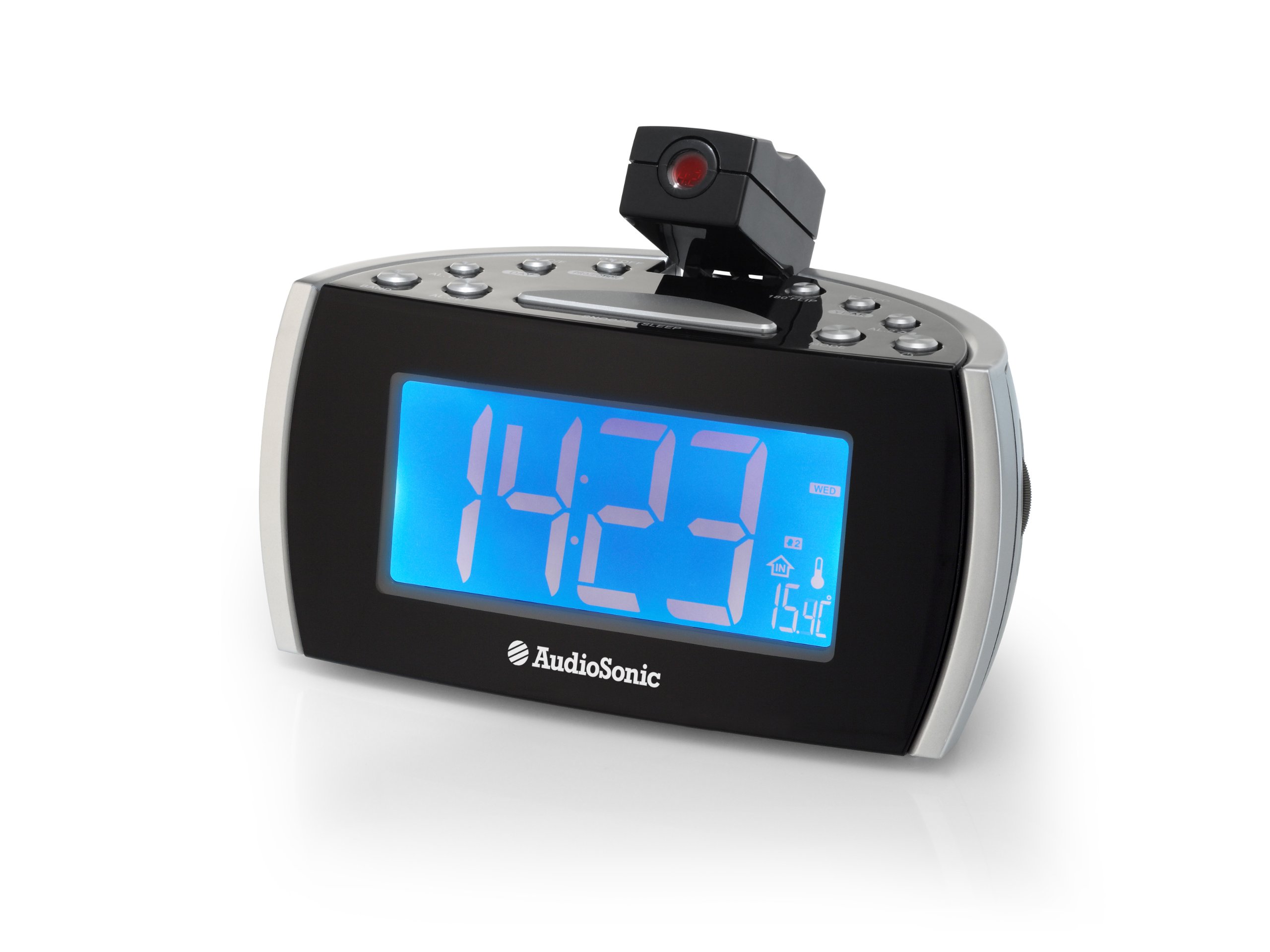
รูปที่ 2: ด้านบน view of the control panel and projection unit.
The top panel houses all functional buttons and the adjustable projection lens. Refer to the table below for button functions:
| ปุ่ม | การทำงาน |
|---|---|
| เปิด/ปิด | Powers the unit on or off (standby). |
| C / F | สลับการแสดงอุณหภูมิระหว่างองศาเซลเซียสและองศาฟาเรนไฮต์ |
| โปรเจ็ก | เปิดใช้งานหรือปิดใช้งานการฉายภาพตามเวลา |
| 180 FLIP | Rotates the projected image by 180 degrees. |
| เวลาออมแสง | Adjusts for Daylight Saving Time. |
| ปี | Used for setting the year in time/date setting mode. |
| อ.ล.1 | Activates/deactivates or selects Alarm 1. |
| วัน | Used for setting the day in time/date setting mode. |
| อ.ล.2 | Activates/deactivates or selects Alarm 2. |
| วงดนตรี | Selects between FM and MW (AM) radio bands. |
| อัล.เซ็ต | Enters alarm setting mode or confirms settings. |
| งีบหลับ/หลับ | Press for snooze function; hold for sleep timer. |
| โหมด | Cycles through display modes (time, date, temperature) or enters setting modes. |
3.3 คุณสมบัติการฉายภาพ

Figure 3: Time projection in action.
The integrated projector allows you to display the time onto a wall or ceiling. The projection angle can be adjusted manually, and the 180 FLIP button allows for orientation correction.
4. การตั้งค่า
4.1 การเชื่อมต่อสายไฟ
- Uncoil the FM antenna wire completely for optimal radio reception.
- เสียบอะแดปเตอร์ไฟ AC เข้ากับเต้ารับติดผนังมาตรฐาน
- The unit will power on and the display will illuminate.
4.2 การตั้งค่าเวลาเริ่มต้น
- กดปุ่มค้างไว้ โหมด กดปุ่มค้างไว้จนกว่าหน้าจอแสดงเวลาจะเริ่มกระพริบ
- ใช้ ปี และ วัน buttons to adjust the hour and minute. Press โหมด to cycle between setting hours, minutes, year, and day.
- กด โหมด again to confirm the settings and exit time setting mode.
5. คู่มือการใช้งาน
5.1 Setting the Alarm (AL.1 / AL.2)
The CL-1486 features two independent alarms with a weekend mode function.
- กดปุ่ม อัล.เซ็ต button once to enter Alarm 1 setting mode. The AL.1 indicator will flash.
- ใช้ ปี และ วัน ปุ่มสำหรับตั้งเวลาปลุกที่ต้องการ (ชั่วโมงและนาที)
- กด อัล.เซ็ต again to select the alarm source (Buzzer or Radio). Use ปี or วัน ที่จะเลือก
- กด อัล.เซ็ต a third time to set the weekend mode (on/off). When active, the alarm will not sound on Saturdays and Sundays.
- กด อัล.เซ็ต a fourth time to confirm Alarm 1 settings.
- ทำซ้ำขั้นตอนที่ 1-5 สำหรับนาฬิกาปลุกตัวที่ 2 โดยการกดปุ่ม อัล.เซ็ต twice initially to enter Alarm 2 setting mode.
- To activate or deactivate an alarm, press the respective อ.ล.1 or อ.ล.2 button. The alarm indicator will appear/disappear on the display.
5.2 การใช้งานวิทยุ
- กดปุ่ม เปิด/ปิด ปุ่มเพื่อเปิดวิทยุ
- กดปุ่ม วงดนตรี button to switch between FM and MW (AM) bands.
- To tune to a station, press and hold the ปี or วัน button for automatic scanning to the next available station. For manual tuning, short press the ปี or วัน ปุ่ม.
- Adjust the volume using the volume control knob, typically located on the side of the unit.
- ในการปิดวิทยุ ให้กด เปิด/ปิด ปุ่ม.
5.3 การคาดการณ์เวลา
- กดปุ่ม โปรเจ็ก ปุ่มสำหรับเปิดหรือปิดการแสดงเวลาแบบฉายภาพ
- Adjust the angle of the projection lens manually to direct the time onto a wall or ceiling.
- If the projected image is upside down, press the 180 FLIP button to rotate it.
- To adjust the clarity of the projected image, rotate the focus ring around the projection lens (if available).
5.4 ฟังก์ชั่นการเลื่อนปลุกและการนอนหลับ
- ปิดเสียงเตือนชั่วคราว: เมื่อเสียงสัญญาณเตือนดังขึ้น ให้กดปุ่มขนาดใหญ่ งีบหลับ/หลับ bar to temporarily silence the alarm. The alarm will sound again after a few minutes (default snooze time).
- เวลานอน: While the radio is playing, press and hold the งีบหลับ/หลับ bar to activate the sleep timer. Repeated presses will cycle through available sleep times (e.g., 90, 60, 30, 15 minutes, OFF). The radio will automatically turn off after the selected duration.
6. การบำรุงรักษา
To ensure the longevity and proper functioning of your AudioSonic CL-1486, follow these simple maintenance guidelines:
- การทำความสะอาด: Wipe the unit with a soft, dry cloth. Do not use abrasive cleaners, waxes, or solvents as they may damage the cabinet.
- ฝุ่น: Keep the unit free from dust, especially the projection lens, to maintain clear projection.
- สิ่งแวดล้อม: ควรหลีกเลี่ยงการวางเครื่องไว้ในที่ที่มีแสงแดดส่องโดยตรง ใกล้แหล่งความร้อน หรือในบริเวณที่มีความชื้นสูง
7 การแก้ไขปัญหา
| ปัญหา | สาเหตุที่เป็นไปได้ | สารละลาย |
|---|---|---|
| ไม่มีไฟเลี้ยง / หน้าจอปิด | เสียบสายไฟไม่ถูกต้อง | ตรวจสอบให้แน่ใจว่าได้เสียบอะแดปเตอร์แปลงไฟ AC เข้ากับตัวเครื่องและเต้ารับไฟฟ้าที่ใช้งานได้สนิทแล้ว |
| นาฬิกาปลุกไม่ส่งเสียง | สัญญาณเตือนภัยไม่ได้เปิดใช้งานหรือตั้งค่าไม่ถูกต้อง | Check that the AL.1 or AL.2 indicator is visible on the display. Verify alarm time and source settings. Ensure volume is not set to minimum if radio alarm is selected. |
| การรับสัญญาณวิทยุไม่ดี | เสาอากาศไม่ได้ยืดออก หรือเครื่องอยู่ในบริเวณที่มีสัญญาณรับไม่ดี | ดึงสายเสาอากาศ FM ให้สุด ปรับตำแหน่งเครื่องเพื่อให้รับสัญญาณได้ดีขึ้น |
| Projection is unclear or distorted | Projection lens is out of focus or dirty. | Adjust the focus ring around the projection lens. Clean the lens with a soft, dry cloth. Ensure the projection surface is flat and clear. |
| เวลา/วันไม่ถูกต้อง | Time/Date not set or power interruption. | Reset the time and date following the instructions in section 4.2. |
8. ข้อมูลจำเพาะ
- หมายเลขรุ่น: ซีแอล-1486
- ยี่ห้อ: เครื่องเสียงโซนิค
- ประเภทจอภาพ: ดิจิตอล
- ขนาดจอแสดงผล: 1.8 นิ้ว
- สี: สีดำ
- แหล่งพลังงาน: สายไฟ
- ขนาดสินค้า : 18.5 x 9.5 x 9 ซม.
- น้ำหนัก: 630 กรัม
- คุณสมบัติพิเศษ: Projection, Two Alarm Times, Weekend Mode, Digital Frequency Display
- ประเภทการติดตั้ง: โต๊ะวางของ
- ใช้ในร่ม/กลางแจ้ง: ในร่ม
9. การรับประกันและการสนับสนุน
สำหรับข้อมูลการรับประกันและการสนับสนุนลูกค้า โปรดดูเอกสารประกอบที่ให้มา ณ เวลาที่ซื้อ หรือติดต่อตัวแทนจำหน่ายของคุณ โปรดเก็บหลักฐานการซื้อไว้เพื่อใช้ในกรณีที่ต้องการเคลมประกัน