
1. บทนำ
This manual provides detailed instructions for the installation, operation, and maintenance of your Comelit HFX700M Color Hands Free Video Intercom Kit. This system is designed to enhance security by allowing visual and audio communication with visitors at your door or gate before granting access. It is suitable for both residential and commercial applications requiring reliable access control.
2. สินค้าหมดview
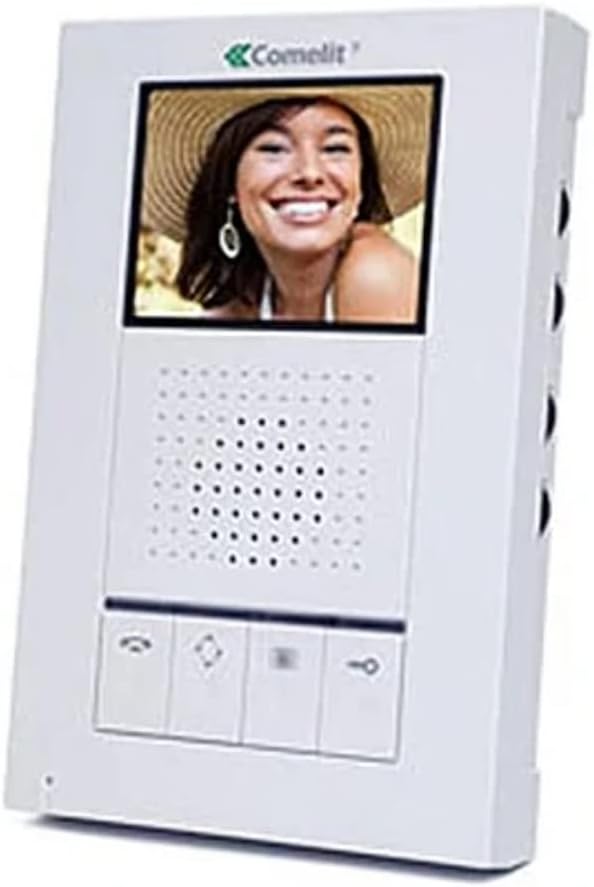
The Comelit HFX700M system includes a hands-free indoor monitor and an outdoor doorbell station. The indoor monitor features a 3.5-inch LCD screen for clear video display, while the outdoor unit is equipped with a 3.6mm wide-angle lens for comprehensive viewการไอเอ็นจี

รูปที่ 2.1: Comelit HFX700M Indoor Monitor Unit. This image shows the white indoor monitor with a color display at the top, a speaker grille in the middle, and control buttons at the bottom.
รูปที่ 2.2: Comelit HFX700M Outdoor Doorbell Station. This image displays the bronze-colored outdoor unit with a camera lens at the top, a speaker/microphone grille, and a doorbell button with an illuminated bell icon.
3. ข้อมูลด้านความปลอดภัย
- อ่านคำแนะนำทั้งหมดอย่างละเอียดก่อนการติดตั้งและใช้งาน
- โปรดตรวจสอบให้แน่ใจว่าได้ตัดกระแสไฟแล้วก่อนทำการเดินสายไฟหรือบำรุงรักษาใดๆ
- หากคุณไม่แน่ใจเกี่ยวกับการเดินสายไฟ ควรให้ช่างผู้ชำนาญการดำเนินการติดตั้ง
- อย่าให้ตัวเครื่องภายนอกสัมผัสกับอุณหภูมิที่สูงหรือต่ำเกินไป หรือถูกฉีดน้ำโดยตรงเกินกว่าระดับการป้องกัน IP54
- Keep the indoor monitor away from moisture and direct sunlight.
4. เนื้อหาบรรจุภัณฑ์
ตรวจสอบว่ามีส่วนประกอบทั้งหมดอยู่ในชุดของคุณ:
- 1 x Comelit HFX700M Indoor Monitor Unit
- 1 x Outdoor Doorbell Station with 3.6mm Wide-Angle Lens
- วงเล็บยึดและสกรู
- Power Supply Unit (AC/DC adapter)
- คู่มือการใช้งาน (เอกสารนี้)
5. การตั้งค่าและการติดตั้ง
The Comelit HFX700M system features a simple 2-wire installation, compatible with Cat 5e or 18/2 multi-conductor cable. You may be able to utilize existing doorbell wiring.
5.1 การเดินสายไฟ
- Ensure all power to the installation area is turned off at the circuit breaker.
- Connect the two main wires from the outdoor doorbell station to the designated terminals on the indoor monitor. Refer to the wiring diagram provided in the separate installation guide for specific terminal assignments.
- Connect the power supply to the indoor monitor and a suitable power outlet.
5.2 การติดตั้ง
- Mount the outdoor doorbell station at a height that allows for optimal viewing of visitors (typically chest height for adults).
- Secure the indoor monitor to a wall using the provided mounting bracket and screws.
5.3 การขยายระบบ
The HFX700M system is expandable. You can add up to 4 total indoor stations (monitors or audio stations) and 2 outdoor camera units to your system. Consult your dealer for compatible expansion units and their specific installation instructions.
6. คู่มือการใช้งาน
The Comelit HFX700M provides hands-free communication and video monitoring capabilities.
6.1 การรับสายโทรศัพท์
- When a visitor presses the doorbell button, the indoor monitor will chime and display live video from the outdoor station.
- กดปุ่ม คำตอบ button (typically a telephone icon) on the monitor to establish two-way, hands-free audio communication.
- หากต้องการสิ้นสุดการสนทนา ให้กดปุ่ม วางสาย button (often a red telephone icon or similar).
6.2 Initiating Live Viewกำลังทำ
คุณสามารถทำได้ view the outdoor area at any time, even without a doorbell press.
- กดปุ่ม เฝ้าสังเกต button (often an eye or camera icon) on the indoor unit to activate live video feed from the outdoor station.
- Press the button again to cycle through multiple outdoor stations if installed, or to turn off the live view.
6.3 Remote Door/Gate Release
If connected to an electronic door strike or gate opener, you can remotely grant access.
- During an active call or live viewกดปุ่ม ปลดล็อค button (often a key icon) on the indoor monitor.
- The door or gate will momentarily unlock.
6.4 Volume and Brightness Adjustment
The indoor monitor typically includes controls for adjusting speaker volume, chime volume, and screen brightness. Refer to the specific buttons or menu options on your monitor for these adjustments.
7. การบำรุงรักษา
- การทำความสะอาด: Use a soft, dry cloth to clean the indoor monitor and outdoor station. Do not use abrasive cleaners or solvents.
- การเชื่อมต่อ: ตรวจสอบการเชื่อมต่อสายไฟทั้งหมดเป็นระยะ เพื่อให้แน่ใจว่าแน่นหนาดีแล้ว
- หน่วยกลางแจ้ง: Ensure the camera lens on the outdoor unit is clean and free from obstructions for optimal video quality.
8 การแก้ไขปัญหา
| ปัญหา | สาเหตุที่เป็นไปได้ | สารละลาย |
|---|---|---|
| No video or audio on monitor | Power supply disconnected; loose wiring; faulty unit. | Check power connection; verify all wiring is secure; contact support if issue persists. |
| Doorbell rings constantly or randomly | Wiring issue; interference; faulty doorbell button. | Inspect doorbell wiring for shorts or damage; ensure proper grounding; if problem continues, disconnect the unit and contact technical support. |
| คุณภาพวิดีโอไม่ดี | Dirty camera lens; insufficient lighting; wiring issue. | Clean camera lens; ensure adequate lighting at the outdoor station; check wiring connections. |
| No remote door/gate release | Incorrect wiring to door strike/gate opener; incompatible strike/opener. | Verify wiring to the door strike/gate opener according to installation guide; ensure the strike/opener is compatible with the system. |
9. ข้อมูลจำเพาะ
- หมายเลขรุ่น: HFX-700M
- เทคโนโลยีการเชื่อมต่อ: Wired (2-wire installation)
- เพิ่มขยาย: Up to 4 indoor monitors/audio stations, 2 outdoor camera units
- จอภาพภายในอาคาร: จอแสดงผล LCD ขนาด 3.5 นิ้ว
- Outdoor Doorbell Lens: เลนส์มุมกว้าง 3.6 มม.
- แหล่งพลังงาน: AC/DC, 9 watts
- การมองเห็นตอนกลางคืน: Night Color capability
- ระดับการกันน้ำ: IP54 (ตัวเครื่องภายนอก)
- ขนาดสินค้า: 18 x 12 x 6 inches (packaging/overall kit)
- น้ำหนักสินค้า: 0.01 Ounces (individual component, refer to packaging for total weight)
10. การรับประกันและการสนับสนุน
For warranty information and technical support, please refer to the documentation provided with your purchase or contact Comelit customer service directly. Keep your purchase receipt as proof of purchase for warranty claims.
Comelit Contact Information: Please visit the official Comelit webเว็บไซต์นี้มีข้อมูลติดต่อฝ่ายสนับสนุนล่าสุด