
Johnson Controls TEC2203-3
คู่มือการใช้งานเทอร์โมสตัทแบบไม่ตั้งโปรแกรมได้ Johnson Controls TEC2203-3
Model: TEC2203-3
1. บทนำ
This manual provides essential information for the installation, operation, and maintenance of the Johnson Controls TEC2203-3 Non-Programmable Thermostat. This device is designed for controlling heating and cooling systems with 2 Heat and 2 Cool stages, and features a 1SPDFAN (Single Pole Double Throw Fan) control. It serves as a reliable replacement thermostat for compatible HVAC systems.
2. สินค้าหมดview
2.1 คุณสมบัติหลัก
- Non-Programmable operation for straightforward temperature control.
- Supports 2 Heat and 2 Cool stages for versatile HVAC system compatibility.
- Integrated 1SPDFAN control.
- Clear digital display for room temperature.
2.2 ส่วนประกอบและจอแสดงผล
The TEC2203-3 thermostat features a user-friendly interface with a digital display and intuitive buttons for control. Refer to the image below for a visual guide to the thermostat's components.
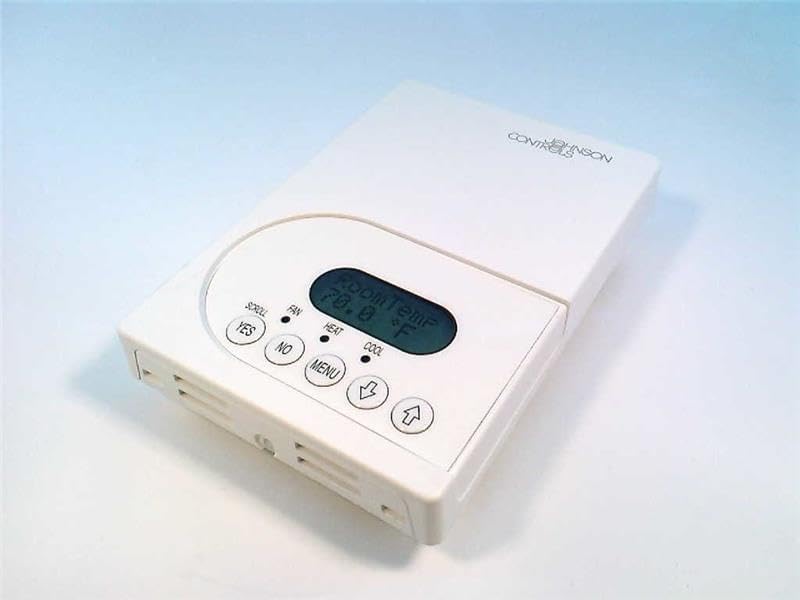
รูปที่ 1: ด้านหน้า view of the Johnson Controls TEC2203-3 Thermostat. The image shows the white rectangular thermostat unit with a central digital display indicating "Room Temp 70.0 °F". Below the display are control buttons: "YES", "NO", "MENU", a down arrow, and an up arrow. Indicators for "SCROLL", "FAN", "HEAT", and "COOL" are also visible.
The display shows the current room temperature. Indicators for HEAT and COOL illuminate when the respective modes are active. The FAN indicator shows fan operation. Buttons include:
- YES / NO: Used for confirming or canceling selections in menu options.
- เมนู: Accesses system settings and operational modes.
- Up Arrow / Down Arrow: Adjusts temperature setpoints and navigates menu options.
3. การติดตั้ง
Installation of the Johnson Controls TEC2203-3 Thermostat should be performed by a qualified HVAC technician. Incorrect installation can lead to system malfunction, property damage, or personal injury. Always ensure power to the HVAC system is turned off at the circuit breaker before beginning any installation work.
3.1 ข้อควรระวังเพื่อความปลอดภัย
- Disconnect all power to the heating and cooling system before installation.
- Follow all local electrical codes and ordinances.
- Ensure wiring connections are secure and correct according to the wiring diagram provided with the product packaging (not included in this manual).
4. คู่มือการใช้งาน
The TEC2203-3 is a non-programmable thermostat, meaning it maintains a set temperature until manually changed.
4.1 การตั้งอุณหภูมิ
- จอแสดงผลแสดงอุณหภูมิห้องในปัจจุบัน
- กดปุ่ม ลูกศรขึ้น or ลูกศรลง button to adjust the desired temperature setpoint.
- The new setpoint will flash briefly and then be saved. The system will then work to reach and maintain this temperature.
4.2 Changing System Mode (Heat/Cool/Off)
- กดปุ่ม เมนู ปุ่ม.
- ใช้ ลูกศรขึ้น or ลูกศรลง to navigate through the available system modes (e.g., HEAT, COOL, OFF).
- กด ใช่ เพื่อเลือกโหมดที่ต้องการ
- The corresponding indicator (HEAT or COOL) will illuminate when active.
4.3 การทำงานของพัดลม
The fan can typically be set to AUTO (runs only when heating or cooling) or ON (runs continuously).
- กดปุ่ม เมนู ปุ่ม.
- Navigate to the fan settings using the ลูกศรขึ้น or ลูกศรลง.
- กด ใช่ เพื่อเลือกโหมดพัดลมที่ต้องการ
5. การบำรุงรักษา
The Johnson Controls TEC2203-3 Thermostat requires minimal maintenance to ensure optimal performance.
- การทำความสะอาด: ควรเช็ดทำความสะอาดภายนอกของเทอร์โมสตัทเป็นระยะด้วยผ้าเนื้อนุ่มและแห้งamp ผ้า ห้ามใช้สารทำความสะอาดที่มีฤทธิ์กัดกร่อนหรือตัวทำละลาย
- การไหลเวียนของอากาศ: Ensure that the thermostat's vents are not obstructed by dust or debris, as this can affect temperature sensing accuracy.
- การตรวจสุขภาพโดยผู้เชี่ยวชาญ: It is recommended to have your entire HVAC system, including the thermostat, inspected by a professional technician annually.
6 การแก้ไขปัญหา
If you experience issues with your TEC2203-3 thermostat, consider the following common troubleshooting steps:
- ไม่มีจอแสดงผล/พลังงาน: Check the circuit breaker for your HVAC system. Ensure the thermostat is properly seated on its base.
- การอ่านอุณหภูมิไม่ถูกต้อง: Ensure the thermostat's vents are clear of obstructions. Avoid placing the thermostat near heat sources (lamps, direct sunlight) or drafts.
- ระบบไม่ตอบสนอง: Verify the system mode (HEAT/COOL/OFF) is correctly selected. Check if the temperature setpoint is above (for heat) or below (for cool) the current room temperature.
- พัดลมไม่ทำงาน: Check the fan mode setting (AUTO/ON). If set to AUTO, the fan will only run when heating or cooling is active.
หากปัญหายังคงอยู่หลังจากลองทำตามขั้นตอนเหล่านี้แล้ว โปรดติดต่อช่างเทคนิคระบบปรับอากาศที่มีคุณสมบัติเหมาะสมเพื่อขอความช่วยเหลือ
7. ข้อมูลจำเพาะ
| คุณสมบัติ | รายละเอียด |
|---|---|
| แบบอย่าง | เทค2203-3 |
| ยี่ห้อ | จอห์นสัน คอนโทรลส์ |
| ประเภทการควบคุม | เทอร์โมที่ไม่สามารถตั้งโปรแกรมได้ |
| Stages | 2 ความร้อน / 2 เย็น |
| การควบคุมพัดลม | 1SPDFAN |
| น้ำหนักสินค้า | 1 ปอนด์ |
| ASIN | B004H2XCMU |
8. การรับประกันและการสนับสนุน
For specific warranty information and technical support regarding your Johnson Controls TEC2203-3 Thermostat, please refer to the documentation included with your purchase or contact Johnson Controls directly. Warranty terms and support options may vary based on region and purchase location.
Ask a question about this manual
Ask about setup, troubleshooting, compatibility, parts, safety, or missing instructions. Manuals+ will review the question and use this page’s manual context to help answer it.